
Your endpoint estate is patched. Your mail gateway strips executables. Your users have passed three rounds of phishing simulation. Then someone in accounts payable gets a Teams chat from "IT Support," accepts a screen share, and clicks Allow on a request for control. Ninety minutes later an external operator is running WinRM sessions against your domain controllers and your certificate authority.
Nothing in that chain was a vulnerability, so Teams helpdesk impersonation detection has to key on behaviour rather than signatures. Teams external access worked exactly as designed. Quick Assist is a signed Microsoft application doing precisely what it exists to do. The Node.js runtime that ran the backdoor was downloaded from the official distribution, correctly signed, and behaviourally indistinguishable from any developer laptop. The only broken component was a human decision made under manufactured time pressure.
Microsoft Threat Intelligence published two campaign write-ups inside a fortnight that describe this shape from different ends. On 2 September 2026 it detailed an intrusion pattern where threat actors impersonate IT support to turn a remote session into enterprise-wide access. On 28 August 2026 it described the TerminalFix campaign, a ClickFix variant that deploys a reverse tunnel through a multistage intrusion. Neither campaign carries a named threat-actor designation in Microsoft's reporting. Both get their initial foothold by convincing a person to run something, and both then behave like a competent human-operated intrusion. This article maps the chain, gives you hunting queries that use real table and column names, and lists the configuration changes that remove the attacker's options rather than relying on the user making the right call.
Teams Helpdesk Impersonation Detection: The Session Nobody Logged
Microsoft is explicit that this is not a product weakness. In its words, "This activity does not stem from a weakness in Microsoft Teams or its built-in protections; instead, the threat actor abuses legitimate collaboration features by persuading the user to override clearly presented security warnings."
The chain runs through nine recognisable stages, and the interesting property is that the first four are all things your users and your tooling are supposed to permit.
The delivery mechanics deserve attention because they are chosen to defeat specific controls. The MSI arrives with a benign name — Microsoft cites devfix and Hotfix — from cloud storage with good domain reputation, and installs silently under msiexec /qn so the sharer watching their own screen sees nothing. If Node.js is absent, the installer fetches a legitimate portable runtime from the official distribution and unpacks it into a randomly named directory under LocalAppData. The JavaScript payload is decrypted in memory, or written to disk with extensions like .tmp, .ini, .dat, .bin and .cfg.
Microsoft names the evasion goal directly: "By using a signed Node.js runtime, including renamed copies of the runtime, to execute nonstandard-extension loaders or JavaScript supplied through standard input, the threat actor can evade controls focused only on unsigned executables and conventional script extensions." If your application control policy trusts signatures and your script detection watches .ps1, .js and .vbs, this payload passes both.
Where the Chain Actually Turns
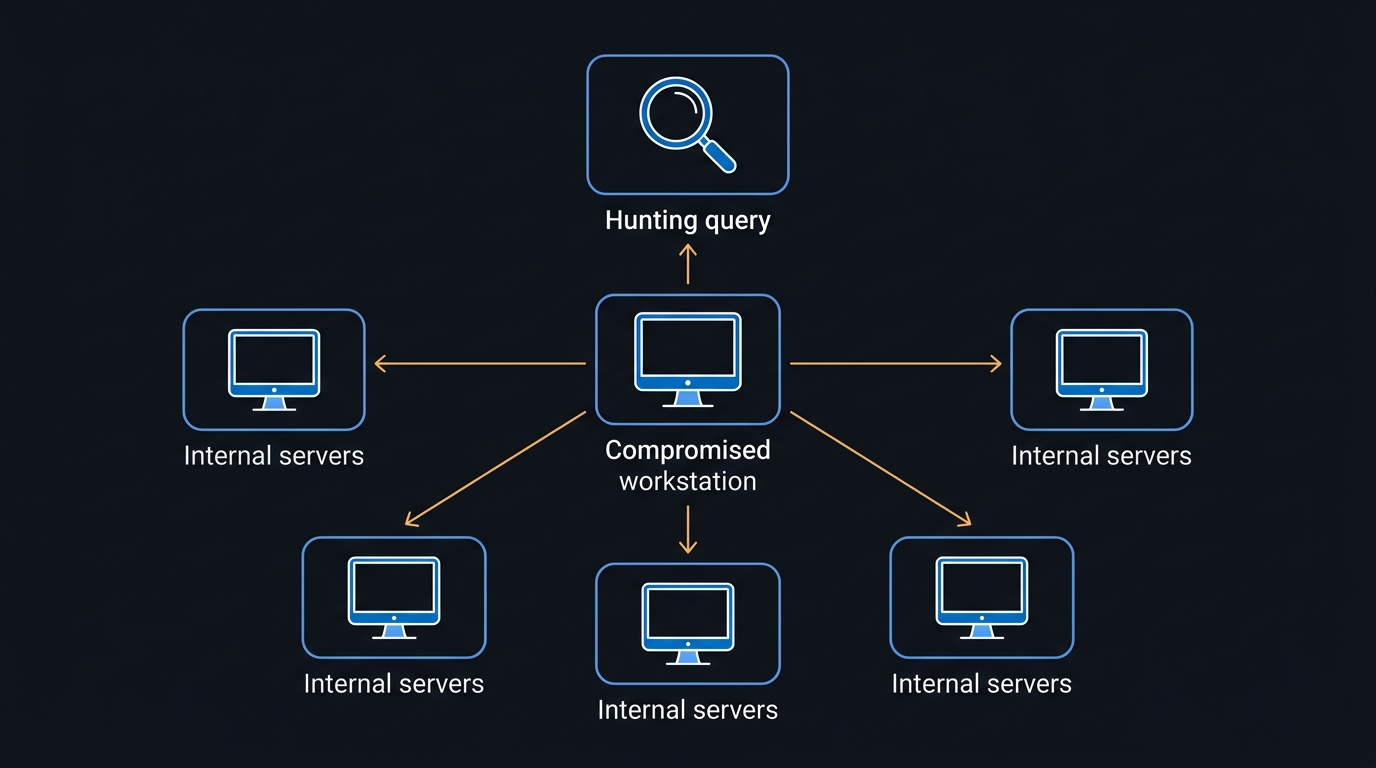
The stage that converts a compromised laptop into an enterprise problem is WinRM. Operator-issued tasking through the Node.js implant opens connections over TCP 5985 to, in Microsoft's description, "dozens of hosts across multiple regions and roles, including file servers, database and application servers, and, critically, domain controllers and certificate authorities."
That last pair is the tell. Reaching a certificate authority is not lateral movement for its own sake — it is a route to durable, credential-independent identity. Microsoft frames the targeting as "a shift from initial foothold toward broader enterprise control, and is a hallmark of intrusions that precede large-scale data theft or ransomware deployment." Treat any confirmed instance of this chain as network-level compromise and rotate every credential reachable from the affected host, domain admin accounts included.
TerminalFix: The Same Persuasion Without the Chat
TerminalFix removes the operator from the conversation and keeps the psychology. A compromised website renders a spoofed Cloudflare Turnstile overlay, and the "verification" instruction tells the visitor to paste a command. The variation that gives the campaign its name is where they are told to paste it: traditional ClickFix drives users to the Win+R Run dialog, while TerminalFix directs them to Windows Terminal or PowerShell, which Microsoft says increases "the likelihood that complex, multi-line scripts execute successfully."
The pasted command prints a fake "Starting Cloudflare verification…" banner, downloads a ZIP with a custom User-Agent, and unpacks it to a fixed ProgramData folder. Inside is a legitimate signed Windows binary and a malicious dui70.dll masquerading as the Windows DirectUI Engine. Microsoft explains the load order that makes it work: "Because the Windows loader resolves the application directory before the System32 directory, the planted DLL is loaded in place of the legitimate one, a technique known as DLL sideloading."
From there the campaign diverges from the usual ClickFix single-infostealer outcome. The sideloaded DLL pulls PNG images from attacker infrastructure and extracts executable payloads from their pixel channels, establishes a scheduled task that re-executes every 60 minutes, runs Active Directory reconnaissance through nltest /domain_trusts and net group "domain admins" /domain, and finally downloads an embeddable Python runtime to run a reverse-tunnel client over TLS 443 that upgrades to a WebSocket and proxies arbitrary TCP.
The two campaigns converge on the same operational reality. Whether an operator was in a Teams chat or a web page did the talking, the outcome is an interactive foothold on a managed device with a legitimate runtime executing attacker code and a path toward your identity infrastructure.
Hunting: Four Queries and What Each One Assumes
These are starting points, not tuned detections. Every one of them will need a baseline pass in your own tenant before it is worth alerting on, and the comments matter as much as the query text. All table and column names below come from the Microsoft Defender XDR advanced hunting schema.
Start with the correlation that makes the initial access visible: a remote-support tool launching on a device shortly after an external party opened a Teams chat with that user.
// Starting point: remote-support tool launched within 2 hours of an inbound external Teams chat.
let LookBack = 7d;
let RemoteSupportTools = dynamic(["QuickAssist.exe","RemoteHelp.exe","AnyDesk.exe",
                                  "TeamViewer.exe","ScreenConnect.ClientService.exe"]);
let ExternalChats =
    CloudAppEvents
    | where Timestamp > ago(LookBack)
    | where Application == "Microsoft Teams" and ActionType == "ChatCreated"
    | where IsExternalUser == true
    | project ChatTime = Timestamp,
              TargetUpn = tostring(RawEventData.Members[1].UPN),
              InitiatorUpn = tostring(RawEventData.Members[0].UPN);
DeviceProcessEvents
| where Timestamp > ago(LookBack)
| where FileName in~ (RemoteSupportTools)
| project Timestamp, DeviceName, AccountUpn, FileName, ProcessCommandLine
| join kind=inner ExternalChats on $left.AccountUpn == $right.TargetUpn
| where Timestamp between (ChatTime .. (ChatTime + 2h))
| project Timestamp, DeviceName, AccountUpn, FileName, InitiatorUpn, ChatTime
| order by Timestamp asc
Two caveats before you deploy it. Confirm the executable names against your own DeviceProcessEvents data — vendors rename binaries between versions, and your sanctioned RMM belongs on an exclusion list rather than in the detection. And the CloudAppEvents side requires Microsoft Defender for Cloud Apps activity for Teams to be flowing; if that connector is absent, the join silently returns nothing rather than erroring.
Next, catch the staging step. A signed Node.js runtime is unremarkable in C:\Program Files; it is not unremarkable in a per-user folder with a script-host parent.
// Starting point: node.exe running from a user-writable path with a script-host or installer parent.
DeviceProcessEvents
| where Timestamp > ago(30d)
| where FileName =~ "node.exe"
| where FolderPath has @"\AppData\" or FolderPath has @"\ProgramData\"
     or FolderPath has @"\Users\Public\"
| where InitiatingProcessFileName in~ ("wscript.exe","cscript.exe","cmd.exe",
                                       "powershell.exe","msiexec.exe","rundll32.exe")
| project Timestamp, DeviceName, AccountName, FolderPath, ProcessCommandLine,
          InitiatingProcessFileName, InitiatingProcessCommandLine
| order by Timestamp desc
Your developer population will generate hits here. That is fine — exclude by device group or by known toolchain paths, not by removing the folder condition, because the folder condition is the entire signal. Microsoft's own variant of this query additionally filters on renamed loaders whose command lines reference AppData\Local without a .js extension, which is worth adding once you know your baseline.
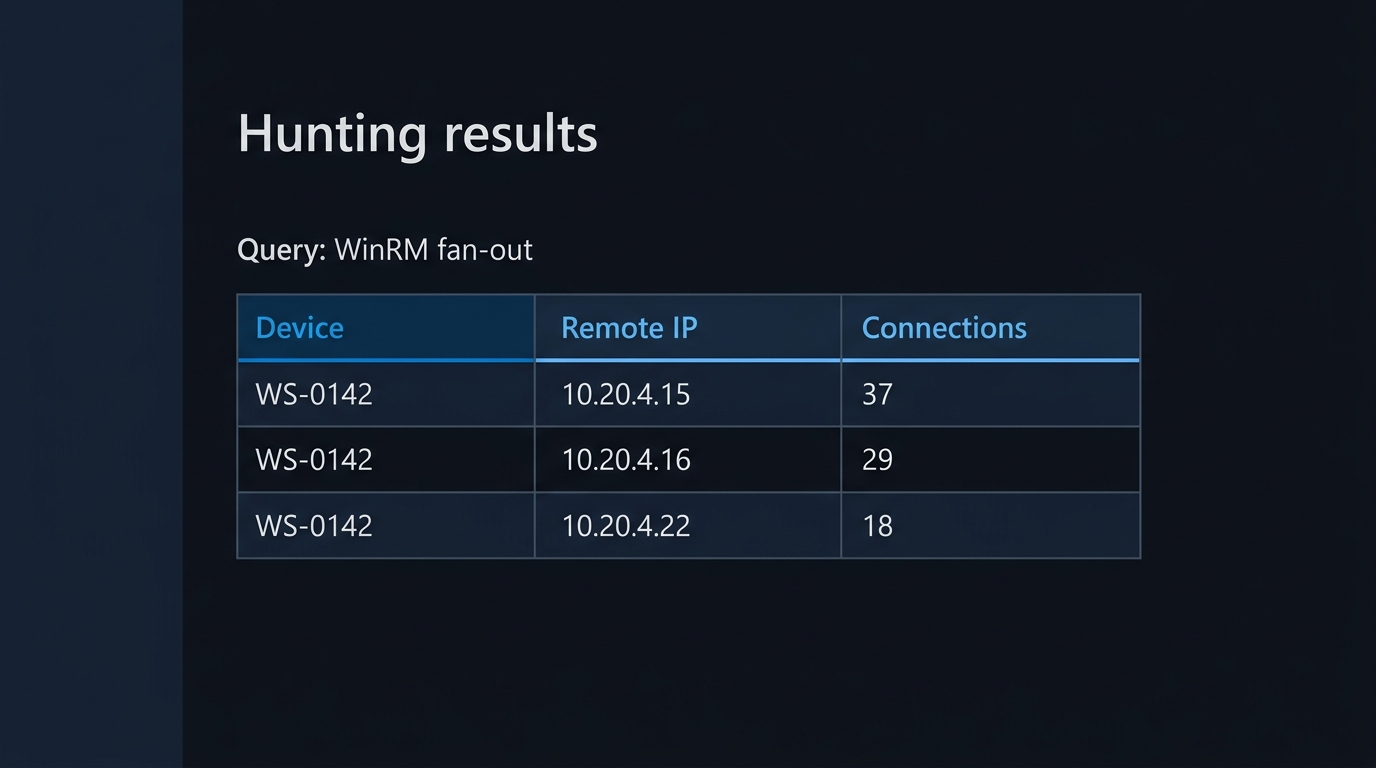
Then the pivot. WinRM from a workstation to more than a handful of hosts is close to a definition of lateral movement.
// Starting point: WinRM (5985/5986) fan-out from a user-context process on a workstation.
DeviceNetworkEvents
| where Timestamp > ago(7d)
| where RemotePort in (5985, 5986)
| where InitiatingProcessFileName in~ ("powershell.exe","pwsh.exe","node.exe","cmd.exe")
| summarize Targets = dcount(RemoteIP),
            TargetSample = make_set(RemoteIP, 25),
            FirstSeen = min(Timestamp),
            LastSeen = max(Timestamp)
    by DeviceName, InitiatingProcessFileName, InitiatingProcessAccountName
| where Targets > 3
| order by Targets desc
Scope this to your workstation device group. On a jump box or management server the same pattern is your admins doing their jobs, and the query will bury you in noise if you run it estate-wide on day one.
Finally, the TerminalFix and ClickFix family leaves a distinctive artefact when the Run dialog is used, because Windows records what was typed there.
// Starting point: paste-and-run lures via the Run dialog (RunMRU) and terminal launches from Explorer.
DeviceRegistryEvents
| where Timestamp > ago(30d)
| where RegistryKey has @"\Explorer\RunMRU"
| where RegistryValueData has_any ("powershell", "pwsh", "curl", "mshta", "wt.exe",
                                   "iwr", "Invoke-WebRequest", "FromBase64String", "IEX")
| project Timestamp, DeviceName, InitiatingProcessAccountName,
          RegistryValueName, RegistryValueData
| order by Timestamp desc
Because TerminalFix deliberately moves the paste target to Windows Terminal, RunMRU alone will miss it. Pair this with a DeviceProcessEvents hunt for wt.exe, powershell.exe or pwsh.exe spawned by explorer.exe with download or decode verbs in the command line. If you are building these into scheduled analytics rather than ad-hoc hunts, our guides to Microsoft Defender XDR and the Sentinel convergence and to building your first Sentinel analytics rules and playbooks cover where each of these belongs.
For the certificate authority end of the chain, the signal lives in Windows security auditing rather than the device tables. With the Audit Certification Services subcategory enabled on the CA and the events forwarded into Sentinel, event 4886 records a certificate request received and 4887 records a request approved and a certificate issued. A sudden burst of either from a single account is worth a look.
Configuration That Removes the Option
Detection tells you it happened. These settings stop it happening.
Teams external access
The organisation-level control lives in the Teams admin center under Users > External access, and Microsoft documents four configuration scenarios: Allow all external domains (the default), Allow only specific external domains, Block only specific external domains, and Block all external domains. Moving from the default to an allow-list is the single highest-value change on this list, because it collapses the attacker's tenant-of-convenience approach.
Separately, decide whether unmanaged Microsoft accounts may open conversations with your staff. The People in my organization can communicate with unmanaged Teams accounts setting governs the capability, and the External users with Teams accounts not managed by an organization can contact users in my organization checkbox governs who may start the conversation.
Connect-MicrosoftTeams

# Read the current federation posture before you change anything.
Get-CsTenantFederationConfiguration |
    Select-Object AllowFederatedUsers, AllowedDomains, BlockedDomains,
                  AllowTeamsConsumer, AllowTeamsConsumerInbound, AllowPublicUsers

# Stop unmanaged Microsoft accounts from initiating chats with your users.
Set-CsTenantFederationConfiguration -AllowTeamsConsumerInbound $false

# Block subdomains of anything you have blocked (they are not blocked by default).
Set-CsTenantFederationConfiguration -BlockAllSubdomains $True
If a full allow-list is politically impossible, use per-user granularity instead: Set-CsExternalAccessPolicy accepts -CommunicationWithExternalOrgs with values including AllowSpecificExternalDomains and BlockSpecificExternalDomains, plus -AllowedExternalDomains and -BlockedExternalDomains lists of up to 100 domains each. Finance, HR and executive assistants are a reasonable first cohort.
Quick Assist, and what replaces it
Microsoft's guidance is to switch Quick Assist users within a single Entra tenant to Intune Remote Help, which adds Conditional Access enforcement, RBAC over who may act as helper, session logging, tenant isolation and Defender for Endpoint integration (Quick Assist documentation). Blocking the remoteassistance.support.services.microsoft.com endpoint disrupts Remote Help too, so if you want Remote Help and no Quick Assist, remove the Store package instead (Get-AppxPackage -Name MicrosoftCorporationII.QuickAssist | Remove-AppxPackage -AllUsers, run elevated) and pair it with application control so users cannot reinstall it. The same social-engineering script works with any RMM agent a user can be talked into installing; for the wider governance model across Quick Assist, Remote Help, RMM and WinRM, see governing remote administration after the Teams helpdesk campaign.
PowerShell logging and a language ceiling
Turn on script block logging so the obfuscated one-liners are recoverable after the fact, then take away the language features that make them powerful. PowerShell drops into ConstrainedLanguage mode automatically when an application control policy is present: "The application control policies detected are AppLocker and Windows Defender Application Control (WDAC) on Windows platforms."
That mode blocks the .NET and COM reflection that pasted payloads depend on while leaving cmdlets and basic language elements working, so most users notice nothing. Microsoft's warning about how to deploy it is worth quoting: "You must use ConstrainedLanguage mode in System Lockdown mode with App Control for Business to ensure that ConstrainedLanguage mode can't be bypassed." Setting the language mode by variable is an experiment, not a control.
Alongside that, three attack surface reduction rules map directly onto these chains — Block execution of potentially obfuscated scripts (5beb7efe-fd9a-4556-801d-275e5ffc04cc), Block JavaScript or VBScript from launching downloaded executable content (d3e037e1-3eb8-44c8-a917-57927947596d), and Block process creations originating from PSExec and WMI commands (d1e49aac-8f56-4280-b9ba-993a6d77406c). Deploy each in audit mode first; the first two both depend on AMSI, and the first additionally requires cloud-delivered protection.
Conditional Access on the admin plane
Both campaigns end in credential-backed access to management surfaces, so make the credentials insufficient on their own. Microsoft's mitigation guidance is to "Require MFA and compliant or managed devices through Microsoft Entra Conditional Access to limit the value of credential-backed remote sessions." In practice that means phishing-resistant authentication strength plus a compliant-device requirement on the Microsoft admin portals, and a hard exclusion of your break-glass accounts. Verify the result rather than assuming it — a Conditional Access gap analysis using What If will show you which admin identities your policy set currently misses.
Standing privilege is the multiplier here. If the account on the compromised workstation holds a permanent role assignment, the operator inherits it the moment the implant lands.
AD CS template hygiene
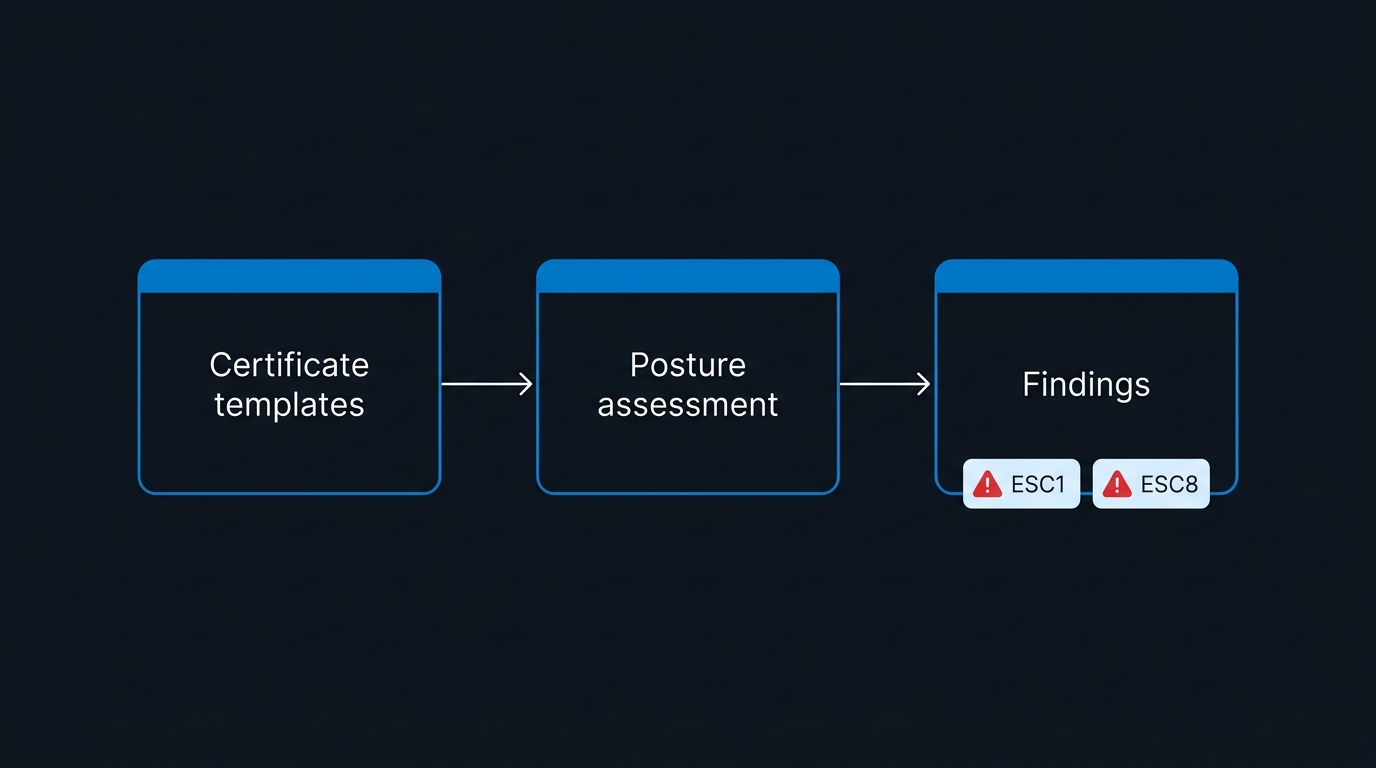
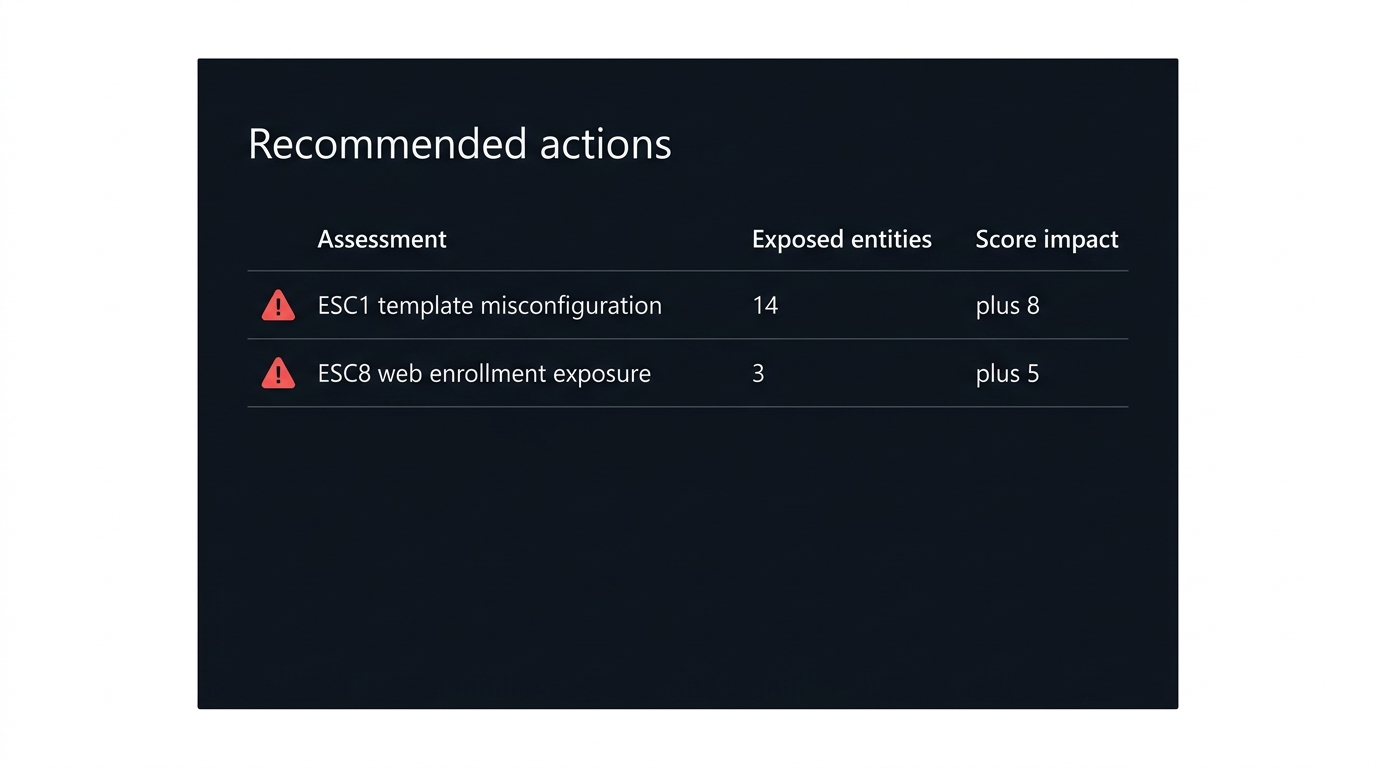
If an intruder reaches your CA, the prize is a certificate that authenticates as somebody else. Microsoft Defender for Identity ships certificate posture assessments covering ESC1 to ESC4, ESC6 to ESC8, ESC11 and ESC15, several of which are available only to customers who have installed a sensor on an AD CS server.
Start with what Microsoft calls one of the most common misconfigurations: a template with Supply in the request enabled. Its documentation is blunt about the consequence — "If the certificate is also permitted for authentication and there aren't any mitigation measures enforced, such as Manager approval or required authorized signatures, the certificate template is dangerous as it allows any unprivileged user to take over any arbitrary user, including a domain admin user." Remediation is to turn off Supply in the request, strip authentication EKUs such as Client Authentication and Smartcard logon where they are not needed, remove enrolment permissions granted to Authenticated Users or Everyone, require manager approval, and unpublish templates nobody uses. Check ESC6 at the same time: certutil -setreg policy\EditFlags -EDITF_ATTRIBUTESUBJECTALTNAME2 clears the CA-wide flag that makes every template behave as though SAN supply were enabled.
What "Real IT" Looks Like at Your Organization
Every control above still leaves one path open: a user who genuinely believes the Teams chat is really the helpdesk rather than impersonation. Close that with a written, published rule that is short enough to remember under pressure.
Publish four statements and repeat them until they are boring:
- We never initiate. Support contact starts with a ticket you opened. If you did not open one, the contact is not us.
- We have one channel. Name it — the service desk number in the directory, or the ticket portal. A Teams chat from outside the organisation is never it, and the external-contact banner Teams shows you is the giveaway.
- Verify by calling back. Hang up, close the chat, and call the published number yourself. A real engineer will wait. Someone who objects to a callback has told you what they are.
- Nobody asks you to paste a command. No verification page, CAPTCHA, or support engineer will ever ask you to open PowerShell, Windows Terminal, or the Run dialog and paste text. That request is the attack, every time.
Make reporting frictionless and blameless. The user who granted control and then said so within ten minutes has handed you a containable incident; the one who is too embarrassed to report it has handed you a breach notification. Say that out loud in the training.
The Assumptions That Get You Hit
Blocking Quick Assist without funding its replacement. Support staff need remote control to do their jobs. Remove the tool and leave nothing, and within a month someone will have a personal AnyDesk licence and a shadow workflow that no policy covers. Stand up Intune Remote Help first, prove it works for the helpdesk, then remove Quick Assist.
"We do not federate with anyone." Verify that. The default Teams external access setting is Allow all external domains, and organisation settings interact with per-user external access policies in ways that surprise people. Run Get-CsTenantFederationConfiguration and Get-CsExternalAccessPolicy and read the actual values rather than the intended ones.
Generic ClickFix rules that fire on every developer. RunMRU and encoded-command detections applied estate-wide without a baseline produce a wall of true-but-irrelevant positives, and the triage queue that results is exactly where a real detection gets closed as noise. Scope by device group, exclude known toolchains explicitly, and keep the noisy variants as hunting queries rather than alerting rules.
Treating the endpoint as the incident. Microsoft's advice for anyone who finds these indicators is to assume the operator obtained network-level access through the compromised host and to prioritise credential rotation for everything reachable from it. Reimaging the laptop and closing the ticket leaves the operator's credentials and their WinRM path intact.
Believing awareness training covers it. These lures do not look like phishing. There is no suspicious link, no misspelled domain, no attachment. There is a colleague-shaped person in your normal collaboration tool, and a legitimate Microsoft product asking a legitimate question. Training that teaches link inspection does not transfer.
The Two Changes That Break the Chain
If you do nothing else this month, do these two, in this order.
Change the Teams external access posture. Move from Allow all external domains to Allow only specific external domains, or at minimum set -AllowTeamsConsumerInbound $false so unmanaged accounts cannot open the conversation. This is a tenant setting with a measurable blast radius, it takes an afternoon including the exception list, and it removes the delivery mechanism for the whole first stage.
Constrain what a remote session can execute. An application control policy that forces PowerShell into ConstrainedLanguage, plus the three ASR rules above in block mode, means that even a successful social-engineering call ends with a payload that will not run. The remote operator still gets a screen; they do not get a runtime.
Everything else on this list — the hunting queries, the AD CS template audit, the callback policy — is worth doing, and none of it is worth doing before those two. The campaigns work because they ride workflows you have deliberately left open. Narrowing those workflows is the control; detection is what catches the cases where narrowing was not enough.

Leave a Reply