
Status as of
Microsoft has put a hard date on something the industry has been circling for a decade. In the SMS and voice retirement announcement, Microsoft states plainly that "SMS and voice are no longer positioned as secure authentication methods and will no longer be provided natively in Entra ID." Microsoft-provided delivery ends on 1 February 2027.
The February date is not the one that should be on your change board this week. On 1 September 2026 — eight days from now — Entra ID starts auto-enabling passkeys and switching the Registration Campaign to Microsoft Managed for every user currently enabled for SMS or voice. That happens in your tenant whether or not you have planned for it, and your users will see a new prompt on their next MFA sign-in.
What follows is the timeline, the temporary opt-out that buys you five months, the queries that tell you who is affected, and the sequence that gets people onto passkeys without a wave of lockout tickets.
What Microsoft Is Actually Retiring
The headline version circulating on social media is wrong. Microsoft is not banning SMS as an authentication method, and SMS does not stop working in every tenant on 1 February 2027.
What is being retired is Microsoft's own free, built-in telecom delivery. Organizations with a genuine business, regulatory, or operational need can keep SMS and voice indefinitely by contracting a customer-managed telecom provider through the Microsoft Security Store — a paid, per-message arrangement whose pricing varies by provider and region.
The accurate framing for your risk register is therefore: Microsoft-provided SMS and voice is being retired; continuing to use telephony becomes a procurement decision with a running cost. For most tenants that is not a cost worth paying for a method that no longer meets any modern assurance bar.
The Timeline, With the Dates That Actually Bite
| Date | What happens | Your exposure |
|---|---|---|
| 1 Sep 2026 | Users enabled for SMS/voice are auto-enabled for passkeys in the Authentication Methods Policy, in an all-passkey-types profile. Registration Campaign flips to Microsoft Managed targeting passkeys and pulls them into scope. | Users are nudged on their next MFA sign-in. Snoozes are unlimited by default, so nobody is blocked — but the help desk gets calls. |
| 18 Sep 2026 | Telecom provider information becomes available in Microsoft Security Store. | Procurement can start evaluating, if you need to keep telephony. |
| 30 Oct 2026 | Customers can select and configure a customer-managed telecom provider. | Last practical window to stand up paid SMS/voice. |
| 1 Feb 2027 | Microsoft-provided SMS and voice delivery is fully retired. | Telephony stops unless a customer-managed provider is configured. |
| After 1 Feb 2027 | Users whose only available MFA method is SMS or voice get a blocking passkey registration prompt. | No opt-out: "There is no opt out from this February 1 behavior. It will be enforced for all tenants." |
Separate those two clearly: September is a nudge with an escape hatch, February is an enforcement with none. Do nothing between now and then and your telephony-only users hit a wall they cannot snooze past — on a Monday morning, at scale.
This Week: Decide Whether to Take the Temporary Opt-Out
Microsoft provides a temporary opt-out covering the 1 September 2026 to 1 February 2027 window. It suppresses the automatic passkey enablement and the Microsoft Managed Registration Campaign so you can run the migration on your own schedule. It does not survive 1 February 2027 — it delays the nudge, not the retirement.
The setting lives on the authentication methods policy in Microsoft Graph beta, and requires the Policy.ReadWrite.AuthenticationMethod permission:
PATCH https://graph.microsoft.com/beta/policies/authenticationmethodspolicy
Content-Type: application/json

{
   "optOutSettings": {
     "passkeyDynamicMigration": true
   }
}
In Microsoft's words, "This lets you delay passkey and Registration Campaign enablement while you complete transition activities." It is a beta endpoint, so treat it as subject to change and re-verify the policy state after applying it.
Microsoft documents a non-API alternative too: "If you do not want this to occur, move users out of SMS or Voice in AMP before September 1st." That is cleaner if you were already close to done — but read the trap section below before assuming that moving users out of the Authentication Methods Policy is sufficient.
Take the opt-out if passkey enrollment is incomplete, no communications are drafted, or you are inside a change freeze. Skip it if your telephony population is small and you would rather let Microsoft's nudge do the work.
Find Out Exactly Who Is Affected
You cannot size this without a list. Start with Microsoft's own first-party tooling, then fall back to Graph if you want something you can schedule.
Use the official analyzer first. Microsoft publishes entra-sms-voice-usage-analyzer, a PowerShell script that checks Entra ID SMS and voice authentication method policy usage. It requires Global Reader, Authentication Policy Administrator, or Security Reader, and it is purpose-built for this retirement — a better starting point than anything you assemble yourself.
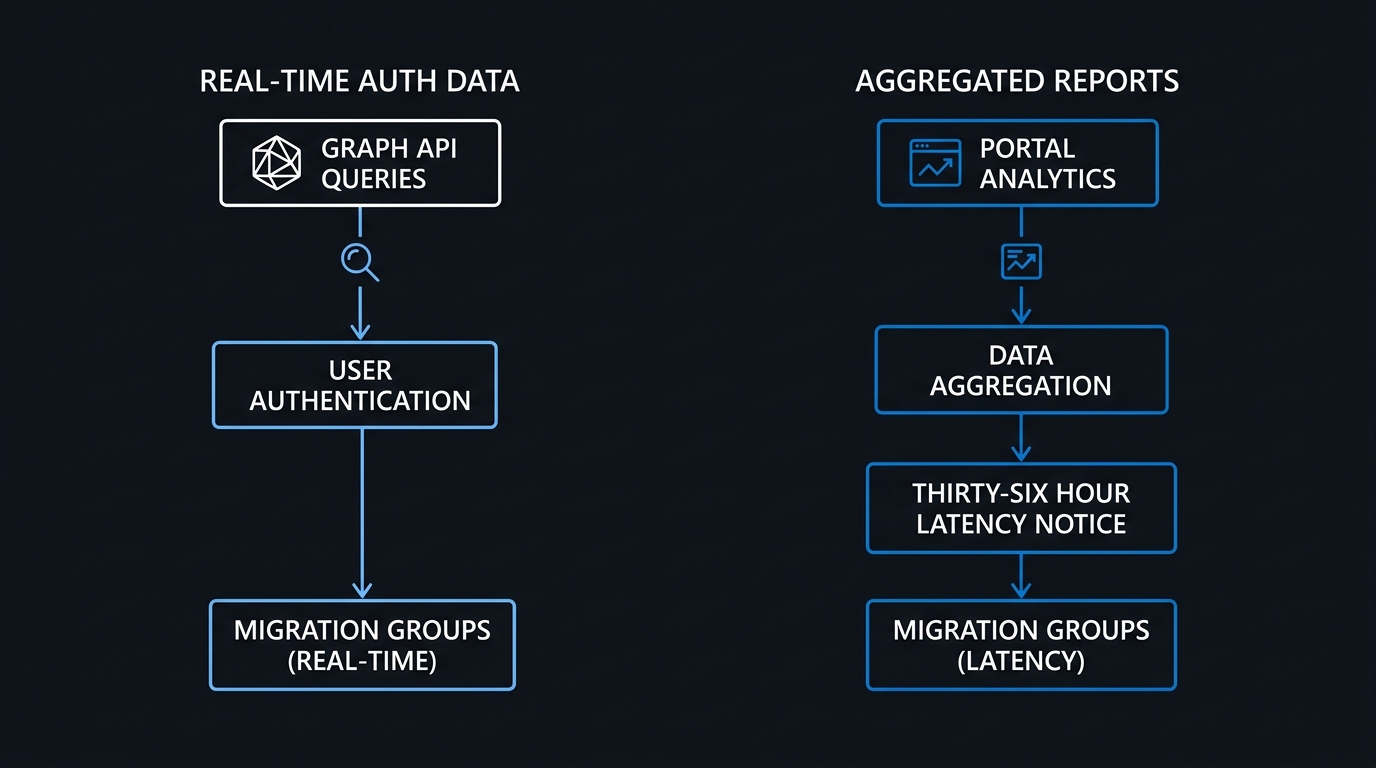
The scriptable alternative is the GA registration details report. Get-MgReportAuthenticationMethodUserRegistrationDetail ships in the Microsoft.Graph.Reports module and needs the AuditLog.Read.All scope. Above a few thousand users, filter server-side rather than pulling everything and filtering locally:
Connect-MgGraph -Scopes "AuditLog.Read.All"

Get-MgReportAuthenticationMethodUserRegistrationDetail `
  -Filter "methodsRegistered/any(x:x eq 'mobilePhone')" `
  -All |
  Select-Object UserPrincipalName, IsMfaRegistered, IsPasswordlessCapable,
                @{n='Methods';e={ $_.MethodsRegistered -join ',' }} |
  Export-Csv .\telephony-users.csv -NoTypeInformation
The equivalent REST call, documented in the userRegistrationDetails reference:
GET https://graph.microsoft.com/v1.0/reports/authenticationMethods/userRegistrationDetails?$filter=methodsRegistered/any(x:x eq 'mobilePhone')
One caveat to verify rather than assume: run an unfiltered sample first and inspect the literal strings your tenant returns in methodsRegistered. Whether voice-call registrations surface distinctly from mobilePhone is not something to take on trust from any article, including this one — confirm it against your own data before building a targeting group from the output.
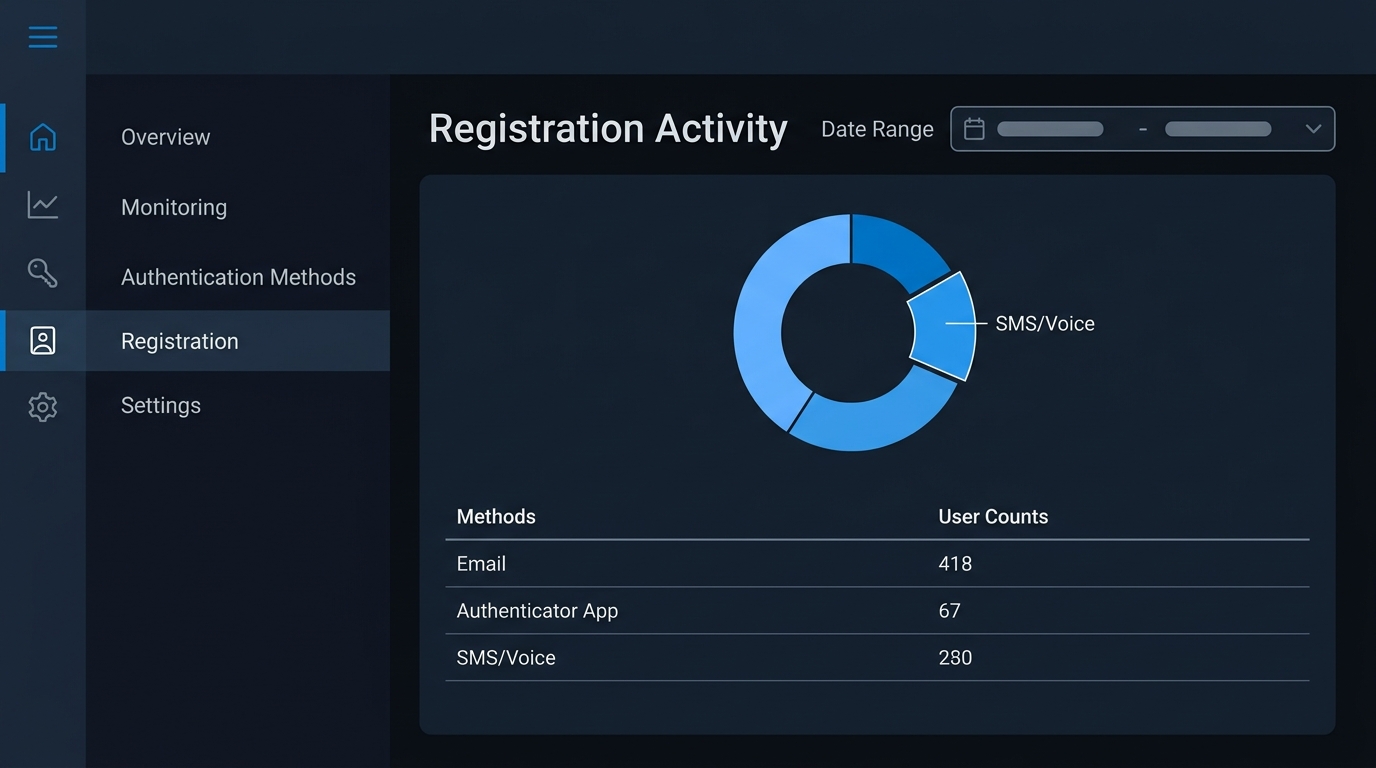
For a management-friendly view, the portal report at Entra ID → Authentication methods → Activity has Registration and Usage tabs. Two limitations matter: it requires Entra ID P1 or P2, and the data lags up to 36 hours, with disabled and soft-deleted users excluded. Do not use it to verify a change you made an hour ago.
The Trap That Breaks Most SMS Migrations
This is the single most common way a telephony migration silently fails, and it deserves its own change-board line.
Authentication method policies in Entra ID are evaluated together, not in precedence order. Microsoft's documentation on managing authentication methods states it directly: "a user who is enabled for an authentication method in any policy can register and use that method. To prevent users from using a method, it must be disabled in all policies."
So disabling SMS in the modern Authentication Methods Policy while leaving Call to phone or Mobile phone enabled in the legacy MFA policy — or the legacy SSPR policy — accomplishes nothing. The user can still register and use it. Your dashboard says migrated; reality says otherwise. Check all three surfaces before declaring a user or group done, and note that the legacy MFA and SSPR policies became non-editable on 30 September 2025: you are inspecting a frozen configuration, not one you can freely change.
Keep one distinction sharp. Microsoft documents the blocking passkey-registration behaviour for the post-February-2027 retirement path. What the sign-in experience looks like today if an admin disables SMS tenant-wide for a user whose only registered method is SMS — hard block versus interrupt-and-register — is not documented for the admin-initiated case. Test it on a pilot account before flipping anything for a large group.
Why Telephony Is Going Away — And Why Authenticator Is Not the Fix
Your executives will ask why. Two reasons — and the second is the point most migration plans miss.
The first is that telephony has never been a trustworthy channel. NIST's SP 800-63B-4, finalized 31 July 2025, classifies PSTN out-of-band authenticators as a restricted authenticator. The precise term is "restricted," not "deprecated," and it is not new — the 2017 edition already flagged PSTN out-of-band the same way. Anyone telling you NIST just banned SMS is reading a headline, not the standard.
CISA's 2022 guidance on phishing-resistant MFA documents the concrete attack paths — SIM swapping, SS7 exploitation, MFA fatigue and prompt-bombing — and names FIDO2/WebAuthn and PKI as the phishing-resistant options. Entra's telephony is already degraded by fraud controls too: Microsoft "may proactively engage temporary throttling when we detect excessive authentication requests from a particular region, phone, or user" as a defence against International Revenue Share Fraud. Your users may already know that as "the code never arrived."
The second reason is the one that should reshape your project plan: moving from SMS to a TOTP authenticator app does not solve the phishing problem. Adversary-in-the-middle proxies defeat time-based codes and push approvals just as reliably as they defeat SMS. Microsoft's own analysis of a multi-stage AiTM phishing campaign describes attacks that "intercept authentication traffic in real time, bypassing non-phishing-resistant multifactor authentication (MFA)."
End your migration with everyone on Microsoft Authenticator TOTP and you will have spent a quarter of effort, satisfied the February deadline, and left the attack surface exactly where it was. Number matching helps against fatigue attacks; it does nothing against a real-time proxy. Aim at passkeys, and treat Authenticator as the fallback for hardware that genuinely cannot support one.
The Migration Decision Flow
Bootstrapping Registration Without Locking People Out
Every passwordless rollout hits the same chicken-and-egg problem: a user needs to authenticate strongly to register a strong credential. Temporary Access Pass solves it. Use New-MgUserAuthenticationTemporaryAccessPassMethod from the Microsoft.Graph.Identity.SignIns module — a v1.0 GA cmdlet.
Connect-MgGraph -Scopes "UserAuthenticationMethod.ReadWrite.All"

$params = @{
    startDateTime     = (Get-Date).AddMinutes(15)
    lifetimeInMinutes = 480
    isUsableOnce      = $false
}

New-MgUserAuthenticationTemporaryAccessPassMethod `
  -UserId "jsmith@contoso.com" `
  -BodyParameter $params
The Temporary Access Pass documentation sets the boundaries: lifetime from 10 minutes to 43,200 minutes (30 days), default one hour, length 8 to 48 characters. One-time-use is a tenant-wide setting, not a per-TAP flag, so decide it deliberately.
Two operational details each save you a support escalation. Issuing roles are constrained: Privileged Authentication Administrator can issue a TAP to any user but not to themselves; Authentication Administrator can issue only to members, again not to themselves. And the one that catches pilot teams — a single-use TAP requires the user to complete passwordless registration within 10 minutes of signing in. For a guided pilot or a remote onboarding call, use a multi-use TAP with a generous lifetime.
Enforcing the Outcome With Conditional Access
Registration is not enforcement. Until a Conditional Access policy requires the stronger method, users keep choosing whatever is easiest. Authentication strengths close that gap. Three built-ins ship in the box:
- Multifactor authentication strength — the broadest; SMS and voice as a second factor satisfy this one.
- Passwordless MFA strength
- Phishing-resistant MFA strength — allows only FIDO2 security key, Windows Hello for Business or platform credential, and certificate-based authentication (multifactor).
Note the exclusions. SMS and voice as a second factor satisfy only the base MFA strength. "SMS sign-in," the passwordless first-factor variant, satisfies none of the three — if you have it enabled anywhere, it earns you nothing under any strength policy.
Authentication strengths are a Conditional Access grant control and inherit CA's licensing floor, so Entra ID P1 is required. One limitation to design around: you cannot combine "Require multifactor authentication" and "Require authentication strength" in the same policy. Pick one grant control per policy and layer policies instead of stacking controls.
Build the strength policy in the portal rather than via API — custom authentication strength creation is documented with a /beta Graph example, and whether it has reached v1.0 GA is not worth betting a rollout on. The portal path is GA regardless. Roll out report-only first, then a pilot group, then expand; if your CA estate has not been audited recently, do it in the same change window using the method in Conditional Access Gap Analysis: Finding and Fixing Coverage Holes with What-If.
Break-Glass Accounts: The Guidance Has Changed
If your emergency access runbook still says "excluded from MFA," it is out of date — this is the section most worth forwarding to your identity team.
Emergency access accounts are not exempt from mandatory MFA. Microsoft's mandatory MFA documentation states: "Break glass or emergency access accounts are also required to sign in with MFA once enforcement begins. We recommend that you update these accounts to use passkey (FIDO2) or configure certificate-based authentication for MFA."
The current emergency access guidance adds practices that are easy to get wrong:
- Use a different phishing-resistant method than your normal admin accounts, so one method's flaw does not take out both.
- Make the Global Administrator assignment active and permanent, not PIM-eligible — an eligible-only break-glass account cannot rescue you from a broken PIM.
- Keep them cloud-only on the
.onmicrosoft.comdomain, so an on-premises outage cannot orphan them. - Exclude them only from Conditional Access policies that block sign-in: "Report-only policies don't block access and don't need to exclude emergency accounts." Blanket exclusions create blind spots.
- Validate every 90 days, as a calendar item with an owner rather than a runbook paragraph.
If you are also standing up just-in-time admin access, sequence it after the break-glass remediation — see Entra ID Privileged Identity Management: Rolling Out Just-in-Time Admin Access.
Targeting the Registration Campaign at the Right People
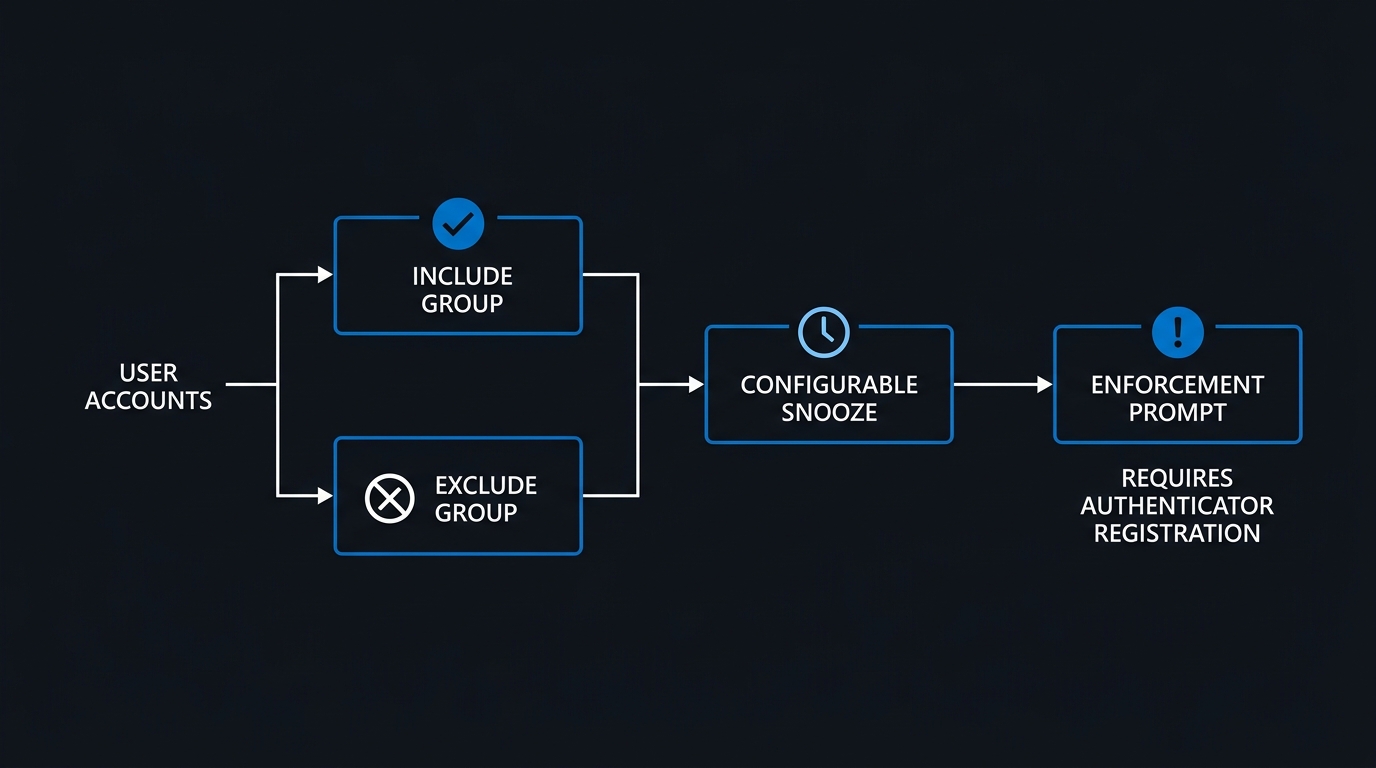
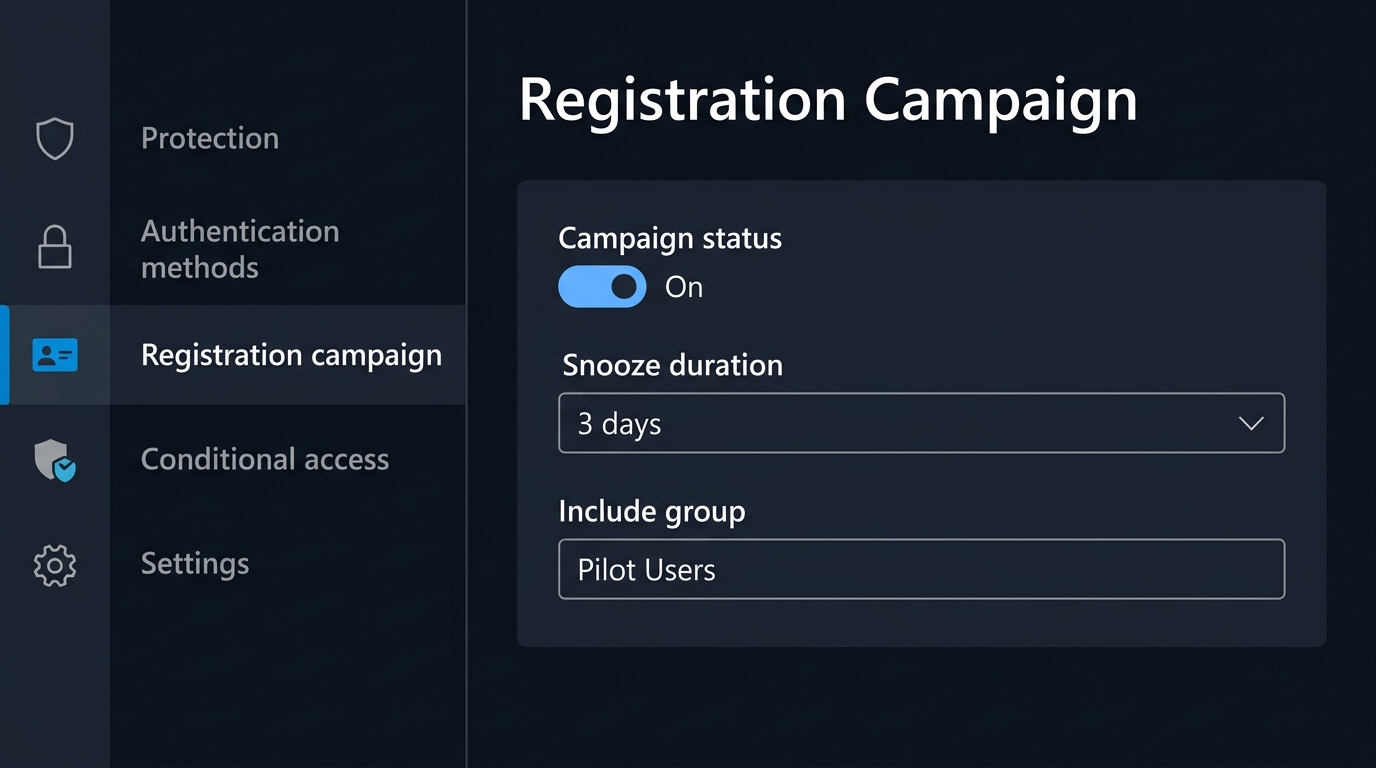
The Registration Campaign lives at Entra ID → Authentication methods → Registration campaign. Snooze duration is configurable from 0 to 14 days, and switching from unlimited to limited snoozes forces registration after three skips. There is no license requirement for the campaign itself, which makes it the cheapest lever you have.
Its limitation is targeting: you cannot dynamically filter "SMS-only users," because the campaign targets groups, not method states. Build a security group from your discovery CSV, target that, and refresh membership on a schedule as people migrate — that is what stops you nagging users who are already done. Sequence the settings deliberately: unlimited snoozes during the awareness phase, limited snoozes once the help desk has capacity and your TAP process is proven.
Two Programmes, Easily Confused
One gotcha will otherwise surface in a steering meeting: Microsoft's mandatory-MFA enforcement for admin portals checks for MFA generically, not for phishing-resistant MFA. SMS satisfies it.
So a tenant can be fully compliant with mandatory MFA today and still be completely exposed to the February 2027 retirement, because those compliant users are satisfying the requirement with a method that is about to stop being delivered. Mandatory MFA and the phishing-resistant push are two separate initiatives on two separate timelines. Say so in your status reporting, or someone will read a green compliance dashboard as evidence that this project is unnecessary.
The Dated Action Plan
This week (by 1 September 2026)
- Run the Microsoft SMS/voice usage analyzer and export your telephony population.
- Decide on the temporary opt-out; if you are taking it, apply the beta
passkeyDynamicMigrationPATCH and verify the policy reflects it. - Draft the user communication before the nudge appears. A prompt nobody warned them about is a ticket.
- Audit SMS and voice state across the Authentication Methods Policy, legacy MFA, and legacy SSPR.
September to October 2026 (before 30 October)
- If telephony is a genuine business or regulatory need, evaluate customer-managed providers from 18 September and configure one before 30 October.
- Remediate break-glass accounts onto passkey (FIDO2) or certificate-based auth, using a different method from your daily admins.
- Pilot TAP-driven passkey registration with 20 to 50 users, using multi-use TAPs.
- Order FIDO2 keys for users without passkey-capable devices — procurement lead time is the underestimated constraint.
November 2026 to January 2027
- Expand the Registration Campaign group by group; move to limited snoozes once support volume is stable.
- Deploy the phishing-resistant strength policy report-only, review impact, then enforce for admins first and standard users second.
- Disable SMS and voice in all policies for each completed cohort, verifying with the Activity report and allowing for the 36-hour lag.
Before 1 February 2027
- Confirm zero users have telephony as their only available method. That number determines whether February is quiet or loud.
- Validate every break-glass account end to end and set the next 90-day check.
- Brief the help desk on the post-retirement blocking prompt so the first call is answered correctly.
The deadline is inconvenient, but the direction is not in dispute: SMS has been a restricted authenticator in NIST's terms since 2017, and real-time proxy phishing has since made every non-phishing-resistant method equally fragile. The teams that come out of this well will treat February 2027 as the forcing function for phishing-resistant authentication generally, not as a swap of one weak second factor for another. Start with discovery this week — the rest of the plan only works once you know who is on the list.
Related Articles
- Microsoft Entra Tenant Security Hardening: The 2026 Checklist
- Azure AD Conditional Access Policies: The Complete Guide
- Conditional Access Gap Analysis: Finding and Fixing Coverage Holes with What-If
- Entra ID Privileged Identity Management: Rolling Out Just-in-Time Admin Access
- Microsoft 365 Reporting in 2026: Usage Reports, Graph API, and Entra Logs

Leave a Reply