
Every mature Active Directory forest has the same drawer of skeletons. A handful of accounts named svc_sql, svc_backup, svc_app01, each with a service principal name, each with a password a human chose in 2019, each documented in a ticket that three people can still search. Rotating them means a change window and a rollback plan, so they never rotate. And because rotating them is expensive, one of them ends up running twelve things, which means it holds the union of twelve services' privileges.
Group managed service accounts are the standard answer, and they are a genuine security gain. But the way most teams describe the benefit — "the password is managed for you" — hides what actually changed. A gMSA does not delete the secret. It relocates it. The password stops being a string in a vault and becomes a value that any authorized host can compute on demand from material held in the forest. That is a genuine improvement, and it moves your security boundary to two places most organizations have never audited: the access control list that decides which principals may retrieve the password, and the Key Distribution Services root key that every gMSA in the forest derives from.
Windows Server 2025 shipped the successor, the delegated managed service account, with a migration story good enough to make dMSA the obvious destination. Researchers took it apart within weeks, Microsoft patched it as a Kerberos elevation-of-privilege bug, and the technique reappeared in three new forms. That sequence is not a reason to avoid dMSA — it is a reason to understand exactly which control is doing the work.
The Account That Twelve Services Share
Start with a precise statement of what is wrong with a plain user account carrying an SPN, because "it's insecure" is not actionable.
Any SPN on a user account is a Kerberoasting target. A domain-authenticated attacker requests a service ticket for that SPN, receives a blob encrypted with a key derived from the account's password, and cracks it offline. Nothing logs an anomaly, because requesting service tickets is what Kerberos is for. The only variable that matters is password entropy, and a human-chosen password is not in the same universe as a machine-generated one.
The password exists in places you do not control. The change ticket that provisioned the service, a runbook, an ancient Group Policy preference, an Ansible vault, a scheduled task's stored credential, and the memory of whoever last rebuilt the server. Each copy is an independent disclosure risk with its own lifetime.
Rotation is a production event, so rotation does not happen. The password lives in the service control manager entry on four hosts, the application pool identity on three more, a SQL Agent proxy, and a linked server — all of which must change in one window. Teams burned once put the account on a "do not touch" list, which is how you get a pwdLastSet from 2019 on an account with MSSQLSvc SPNs.
Reuse compounds all three. When standing up a new service costs a change window, the path of least resistance is reusing an existing account. Six months later svc_app01 is the identity for a web front end, two batch jobs, a reporting service, and a file share ACL. Its effective privilege is the union of everything it was ever granted, and each of those services is now a path to all the others.
That is the actual problem. A gMSA solves the first three cleanly and does nothing at all about the fourth.
Where the Password Actually Lives
The mechanism is worth understanding precisely, because the threat model falls out of it.
A forest gets one Key Distribution Services root key, created once with Add-KdsRootKey. Microsoft's documentation is explicit about where it lands: KDS root keys are stored in Active Directory in the container CN=Master Root Keys,CN=Group Key Distribution Service,CN=Services,CN=Configuration,DC=<forest name> — the Configuration partition, which replicates to every domain controller in the forest. Domain controllers then "wait up to 10 hours from time of creation to allow all domain controllers to converge their Active Directory replication before allowing the creation of a gMSA", per Microsoft's KDS root key guidance.
When a member host asks for a gMSA's password, the domain controller does not look it up. It calculates it. The gMSA overview states it plainly: "For a gMSA, the domain controller computes the password on the key that the Key Distribution Services provides, along with other attributes of the gMSA. Member hosts can obtain the current and preceding password values by contacting a domain controller."
The inputs are the root key, the account's SID, and the account's msDS-ManagedPasswordId — which encodes the key identifier and the time interval the password belongs to. The output, per Microsoft's gMSA security guidance, is a "240-byte, randomly generated" password that the Windows OS "changes every 30 days" by default.
The retrieval path, step by step:
- The KDS root key in
CN=Master Root Keys(Configuration partition) and the gMSA object's SID plusmsDS-ManagedPasswordIdfeedkdssvc.dllon the domain controller. - The service derives the 240-byte managed password on demand. Nothing is written to the account object.
- A member host or authorized principal asks a domain controller over a sealed LDAP channel.
- The domain controller checks whether the caller is present in
msDS-GroupMSAMembership. - Not present: access denied, no password material returned.
- Present:
msDS-ManagedPasswordis returned with the current and previous values. - LSA caches it locally, the service starts, and no human ever sees the string.
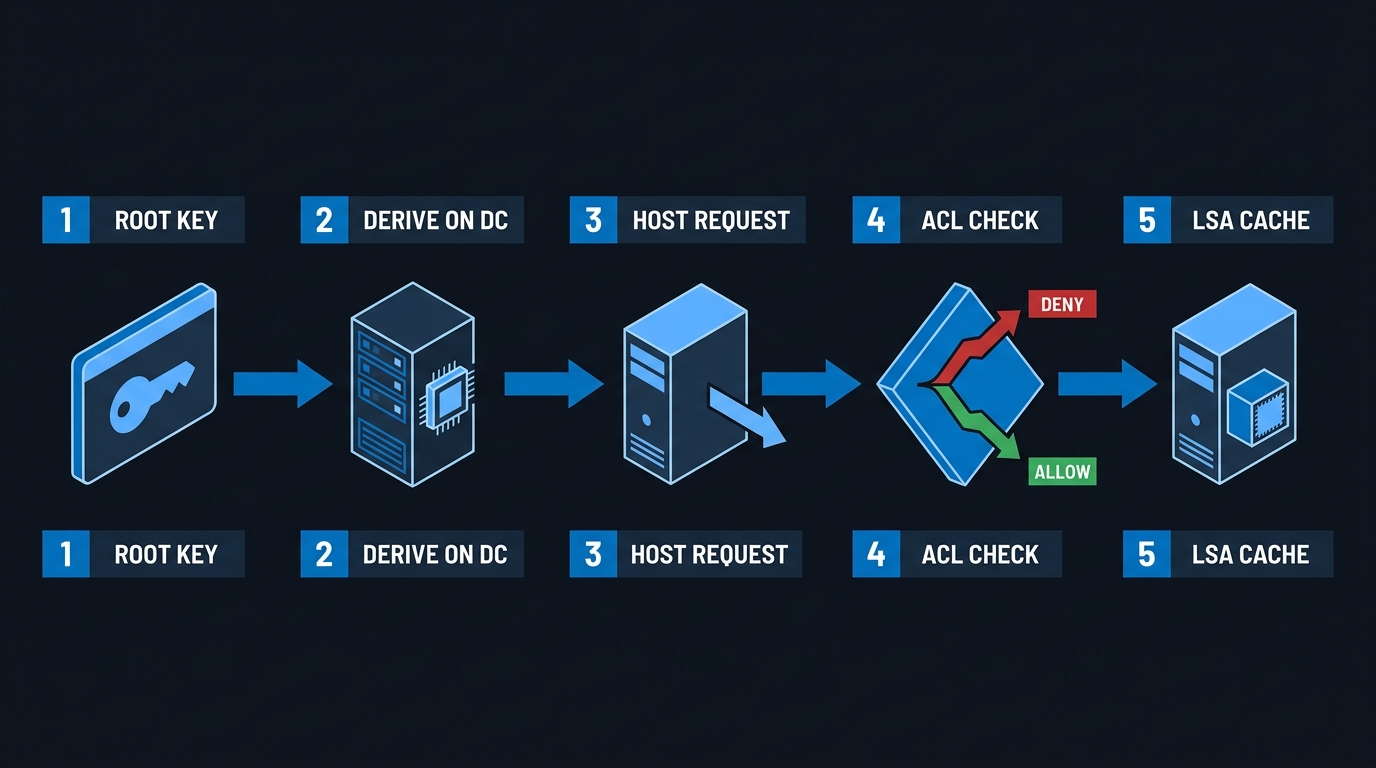
Three consequences follow, and they are the whole security story.
The password is computable, not stored. No hash sits on the account object waiting to be dumped in the usual way, which is why gMSAs resist the attacks that make svc_sql dangerous. But it also means anyone holding the root key material plus the account's SID and password ID can compute that password offline, forever, with no network traffic and no events.
The gate is an ACL, not a credential. msDS-GroupMSAMembership — set through -PrincipalsAllowedToRetrieveManagedPassword — decides who may read msDS-ManagedPassword. It is an attribute writable with directory permissions, which makes it a graph edge, not a wall.
The rotation interval is fixed at creation. The New-ADServiceAccount reference is unambiguous about -ManagedPasswordIntervalInDays: "This can only be set on object creation. After that the setting is read only." Get it wrong and your only remedy is a new account.
Choosing an Account Type Without Guessing
Before you write a single cmdlet, decide what each workload actually needs, because group managed service accounts security starts with choosing the right account type. Most "gMSA doesn't work here" tickets are really "this workload was never a gMSA candidate."
Two questions settle most of it: who manages the password, and how many hosts can ask for it.
| Capability | User account | Computer account | sMSA | gMSA | dMSA | Entra workload identity |
|---|---|---|---|---|---|---|
| Multiple hosts share the identity | Yes | No | No — single host | Yes | Yes, via allowed principals | Yes |
| Works across domains in a forest | Yes | Limited | No | Yes | Yes | N/A |
| Works across a forest trust | Yes | No | No | Not documented | Not documented | N/A |
| Automatic password rotation | No | Yes (machine) | Yes | Yes — 30 days default | Yes, DC-held keys | Yes — certificate or federated |
| Interactive / RDP logon | Yes | No | No | No | No | No |
| Windows container support | Yes | No | No | Yes, via credential spec | Not documented for containers | N/A |
| Cloud or hybrid auth | No | No | No | No | No | Yes |
| App compatibility (blank password, no secret read) | Universal | Poor | Good | Good — most Microsoft workloads | New — needs WS2025 clients | N/A |
| Kerberoastable | Yes | No | No | No | No — see below | N/A |
Two rows do the most work. Cross-forest is undocumented ground. Microsoft scopes gMSA use to "any machine that is able to use the Lightweight Directory Access Protocol (LDAP) to retrieve the gMSA's credentials" and says nothing either way about forest trusts, so a service that must authenticate as itself into another forest is a lab-proof-first case, not a documented pattern. And "app compatibility" is where projects die: any application that expects to be handed a password string, rather than run under an identity Windows resolves for it, cannot use a managed account at all.
The dMSA overview is direct about why dMSA exists at all: it "allows migration from a traditional service account to a machine account with managed and fully randomized keys, while disabling original service account passwords", and "helps to prevent harvesting credentials using a compromised account (kerberoasting)". The structural difference from gMSA is stated in the same document: "While the secrets used by dMSA are updated periodically on an epoch like a gMSA, the key difference is that dMSA's secret can't be retrieved or found anywhere other than on the DC."
That single sentence is the entire dMSA value proposition. gMSA passwords leave the domain controller by design. dMSA keys do not.
Standing One Up: Root Key to Running Service
The forest-level prerequisite is once and only once. Check before you create.
# Run on a DC or a member with RSAT-AD-PowerShell, as Domain or Enterprise Admin.
# An empty result means no root key exists yet in this forest.
Get-KdsRootKey | Select-Object KeyId, EffectiveTime

# Production: create it and then wait. The name of the switch is misleading.
Add-KdsRootKey -EffectiveImmediately
-EffectiveImmediately makes the key usable on the DC that created it, not everywhere. You still wait out replication convergence. Microsoft documents a backdating trick for single-DC labs, and documents the warning alongside it — "Don't use this technique in a production environment" — in the Windows containers gMSA guide:
# LAB ONLY. Never run this against production AD. Backdating the effective time
# skips the replication-convergence wait and will produce gMSAs whose password
# retrieval fails intermittently on DCs that have not yet received the key.
Add-KdsRootKey -EffectiveTime ((Get-Date).AddHours(-10))
One more rule from the same document, and it is the kind that ruins a Tuesday: "You should only create one KDS root key per forest. If multiple KDS root keys are created, it will cause the gMSA to start failing after the gMSA password is rotated." If Get-KdsRootKey returns more than one object and you did not deliberately roll the key, stop and investigate before creating anything.
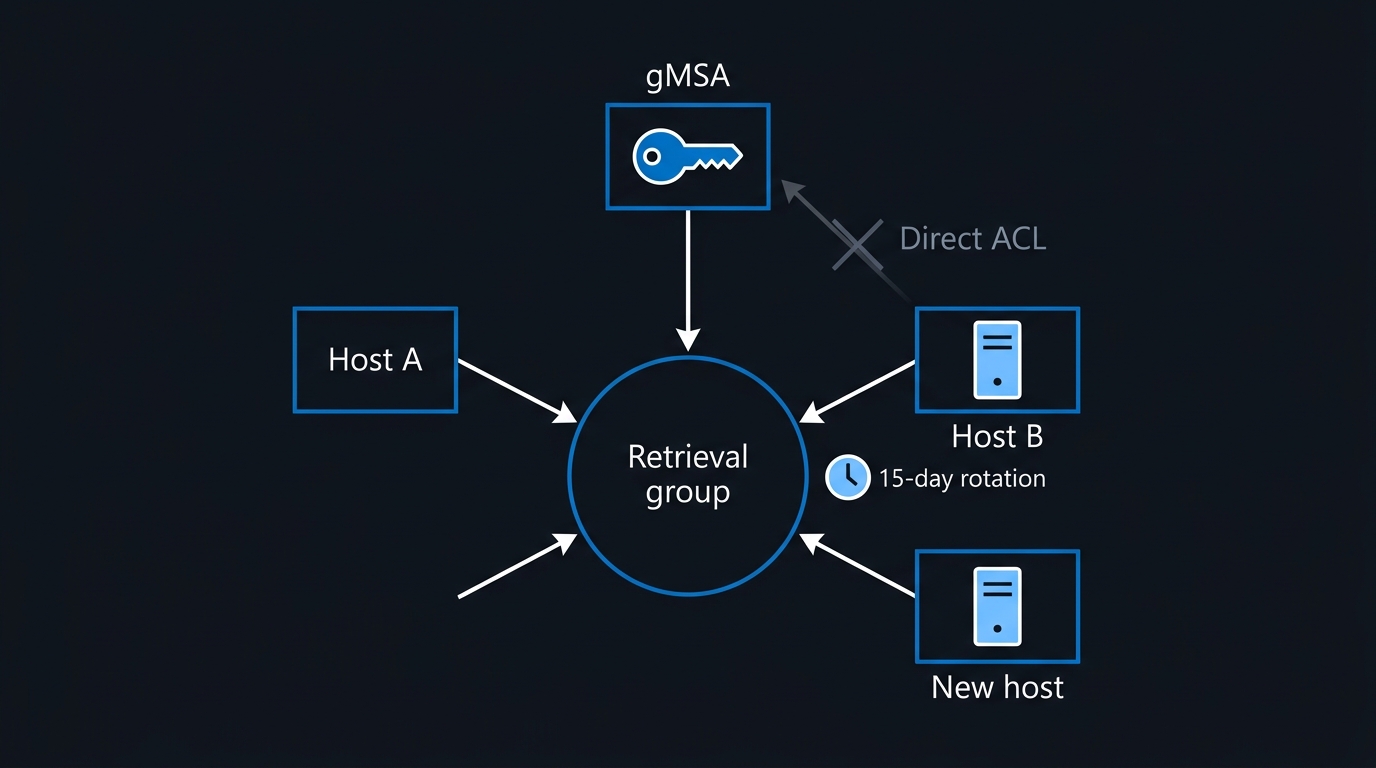
Scope Retrieval to a Group, Never to Computers
Now create the account. The single most consequential decision here is what goes into -PrincipalsAllowedToRetrieveManagedPassword.
# One gMSA per service. One retrieval group per gMSA. Never a shared group.
New-ADGroup -Name 'gMSA-SQL-Reporting-Hosts' -SamAccountName 'gMSA-SQL-Reporting-Hosts' `
    -GroupScope DomainLocal -Path 'OU=Service Account Groups,OU=Tier1,DC=contoso,DC=com'

Add-ADGroupMember -Identity 'gMSA-SQL-Reporting-Hosts' -Members 'SQLRPT01$','SQLRPT02$'

$params = @{
    Name                                       = 'gmsa_sqlrpt'
    SamAccountName                             = 'gmsa_sqlrpt'
    DNSHostName                                = 'sqlrpt.contoso.com'
    PrincipalsAllowedToRetrieveManagedPassword = 'gMSA-SQL-Reporting-Hosts'
    ServicePrincipalNames                      = 'MSSQLSvc/sqlrpt.contoso.com:1433'
    ManagedPasswordIntervalInDays              = 15
    KerberosEncryptionType                     = 'AES128,AES256'
    Path                                       = 'OU=Managed Service Accounts,OU=Tier1,DC=contoso,DC=com'
    Enabled                                    = $true
}
New-ADServiceAccount @params
Populating the parameter with a group rather than a list of computer objects is not a style preference. Adding a rebuilt host to a group is a membership change your existing tooling already handles and audits. Rewriting msDS-GroupMSAMembership on the account object is an ad hoc directory write on a security-sensitive attribute, usually by whoever is on the bridge at 2am. The group indirection makes the routine operation reversible and leaves the attribute itself static — which matters enormously at detection time, because a write to it then becomes anomalous by definition.
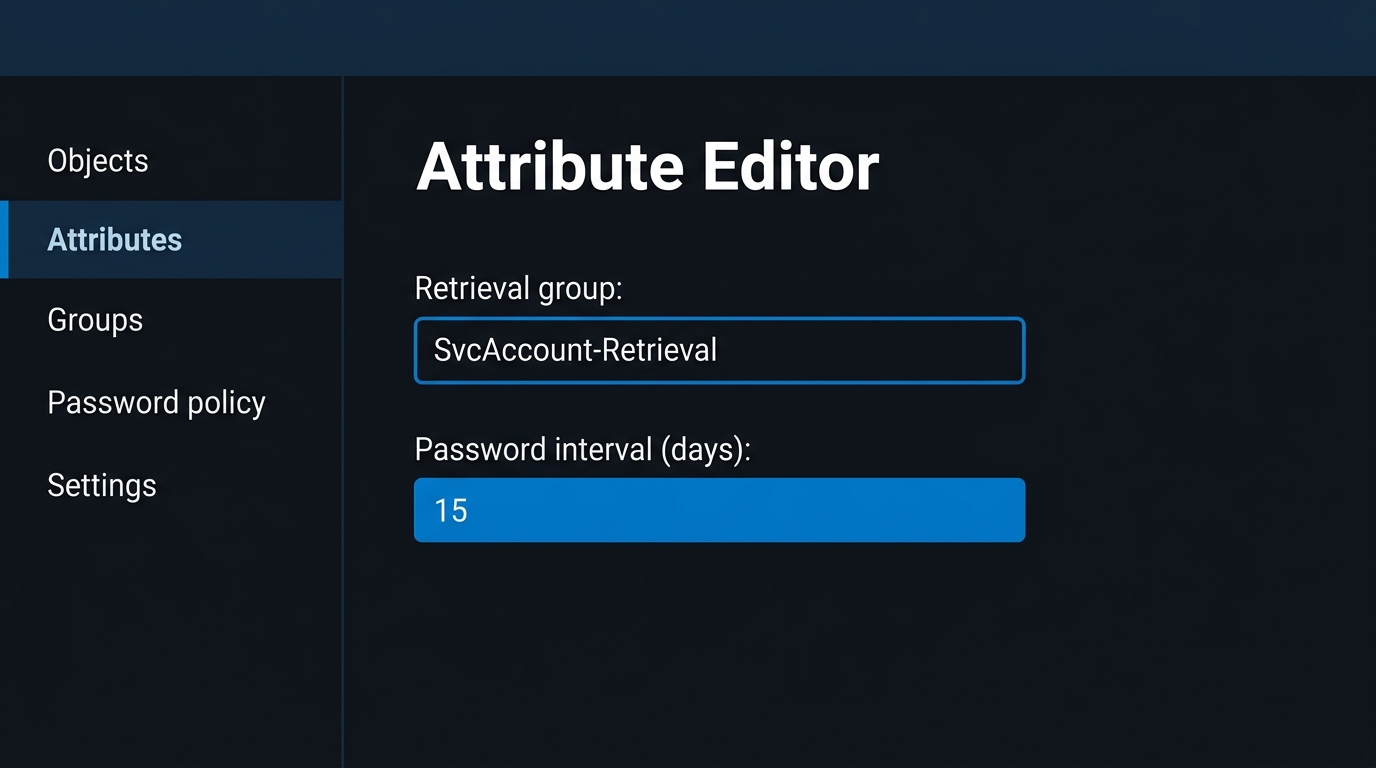
ManagedPasswordIntervalInDays = 15 is also deliberate. Microsoft's own Golden gMSA recovery article suggests "setting the ManagedPasswordIntervalInDays parameter to 15 days or choosing an appropriate value when creating a gMSA, as the ManagedPasswordIntervalInDays value becomes read-only after a gMSA is created." Halving the interval halves the window in which stale derived material stays valid after a compromise.
Install and Prove It on the Host
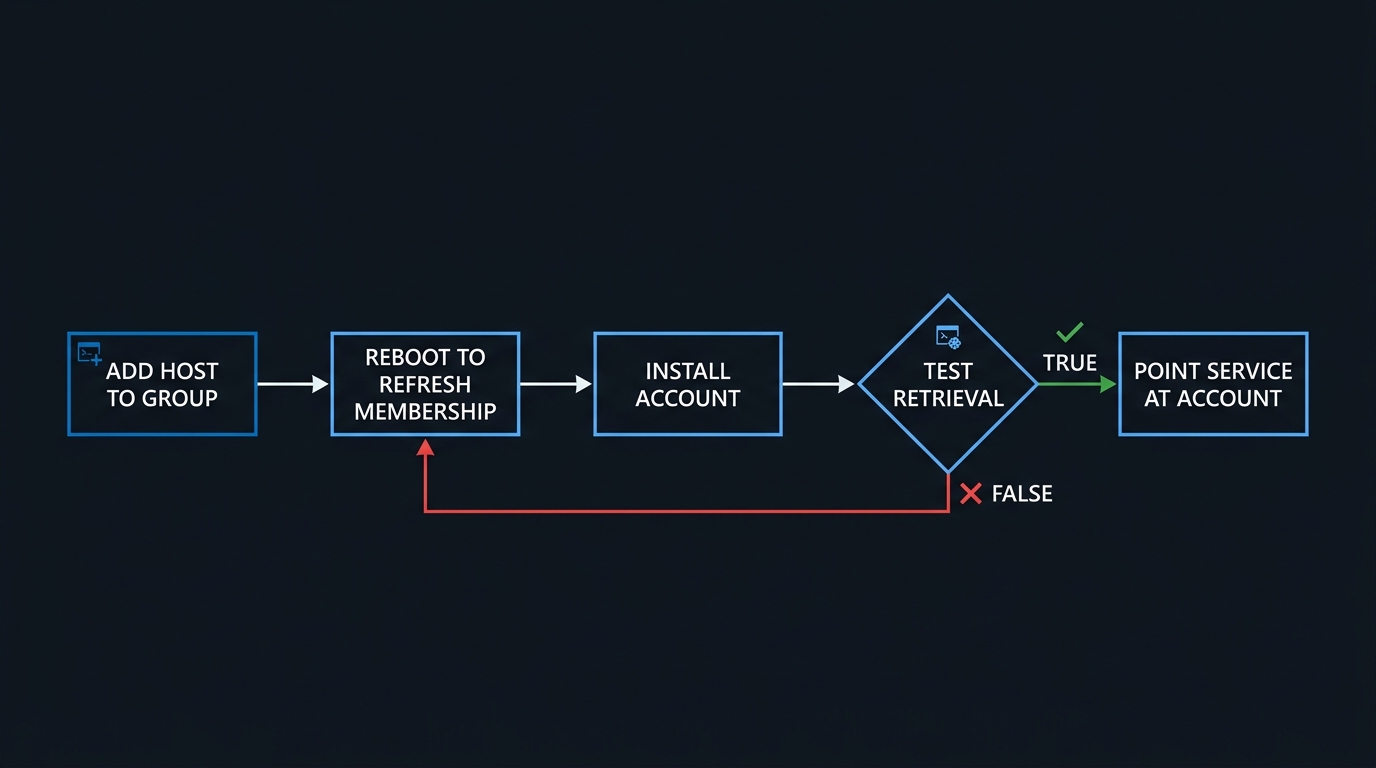
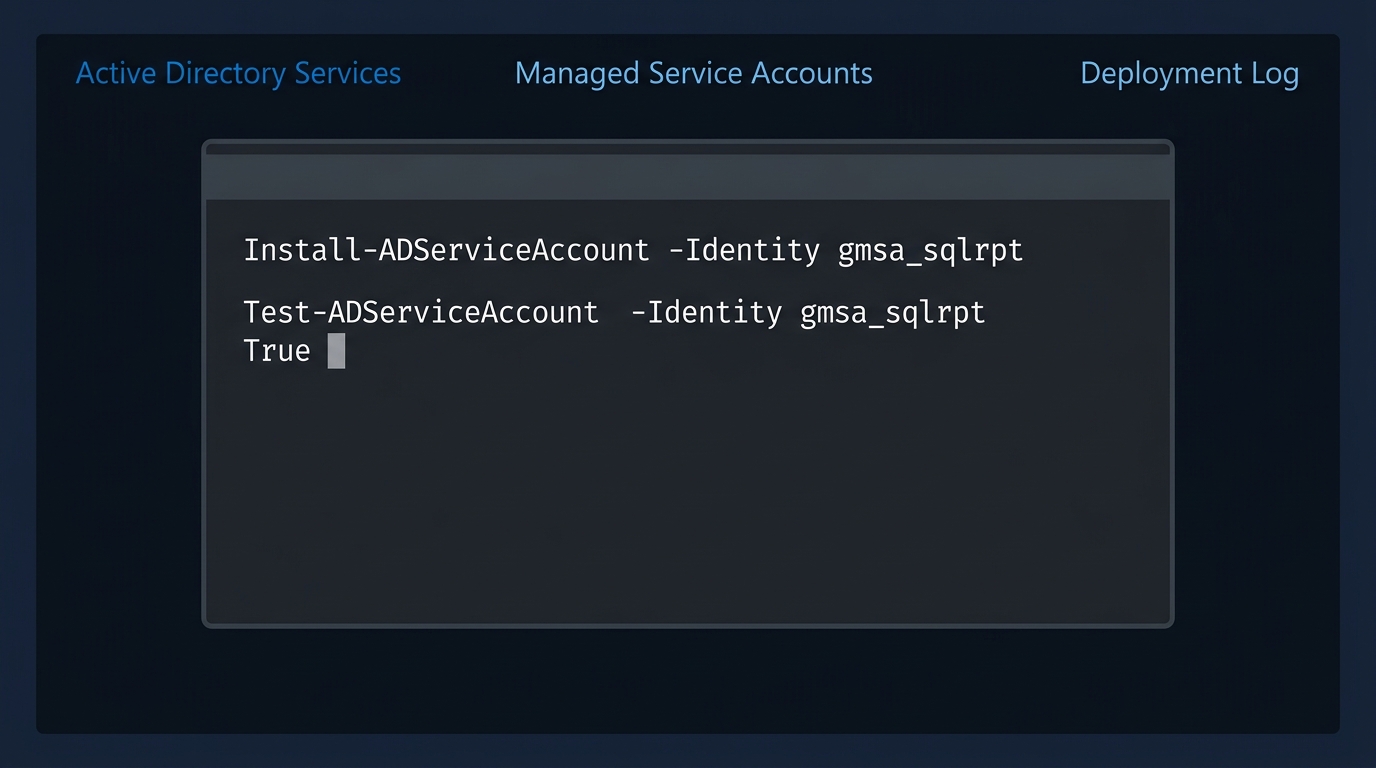
On each member host, install the account into the local LSA cache and verify retrieval actually works before you point a service at it.
# On SQLRPT01, after the host has picked up its new group membership (reboot required).
Install-ADServiceAccount -Identity 'gmsa_sqlrpt'

# Returns True only if this host can actually retrieve the managed password.
Test-ADServiceAccount -Identity 'gmsa_sqlrpt'
Test-ADServiceAccount returning False on a host you just added to the group almost always means the machine has not refreshed its Kerberos group membership. Reboot before you touch any ACL.
Per-Workload Notes That Save You a Weekend
The cmdlets are the easy part. Each consuming workload has one detail that is not obvious.
SQL Server. Set the service account in SQL Server Configuration Manager, not services.msc. Microsoft's service account guidance says Configuration Manager "performs additional configuration such as updating the Windows local security store, which protects the service master key for the Database Engine", while other tools such as the Windows Services Control Manager "can change the account name but doesn't change all the required settings." Enter it as CONTOSO\gmsa_sqlrpt$ — the trailing dollar sign is mandatory — and leave the password field blank. Move the MSSQLSvc SPN to the gMSA and remove it from the old account in the same change, or you get duplicate SPNs and intermittent Kerberos failures. SQL Agent proxies are separate credential objects and do not migrate with the service identity.
IIS application pools. Set the pool identity to a custom account, enter CONTOSO\gmsa_web01$, blank password, then check loadUserProfile — applications that wrote to a user identity's profile can behave differently. If the site uses Kerberos, either register the HTTP/ SPN on the gMSA or enable kernel-mode authentication with the pool credential, not a half-configured mix of both.
Scheduled tasks. Register the principal with -LogonType Password — one of the accepted values for New-ScheduledTaskPrincipal — and supply no password, leaving Windows to resolve the managed one. The task's host must be in the retrieval group like any other member. Confirm the behaviour in a lab before you standardise on it: Microsoft documents Task Scheduler as a supported gMSA consumer and documents the -LogonType values, but no learn.microsoft.com page states that -LogonType Password specifically suppresses the password prompt for a gMSA.
$action    = New-ScheduledTaskAction -Execute 'powershell.exe' `
                -Argument '-NoProfile -File C:\Ops\Invoke-NightlyReconcile.ps1'
$trigger   = New-ScheduledTaskTrigger -Daily -At 2:15am
$principal = New-ScheduledTaskPrincipal -UserId 'CONTOSO\gmsa_sqlrpt$' `
                -LogonType Password -RunLevel Limited

Register-ScheduledTask -TaskName 'Nightly Reconcile' -Action $action `
    -Trigger $trigger -Principal $principal
AD FS. A gMSA is the recommended farm service account, and the identity is chosen at farm creation — Install-AdfsFarm takes it as -GroupServiceAccountIdentifier, trailing dollar sign included. Microsoft's farm service account guidance is to create one dedicated account and then configure every federation server in the farm to use it, so changing it later is a farm-level operation rather than a service-properties edit on one node.
SCOM. Microsoft documents gMSA support against a named list of System Center Operations Manager accounts — action accounts, the Configuration and Data Access services, the Data Reader and Data Warehouse Write accounts, the agent installation account — rather than universally, and carves out one explicit exception: gMSAs "are not supported as a SQL report server service account for Data reader account." Check that list against your roles before you plan the change.
Windows containers. Containers cannot be domain joined; they borrow the gMSA identity through a credential spec. The container gMSA guide is explicit that "the credential spec file does not contain any secrets, such as the gMSA password, since the container host retrieves the gMSA on behalf of the container."
# On a domain-joined container host.
Install-Module CredentialSpec
New-CredentialSpec -AccountName 'gmsa_web01'
Get-CredentialSpec   # confirms the JSON landed in C:\ProgramData\Docker\CredentialSpecs
The nuance that matters: for non-domain-joined container hosts, retrieval moves to ccg.exe using a portable user identity held in a secret store, configured through a HostAccountConfig block in the credential spec. Microsoft states that "Windows does not currently offer a built-in, default plug-in" — so this path needs a third-party or platform-supplied one, and it converts your retrieval ACL from "these computer accounts" into "whoever can read this secret." That is a different blast radius, and it belongs in the threat model rather than a footnote.
The Cases gMSA Cannot Cover
Plan for these up front. Every one of them is a project that stalls in week three otherwise.
The application wants the password. Agents, connectors, and older middleware that take a username and password in a config file and bind with them cannot use a gMSA; the whole point is that no caller holds the string. Either the vendor supports a Windows service identity, or you stay on a user account with a vaulted, rotated credential.
No Kerberos, no gMSA. If the workload is NTLM-only, or uses a protocol that never touches Windows integrated auth, a managed account buys you nothing. A managed account is also bound to Kerberos encryption types via msDS-SupportedEncryptionTypes. The gMSA overview explains that when the attribute is missing the DC treats the server as not supporting stronger encryption types, and that if you have configured the host to not support RC4, "authentication always fails." Its conclusion is blunt — "you should always configure AES for MSAs" — so set -KerberosEncryptionType AES128,AES256 at creation.
Cross-forest. Microsoft documents neither support for nor a supported pattern for a managed account across a forest trust, and gMSA names must be unique forest-wide rather than domain-wide. Treat a service in forest A that must authenticate as itself into forest B as a user-account case until you have proven otherwise in a lab.
DMZ and non-domain-joined hosts. Password retrieval is an authenticated LDAP operation against a domain controller, so a hardened DMZ host with no DC path retrieves nothing. The container ccg.exe route is the documented exception, with the caveats above.
Third-party software with hardcoded credential handling. The failure is rarely "gMSA unsupported" in the release notes. It is an installer that validates the password field before it will proceed, or a repair routine that re-prompts during an upgrade and silently reverts the identity.
Clustered workloads. The gMSA overview draws a careful line: "Although failover clusters don't provide support for gMSAs, services that operate on the Cluster service can utilize a gMSA or sMSA if they're a Windows service, an app pool, a scheduled task, or natively support gMSA or sMSA." The cluster itself, no; the workload on top of it, often yes. Test the specific role.
Hybrid services needing cloud auth. If the workload's real destination is a cloud API, a gMSA is a detour. Workload identity federation removes the secret rather than relocating it, and is the better answer for anything CI/CD or Azure-facing.
What Group Managed Service Accounts Security Fixes, and What It Moves
Give group managed service accounts full credit for the security problems they genuinely close.
It ends offline cracking: a 240-byte machine-generated password is not a practical cracking target, which removes the SPN account from the Kerberoasting board entirely. It ends rotation debt, because rotation is a background operation with no change window. And it removes human knowledge of the credential — nobody types it, nobody stores it, and there is no ticket to find in the ITSM archive three years later.
Now the honest ledger of what remains.
Over-privilege survives untouched. Converting svc_app01 to a gMSA does not remove it from Domain Admins, and a shared gMSA preserves the union-of-privileges problem exactly. Microsoft's gMSA security guidance lists "gMSA is a member of privileged groups" as the first issue to mitigate. The one-gMSA-per-service rule is what actually fixes this, and it is a decomposition exercise, not a cmdlet.
The retrieval ACL is a lateral movement edge. This is the one most teams miss. If a principal can read msDS-ManagedPassword, it can obtain the password, derive the NT hash, and authenticate as the account. BloodHound models this as the ReadGMSAPassword edge, and its documentation is blunt about the abuse: retrieve the password remotely, convert it to an NT hash, and perform overpass-the-hash. If the gMSA is a local administrator on twenty servers, then whoever holds that edge is effectively a local administrator on twenty servers — and unlike group membership, nobody reviews it quarterly.
Host compromise is account compromise. An authorized host can retrieve the current password by design, so SYSTEM on that host can obtain it. A gMSA shared across a tier-1 web farm and a tier-0 management server means the weakest web node yields the tier-0 identity. Tiering rules apply to gMSAs exactly as they apply to admin accounts.
Golden gMSA is the deep one. Semperis published the technique in March 2022: with the KDS root key attributes plus a gMSA's SID and msDS-ManagedPasswordId, an attacker computes that account's password offline, indefinitely. Microsoft's recovery guidance confirms the analysis — "The description in the above article is accurate" — and prescribes the only real fix: "replace the Microsoft Key Distribution Service (kdssvc.dll, also known as KDS) root key object and all gMSAs that use the compromised KDS Root Key object."
The scope is easier to see than to read: one key, one forest, every managed password.
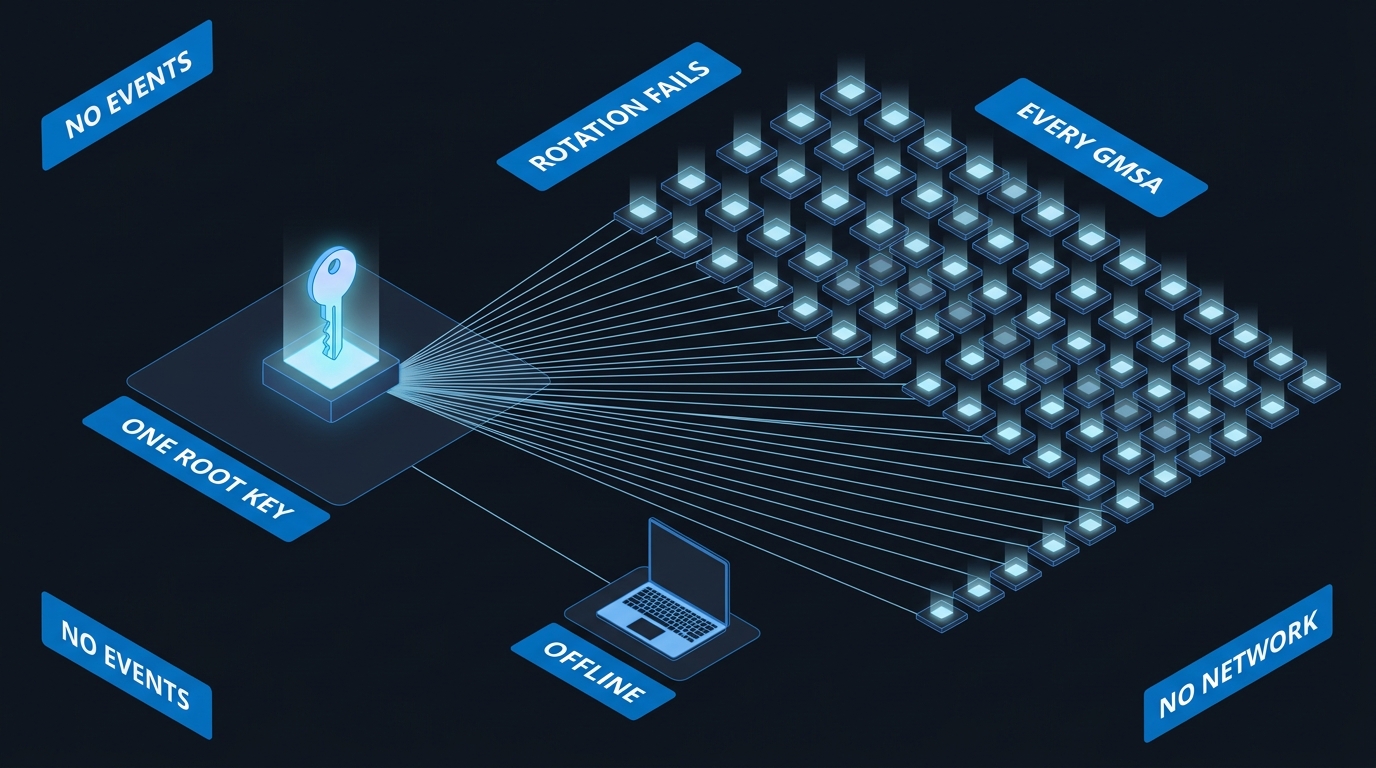
Sit with what that means operationally. Password rotation gives you nothing, because the attacker derives the new password from the same root key. Microsoft scopes this as post-domain-compromise, so it is persistence rather than escalation — but persistence that survives incident response unless recovery explicitly rolls the root key and rebuilds every gMSA. If your DR runbook does not name the KDS root key, your recovery plan has a hole in it.
Delegation misconfiguration undoes the rest. A gMSA with unconstrained delegation, or with msDS-AllowedToActOnBehalfOfOtherIdentity populated by someone debugging, hands an attacker impersonation of arbitrary users. The managed password is irrelevant at that point.
The dMSA Chapter: Shipped, Broken, Patched, Reworked
Windows Server 2025 introduced dMSA to close the gap gMSA leaves open — the retrievable password. Migration is genuinely elegant: Start-ADServiceAccountMigration sets msDS-DelegatedMSAState to 1 and links the dMSA to the legacy account via msDS-ManagedAccountPrecededByLink, the dMSA learns which machines use the service, and Complete-ADServiceAccountMigration sets the state to 2, copies the SPNs and delegation configuration across, and disables the old account. The dMSA overview tells you to wait "at least two ticket lifetimes (equivalent to 14 days) after modifying the Security Descriptor (SD) before completing the dMSA migration", and recommends "keeping a service in the start state for four ticket lifetimes (28 days)."
Then Akamai's Yuval Gordon published BadSuccessor on 21 May 2025.
The flaw is easier to hold in your head as a picture: a successor account inheriting an identity nobody checked it was entitled to.
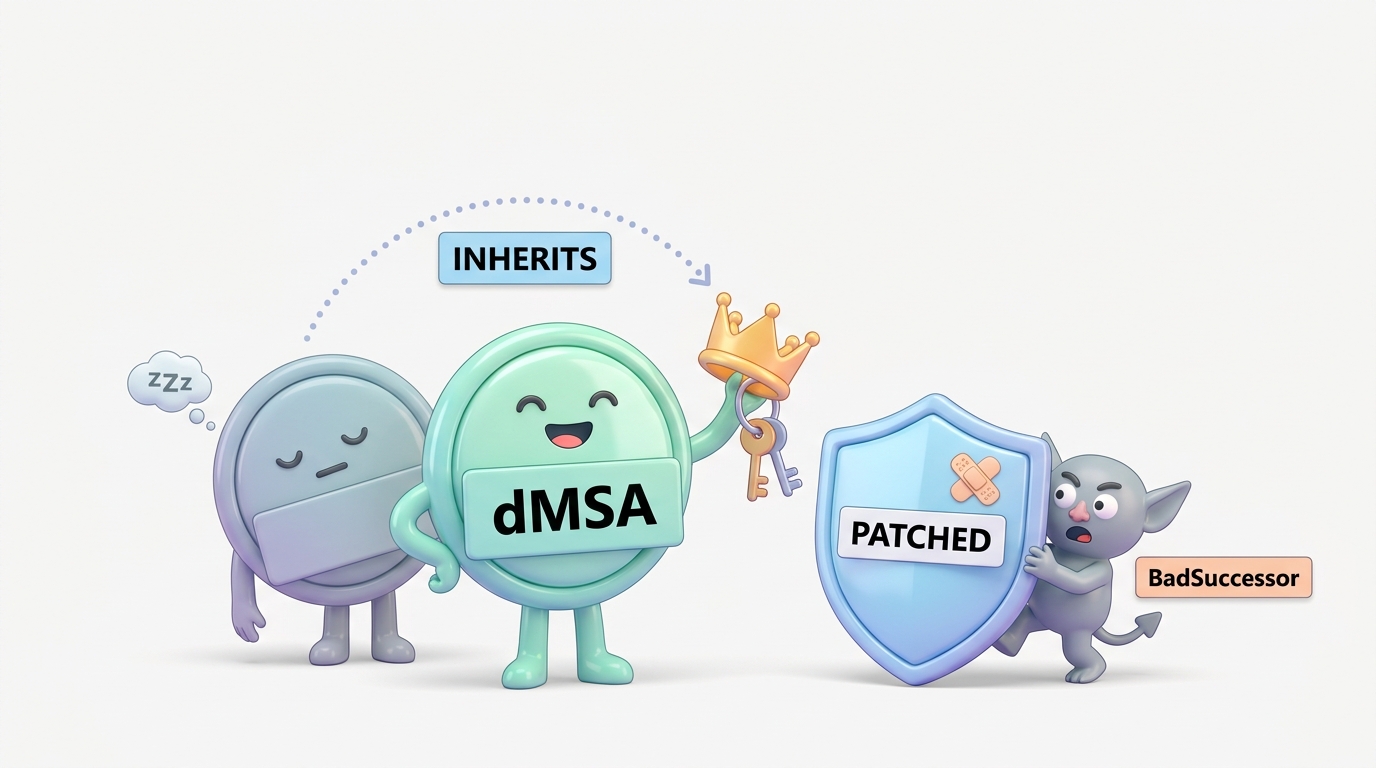
The flaw was in what the KDC trusted. The Kerberos PAC for a dMSA was built from msDS-ManagedAccountPrecededByLink with no verification that a migration had ever occurred. Set that attribute to the distinguished name of any account — Domain Admin included — set msDS-DelegatedMSAState to 2 to claim the migration finished, and the KDC issued the dMSA a ticket carrying the target's privileges and keys. No compromise of the target. No password. One attribute write, in one direction.
The prerequisite turned a clever trick into an emergency. Akamai's finding: "Any user that has either the Create msDS-DelegatedManagedServiceAccount or Create all child objects rights on any OU can create a dMSA" — and "In 91% of the environments we examined, we found users outside the domain admins group that had the required permissions to perform this attack." That is delegated OU permissions, the most widely granted right in Active Directory, promoted to full domain compromise.
Microsoft initially assessed it as Moderate severity and stated it did not meet the bar for immediate servicing. That position changed. The fix shipped in the August 2025 update cycle as CVE-2025-53779, a Windows Kerberos elevation-of-privilege vulnerability rated CVSS 7.2.
Critically, the enforcement went into the right place. Akamai's post-patch analysis, published 27 August 2025, describes it: "Changes in kdcsvc.dll force the KDC to validate the relationship at ticket time", so a one-way link no longer works, and "the only way to obtain a valid ticket for a dMSA that is linked to another account post-patch was to make the link mutual: The target must also reference the dMSA, mirroring what a real migration produces." The target's side of the link is msDS-SupersededManagedServiceAccountLink together with the superseded-account state — the same attributes Complete-ADServiceAccountMigration writes during a legitimate migration. MSRC lists the Windows Server 2025 fix as KB5063878, released 12 August 2025, with a fixed build of 26100.4946 — so enforcement lives on domain controllers at that build or later.
Then three follow-ons arrived, and they define what dMSA risk actually looks like today.
Akamai's own two techniques. The same post-patch article shows that the underlying principles survive as a shadow-credentials-style route to credential and privilege acquisition, and as a targeted credential dump in domains an attacker already owns — an alternative to DCSync with entirely different telemetry.
BetterSuccessor. Altered Security's Shaunak Khosla published this in November 2025. If the KDC now demands a mutual link, write both halves. The technique needs CreateChild on an OU to create the dMSA and GenericWrite on the account being impersonated. That second requirement is the patch doing real work: it raises the bar from "can create an object somewhere" to "already controls the target," which is a different class of attacker.
Golden dMSA. Semperis researcher Adi Malyanker found the design flaw with the longest tail. The ManagedPasswordId structure's time-based components are bounded — the L1 and L2 indices each range 0–31, and the L0 index is not used at all, leaving "only 32 × 32 = 1,024 possible vectors to test." With KDS root key material, an attacker brute-forces that keyspace trivially and generates valid passwords for any gMSA or dMSA in the forest. Microsoft's response, quoted in the research: "If you have the secrets used to derive the key, you can authenticate as that user. These features have never been intended to protect against a compromise of a domain controller." That is a defensible scoping decision, and it means Golden dMSA — like Golden gMSA — is your problem to handle in DR planning rather than Microsoft's to patch.
dMSA Ouroboros. Huntress researcher Andrew Schwartz published this on 4 May 2026. It constructs a legitimate bidirectional link and then engineers a self-referential loop in which the dMSA authenticates and authorizes itself to extract the superseded account's NT hash, with no further attacker involvement. It works on fully patched Windows Server 2025. Microsoft closed the case as a persistence mechanism rather than privilege escalation.
The net, stated fairly: the direct low-privilege-to-Domain-Admin path is closed. The technique class survives as credential access and persistence, requiring meaningfully more privilege than the original. dMSA is still the better account type — its keys never leave the DC, which is more than gMSA can say. But treat every dMSA object and migration-link attribute as tier-0 material, because the telemetry these techniques produce looks nothing like the DCSync patterns your detections were tuned for.
Detection: Watching the Two Things That Matter
Your monitoring should follow the mechanism. Group managed service accounts security rests on two objects, and both are watchable: the root key and the retrieval ACL.
The picture below is the whole detection problem in one frame: where the password comes from, who is allowed to ask for it, and which two reads and writes you must be watching.
Put a SACL on the root key container. Microsoft's Golden gMSA article gives the exact recommendation: "A system access control list (SACL) with successful reads can be placed on the Master Root Keys container, which allows auditing of successful reads on the msKds-RootKeyData attribute of the msKds-ProvRootKey class." Read the caveat too — "Auditing only helps to detect an online attack on the KDS Root Key data." An attacker with a stolen ntds.dit produces no events at all. This catches the live read, which is still worth having.
Reads surface as event 4662 on domain controllers, where the Properties field carries schema GUIDs rather than names. Resolve them from your own schema rather than copying GUIDs from a blog post:
# Resolve the schema GUIDs you will filter 4662 on, from your own forest's schema.
$schema = (Get-ADRootDSE).schemaNamingContext
'msKds-RootKeyData','msDS-ManagedPassword','msDS-GroupMSAMembership',
'msDS-ManagedAccountPrecededByLink','msDS-SupersededManagedServiceAccountLink' |
    ForEach-Object {
        Get-ADObject -SearchBase $schema -LDAPFilter "(lDAPDisplayName=$_)" `
            -Properties lDAPDisplayName, schemaIDGUID |
        Select-Object lDAPDisplayName,
            @{n='GUID'; e={ [guid]$_.schemaIDGUID }}
    }
Audit dMSA creation and both sides of the link. Every technique in this family begins with a dMSA object appearing where none should, followed by writes to migration-link attributes. Audit msDS-DelegatedManagedServiceAccount object creation across every OU, plus writes to msDS-ManagedAccountPrecededByLink and msDS-SupersededManagedServiceAccountLink. Watching only the dMSA side misses BetterSuccessor, which writes the target's side too.
Know what Defender for Identity gives you natively. Two detections in the XDR security alerts catalogue cover this ground directly, both High severity and both mapped to MITRE T1555:
- Suspicious Golden gMSA related activity (
xdr_SuspiciousGoldenGmsaActivity) — "A suspicious read activity was made to sensitive group Managed Service Account (gMSA) objects, which could be associated with a threat actor trying to leverage the Golden gMSA attack." - Suspicious DMSA related activity detected (
xdr_SuspiciousDmsaAction) — "A suspicious Delegated Managed Service Account (DMSA) related activity was detected. This may indicate a compromised managed account or an attempt to exploit a DMSA account."
If you are consolidating detections in the unified Defender portal, verify both fire in your tenant rather than assuming coverage — a healthy sensor on every domain controller is the prerequisite.
Write the rule your SIEM is missing. Native detections are behavioural. Add a deterministic one for what should essentially never happen: a change to a gMSA's retrieval ACL. If you scoped retrieval to groups, that attribute is static in normal operation — high signal, low volume. Drop this into Sentinel:
// Writes to gMSA/dMSA security-critical attributes on domain controllers.
// Requires object-access auditing (4662) forwarded from every DC.
let CriticalAttributes = dynamic([
    "msDS-GroupMSAMembership",
    "msDS-ManagedAccountPrecededByLink",
    "msDS-SupersededManagedServiceAccountLink",
    "msDS-AllowedToActOnBehalfOfOtherIdentity"
]);
let ApprovedOperators = dynamic(["svc_adprovisioning", "adm_identity_eng"]);
SecurityEvent
| where EventID == 4662
| where AccessMask has_any ("0x20", "0x8")           // write property / validated write (SELF)
| where Properties has_any (CriticalAttributes)
| where SubjectUserName !in~ (ApprovedOperators)
| project TimeGenerated, Computer, SubjectUserName, SubjectDomainName,
          ObjectName, Properties, AccessMask
| order by TimeGenerated desc
Swap the attribute names for the resolved schema GUIDs above if your Properties field carries GUIDs rather than display names — it usually does.
Enumerate the graph, not the group. Finally, ask BloodHound who can actually read your gMSA passwords — the query that turns an invisible ACL into a reviewable list:
// Every principal with a path to reading a gMSA password, and how many hops away.
MATCH p = shortestPath(
  (n:Base)-[:MemberOf|ReadGMSAPassword*1..]->(g:User)
)
WHERE n <> g
  AND NOT n:Computer
RETURN p
LIMIT 200
Non-computer principals in those results are the finding. A gMSA should be retrievable by hosts, through a group, and by nothing else. A user or nested group holding that edge is either a documented break-glass arrangement or an unreviewed escalation path, and there is no third option.
Sequencing the Rollout
Do not start by creating gMSAs. Start by finding out what you have.
# Service-account discovery: user accounts carrying SPNs, aged by password.
# These are your Kerberoasting surface, ordered worst-first.
$cutoff = (Get-Date).AddDays(-365)

Get-ADUser -LDAPFilter '(&(servicePrincipalName=*)(!(objectClass=computer)))' `
    -Properties servicePrincipalName, pwdLastSet, memberOf, lastLogonTimestamp,
                userAccountControl, adminCount |
Select-Object Name, SamAccountName,
    @{n='PwdLastSet';   e={[datetime]::FromFileTime($_.pwdLastSet)}},
    @{n='PwdAgeDays';   e={[int]((Get-Date) - [datetime]::FromFileTime($_.pwdLastSet)).TotalDays}},
    @{n='LastLogon';    e={[datetime]::FromFileTime($_.lastLogonTimestamp)}},
    @{n='SPNCount';     e={$_.servicePrincipalName.Count}},
    @{n='SPNs';         e={$_.servicePrincipalName -join ' | '}},
    @{n='GroupCount';   e={$_.memberOf.Count}},
    @{n='IsAdminCount'; e={[bool]$_.adminCount}} |
Where-Object { $_.PwdLastSet -lt $cutoff -or $_.IsAdminCount } |
Sort-Object PwdAgeDays -Descending |
Export-Csv -NoTypeInformation -Path .\service-account-inventory.csv
SPNCount and GroupCount tell the real story. An account with nine SPNs is nine services wearing one identity, and it needs decomposing into nine gMSAs before anything else happens. IsAdminCount set to true means the account has been in a protected group — a tier-0 conversation, not a migration ticket.
From there, five phases:
-
Classify by privilege tier. Sort the inventory into tier 0 (anything touching domain controllers, ADCS, backup infrastructure, or protected groups), tier 1, and tier 2. Tier-0 accounts convert last, under change control, with a tested rollback — and they are where per-service decomposition matters most.
-
Pilot on one low-risk service. Pick something with a single host, a single SPN, an owner who answers messages, and a usable maintenance window. The pilot proves your retrieval-group pattern, your
Test-ADServiceAccountgate, and your rollback. -
One gMSA per service, without exception. This is the phase where the twelve-services-one-account problem gets fixed, and the only phase that fixes it. Resist the reasonable-sounding request to reuse a working gMSA for a second service; that recreates the condition you started the project to eliminate.
-
Separate tier 0 completely. Tier-0 accounts get their own gMSAs, retrieval groups, and an OU with restricted
CreateChilddelegation, with no membership overlap with tier-1 hosts. Pair that with just-in-time elevation for their human operators — PIM-style time-bound access applies even when the accounts themselves are on-premises. -
Back up the root key and write down the recovery path. The KDS root key comes back with a forest recovery, but "it is in the system state backup somewhere" is not a plan. Document the key ID and effective time, confirm it is captured, and name the Microsoft recovery procedure in your IR runbook so nobody has to discover Golden gMSA at 3am.
Rollback is straightforward if you sequence it correctly: keep the legacy account enabled but with its SPNs removed until the gMSA has run a full business cycle. Reverting is then re-registering the SPN and setting the service identity back. Delete the old account only after the cycle completes and you have confirmed nothing else was quietly using it.
Per service, the sequence is short, and the two gates in it fail loudly rather than silently:
- Identity team: confirm exactly one KDS root key exists in the forest. If not, run
Add-KdsRootKeyand wait for replication. - Identity team: create a per-service retrieval group, then create the gMSA scoped to that group.
- Platform team: install the account on the host with
Install-ADServiceAccount, then runTest-ADServiceAccount. A False almost always means the host has not refreshed its Kerberos group membership. Reboot and test again. Do not touch the ACL. - Application owner: point the service at the gMSA and run one full business cycle.
- Identity team: remove the SPNs from the legacy account. The service is now running on the gMSA.
For dMSA the rollback is more brittle. Complete-ADServiceAccountMigration disables the original account and copies SPNs and delegation across, so reverting means re-enabling and reconstructing. Sit in the start state for the recommended interval, and confirm every consuming machine supports dMSA first — Microsoft warns that machines which do not "fails authentication with the existing service account once the account becomes disabled during migration."
Pre-Flight Checklist
Run this before you convert anything, and again as a quarterly review.
-
Get-KdsRootKeyreturns exactly one key per forest, with a known effective time - The KDS root key is confirmed present in AD backups, and forest recovery has been tested against it
- A SACL for successful reads is set on the Master Root Keys container for
msKds-RootKeyData - Golden gMSA recovery is named in the incident response runbook, with the key-roll and gMSA-rebuild steps
- Every gMSA has
-PrincipalsAllowedToRetrieveManagedPasswordpointing at a dedicated group, never at individual computer objects - No gMSA's retrieval group contains a user account, a nested administrative group, or hosts from more than one tier
-
ManagedPasswordIntervalInDayswas set deliberately at creation — it cannot be changed afterwards -
-KerberosEncryptionType AES128,AES256is set on every managed account - No gMSA is a member of a protected group, and none has
adminCountset - Every gMSA maps to exactly one service; no account carries SPNs for more than one workload
- Unconstrained delegation is absent, and
msDS-AllowedToActOnBehalfOfOtherIdentityis empty unless explicitly designed - A BloodHound
ReadGMSAPasswordreview is scheduled quarterly, with non-computer principals treated as findings - All domain controllers are at build 26100.4946 or later if any Windows Server 2025 DC is present
-
CreateChildformsDS-DelegatedManagedServiceAccountis delegated only where intended — audit every OU, not just the obvious ones - Auditing covers dMSA object creation plus writes to
msDS-ManagedAccountPrecededByLinkandmsDS-SupersededManagedServiceAccountLink - Defender for Identity sensors are healthy on every DC, and both managed-account detections are confirmed active
- Each converted service has a documented rollback with the legacy account retained through one full business cycle
The pattern worth carrying out of all this: a managed service account moves the secret from a place people can read to a place the directory computes. That is a large, real improvement, and it is not the same thing as removing the secret. Group managed service accounts security now rests on two objects — the retrieval ACL and the root key — and both are cheap to audit and almost never audited. Fix that, and the account type you pick matters far less than the fact that you finally know who can become it.

Leave a Reply