
Status as of
The EWS retirement in Exchange Online is no longer a future event. On 1 October 2026 Microsoft began switching Exchange Web Services off by default, and the end-of-August opt-out window that most of the summer's coverage fixated on has closed. If your tenant still runs anything that talks EWS, the question is no longer whether to act before a deadline. It is which of your callers survived the switch, which are living on an allowlist, and what replaces them before the final date.
The common reading of the timeline, that EWS stopped working at the end of August, was wrong. The end of August was the deadline to opt out of what came next. Microsoft's Exchange Team stated it plainly in Exchange Online EWS, Your Time is Almost Up: "if you proactively configure an Allow List and set EWSEnabled to True by the end of August 2026, your tenant will be excluded from the October 1 automatic change to EWSEnabled=False." Tenants that missed that window had an allowlist pre-populated for them from their own EWS telemetry ("we will pre-populate the Allow List for customers who have not created one before September 2026, based on each tenants own usage"), and from 1 October EWS began being disabled by default. Permanent retirement remains 1 April 2027.
On 4 September, a few weeks before the switch, Microsoft also rewrote the parity-gap roadmap on its EWS deprecation page and named a second usage-discovery tool. Both are folded into this guide: the gap diff has its own section below, and the tool sits with the rest of the discovery workflow.
Skype for Business Server hybrid deployments were the one population for whom the end of August was a hard, named cutoff, with a second deadline stacked behind it. That has its own section below.
This guide walks the timeline, shows you how to find your actual EWS callers, gives the exact cmdlets, and is honest about the parts of EWS that Microsoft has stated will never reach Graph.
Three Dates, and What Each One Actually Does
EWS has been deprecated since July 2018 and its retirement was announced on 19 September 2023, so nobody can claim surprise. What changed is the scope and the enforcement. The January 2024 Midnight Blizzard incident involved EWS and, in Microsoft's words on the EWS deprecation page, "the scope was also widened from third party applications to include all Microsoft applications." That removed the last plausible "surely Microsoft will carve out an exception" argument.
End of August 2026 — the opt-out deadline (passed). Tenants that set EwsEnabled = $true and populated an allowlist before this date were excluded from the 1 October automatic switch entirely. Tenants that did nothing got a list built for them from their own telemetry. It was the only one of the three dates admins controlled.
1 October 2026 — disabled by default. Any tenant still sitting at the default EwsEnabled = Null gets flipped to $false. If you have explicitly set EwsEnabled = $true, EWS keeps working, but only for the App IDs present on EwsAllowedAppIDs. Everything else gets refused. This is the date that generates the support tickets.
This one is recoverable, and it is worth knowing that before you write your incident plan. Microsoft is explicit that an admin can re-enable EWS after the block — either by setting EwsEnabled = $true and maintaining an allowlist, or by setting it back to Null, which "re-enables EWS without restrictions until the final deprecation occurs." Both require Exchange Online PowerShell, and Microsoft warns that "there will be a service interruption in this case." Recoverable is not the same as painless.
1 April 2027 — permanent retirement. Microsoft's wording is "no exceptions," and the ability to control EwsEnabled is removed from tenant admins entirely. No allowlist entry, no $true, no admin override, no support ticket changes the outcome. The switch is not a policy after that date; it is an absence.
Between October and April you have a bridge, not a reprieve. The allowlist is a mechanism for keeping a known, inventoried set of applications alive while their owners finish a Graph migration. It is not a way to defer the migration.
One scope question, answered before you escalate it. This is an Exchange Online change only. Microsoft's wording: the retirement applies "only to Microsoft 365 and Exchange Online (all environments); there are no changes to EWS in Exchange Server." If you run Exchange Server on-premises, your on-premises EWS endpoints are unaffected. "All environments" also means there is no separate, later date for GCC, GCC High, or DoD — the dates above are the dates everywhere. Government and sovereign cloud tenants get a different link to the usage tooling, not a different deadline.
Find Your Callers Before You Touch Any Setting
The most common failure in this project is configuring an allowlist from memory. Almost every tenant has EWS traffic nobody in the room can name: a decade-old signature manager, a room-booking panel, a backup product's legacy connector, a departed contractor's reporting script running on a scheduled task.
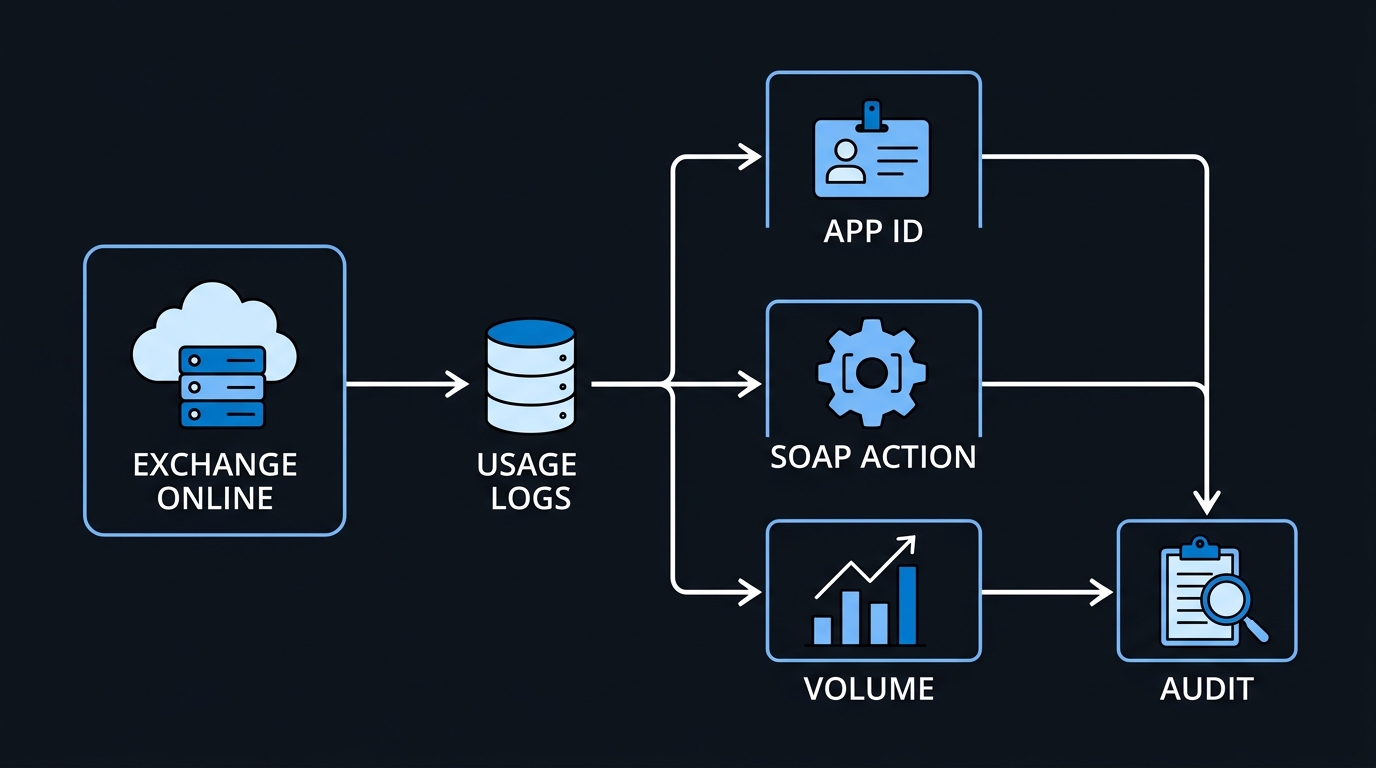
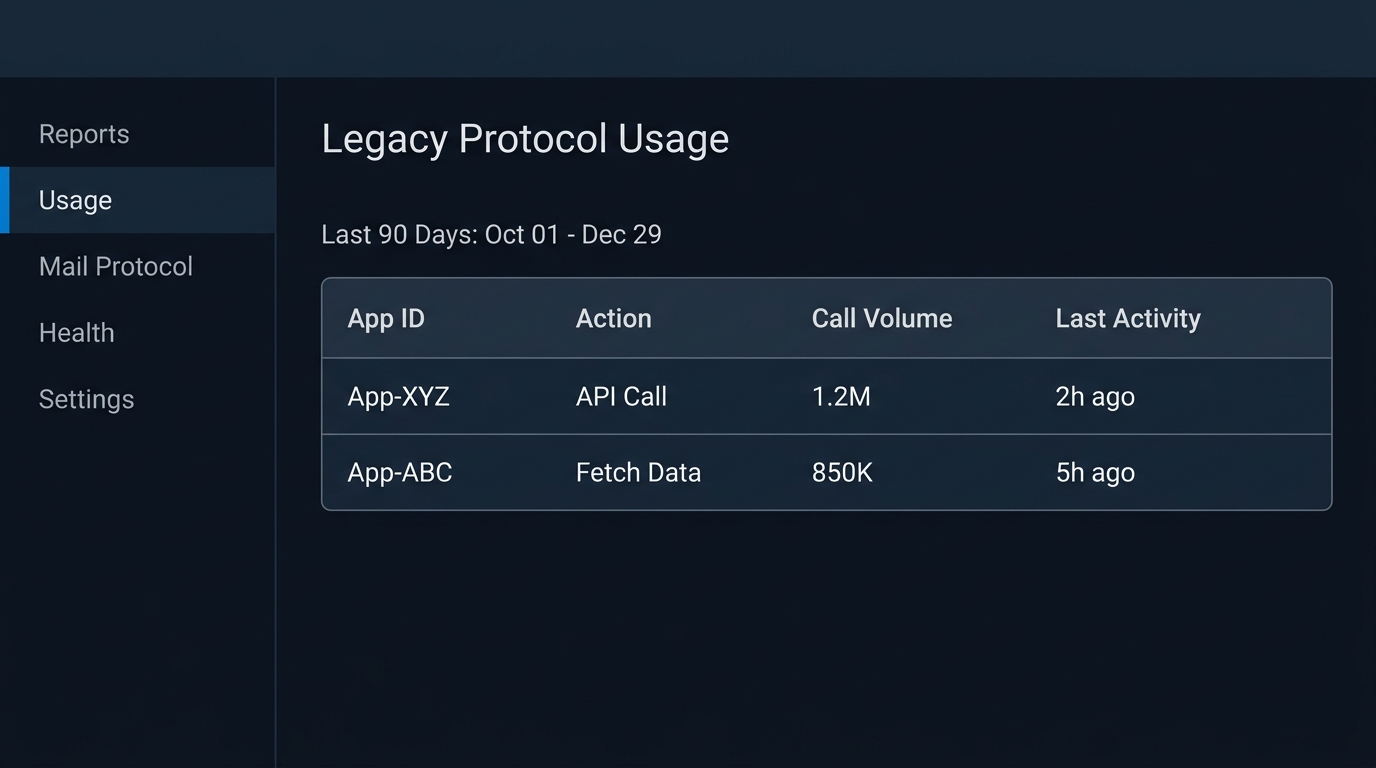
Microsoft ships the answer. The EWS Usage Report lives in the Microsoft 365 admin center under Reports → Usage → Exchange, on the EWS usage tab. It offers 7, 30, and 90-day windows and gives you four columns that matter: Application ID, SOAP Action, Call Volume, and Last Activity date in UTC. You can export the whole thing to CSV, which is where the real work happens.
There is one caveat in Microsoft's documentation for the report that dictates your schedule more than any other single fact: "It can take up to 10 days for usage to show in the report." If you are starting discovery only now, after the 1 October switch, the report is still describing traffic from before it, and a caller that broke on the switch shows up as a sudden stop in Last Activity rather than as an error. The 90-day window is still the one to pull: it catches quarter-end batch jobs, annual-ish reporting scripts, and the seasonal integrations that only run twice a year.
Work the CSV like an inventory, not a report:
- Pivot on Application ID, sorted by call volume descending. The top five App IDs usually account for the great majority of traffic and are the ones with real owners.
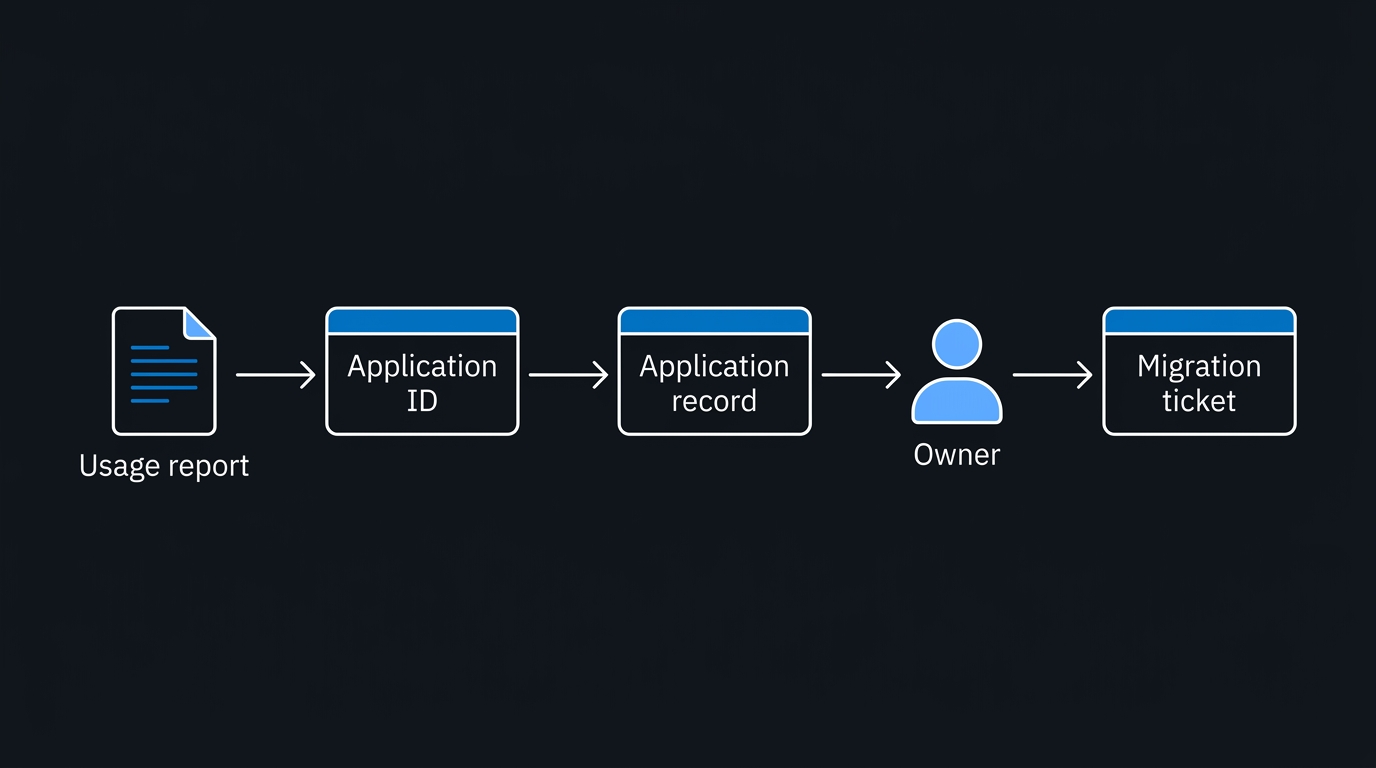
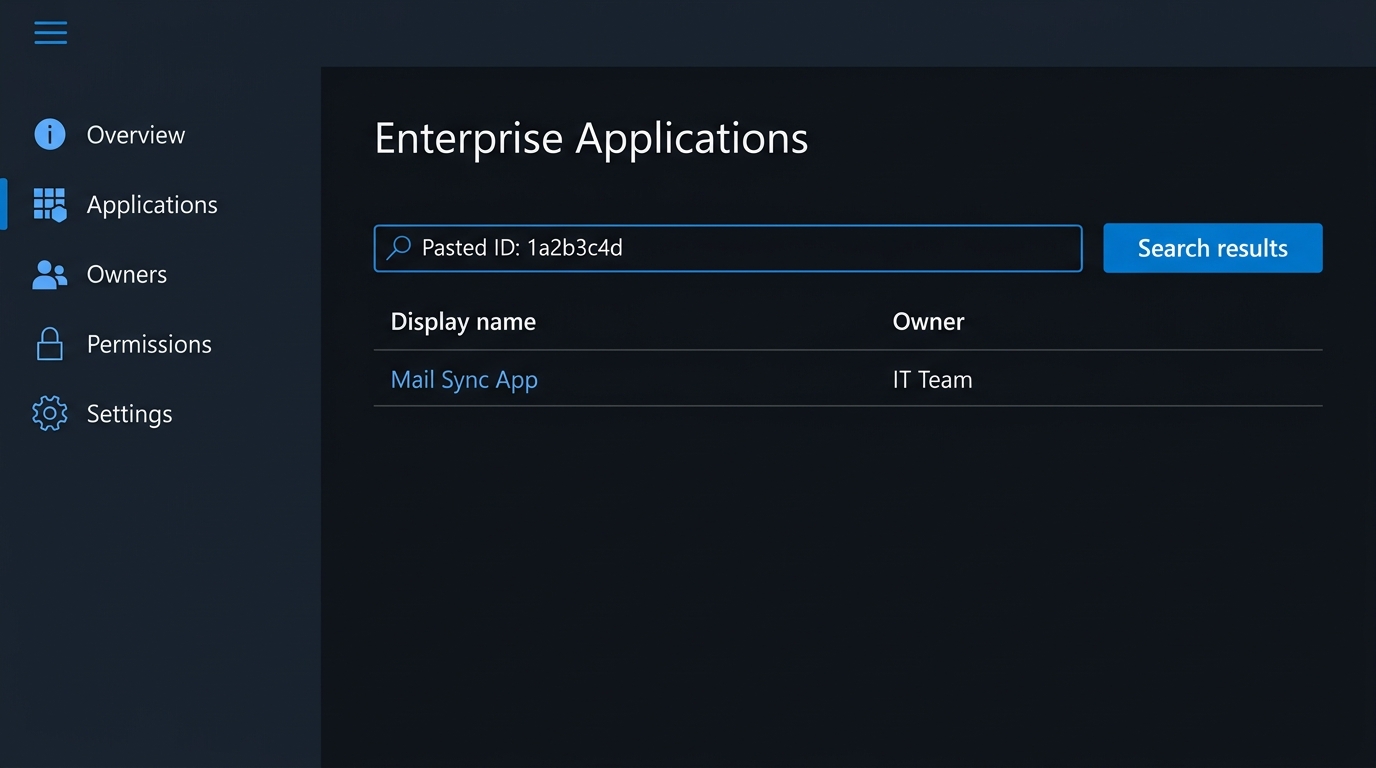
- Resolve each App ID in Entra ID → Enterprise Applications. A resolved display name turns "unknown GUID" into "the HR onboarding connector," which turns an unknown into a conversation.
- Read the SOAP Action column as a requirements list.
SyncFolderItems,Subscribe,GetUserAvailabilityand friends tell you exactly which Graph capability that caller needs — before you talk to a single vendor. - Treat Last Activity as your decommission evidence. An App ID that last called EWS eleven weeks ago is a candidate for simply being switched off, and the report is the artifact that lets you say so with a straight face.
A note on Entra sign-in logs, because you will see them recommended: they are a reasonable corroborating signal for confirming an App ID is still authenticating, but Microsoft publishes no EWS-specific KQL query or sign-in log column for isolating EWS traffic. Any query you find claiming otherwise is somebody's inference. Correlate the App IDs you got from the usage report against sign-in activity yourself, and treat the usage report as the authority.
A second, scriptable view: Ews.App.Usage. Microsoft's 4 September revision of the deprecation page names a second discovery tool alongside the admin center report: the EWS Usage Reporting tool, distributed as Ews.App.Usage in the same EWS Migration Tools repository that hosts the EWS Code Analyzer. Where the admin center report is a canned view you cannot query further, Ews.App.Usage pulls directly from your tenant's Microsoft Graph audit logs and writes the result to files you own. According to the tool's setup documentation, it needs its own Entra app registration:
{
  "TenantId": "<tenant-id>",
  "ClientId": "<client-id>",
  "ClientSecret": "<client-secret>",
  "OutputPath": ".\\Usage-Data"
}
The app registration behind those credentials needs AuditLog.Read.All and Application.Read.All as application permissions. Running Collect-EWS-App-Usage.ipynb pulls the raw activity; Report-EWS-App-Usage.ipynb turns it into EWS-Usage.csv and a matching Power BI file, EWS-Usage.pbix. It is worth setting up if the admin center report is thin for you, sovereign cloud tenants in particular, since "Sovereign Cloud availability" for the underlying Exchange workload APIs is itself one of the Q4 CY2026 roadmap gaps. It also suits any tenant that wants a repeatable, scriptable pull instead of a monthly export-and-pivot ritual.
Resolving owners at scale. Neither tool tells you who owns an Application ID. Step 2 above works by hand for a handful of GUIDs; past that, do it with Microsoft Graph PowerShell:
# Requires: Connect-MgGraph -Scopes "Application.Read.All"
# $appIds comes from either the admin center CSV export or EWS-Usage.csv
$appIds = Import-Csv .\EWS-Usage.csv | Select-Object -ExpandProperty ApplicationId -Unique

foreach ($appId in $appIds) {
    $sp = Get-MgServicePrincipal -Filter "appId eq '$appId'" -Property Id, DisplayName, AppId
    $owners = if ($sp) { Get-MgServicePrincipalOwner -ServicePrincipalId $sp.Id } else { @() }

    [PSCustomObject]@{
        AppId       = $appId
        DisplayName = if ($sp) { $sp.DisplayName } else { 'UNRESOLVED' }
        OwnerCount  = $owners.Count
    }
}
An UNRESOLVED row is a finding, not a dead end. An App ID with no matching service principal and no recent activity is a strong decommission candidate; one with recent activity and no resolvable owner is exactly the kind of orphaned integration that turns into a support ticket once EWS is off for it.
For code you own, the EWS Code Analyzer is worth twenty minutes of setup. It is a Roslyn analyzer for Visual Studio and VS Code that scans .NET source for EWS calls and suggests the Graph equivalents inline, available via aka.ms/ewsTools. It will not migrate anything for you, but it converts "we think that service uses EWS somewhere" into a file-and-line list.
Discover, Decide, Migrate
The first pass asks three questions of every App ID in your export:
- Has it called EWS inside the 90-day window at all?
- Do you control the code, or does a vendor?
- Does the feature it needs exist in Graph as GA, as preview, or never?
flowchart TD
    N1[EWS Usage Report
90 days, by App ID] --> N2{Last Activity in window?}
    N2 -->|No| N3[Decommission
Do not allowlist]
    N2 -->|Yes| N4{You control the code?}
    N4 -->|No| N5[Vendor path
Written Graph date
Bridge on allowlist]
    N4 -->|Yes| N6{Feature in Graph?}
    N6 -->|GA| N7[Migrate to Graph
App-only + RBAC]
    N6 -->|Preview| N8[Prototype now
Bridge, then re-test]
    N6 -->|Never| N9[Redesign or retire
No allowlist saves this]
The branch that people skip is the last one. If a caller depends on something Microsoft has said will not exist in Graph, no amount of allowlist configuration helps, and the only useful move is to surface that as a business decision while there is still budget and calendar to respond to it.
Once every remaining caller has a named owner, the 4 September roadmap table (covered below) decides which of four outcomes it lands in:
- Bridge: the capability is in the roadmap table with a Q3 or Q4 CY2026 target. Keep it on the allowlist until the target, then re-test, because targets can slip.
- Decommission: not on the roadmap and no longer business-critical. Remove it from the allowlist.
- Vendor escalation: not on the roadmap, still critical, and someone else owns the code. Get a written Graph migration date; the allowlist entry is leverage, not comfort.
- Re-architect: not on the roadmap, still critical, and the code is yours. Start now, because no allowlist entry survives 1 April 2027.
flowchart TD
    A[Caller identified with an owner] --> B{Listed in the roadmap table
with a Q3/Q4 CY2026 ETA?}
    B -->|Yes| C[Bridge on the allowlist until the ETA
Re-test at GA — targets can slip]
    B -->|No: unlisted or confirmed won't-add| D{Still business-critical?}
    D -->|No| E[Decommission
Remove from the allowlist]
    D -->|Yes| F{Who owns the code?}
    F -->|Vendor / third party| G[Get a written Graph migration date
Allowlist entry is leverage, not comfort]
    F -->|In-house| H[Re-architect now
No allowlist entry survives April 2027]
The "No" branch is the one to sit with. A caller that depends on generic Public Folder CRUD, generic Microsoft 365 Group mailbox CRUD, or Discovery Mailbox access has no destination coming; those are the confirmed permanent gaps as of 4 September. A caller that depends on the recurring-event delta or on no-attendee calendar events lands in the same place under the page's own default rule, even without a formal "won't be added" label.
The Allowlist: Exact Cmdlets and One Trap
The org-level controls live on Set-OrganizationConfig, documented on Microsoft's page for controlling access to EWS in Exchange. Start by reading your current state, because a surprising number of tenants have never set these at all:
# What is the tenant actually configured to do today?
Get-OrganizationConfig | Format-List EwsEnabled, EwsApplicationAccessPolicy
If EwsEnabled comes back empty, you are in the default state — and that default is exactly what changes. Microsoft states it plainly: "The default value Null is treated as EwsEnabled set to True." That treatment is what ends on 1 October.
To keep a controlled set of applications running through the bridge period, set the flag explicitly and populate the allowlist:
# Explicitly enable EWS at the org level
Set-OrganizationConfig -EwsEnabled:$true

# Restrict EWS to a known set of application IDs
Set-OrganizationConfig -EwsAllowedAppIDs "guid1,guid2"
The behaviour is narrower than the parameter names suggest, and Microsoft says so directly: "When EWSEnabled is set to True, only the Application IDs in this list can use EWS." Setting $true without populating the list does not mean "everything works." It means you have opted into an allowlist model with an empty allowlist.
Two things about that second command that will bite you if you copy it straight into production. First, it overwrites — it does not append. Run it twice with different GUIDs and the second run silently discards the first. Microsoft's own sample code uses a read-modify-write pattern for exactly this reason: read the current value, split on commas, add only what is missing, write the whole list back. Treat EwsAllowedAppIDs as a single string you own end to end, not as a collection you can push to.
Second, the allowlist does not show up in the obvious Get-OrganizationConfig output. You need a specific switch to retrieve it:
# The allowlist is NOT returned without -RetrieveEwsOperationAccessPolicy
Get-OrganizationConfig -RetrieveEwsOperationAccessPolicy | Format-List EwsAllowedAppIDs
Run that after every change. An admin who verifies with a plain Get-OrganizationConfig sees nothing about the allowlist and concludes the setting did not take.
Per-mailbox overrides exist and behave the way you would expect from Exchange precedence rules:
# Per-user override — only meaningful when the org is not disabled
Set-CASMailbox -Identity user@contoso.com -EwsEnabled:$true
And here is the trap worth writing into your runbook, again in Microsoft's own words: "Disabling EWS in the organization also disables per-user EWS overrides." An org-level $false beats a mailbox-level $true, silently. If a service account's mailbox is configured for EWS and the tenant was flipped to disabled on 1 October, that mailbox setting becomes decoration. Nobody gets an error explaining the precedence; the calls simply stop.
One more point on the pre-populated list. Tenants that had not built an allowlist before September got one from Microsoft, generated from their own tenant telemetry: an algorithmic guess based on what had been calling recently. That is better than nothing, and it is not a plan. It will happily include the abandoned contractor script and may miss the quarterly job that did not run inside the observation window. If yours is one of those tenants, diff Microsoft's list against the CSV you exported and make the list your own.
What Maps Cleanly to Graph
For most workloads the migration is mechanical rather than architectural. Microsoft maintains an explicit EWS to Microsoft Graph API mapping, and the well-trodden paths all have destinations:
- Mail operations — create, read, update, delete, send, move, copy.
- Folders and attachments — full CRUD, including large attachment handling.
- Inbox rules, MailTips, and Out of Office — all present.
- Calendar — availability lookups, reminders, and calendar sharing.
- Notifications — EWS pull subscriptions become Graph delta queries; EWS push
Subscribebecomes Graph subscriptions with webhooks. - Synchronisation —
SyncFolderItemsbecomes the delta query pattern.
The notification and sync changes are the ones that require real thought rather than a search-and-replace. A pull-subscription design that polls on a timer maps onto delta queries fairly directly. A push-subscription design has to account for Graph's subscription lifecycle: subscriptions expire, renewal is your responsibility, and your webhook endpoint must respond to the validation handshake. Budget engineering time for that specific piece; budget almost none for mail CRUD.
What Will Not Make the Crossing
This is the section that decides whether your project has a nasty surprise in it. Note that the gaps are not on the API mapping page — that page is a mapping table and lists no gaps at all. The citable list is the "Roadmap for parity gaps" section of Microsoft's Deprecation of Exchange Web Services in Exchange Online page, and the 2023 retirement announcement conceded that "It's possible some functionality will not make it to Microsoft Graph." Vendor blogs and forum threads speculate well beyond that list; this is the part Microsoft actually commits to in writing.
The lists below are the page as it stood in late August, when this guide was first written. Microsoft rewrote the roadmap on 4 September, and the next section shows exactly what moved; read the two together.
Permanently not migrating:
- Public folder CRUD APIs "will not be available" in Microsoft Graph. If a line-of-business application reads or writes public folders through EWS, there is no Graph destination for it. Import and export of public folders is on the roadmap; programmatic create/read/update/delete is not. That is a redesign or a migration off public folders entirely, and it is not a piece of work that fits comfortably before April 2027.
- Creating a calendar event without inviting attendees "will not be supported in Microsoft Graph API." This one catches room-booking, resource-management, and blocking-time automations that deliberately create events with no invitees.
Preview only, not generally available:
- Mailbox import and export — and note the carve-out, which is easy to miss: the preview covers mailboxes except Microsoft 365 Groups and public folder mailboxes
- User configuration
- The newer admin APIs — accepted domain, distribution group membership, dynamic distribution group membership, mailbox, mailbox folder permission, and organisation config
Preview means you can prototype and you can validate the shape of your migration, but you should not put a compliance-critical workload behind it and call the project finished. Re-test these against GA status well before April 2027.
Roadmap items with no committed destination:
- Microsoft 365 Groups import and export
- In-place Archive access
- Event delta for recurring events
- Sticky Notes CRUD
If any of these appear in your SOAP Action column, escalate now. A dependency with no Graph equivalent and a hard April 2027 end date is a business risk, not a technical backlog item, and the people who can fund a redesign need months of notice.
What Microsoft changed on 4 September
On 4 September 2026 the EWS deprecation page picked up a new updated_at timestamp, and the parity-gap roadmap was rewritten, not just refreshed. The previous version sorted gaps into the two soft buckets shown above, "preview only, not GA" and "no committed destination". The new version replaces both with a single table of thirteen named gaps, each carrying a Q3 CY2026 or Q4 CY2026 target, plus a blunt rule that was not there before: "If an EWS capability isn't listed in this roadmap table, don't plan on a corresponding Microsoft Graph or Exchange Admin API capability being available before EWS is fully disabled." That sentence does more work than any individual date. Every capability Microsoft has not explicitly promised now defaults to "assume permanent", not "assume eventual".
Here is what moved, using the same page as the source for both columns:
| Item | Before (late August) | After (4 September) |
|---|---|---|
| Archive access | In-place Archive listed with no committed destination | Two named gaps — Import-Export (Archive) and In-Place Archive (Generic CRUD) — both targeted Q4 CY2026 |
| Public folders | Import/export "on the roadmap," no date; generic CRUD confirmed as never shipping | Import-Export (Public Folder) now carries a Q4 CY2026 target; generic Public Folder CRUD is still confirmed as never shipping |
| Microsoft 365 Groups | Import/export listed with no committed destination | Import-Export (Group) now targeted Q4 CY2026; generic Group mailbox CRUD is newly named as a permanent gap, separate from import/export |
| Sticky Notes | "Sticky Notes CRUD" had no committed destination | Renamed Notes (IPM.StickyNote access), targeted Q3 CY2026 |
| Recurring event delta | Named explicitly as having no committed destination | Absent from the current table — under the new rule above, that now means don't plan on it before full disablement |
| No-attendee calendar events | Confirmed "will not be supported in Microsoft Graph API" | No longer appears anywhere on the page — not in the roadmap table, not in the confirmed-non-migrating list |
| Discovery Mailbox access | Not mentioned | Newly named and confirmed permanent: generic access to legacy Discovery Mailboxes "won't be added"; Purview eDiscovery APIs are the stated replacement |
Two rows deserve a caveat rather than a verdict. The recurring-event delta did not get a written "resolved" notice; it simply stopped appearing, and the page's own rule says to treat that as unplanned, not as fixed. The no-attendee calendar event restriction is the same story from the opposite direction: dropping it from the confirmed-won't-add list is not the same claim as "now supported", and nothing on the page says it is. Raise both with your Microsoft contact rather than treating either as settled.
The rest of the diff is good news with a target attached. Archive access, Microsoft 365 Groups import/export, public folder import/export and Notes all moved from "we don't know" to a named quarter, which is what lets you tell a business owner when their dependency gets a real answer. Treat a quarter as a target, not a ship date: Q3 CY2026 ended on 30 September, so check the page for the current status of anything you bridged on a Q3 item before you remove its allowlist entry.
Impersonation Is Gone: App-Only Access and RBAC
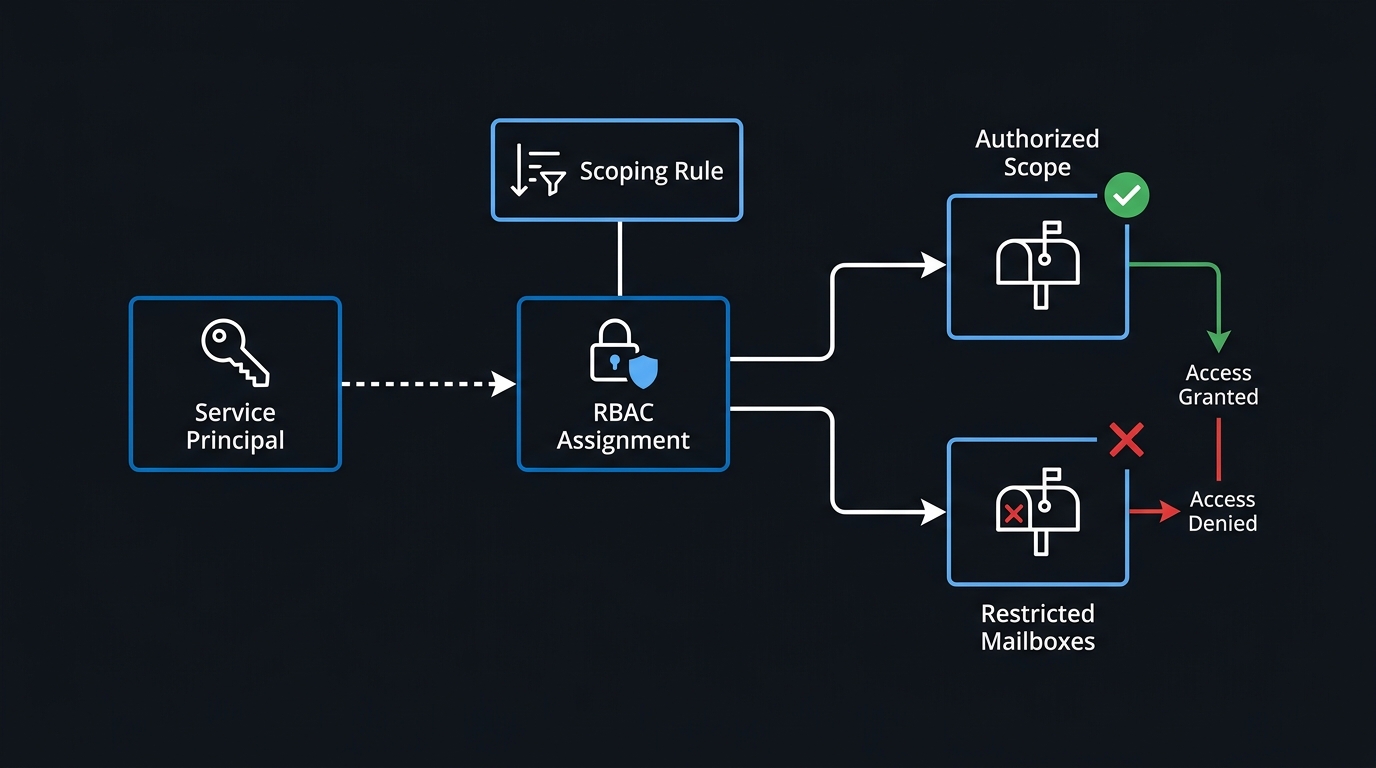
The EWS service-account-plus-impersonation pattern is the single most common architectural dependency in older integrations, and it has no direct replacement. Microsoft's authentication migration guidance is unambiguous: "With Microsoft Graph, there are no service accounts… The way to achieve Impersonation in Microsoft Graph is by making use of app-access policy and application permissions."
The upside is real, and it is worth putting in the business case rather than presenting this purely as forced work. Microsoft's assessment of the old model: "EWS has all or nothing access model and there is no granular scoping." Graph replaces that with per-feature application permissions, so a signature-management application can be granted mail read access to one scoped set of mailboxes instead of effective access to everything.
Now the currency point that most migration guides published before this year get wrong. New-ApplicationAccessPolicy still works, and it is still what half the internet will tell you to run. Microsoft's guidance says otherwise. Its documentation page is now titled Application Access Policies (legacy) and opens with this: "App Access Policies has been replaced by Role Based Access Control for Applications… New access configuration should not use Application Access Policies since this feature will have deprecation announced in the future which will require migration." Building your 2026 migration on App Access Policies means scheduling a second migration for yourself.
The recommended path is RBAC for Applications, which uses a different and more granular set of cmdlets:
# Register the app's service principal in Exchange Online
New-ServicePrincipal -AppId <app-guid> -ObjectId <entra-object-guid>

# Define the mailbox scope the app is allowed to touch
New-ManagementScope -Name "Signature Service Scope" `
  -RecipientRestrictionFilter "Department -eq 'Sales'"

# Grant a single scoped role, not tenant-wide access
New-ManagementRoleAssignment -Role "Application Mail.Read" `
  -App <app-guid> -CustomResourceScope "Signature Service Scope"

# Prove it before the app tries it
Test-ServicePrincipalAuthorization -Identity <app-guid>
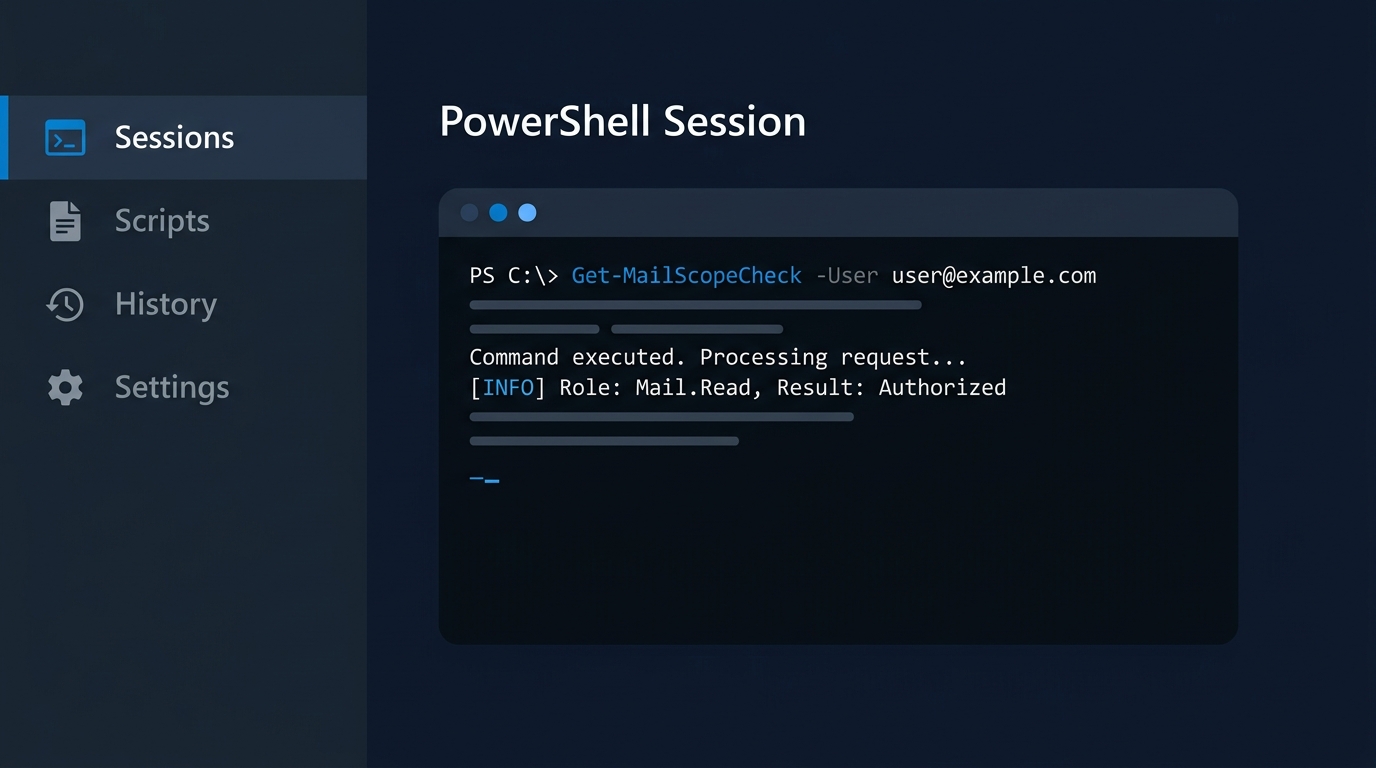
Test-ServicePrincipalAuthorization is the step teams skip and then regret. It tells you what the service principal is actually authorised to do, in advance, rather than letting a production job discover it at three in the morning. If you are also cleaning up how these applications obtain credentials in the first place, this is a natural moment to move CI-driven jobs onto workload identity federation rather than porting client secrets across to the new model.
Skype for Business Server Hybrid: The Genuinely Different Deadline
If you still run a Skype for Business Server hybrid deployment, the general timeline above applies to you as well — but Microsoft's Skype for Business hybrid EWS retirement page turned the end-of-August opt-out from a good idea into a named, hard requirement, and added a second deadline nobody else has. A hybrid deployment that missed the first faces a service break for an on-premises platform, not just an application outage.
Microsoft states two deadlines for these deployments:
- End of August 2026 (passed; if you missed it, do it now) — configure
EwsEnabled = $trueand add two App IDs to the allowlist: your Skype for Business Server App ID, and the Skype desktop client App ID. The second one is the trap, because it is not something you will find by reading your own usage report and reasoning about your own servers. It is a well-known Microsoft first-party ID,d3590ed6-52b3-4102-aeff-aad2292ab01c, and it has to be there too. Find your server's App ID by runningGet-CsOAuthConfiguration | Format-List ServiceNamein the Skype for Business Server Management Shell — theServiceNamevalue is the App ID you need. - Before 1 April 2027 — install the forthcoming Skype for Business Server update that replaces its EWS calls to Exchange Online with Microsoft Graph calls. Configuration alone does not carry you past April; only the update does. Watch the Microsoft 365 Message center for the release announcement.
Note the scope limit before you escalate this internally: it affects hybrid deployments only — Skype for Business Server on-premises with mailboxes in Exchange Online. A pure on-premises deployment, with Exchange Server on-premises too, is not affected, because EWS retirement is an Exchange Online change. That population is small and shrinking, which is exactly why its deadline generalised so badly in secondhand coverage. Confirm which category you are in before you set your project dates, and put the answer in writing where your change advisory board can see it.
From 1 October to 1 April 2027
The opt-out window has closed and the default switch has started. What is left is the bridge: roughly six months in which allowlisted callers keep working while their owners finish the move to Graph. A sequence for that window:
- Confirm where your tenant landed. Run
Get-OrganizationConfig | Format-List EwsEnabledand the-RetrieveEwsOperationAccessPolicyquery from the allowlist section.$falsemeans EWS is off for every caller;$truemeans only the listed App IDs work. If you did not build the list yourself, its entries are Microsoft's telemetry-based guess. - Pull a fresh 90-day EWS usage export, with an
Ews.App.Usagerun alongside it if you can. Remember the ten-day lag: a caller whose Last Activity stops just after 1 October was probably cut off, not retired. - Resolve every App ID to a named owner with the snippet above.
UNRESOLVEDrows are findings, not blockers. - Sort each caller into the four buckets: bridge, decommission, vendor escalation, re-architect. Anything that depends on a confirmed or default-permanent gap goes to your change advisory board now; a redesign needs months of notice.
- Fix the allowlist deliberately. Add bridged callers using the read-modify-write pattern and remove anything you decommissioned. If EWS was switched off for your tenant and bridged callers need it back, set
EwsEnabled = $truewith a populated list, and plan for the service interruption Microsoft warns about. - Rebuild authentication on RBAC for Applications, not App Access Policies, and verify each app with
Test-ServicePrincipalAuthorization. - Remove App IDs from the allowlist as each migration lands. A shrinking list is the only honest progress metric this project has.
- Re-check the roadmap table for every bridged caller. The Q3 CY2026 targets are now past, and the Q4 ones run to the end of December. Book a checkpoint for January 2027 to re-test anything parked on a preview API or a roadmap target, with enough runway to react before April.
- Skype for Business Server hybrid: install the Skype for Business Server update that replaces its EWS calls with Microsoft Graph calls before 1 April 2027, and watch the Microsoft 365 Message center for its release.
On 1 April 2027 there is no configuration left to change: no allowlist entry, no $true, no admin override. Every caller still on your list that morning stops. The distance between that outcome and an uneventful April is the ownership work above, done while there is still calendar left to do it in.

Leave a Reply