
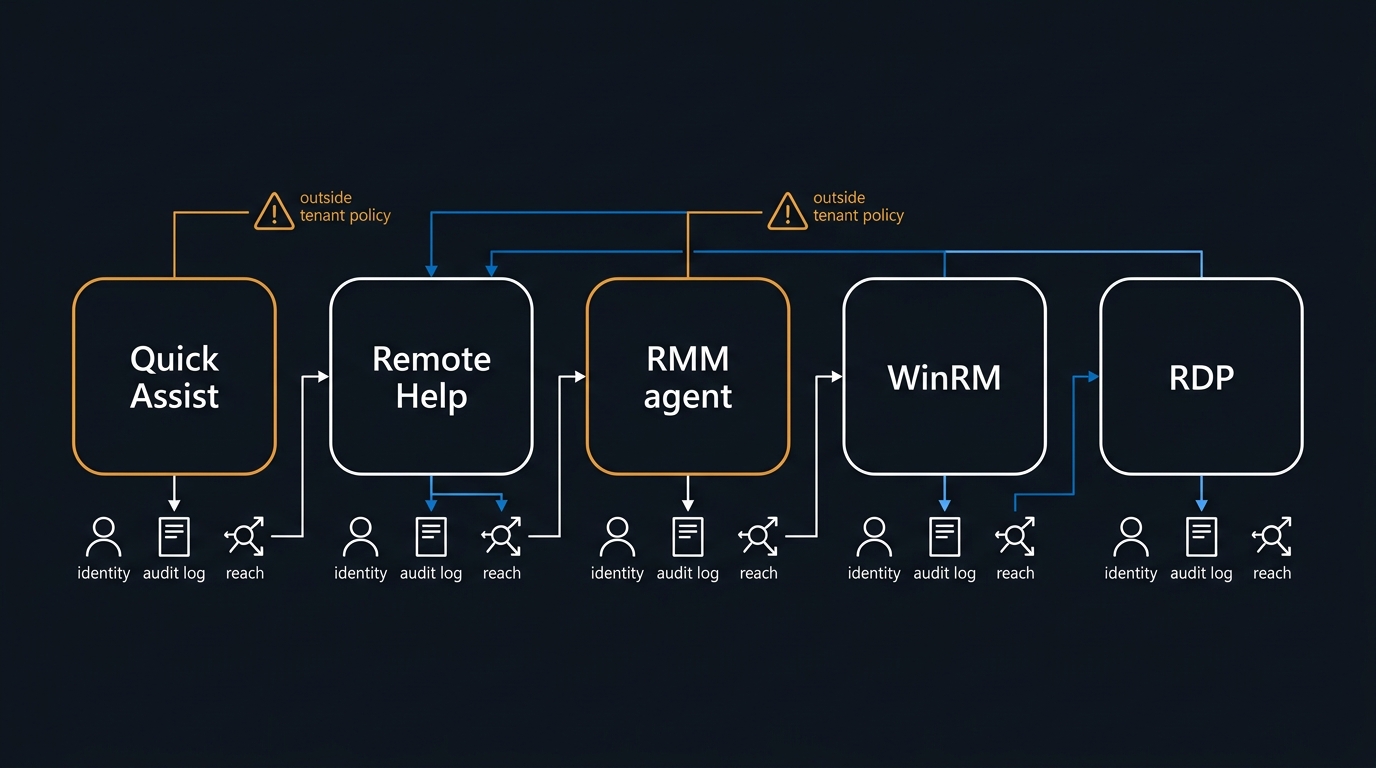
Every helpdesk ticket that ends in "let me take control of your screen" is a privileged access grant, whether or not your access reviews ever see it. Quick Assist, Intune Remote Help, a third-party RMM agent, a WinRM session, an RDP connection — five tools, five identity models, and in most tenants, zero shared governance across any of them. Intune Remote Help governance has to cover all five, because that gap is what Microsoft's September 2026 helpdesk-impersonation findings exploited, and our Teams helpdesk impersonation analysis covers the attack chain itself.
No vulnerability was involved: Quick Assist and WinRM worked as designed. The only exploit was the absence of a policy saying who can start a remote session, with what identity, and under whose eye. What follows closes that gap: an inventory of every tool that can put someone else's hands on your keyboard, a decision flow for what you actually allow, and the Intune, WinRM, and Autopatch controls that turn "we should lock that down" into an enforced policy.
The Remote Session Is a Privileged Access Path You Haven't Inventoried
Treat every remote-administration tool as an access surface with its own authentication model, audit posture, and blast radius. Most security teams have never listed them side by side:
| Tool | Who can initiate | Identity used | Audit trail | Blast radius |
|---|---|---|---|---|
| Quick Assist | Anyone with an MSA or Entra sign-in — no tenant policy required | MSA/Entra ID for the helper; sharer doesn't authenticate | Start/end time only, 3 days on Microsoft's servers; no logs on either device | Full interactive control at the sharer's permission level, no tenant-side record |
| Remote Help — attended | Anyone with a Remote Help RBAC permission scoped to the target | Entra ID, same tenant | 30 days on Microsoft's servers, plus both devices' Event Log | Bounded by RBAC scope and by the sharer accepting |
| Remote Help — unattended | Helper holding Windows unattended control remote sign-in, scoped to a device group | Entra ID, helper's own credentials at sign-in | Same as attended, but no one present to notice it start | Full control of a corporate device, unwatched — scope group is the only brake |
| Third-party RMM agent | Whoever holds the RMM console/tenant credentials, often outside Entra entirely | Vendor's own account model — frequently unfederated | Whatever the vendor logs; rarely in Entra/Intune sign-in logs | Persistent, always-on control of every enrolled endpoint |
| WinRM / PowerShell Remoting | Local Administrators, or a user granted a JEA endpoint | Kerberos/NTLM Windows identity | Microsoft-Windows-WinRM/Operational, plus 4688 with wsmprovhost.exe as parent |
Remote code execution as the connecting identity — the lateral-movement rail the September campaign rode |
| RDP | Remote Desktop Users/Administrators with network reachability | Windows/Entra identity | Security log logons plus Terminal Services channels | Full desktop control; a frequent credential-stuffing target when exposed |
Two rows should worry you immediately: Quick Assist needs no tenant policy to function, and RMM agents routinely sit outside every identity control you've built into Entra ID.
Intune Remote Help Governance Decides What You Allow
Decide the policy before configuring anything. Managed status gates everything; attended-versus-unattended gates the identity requirement; a privileged target gates whether WinRM/JEA replaces a GUI tool entirely.
Everything that survives this flow lands on Remote Help or a WinRM/JEA endpoint. Quick Assist and unmanaged RMM have no branch leading to "allowed" — deliberately. A legitimate exception gets its own explicit scope, not tolerated default behavior.
Quick Assist: Block It, Replace It, or Both
Quick Assist's own documentation makes the enterprise case against it: no Conditional Access, RBAC, session logging, tenant isolation guarantee, or Defender for Endpoint integration. Microsoft's guidance is direct: "If your organization uses Quick Assist within a single Microsoft Entra tenant, consider switching to Intune Remote Help for enhanced security and enterprise-grade controls."
Three documented options, most surgical first:
AppLocker packaged app rule, targeting the app's package identity via the packaged-app deny rule, deployable through Intune's AppLocker CSP or GPO. Quick Assist's own uninstall command confirms the package identity to target:
# Package identity for an AppLocker deny rule, or for manual removal
Get-AppxPackage -Name MicrosoftCorporationII.QuickAssist | Remove-AppxPackage -AllUsers
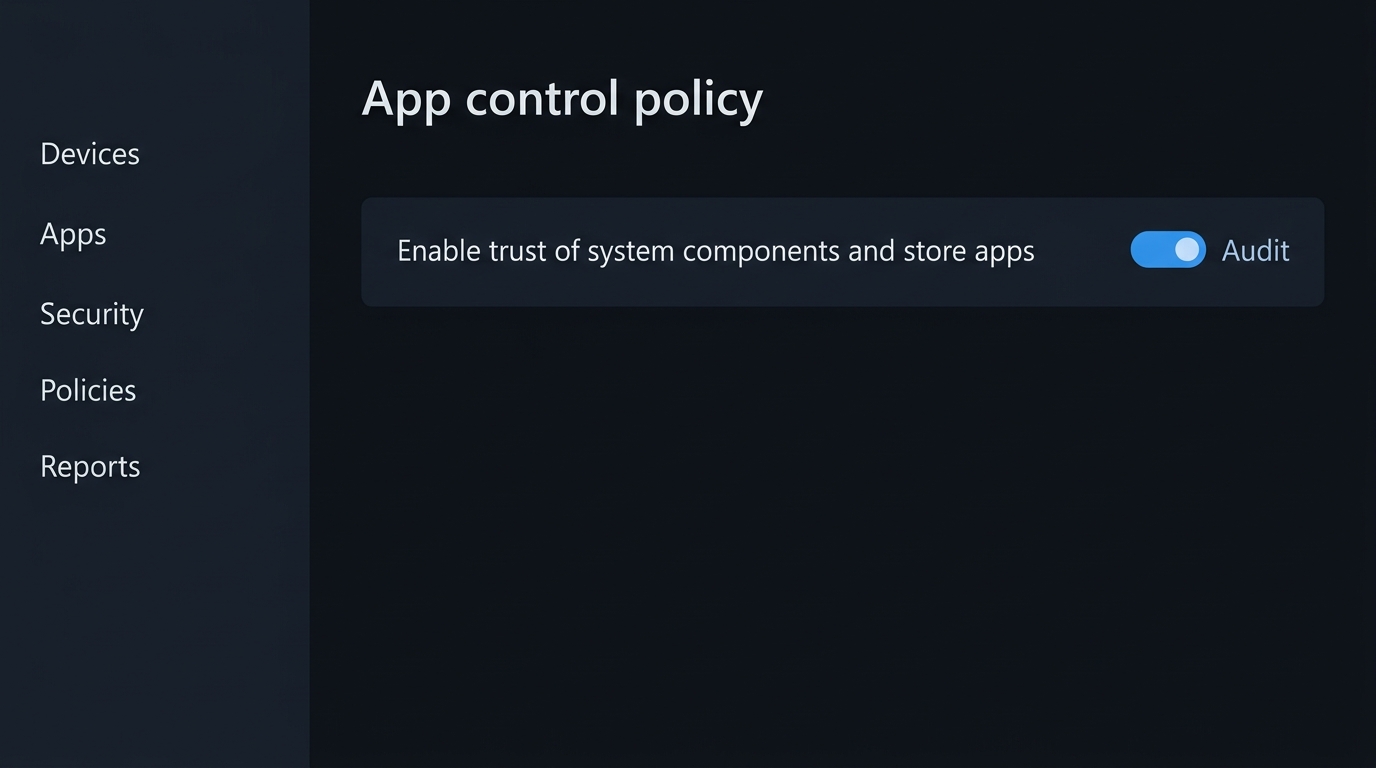
App Control for Business (WDAC): Intune's App Control for Business policy toggles "Enable trust of Windows components and store apps." Keep it enabled with a supplemental deny rule scoped to Quick Assist's package family name if other Store apps still need to run; disable it outright only if blocking Store apps broadly is acceptable.
Endpoint block: block outbound traffic to remoteassistance.support.services.microsoft.com. This is the pitfall every rollout hits — Microsoft's own page warns "blocking the endpoint will disrupt the functionality of Remote Help, as it relies on this endpoint for operation." Don't reach for this once Remote Help is your replacement; it takes out both at once.
None of these replace user education. Quick Assist's abuse pattern depends on a user reading a code to someone who called them first — the control that stops that initial access is "your helpdesk never cold-calls you," trained, not just policed.
Remote Help's Unattended Mode Needs Its Own Guardrails
Microsoft shipped unattended Remote Help for physical Windows devices in the August 2026 service release: "Microsoft Intune now supports unattended Remote Help sessions on physical Windows devices. Authorized helpdesk agents can sign in to a remote device with their own credentials without requiring the user to be present or take action," per the Intune What's New page. It needs a Remote Help license for every helper and sharer — standalone, via Intune Suite, or bundled with Microsoft 365 E3/E5 — layered on Intune Plan 1 or Plan 2.
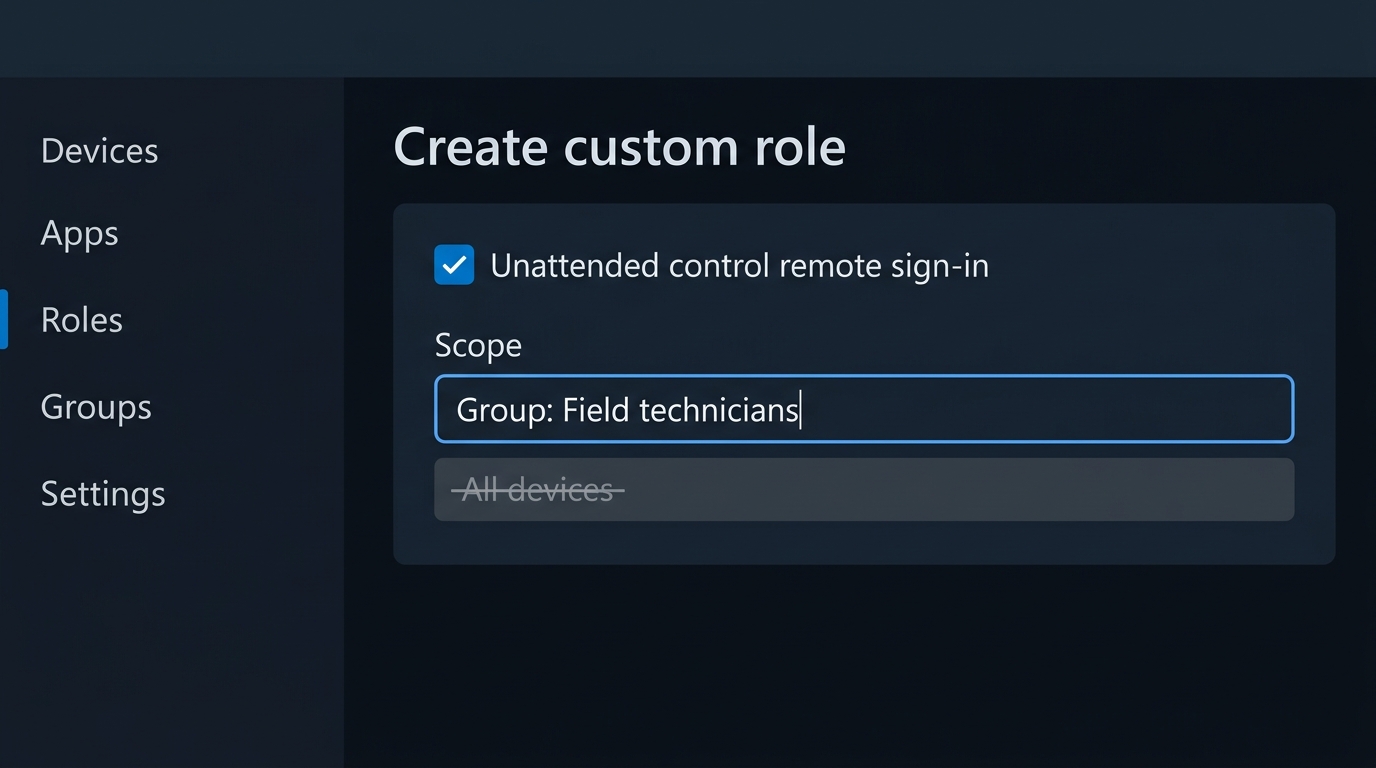
Good Intune Remote Help governance is mostly RBAC discipline applied before the feature ever gets turned on, not after. Read the RBAC model carefully before enabling anything. Unattended access is its own permission, Remote Help app – Windows unattended control remote sign-in, which Microsoft's planning guide says to "assign explicitly and scope it to the specific devices that can receive unattended support." The built-in Help Desk Operator role does not include it — that role carries view-screen, full-control, elevation, and Android unattended control, but Windows unattended sign-in requires a custom role. That's deliberate: the default helpdesk role can't start an unattended session until you decide it should.
Build the custom role narrowly:
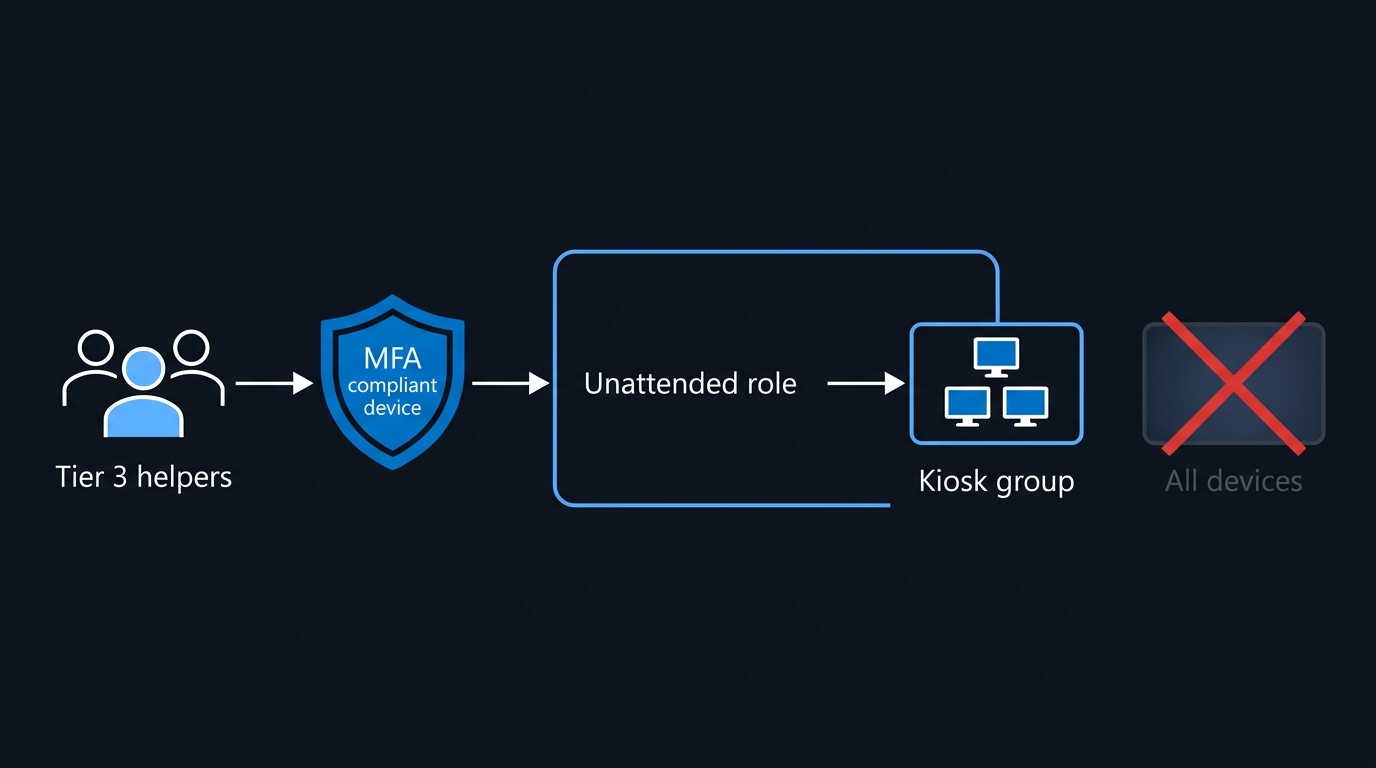
- Scope it only to the device group that genuinely needs unattended coverage — kiosks, labs, after-hours servers — never "All Devices."
- Assign it only to Tier 3 helpdesk or senior admins, per Microsoft's recommendation.
- Require MFA and a compliant device on the helper account via Conditional Access. Microsoft states Entra Conditional Access policies for Remote Help are supported only on Windows and macOS — Android sessions, unattended included, aren't CA-gated at all, so RBAC scope is the only control there.
- Confirm targets are physical, Intune-managed, Entra joined or hybrid joined, x64, running the Intune Management Extension and the Azure Virtual Desktop agent plus bootloader, with Remote Desktop enabled and the device powered on. Virtual desktops, BYOD, and unenrolled devices fall back to attended sessions only.
Pair this with your device compliance baseline so a non-compliant device can't be the unattended target of an unwatched session, and route helper accounts through just-in-time PIM activation rather than standing assignment.
Hardening the WinRM Listener You Forgot You Had
WinRM is on by default from Windows Server 2012 R2 onward, and it's what the September campaign used to move from one compromised endpoint toward a domain controller. Microsoft's guidance lays out levers most tenants have never pulled:
Require HTTPS. WinRM listens on 5985 (HTTP) and 5986 (HTTPS) by default. Microsoft notes that ongoing traffic is always encrypted post-authentication, but HTTP-only authentication still relies on Kerberos or NTLM alone to establish server trust — HTTPS adds the certificate-backed check HTTP can't provide.
Treat TrustedHosts as a workaround, not a control. Per Microsoft: "Adding a server name to the TrustedHosts list shouldn't be considered as any form of statement of the trustworthiness of the hosts themselves… you should consider the TrustedHosts setting to be the list of hosts for which you wish to suppress" the error generated by being unable to verify the server's identity. An empty TrustedHosts list everywhere, with Kerberos or HTTPS doing the real authenticating, is the defensible default — never *.
Scope the firewall to admin subnets. WinRM's default firewall rule accepts all connections on private networks. Replace it:
# Remove the permissive default; scope WinRM to the admin subnet only
Remove-NetFirewallRule -Name "WINRM-HTTP-In-TCP"
New-NetFirewallRule -DisplayName "WinRM-HTTPS-Admin-Subnet-Only" `
    -Direction Inbound -Protocol TCP -LocalPort 5986 `
    -RemoteAddress 10.10.20.0/24 -Action Allow
Put JEA in front of anything routine. Just Enough Administration constrains a WinRM endpoint to a specific, auditable command set instead of a full admin shell:
@{
    GUID           = 'b1e6f3a2-...'
    VisibleCmdlets = @(
        @{ Name = 'Restart-Service'; Parameters = @{ Name = 'Name'; ValidateSet = 'Spooler','wuauserv' } }
    )
}
Every JEA session transcribes itself automatically — the audit trail raw WinRM logs make you reconstruct by hand is generated as a side effect.
RMM Agents Are Shadow Admin Until You Allow-List Them
A third-party RMM agent is a standing, always-on remote-control channel most identity governance never touches, because it authenticates against the vendor's platform, not Entra ID. Treat it like any other privileged service account: allow-list the signed binaries through the same App Control for Business policy used for Quick Assist, verify the code-signing certificate before every version bump, and put the RMM console itself behind SSO and Conditional Access rather than a local username and password. If nobody can name which RMM binaries are allow-listed and which certificate signs them, that's an unmanaged admin channel running on every endpoint it touches.
Watching the Sessions You Just Allowed
Governance without detection is a policy document. Three places to look:
Remote Help session logs: start/end time, who helped whom, on what device — 30 days on Microsoft's servers, mirrored to both devices' Event Log. Pair with Endpoint Analytics; a helper account running unattended sessions outside its assigned scope is worth alerting on, not just reviewing after the fact.
WinRM and process-creation events on the target: Microsoft-Windows-WinRM/Operational records session creation and the authenticating account; Security event 4688 captures the resulting process, with wsmprovhost.exe as parent when it arrived over WinRM — the single most useful pivot for separating legitimate remote administration from lateral movement on the same protocol.
Workstation-to-workstation WinRM traffic: the September campaign's lateral-movement pattern is exactly what a Sentinel analytics rule should watch for:
DeviceNetworkEvents
| where RemotePort in (5985, 5986)
| where InitiatingProcessAccountName !in (KnownAdminAccounts)
| where DeviceName !in (KnownJumpHostsAndBastions)
| where RemoteIPType == "Private"
| summarize Connections = count() by DeviceName, RemoteIP, InitiatingProcessAccountName, bin(Timestamp, 1h)
Tune KnownJumpHostsAndBastions to your real PAW/bastion inventory — the firewall scoping above should keep that list short enough to maintain by hand.
Autopatch's Approval Controls Are the Template to Copy
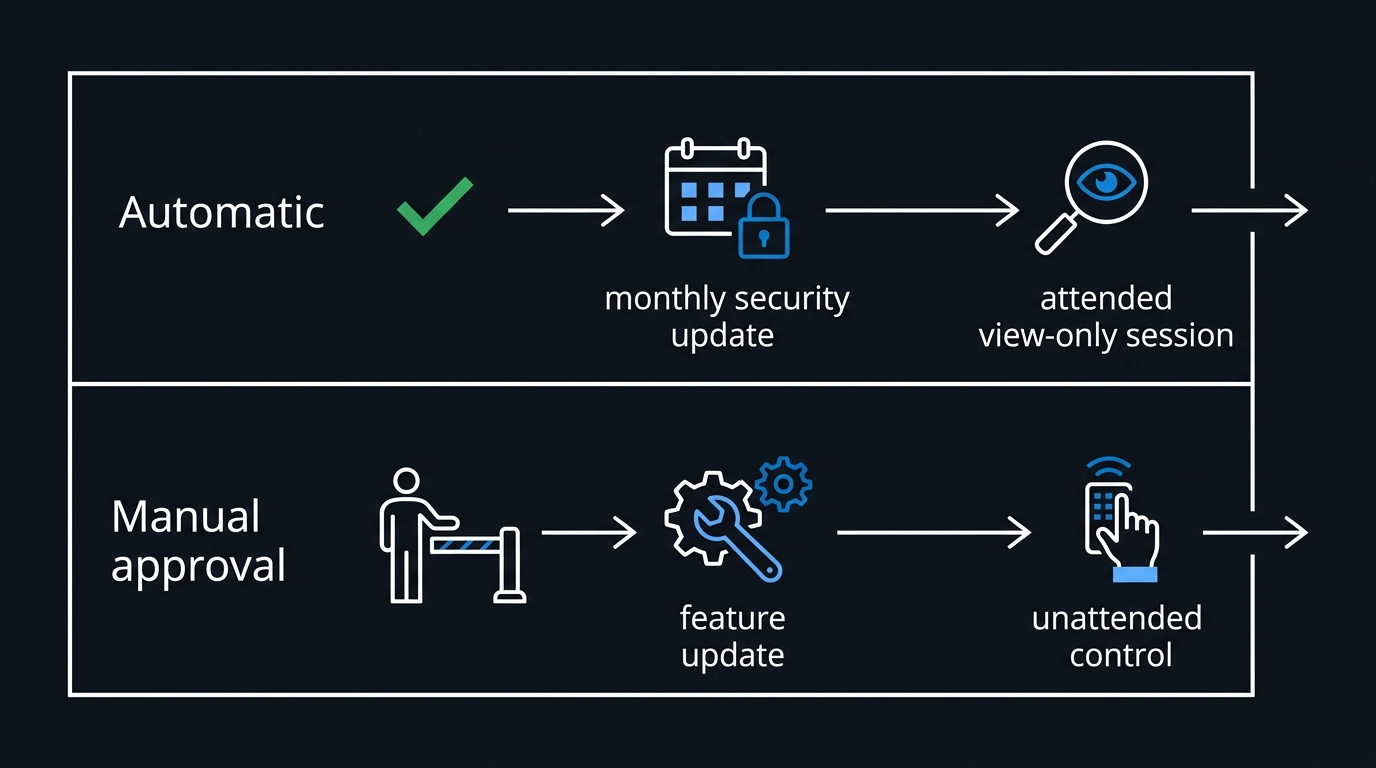
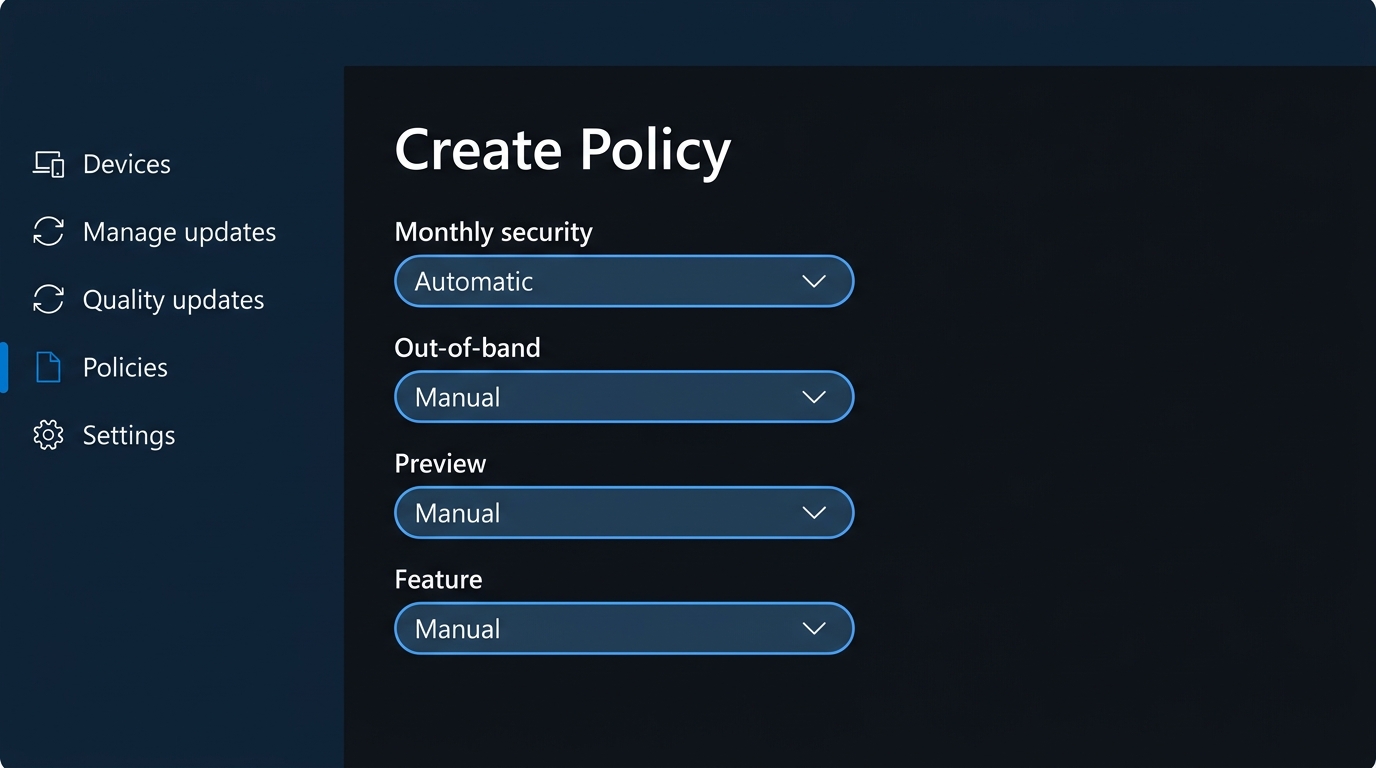
Windows Autopatch expanded its approval model on the same schedule as this governance push, and it's a pattern worth borrowing directly. As of the September 1, 2026 update to quality update policies, approval is configurable independently across four categories — monthly security, monthly non-security preview, out-of-band security, and out-of-band non-security — each defaulting differently: "the default approval configuration of monthly security updates is automatic. The default approval configuration of other updates is manual."
That's the shape your remote-administration policy should take too: automatic for the low-risk, high-frequency case (attended, view-only Remote Help), manual or stricter for the high-risk, low-frequency case (unattended sessions, WinRM to a domain controller). Capability expanding — Autopatch gained approval knobs, Remote Help gained unattended mode — should ship with governance expanding at the same rate, scoped by the RBAC on the manage-quality-updates roles page: a Policy and Profile Manager role to configure approvals, separate from Help Desk Operator or Read Only Operator for anyone who only needs visibility.
Where the Governance Model Breaks
The failure modes repeat across every tenant that builds this policy:
Blocking Quick Assist breaks the helpdesk workflow you didn't map. If frontline support has leaned on it for years because Remote Help was never deployed, an AppLocker deny rule shipped without a replacement floods you with tickets on day one. Pilot Remote Help to completion before blocking the fallback it replaces.
Unattended access without Conditional Access is a standing door, not a session. No CA on the helper account means one compromised helpdesk credential grants silent, no-consent access across that role's whole scope — exactly the access shape the September campaign tried to manufacture manually. CA on the helper, every time.
JEA gets scoped in the design doc and never implemented. It's the control most often deferred as "we'll wrap the endpoint in JEA later"; later rarely arrives before the next audit or incident. If a role capability file feels like overkill for one admin task, that narrowness is usually the sign it's the right JEA candidate.
RMM agents quietly become shadow admin. A platform onboarded by a former IT lead, still on a shared local account, full control on every endpoint, reviewed by nobody — the single most common finding once a tenant finally audits its remote-administration surface.
Build the inventory table at the top of this article for your own tenant before touching a single policy. The decision flow, the RBAC scoping, the WinRM hardening, and the detection queries only work once you know which of these tools someone in your organization is already running, unmanaged, right now.

Leave a Reply