
Your phishing filter has a rule that flags "wire transfer" and "invoice payment" with high confidence. It has worked for years. Then a message lands in a user's inbox with both phrases sitting right there, plainly readable, and your rule never fires. Nothing in the mail flow log explains why — the words are visibly present, the sender is unremarkable, and the message clears every keyword and regex check you have. This is ASCII smuggling phishing, and it has already beaten you once.
The reason is a handful of characters your filter never rendered and never counted. Microsoft's security research team disclosed in September 2026 that a high-volume phishing operation had spent months inserting invisible Unicode characters inside financial lure words — "funding" becomes two visible fragments and one invisible one — specifically to break the literal string match a content filter runs before a human ever sees the message. The technique borrows its name from AI security research: ASCII smuggling, now repurposed as phishing filter evasion rather than prompt injection.
What makes this worth an afternoon of your time isn't the specific campaign. It's the structural gap it exposes: almost every keyword, regex, and signature-based filter in production today matches against raw bytes before anyone normalizes the text. That ordering is backwards, and it isn't unique to email — the same invisible characters that split "funding" past your transport rule also carry hidden instructions past an AI assistant, and the fix is identical in both places.
ASCII Smuggling Phishing: The Word Your Filter Never Saw
A phishing message doesn't need to hide "funding" from a person. It needs to hide it from the string comparison a filter runs before delivery. Unicode gives an attacker exactly that tool: code points designed to be invisible in rendering while still occupying real bytes in the text stream.
The block Microsoft identified as most abused is the Unicode Tags block, U+E0000 to U+E007F — 97 code points originally defined to mirror ASCII for language-tagging metadata, now mostly deprecated aside from a narrow legitimate use in regional-flag emoji sequences. Every character in the block carries Unicode's Cf (Format) general category — the same category as the zero-width space (U+200B), the zero-width joiner and non-joiner (U+200D, U+200C), and the soft hyphen (U+00AD). Format characters are meant, by design, to influence processing without being displayed — precisely the property an attacker wants.
Here is the technique at the byte level. Take the word "funding" and insert a single TAG SPACE character, U+E0020, after the third letter:
fun<TAG SPACE U+E0020>ding

UTF-8 bytes:
66 75 6E F3 A0 80 A0 64 69 6E 67
f  u  n  [--- U+E0020 ---]  d  i  n  g
A mail client renders that sequence as "funding" — the tag character has no glyph, so nothing appears between "n" and "d". A filter matching the literal string funding, or a regex assuming keyword characters sit contiguously, sees fun, four unrecognized bytes, then ding. The keyword is gone as far as the matcher is concerned, even though every human recipient reads the word correctly.
A Message's Trip From Wire to Screen
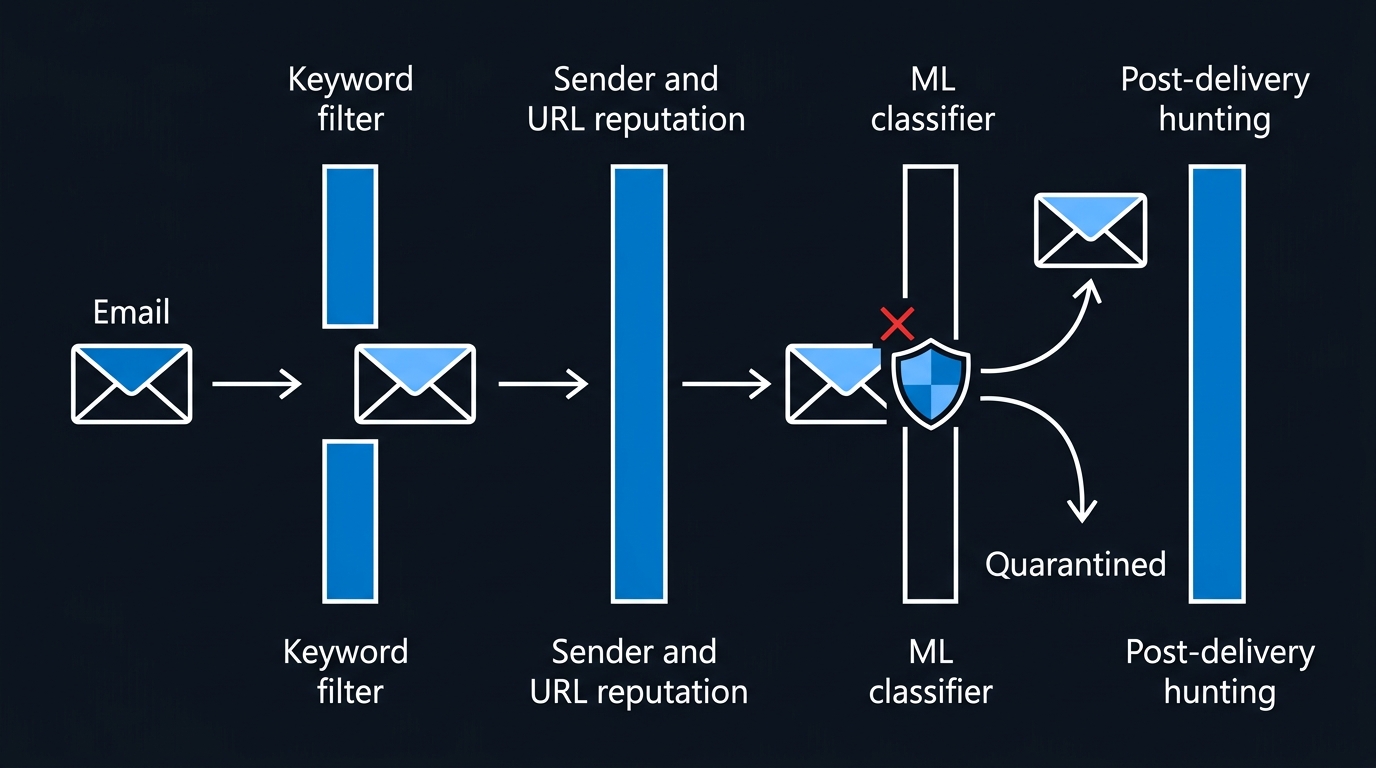
The reason this works is an ordering problem, easiest to see as a sequence. Most content-filtering pipelines inspect the message on the wire, as the byte stream the sending server transmitted, and only the mail client — much later — renders that stream into glyphs.
Every stage after the filter works correctly. The mailbox stores what it received; the renderer follows Unicode's rules exactly as specified. Only the filter behaves differently from what its designer intended, and only because it ran a byte-level comparison against text nobody had normalized first. A filter that collapses Cf characters out of the stream before evaluating keywords would see funding and fire exactly as designed.
How Big This Got, By the Numbers
This wasn't a boutique technique used sparingly against high-value targets. Microsoft's telemetry showed a hunting signature for Unicode Tags block usage in email jump from a low-thousands-per-day baseline — roughly 21,000 hits the day before onset — to more than 1.3 million on February 9, 2026, running in high-volume weekday bursts for about three months and peaking at 2.37 million messages a day around February 26, 2026 before dropping sharply after May 15.
The infrastructure was disposable and financially themed by design: roughly 150 sender domains active on a single day, built from a small, reusable vocabulary of finance-adjacent words — "funding," "capital," "boost," "advance," "loan." The mail was relayed through the legitimate email-marketing platform ActiveCampaign, borrowing its sender reputation and click-tracking infrastructure — a second evasion layer stacked on the Unicode trick, so even a filter that caught the smuggled keyword still had to get past a sender that looked, on paper, like a reputable marketing vendor.
The campaign's own operators inadvertently proved the defense works when applied correctly. Microsoft's telemetry showed that the majority of these messages were still flagged by layered protections rather than by any single Unicode-specific signal — sender and IP reputation, URL and domain analysis, and ML content classifiers don't care whether the keyword string matched. A single evaded control did not mean a single evaded pipeline.
Normalize First, Match Second
The fix doesn't require decoding Unicode Tags specifically. It requires running Unicode normalization and stripping default-ignorable format characters before any keyword, regex, or signature check touches subject lines, bodies, chat content, or anything else filtered on a string basis.
NFKC (Compatibility Decomposition, followed by Canonical Composition) collapses many visually equivalent representations to a single form, but won't remove Cf format characters on its own — a zero-width joiner or Tags-block character has no compatibility decomposition to nothing. Strip them explicitly, by Unicode general category, after normalizing.
In PowerShell, walk the string by code point (keeping surrogate pairs intact for supplementary-plane characters like the Tags block) and drop anything categorized Format or Control:
function ConvertTo-FilterSafeText {
    param(
        [Parameter(Mandatory, ValueFromPipeline)]
        [string]$Text
    )
    process {
        $nfkc = $Text.Normalize([Text.NormalizationForm]::FormKC)
        $sb = [System.Text.StringBuilder]::new()
        $i = 0
        while ($i -lt $nfkc.Length) {
            $isPair = [char]::IsSurrogatePair($nfkc, $i)
            $len = if ($isPair) { 2 } else { 1 }
            $cat = [Globalization.CharUnicodeInfo]::GetUnicodeCategory($nfkc, $i)
            if ($cat -ne [Globalization.UnicodeCategory]::Format -and
                $cat -ne [Globalization.UnicodeCategory]::Control) {
                [void]$sb.Append($nfkc.Substring($i, $len))
            }
            $i += $len
        }
        $sb.ToString()
    }
}

# "fun" + TAG SPACE (U+E0020) + "ding invoice payment"
$smuggled = "fun" + [char]::ConvertFromUtf32(0xE0020) + "ding invoice payment"
ConvertTo-FilterSafeText -Text $smuggled
# Output: funding invoice payment
Python's unicodedata module makes the same operation more compact, since it already iterates by code point rather than UTF-16 code unit:
import unicodedata

def normalize_for_matching(text: str) -> str:
    """NFKC-normalize, then drop Cf (format) and stray Cc (control) code points
    so keyword/regex matching sees the same text a human reader sees."""
    text = unicodedata.normalize("NFKC", text)
    keep = []
    for ch in text:
        category = unicodedata.category(ch)
        if category == "Cf":
            continue
        if category == "Cc" and ch not in ("\n", "\t", "\r"):
            continue
        keep.append(ch)
    return "".join(keep)

smuggled = "fun" + chr(0xE0020) + "ding invoice payment"
print(normalize_for_matching(smuggled))
# funding invoice payment
Both functions were tested against the TAG SPACE example above and reproduce the clean keyword before the check runs. Apply this ahead of any regex, keyword list, or DLP condition inspecting subject or body text — including a prompt handed to an AI assistant.
Hunting the Pattern in Advanced Hunting
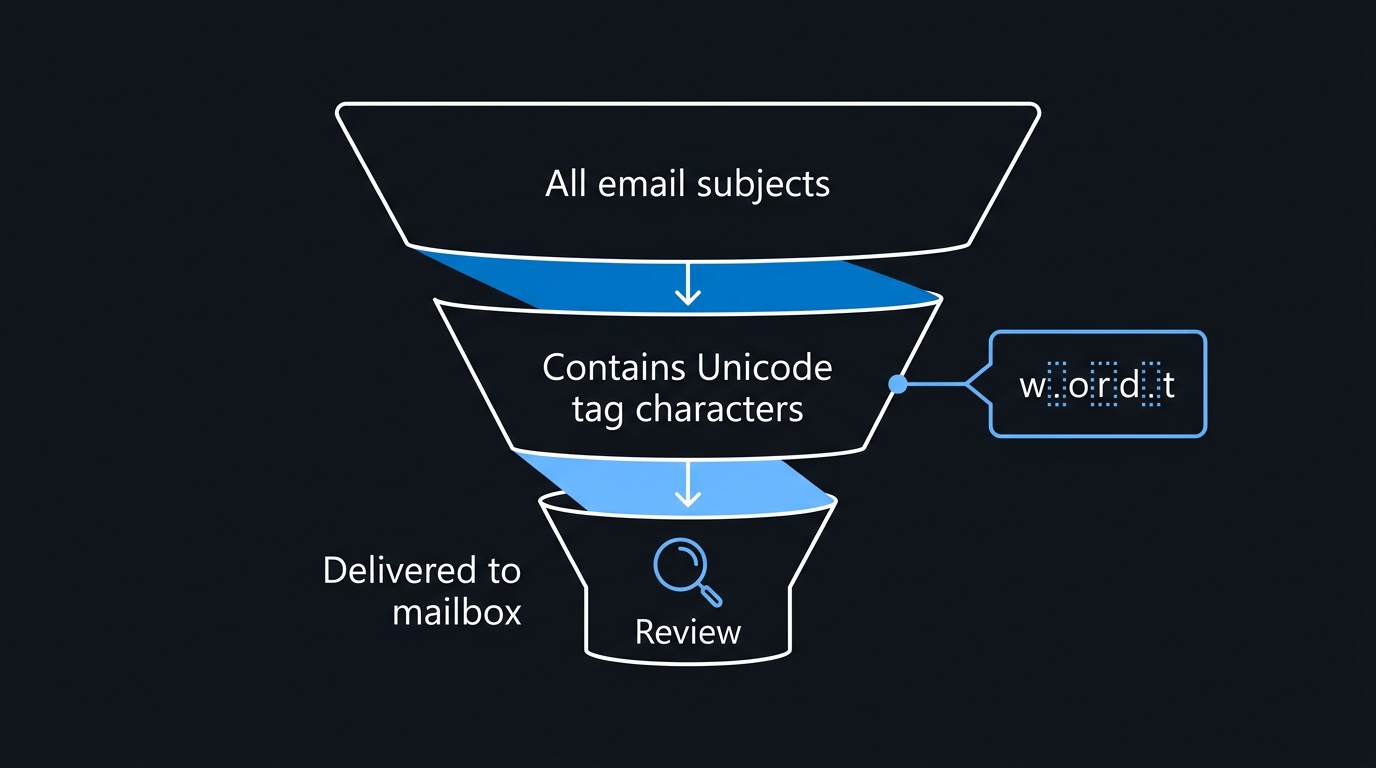
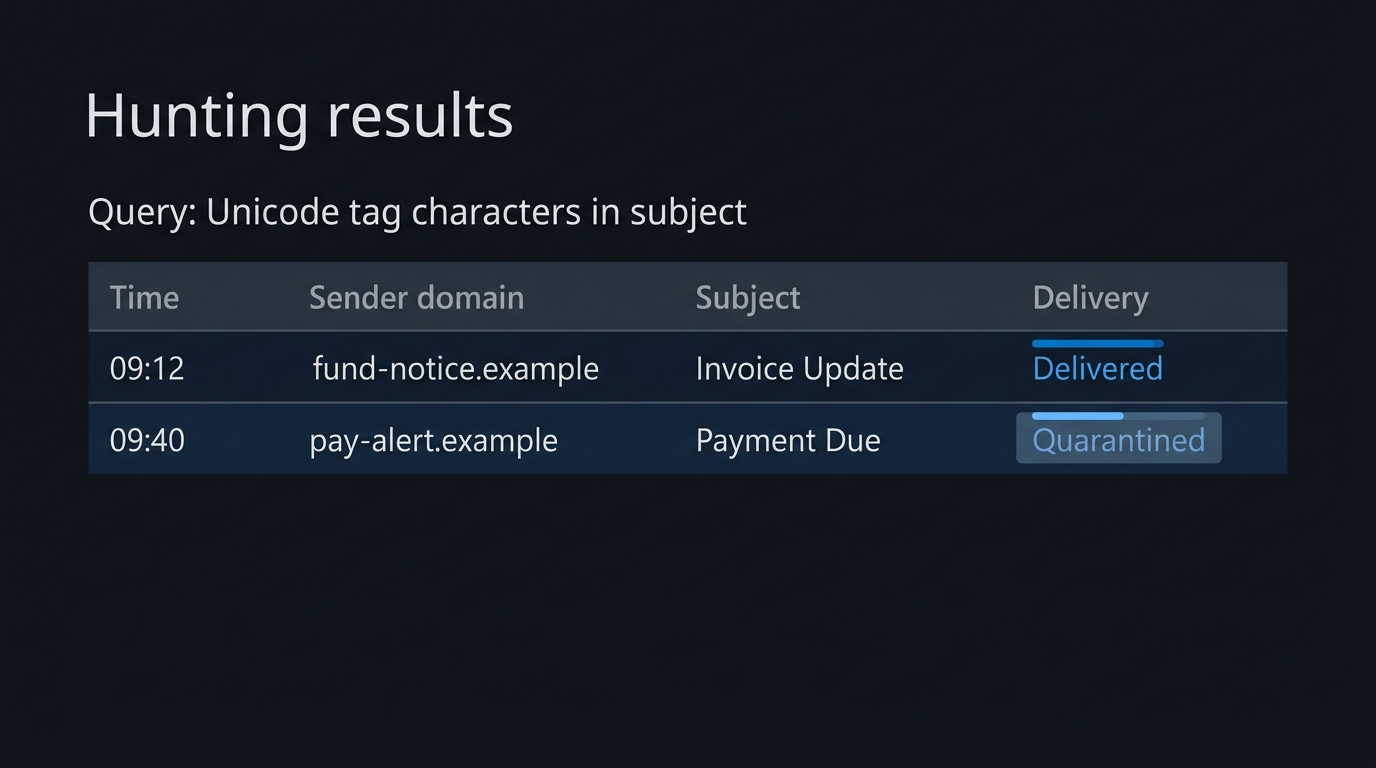
Defender's EmailEvents table in advanced hunting has no ready-made "Cf character count" column, so a direct hunt has to match the pattern in Subject yourself. Kusto stores the string type internally as UTF-8, so a Tags-block character shows up as a single Unicode scalar value, not a UTF-16 surrogate pair — match the code point range directly with KQL's \x{...} hex escape:
EmailEvents
| where Timestamp > ago(14d)
| where Subject matches regex @"[\x{E0000}-\x{E007F}]"
| project Timestamp, SenderFromDomain, Subject, ThreatTypes,
          DetectionMethods, DeliveryAction
| order by Timestamp desc
Add | where DeliveryAction == "Delivered" and summarize by SenderFromDomain to focus on the population most worth reviewing — messages that carried the pattern and still reached a mailbox, since a heavy hitter on other signals was likely already quarantined.
Treat a match as an anomaly signal, not an automatic verdict — Microsoft's guidance flags tag-block characters as suspicious precisely because legitimate use is essentially limited to subdivision-flag emoji sequences, which won't turn up mid-word in a finance-themed subject line.
What Your Mail Flow Rules Never Had a Chance to Catch
Exchange Online Protection and Defender for Office 365 layer detection that doesn't depend on literal keyword matching — sender and domain reputation, authentication checks, URL reputation, ML content classification — which is why Microsoft's telemetry showed the bulk of this campaign still got caught despite the Unicode trick working as designed. If you're unsure which layers your tenant actually has active, EOP vs. Defender for Office 365 is worth revisiting before you treat a keyword-based transport rule as your safety net.
That transport rule is the specific place this bites. A mail flow rule condition built on SubjectOrBodyContainsWords or a custom regex evaluates the raw message content and has no normalization step of its own. Custom keyword-based mail flow rules layered on top of EOP and Defender for Office 365, expected to catch what the platform misses, inherit exactly this gap. Confirming what a rule actually matched, versus what a user reported, is where message trace and mail flow rule diagnostics earn their keep.
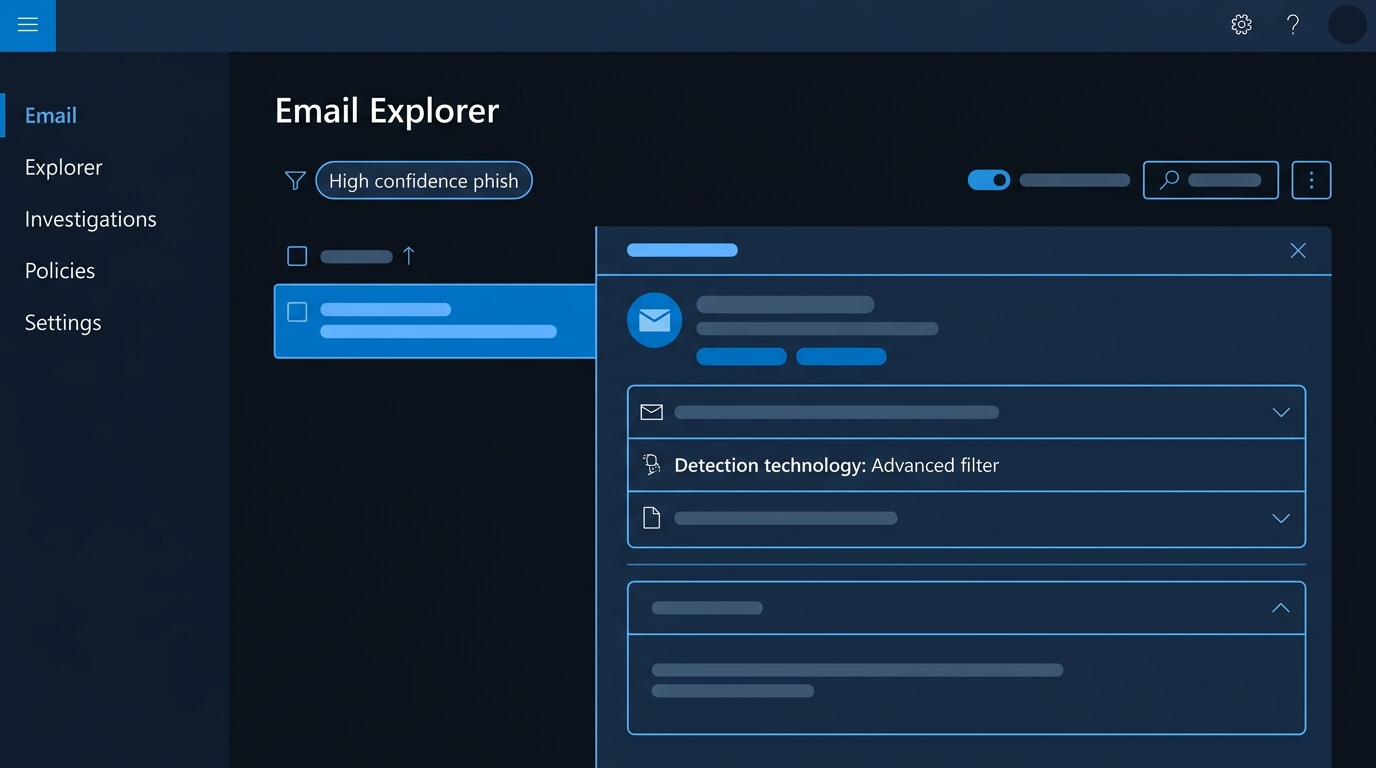
Microsoft has also started closing the adjacent gap against AI assistants. Prompt injection protection in Defender for Office 365 Plan 2 is rolling out to general availability — Microsoft's Message Center update moved the completion date to early October 2026 — and, once active, requires no additional configuration: it explicitly evaluates "encoding and obfuscation" — the documentation names "homoglyphs, unusual Unicode, or fragmented phrasing" — in the same mail-flow inspection that already runs phishing and malware checks. Detections surface under the existing High Confidence Phishing verdict with a new Detection Technology value, Prompt injection protection. That protects the mailbox layer; it doesn't extend to a third-party gateway in front of it, or an in-house script matching Subject text pulled from EmailEvents without normalizing first.
The Same Trick Outside Your Inbox
Email is the channel with the numbers attached, but the mechanism generalizes to anything that separates "what a human sees" from "what software parses."
AI prompt injection. This is where the technique started. Invisible Tags characters can carry an entire instruction string that a language model tokenizes while a person sees nothing where the hidden text sits — OWASP's Gen AI Security Project names hidden, imperceptible content as a recognized prompt injection vector, since a payload needn't be human-readable to reach the model. Researcher Johann Rehberger has documented the technique exfiltrating data through Microsoft Copilot and other assistants using the same Tags-block encoding this campaign repurposed — the guardrail gap our piece on Copilot and data it shouldn't surface covers in more depth.
Chat and collaboration content. Microsoft 365 Copilot draws on Teams chat the same way it draws on email — pulled through Microsoft Graph as grounding content for summaries. A chat message renders identically whether or not it carries invisible Cf characters, so a hidden instruction in a Teams message reaches a Copilot workflow through the same blind spot as a smuggled email lure, minus the sender-reputation and domain-analysis layers that catch so much of the email-borne version.
File and asset names. MITRE ATT&CK tracks this as T1027.018 — Obfuscated Files or Information: Invisible Unicode, covering zero-width spaces, variation selectors, and Private Use Area characters concealed in filenames and source text. The GlassWorm supply-chain campaign, first documented in October 2025 with macOS variants by December, used invisible Private Use Area characters so malicious code wouldn't render in a code editor — the reviewer sees clean code because the payload was never meant to be seen.
Where Normalization Bites Back
Stripping "invisible-looking" characters isn't free, and getting it wrong creates a different incident than the one you were defending against.
Zero-width joiners and non-joiners are load-bearing in real scripts. ZWJ (U+200D) and ZWNJ (U+200C) are Cf-category characters — the same category as the Tags block — but Arabic and several Indic scripts, including Devanagari and Bengali, depend on them for correct letterform selection and word formation. A pass that blanket-strips every Cf character will corrupt legitimate text in those scripts, not just neutralize a payload. Scope the strip to the ranges actually implicated — Tags block, zero-width space, soft hyphen, bidirectional overrides — and leave ZWJ/ZWNJ alone absent evidence of abuse in your own traffic.
A regex against HTML markup is not a regex against text. If your filter runs against the raw HTML body rather than the extracted, rendered text, an attacker doesn't even need invisible Unicode — a <span style="display:none"> block or a font-size-zero run does the same job with plain ASCII, exactly the evasion pattern Microsoft's own prompt-injection documentation calls out. Normalizing Unicode without also converting HTML to rendered text first still leaves that door open.
Subject-line rules assume the subject is where the lure lives. This campaign put obfuscated keywords in subjects and bodies alike; a rule that inspects only the subject misses the body-only variant entirely. Treat subject and body as one inspection surface, not two separately-scoped ones.
Fix the Order, Not Just the Filter
None of this requires ripping out an existing keyword list, mail flow rule, or DLP policy — just one step ahead of all of them: normalize the text, strip the narrow set of Cf and Cc code points with no business appearing mid-word in ordinary correspondence, and only then run the match you already trust. Do that in your own scripts and gateway rules, hunt the Tags-block surrogate pattern in EmailEvents on a schedule, and confirm AI-facing workflows normalize before handing a message to a model. The keyword logic was never wrong — it was comparing against bytes nobody had cleaned up first.

Leave a Reply