
Executive Snapshot
| Question | Answer |
|---|---|
| What problem does this solve? | Repeated large prompt prefixes (system instructions, tool schemas, long documents) get billed at full price on every request unless you explicitly cache them |
| Core mechanism | Prompt caching is a prefix match — identical bytes up to a cache_control breakpoint get reused; anything after the first changed byte is not |
| Cost model | Cache writes cost ~1.25× (5-minute TTL) or 2× (1-hour TTL) input price; cache reads cost ~0.1× input price |
| Break-even | 2 requests for 5-minute TTL; 3 requests for 1-hour TTL, assuming a stable shared prefix |
| Minimum cacheable prefix | Model-dependent — 1024 to 4096 tokens; shorter prefixes silently do not cache (no error) |
| Verification | Check usage.cache_read_input_tokens and usage.cache_creation_input_tokens on every response |
| Biggest risk | Silent invalidators — a timestamp, a non-deterministic JSON serialization, or a varying tool list quietly kill your hit rate with no error message |
TL;DR
- Prompt caching is a prefix match, not a semantic cache — render order is
tools→system→messages, and one changed byte invalidates everything downstream of it. - Cache reads cost about a tenth of normal input pricing, but writes cost more upfront (1.25× for the default 5-minute TTL, 2× for the 1-hour TTL) — the payoff comes from reuse, not the first request.
- You get up to four
cache_controlbreakpoints per request — mark a breakpoint by attachingcache_control: {type: "ephemeral"}to the last content block of each stable prefix (asystemtext block, atoolsentry, or amessagescontent block); everything before it is cached. - Break-even is two requests at the 5-minute TTL and three at the 1-hour TTL — below that, caching costs you money instead of saving it.
- The most common production bug isn't a bad breakpoint — it's a silent invalidator: a
datetime.now()in the system prompt, an unsorted dict serialized to JSON, or a tool list that varies by user, all of which quietly zero out your cache hit rate with no error thrown.
Introduction
If you're building anything with Claude that reuses the same system prompt, tool definitions, or reference document across many requests — an agent loop, a chatbot with a long instruction set, a RAG pipeline with static grounding context — you are almost certainly paying full price for tokens you've already sent once. Prompt caching fixes that by letting Anthropic's API reuse a previously processed prefix of your request instead of reprocessing it from scratch.
Done right, the win is dramatic: cached tokens are billed at roughly one-tenth of standard input pricing (see Anthropic's pricing page for the per-model rates), which is where the "cut token costs by 90%" framing comes from on any workload where most of the prompt is stable and only a small suffix changes per call. Done wrong — a prefix that shifts by even one byte per request — caching quietly costs you more than doing nothing, because you pay the write premium on every request and never collect a read.
This tutorial walks through the mechanics of prefix caching, how to wire up cache_control in the Python SDK, how caching behaves across multi-turn conversations, the exact math behind the break-even point, and the invalidators that silently sabotage a cache that looks correctly configured. By the end you should be able to look at response.usage and know immediately whether your caching setup is actually working.
Prerequisites
- Python 3.9+ and the
anthropicSDK (pip install anthropic) — examples target the standardclient.messages.create()surface - An Anthropic API key exported as
ANTHROPIC_API_KEY(the SDK reads it automatically), or passed explicitly withAnthropic(api_key=...) - Familiarity with basic
messages.create()calls (model,max_tokens,messages) - A workload with a genuinely reusable prefix — a fixed system prompt, static tool definitions, or a long document that many questions get asked against. If your prompt differs from the first token onward, caching has nothing to grab onto and this tutorial won't help
How Prefix Caching Actually Works
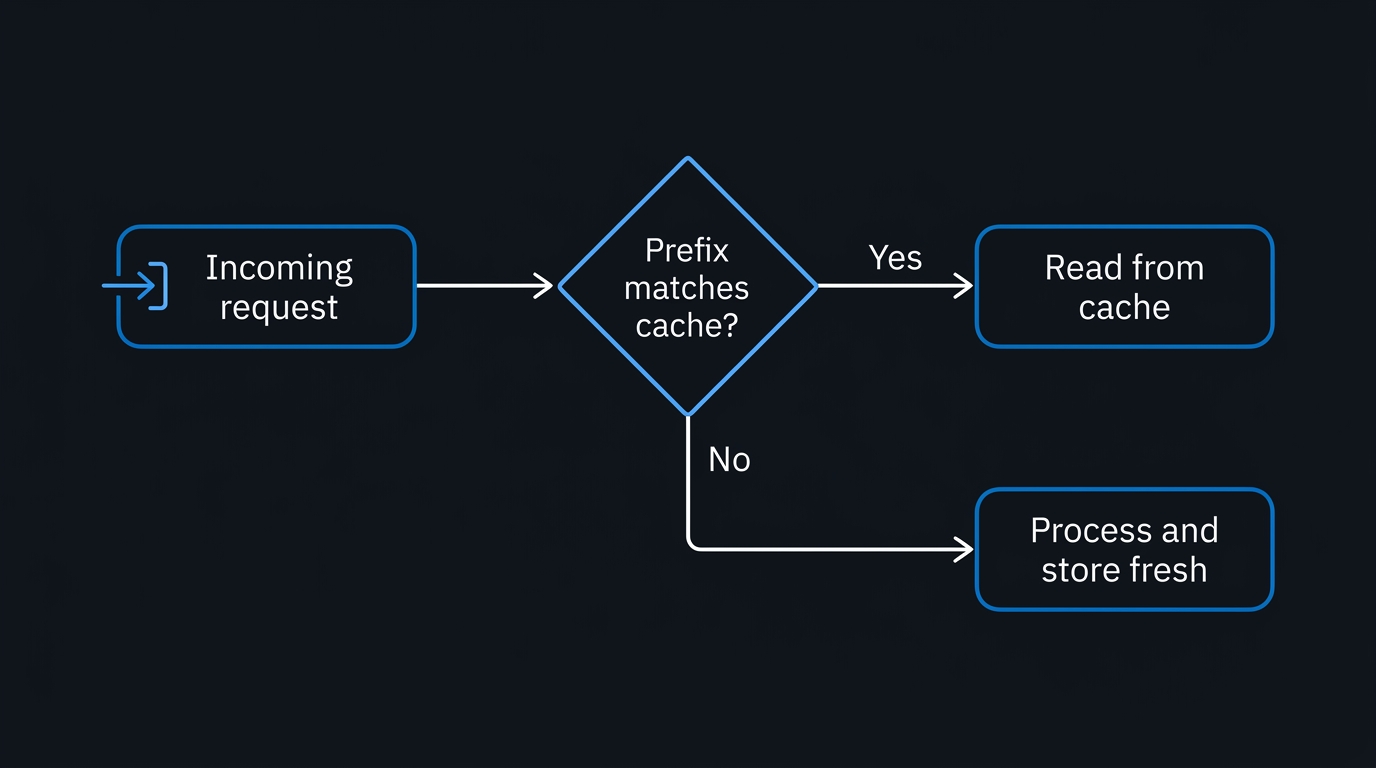
The single fact that explains almost every caching bug: prompt caching is a prefix match. The API computes a cache key from the exact bytes of your rendered request up to each cache_control breakpoint. If two requests share an identical byte sequence up to that point, the second one can read from cache. If they diverge anywhere before the breakpoint — even a single character — the cache for that breakpoint (and everything after it) misses, full stop.
Render order matters because it defines what "before the breakpoint" means: Anthropic assembles the request as tools → system → messages, in that order, every time. A cache_control marker placed on the last block of your system prompt caches the tool definitions and the system prompt together, since both come before it in the render order. A marker placed later, on a message content block, extends the cached prefix to include everything that came before — tools, system, and prior turns.
This has a direct architectural consequence: stable content has to come first, and it has to be byte-identical across requests. If you interpolate a timestamp, a request ID, or a per-user value into your system prompt, you've broken the prefix for every request after that point, no matter how many cache_control blocks you scatter around it.
The flow the API runs on every request looks like this:
This is also why placement matters in agentic loops: with many tool_use/tool_result pairs accumulating per turn, the stable prefix you want to cache is everything up to the last completed exchange. Put your one moving conversation breakpoint at that boundary so each new request reuses the whole settled history, and remember the hard limit is four breakpoints total — you relocate the marker, you don't add one per tool call.
Step-by-Step: Adding cache_control (Python SDK)
The simplest case is a large, static system prompt reused across many calls. Add cache_control to the system content block:
import anthropic

client = anthropic.Anthropic()

LARGE_SYSTEM_PROMPT = """You are a technical support agent for a SaaS billing
platform. You have access to the full product documentation, refund policy,
and escalation procedures below. Follow them exactly...
""" + ("... (imagine several thousand tokens of policy text) " * 200)

def ask_support_agent(user_question: str) -> str:
    response = client.messages.create(
        model="claude-opus-4-8",
        max_tokens=1024,
        system=[
            {
                "type": "text",
                "text": LARGE_SYSTEM_PROMPT,
                "cache_control": {"type": "ephemeral"},  # 5-minute TTL, default
            }
        ],
        messages=[{"role": "user", "content": user_question}],
    )
    return response.content[0].text
For content you expect to reuse across a longer gap — say, a batch job that runs every 20 minutes against the same reference document — use the 1-hour TTL instead:
response = client.messages.create(
    model="claude-opus-4-8",
    max_tokens=1024,
    system=[
        {
            "type": "text",
            "text": LARGE_SYSTEM_PROMPT,
            "cache_control": {"type": "ephemeral", "ttl": "1h"},
        }
    ],
    messages=[{"role": "user", "content": "What's the refund window for annual plans?"}],
)
If your prompt has a shared prefix followed by a varying suffix — for example, a large set of few-shot examples plus a different final question each time — put the breakpoint at the end of the shared portion only, not at the end of the whole message:
response = client.messages.create(
    model="claude-opus-4-8",
    max_tokens=1024,
    messages=[
        {
            "role": "user",
            "content": [
                {
                    "type": "text",
                    "text": SHARED_FEW_SHOT_EXAMPLES,  # large, identical every call
                    "cache_control": {"type": "ephemeral"},
                },
                {
                    "type": "text",
                    "text": user_specific_question,  # no cache_control — varies every time
                },
            ],
        }
    ],
)
Putting the breakpoint at the very end of the message instead would key the cache to the varying question, meaning every request writes a fresh, never-read cache entry — a common and completely silent mistake.
There is no top-level shortcut — cache_control is always attached to a specific content block (a system text block, a tools entry, or a messages content block), never passed as a bare keyword on messages.create(). You're limited to 4 breakpoints per request in total, across system, tools, and messages combined, so plan placement around the boundaries that matter most: typically the end of the tools/system prefix, and the end of each stable conversation prefix. The API caches everything from the start of the request up to and including each marked block.
Multi-Turn Conversation Caching
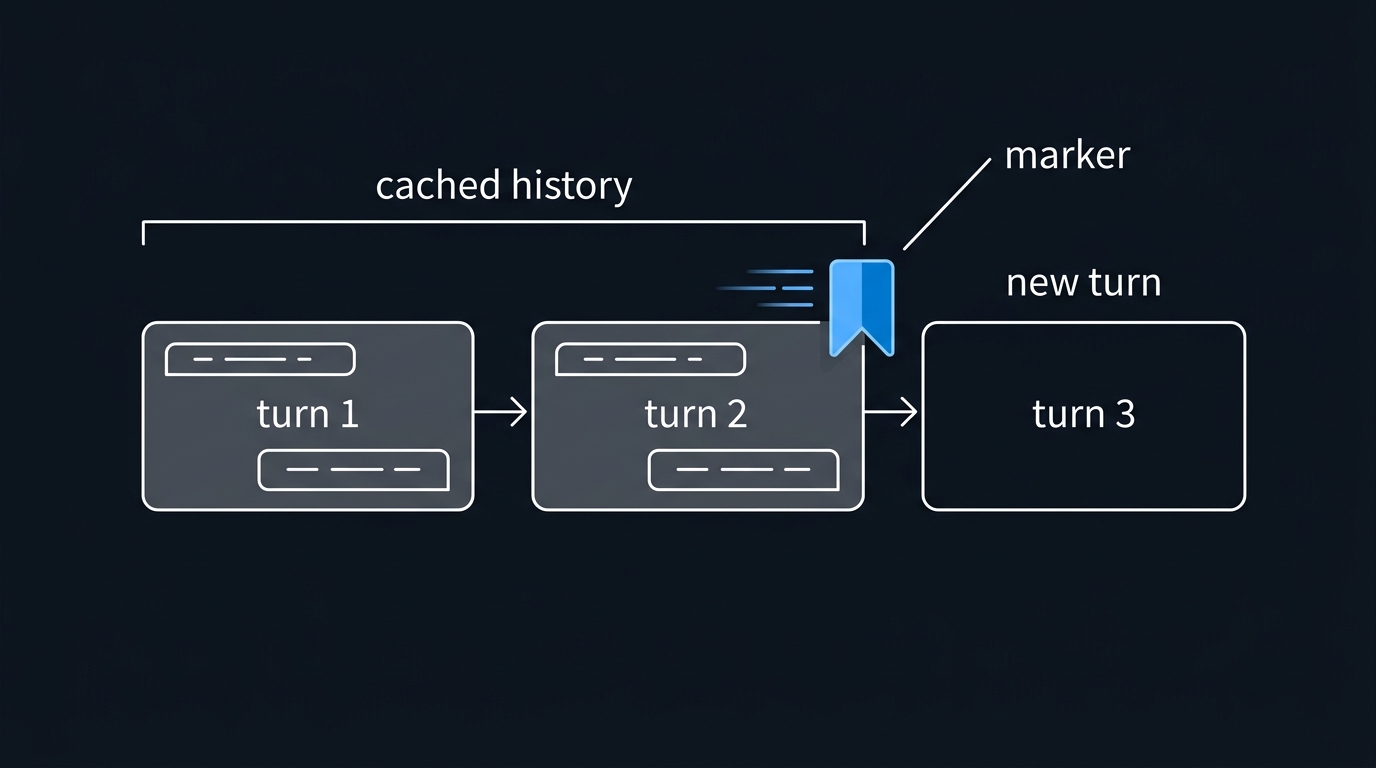
Conversational agents are where caching pays off fastest, because each new turn appends to an already-cached history rather than resending it cold. The pattern is to move the breakpoint to the last content block of the most recently appended turn on every request:
The mechanic that matters: you have only four breakpoints total, and the persistent system breakpoint already claims one. So you don't add a breakpoint each turn — you move the single conversation breakpoint onto the newest turn and strip it from the previous one. That one moving marker still caches the entire history up to it, because caching keys on the whole prefix, not on where past markers used to sit.
messages = [
    {"role": "user", "content": "I need help understanding my invoice."},
]

def _strip_breakpoints(messages: list) -> None:
    # Remove any existing cache_control from message content so we never
    # accumulate past the 4-breakpoint cap as the conversation grows.
    for msg in messages:
        if isinstance(msg["content"], list):
            for block in msg["content"]:
                if isinstance(block, dict):
                    block.pop("cache_control", None)

def send_turn(messages: list, new_user_text: str) -> list:
    _strip_breakpoints(messages)                 # move, don't add
    messages.append({
        "role": "user",
        "content": [
            {
                "type": "text",
                "text": new_user_text,
                "cache_control": {"type": "ephemeral"},  # the one moving breakpoint
            }
        ],
    })

    response = client.messages.create(
        model="claude-opus-4-8",
        max_tokens=1024,
        system=[{"type": "text", "text": LARGE_SYSTEM_PROMPT, "cache_control": {"type": "ephemeral"}}],
        messages=messages,
    )

    # Append the full assistant response, unmodified, before the next turn
    messages.append({"role": "assistant", "content": response.content})
    print(f"cache_read={response.usage.cache_read_input_tokens} "
          f"cache_creation={response.usage.cache_creation_input_tokens}")
    return messages

messages = send_turn(messages, "Why was I charged twice this month?")
messages = send_turn(messages, "Can you check if that's a proration issue?")
On turn one, you'll see cache_creation_input_tokens populated (system prompt written to cache) and cache_read_input_tokens at zero. On turn two onward, the entire prior history — system prompt plus all earlier turns — reads from cache up to the moved breakpoint, and only the newest turn is written fresh. Because the breakpoint relocates rather than accumulates, you stay within the four-breakpoint cap no matter how long the conversation runs (system holds one; the moving conversation marker holds another).
One structural rule that trips people up in agent harnesses: don't edit the top-level system field mid-conversation to inject dynamic context (a mode switch, fresh state) — that sits ahead of the entire history in render order, so editing it invalidates every cached turn that follows. The Messages API messages[] array only accepts user and assistant roles — system is a top-level parameter, not a message role — so the correct pattern is to keep system byte-stable and inject dynamic operator context as a user-turn content block after your last cache breakpoint. Everything up to the breakpoint stays cached; only the small trailing turn is fresh.
Measuring Hits and Computing Break-Even
Every response carries a usage object with three fields that tell you exactly what happened:
response = client.messages.create(...)
usage = response.usage

print(f"input_tokens (full price):        {usage.input_tokens}")
print(f"cache_creation_input_tokens (~1.25x-2x): {usage.cache_creation_input_tokens}")
print(f"cache_read_input_tokens (~0.1x):  {usage.cache_read_input_tokens}")
input_tokens reports only the uncached remainder — the total size of the prompt is the sum of all three fields, not input_tokens alone. If an agent has been running for a while but input_tokens looks tiny, that's a good sign: the rest is being served from cache.
If cache_read_input_tokens is zero across repeated requests with what should be an identical prefix, something is silently invalidating the cache. There is no error thrown for this — the request just runs as if caching were never configured, and you keep paying the write premium (or worse, full uncached price if the minimum prefix length isn't met).
Now the arithmetic. Let cached-portion cost at standard pricing be 1.0 per unit of tokens. Under the 5-minute TTL:
- Write cost: 1.25× per unit, once
- Read cost: 0.1× per unit, per subsequent request
Two requests total: 1.25 + 0.1 = 1.35× versus 2.0× for two uncached requests of the same content. Caching wins starting at request two. One request alone: you paid 1.25× versus 1.0× uncached — caching loses on a single request, which is exactly why you shouldn't cache content you'll only ever send once.
Under the 1-hour TTL, the write premium doubles to 2×:
- Two requests:
2.0 + 0.1 = 2.1×versus2.0×uncached — still a net loss at two requests - Three requests:
2.0 + 0.1 + 0.1 = 2.2×versus3.0×uncached — now a clear win
So the practical rule is: use the 5-minute TTL by default, and reach for the 1-hour TTL only when you expect gaps between requests longer than 5 minutes but still expect at least three total requests against the same prefix inside that hour. If your traffic is dense enough that requests land less than 5 minutes apart, the default TTL keeps refreshing itself for free and there's no reason to pay the 2× write premium.
Also confirm your prefix actually clears the minimum cacheable size — it's model-dependent, roughly 1024–4096 tokens. A 3,000-token system prompt might cache cleanly on one model tier and silently fail to cache on another with a higher floor. There's no error in either case — only a cache_creation_input_tokens of zero on every call gives it away, so check usage rather than assuming.
Silent Cache Invalidators
These are the bugs that look like working caching until you check the numbers. Grep for these patterns anywhere they touch your prompt prefix:
- Timestamps in system prompts.
f"Current date: {datetime.now()}"embedded in the system prompt changes on every single call, which invalidates the system-prompt cache and everything after it on every request, forever. If the model needs the current date, put it in a user-turn message after the last cache breakpoint, not in the stable system block. - Unsorted JSON serialization.
json.dumps(some_dict)withoutsort_keys=True, or iterating over a Pythonset, can produce different byte orderings across otherwise-identical calls even when the underlying data hasn't changed. The prefix looks the same to a human reading it and different to the byte-level cache key. - Varying tool sets per user or per request. Tools render first, at position 0. If
tools=build_tools(current_user)returns a different tool list depending on who's asking, every user gets their own distinct, never-shared cache entry — and if the tool list changes turn to turn for the same user, you invalidate your own cache mid-conversation. - Random IDs early in content. A
uuid4()or request ID interpolated into the beginning of a message, rather than appended at the very end, breaks the prefix for that entire message and anything cached after it. - Conditional system-prompt sections.
if feature_flag: system_prompt += "..."means every combination of flags is functionally a distinct, separately-cached prompt. If you have several flags, you may be fragmenting your cache across dozens of near-identical variants that never individually get enough traffic to pay off.
The fix in every case is the same: move the volatile piece to after the last cache_control breakpoint, make the serialization deterministic, or remove it entirely if it isn't load-bearing for the model's behavior.
Troubleshooting
cache_read_input_tokens is always zero. Diff the exact rendered request bytes between two calls that you believe are identical — most often you'll find a timestamp, UUID, or non-deterministic serialization near the front of the prompt. Confirm render order: tools before system before messages, and check that your breakpoint sits after all the stable content, not before it.
cache_creation_input_tokens is zero and reads are also zero. The prefix is very likely under the model's minimum cacheable size (1024–4096 tokens depending on model). Nothing was written, so nothing can be read. Either grow the cached region or accept that this content isn't worth caching at that model's threshold.
Costs went up after adding caching. You're probably writing on every request and never reading — check whether the request volume against a given prefix is actually ≥2 (5-minute TTL) or ≥3 (1-hour TTL). Also check for concurrent request timing: parallel requests sent before the first response starts streaming cannot read a cache entry the first request hasn't finished writing yet. For fan-out patterns, send one request, wait for the first streamed token, then fire the rest.
Works in a short conversation but breaks after several tool calls. You're most likely accumulating cache_control markers past the four-breakpoint cap as tool turns pile up, so the request starts erroring or silently dropping breakpoints. Relocate the single conversation breakpoint to the last block of the settled history each turn instead of adding a new one per tool call.
Cache seems to reset every model or config change. This is expected, not a bug — tool definitions, model ID, and (for some parameters) system-prompt content sit in higher tiers of the cache hierarchy. Changing the model always forces a full rebuild; changing tool_choice or toggling thinking does not invalidate the tools+system cache, only the messages cache.
Common Mistakes to Avoid
- Caching content you'll only call once. A single request pays the write premium with no read to offset it — strictly worse than no caching at all.
- Putting the breakpoint after the varying suffix instead of before it in a shared-prefix-varying-suffix pattern, which keys the cache to content that's different every time.
- Editing the top-level
systemfield mid-session to inject dynamic state, instead of appending a later message — this invalidates the entire cached history on every edit. - Assuming caching "just works" without checking
usage. Silent invalidators produce no error; the only signal is acache_read_input_tokensof zero that most teams never look at until the bill arrives. - Sending parallel identical-prefix requests simultaneously and expecting them to share a cache write that hasn't finished yet.
- Reaching for the 1-hour TTL by default without checking that request volume actually clears the higher break-even threshold it requires.
Key Takeaways
- Prompt caching is a byte-exact prefix match, rendered in
tools→system→messagesorder — architect prompts with stable content first and volatile content last. - Cache reads cost roughly 0.1× standard input price; writes cost 1.25× (5-minute TTL) or 2× (1-hour TTL) — break-even is 2 requests and 3 requests respectively.
- Always verify actual behavior via
usage.cache_read_input_tokensandusage.cache_creation_input_tokens— don't assume a correctly-placedcache_controlblock is actually producing hits. - The most expensive caching bugs are invisible: timestamps, non-deterministic serialization, and varying tool sets silently zero out hit rates with no thrown error.
- Multi-turn conversations accrue caching benefit automatically as long as you move the breakpoint forward each turn and never edit the earlier, already-cached prefix.
Next Steps
Audit one production prompt today: log usage.cache_read_input_tokens for a day of traffic and see whether it's nonzero on the calls you expect to be cached. If it's zero, diff two "identical" requests byte-for-byte before assuming the breakpoint placement is the problem — in most real incidents, it's a silent invalidator further up the prefix. From there, extend caching to your tool definitions if you haven't already, since they render first and are usually the largest fully-static chunk of any agentic request.

Leave a Reply