
Most teams race to get their first GPT-4o deployment running and think about security second. By then, they have an API key hardcoded in a pipeline, a publicly reachable endpoint, and content filtering set to the defaults that shipped with their region. When that setup hits a compliance review—or a penetration test—it fails on every count.
This guide takes the opposite approach. You will lock the network perimeter first with a Private Endpoint and DNS configuration that routes all traffic over the Microsoft backbone, then replace shared API keys with Entra ID token auth, and finally tune Azure OpenAI's built-in content filters to a policy your legal and compliance teams can sign off on. The result is a deployment that satisfies SOC 2, ISO 27001, and most regulated-industry requirements from day one.
What You Need Before You Start
- An Azure subscription with Contributor and User Access Administrator roles (or an equivalent custom role) on the target resource group.
- Azure CLI ≥ 2.61 and the
mlextension, or Terraform ≥ 1.8 if you prefer IaC. - An existing Azure OpenAI resource in a supported region —
eastus2andswedencentralare the most feature-complete as of mid-2026. - A virtual network (VNet) with at least one subnet delegated to private endpoints (no
Microsoft.Network/virtualNetworks/subnets/delegationsconflicts). - A Private DNS Zone for
privatelink.openai.azure.comor permission to create one. - An Entra ID tenant where you can register applications and assign roles.
The Attack Surface You Are Eliminating
Before touching the CLI, it helps to understand exactly what the default deployment exposes:
In the default path, traffic traverses the public internet, authentication is a static secret that can be leaked or rotated imperfectly, and content filtering uses Microsoft's baseline policy which is calibrated for general use, not enterprise risk tolerance. Each of those three vectors has its own remediation section below.
Step 1 — Disable Public Network Access and Create a Private Endpoint
1.1 Lock the Resource to Private Traffic Only
RG="rg-ai-prod"
AOAI_NAME="aoai-prod-eastus2"
LOCATION="eastus2"
VNET_NAME="vnet-ai-prod"
SUBNET_NAME="snet-private-endpoints"

# Disable public network access
az cognitiveservices account update \
  --name "$AOAI_NAME" \
  --resource-group "$RG" \
  --public-network-access Disabled
Pitfall: Disabling public access before the private endpoint is fully provisioned and DNS is resolving will break existing callers immediately. Do the full sequence in one maintenance window, or use the
--public-network-access Enabledflag temporarily with an IP allowlist while you wire up the private path.
1.2 Create the Private Endpoint
AOAI_ID=$(az cognitiveservices account show \
  --name "$AOAI_NAME" \
  --resource-group "$RG" \
  --query id -o tsv)

az network private-endpoint create \
  --name "pe-aoai-prod" \
  --resource-group "$RG" \
  --vnet-name "$VNET_NAME" \
  --subnet "$SUBNET_NAME" \
  --private-connection-resource-id "$AOAI_ID" \
  --group-id "account" \
  --connection-name "aoai-prod-connection" \
  --location "$LOCATION"
The --group-id account value is specific to Azure AI Services / Cognitive Services resources. Microsoft documents the supported sub-resources here.
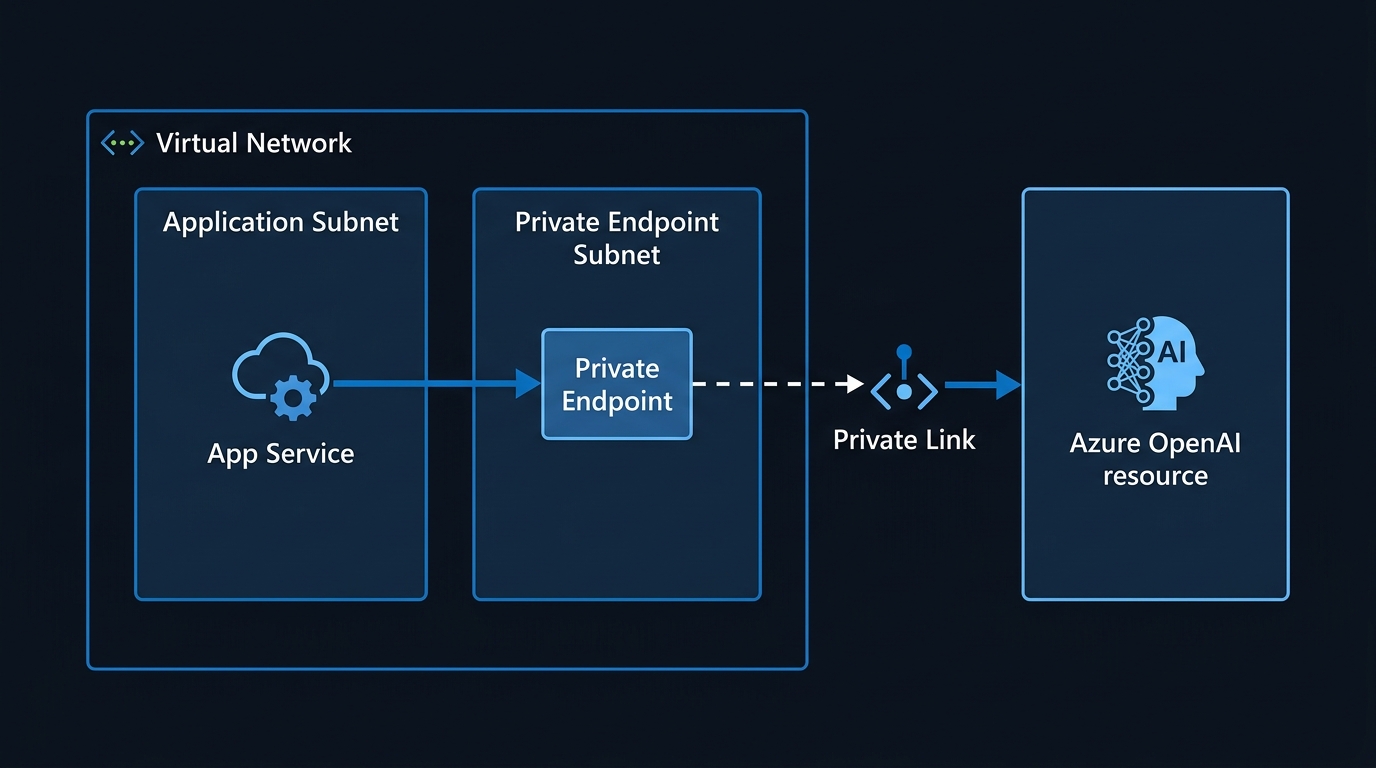
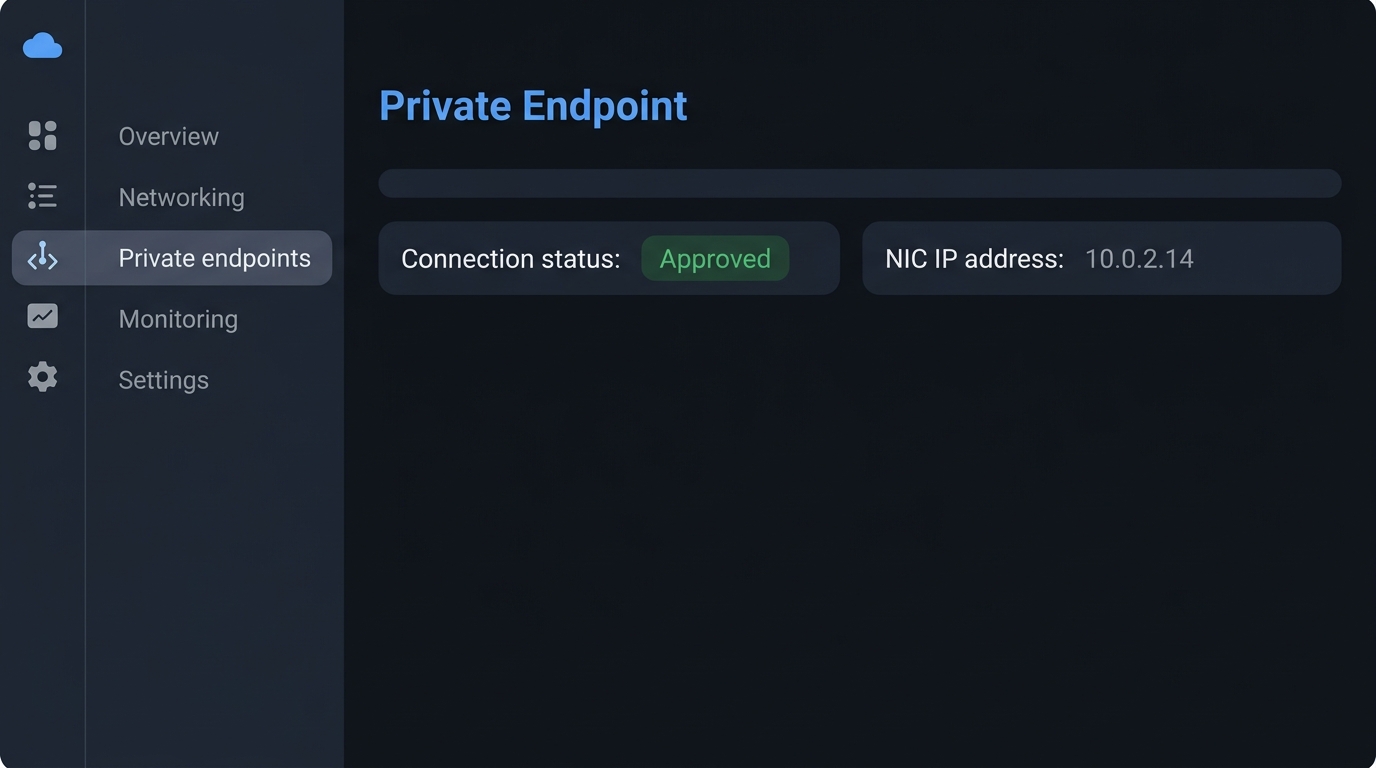
1.3 Configure Private DNS
Without correct DNS, your app resolves the Azure OpenAI FQDN to the old public IP even though the private endpoint is up. This is the most common misconfiguration in enterprise rollouts.
# Create the Private DNS Zone if it does not already exist
az network private-dns zone create \
  --resource-group "$RG" \
  --name "privatelink.openai.azure.com"

# Link the zone to the VNet
az network private-dns link vnet create \
  --resource-group "$RG" \
  --zone-name "privatelink.openai.azure.com" \
  --name "dns-link-vnet-ai-prod" \
  --virtual-network "$VNET_NAME" \
  --registration-enabled false

# Create DNS zone group so the PE registers its A record automatically
az network private-endpoint dns-zone-group create \
  --resource-group "$RG" \
  --endpoint-name "pe-aoai-prod" \
  --name "aoai-dns-zone-group" \
  --private-dns-zone "privatelink.openai.azure.com" \
  --zone-name "privatelink.openai.azure.com"
Verify resolution from inside the VNet (or from an on-premises machine that reaches the VNet via ExpressRoute or VPN):
# Should return a 10.x.x.x address, not 20.x.x.x or similar public IP
nslookup "${AOAI_NAME}.openai.azure.com"
If you get a public IP back, the DNS link is not effective for the querying machine — check that on-prem DNS is forwarding .openai.azure.com to Azure's private resolver (168.63.129.16) through your DNS forwarder, not resolving via the internet.
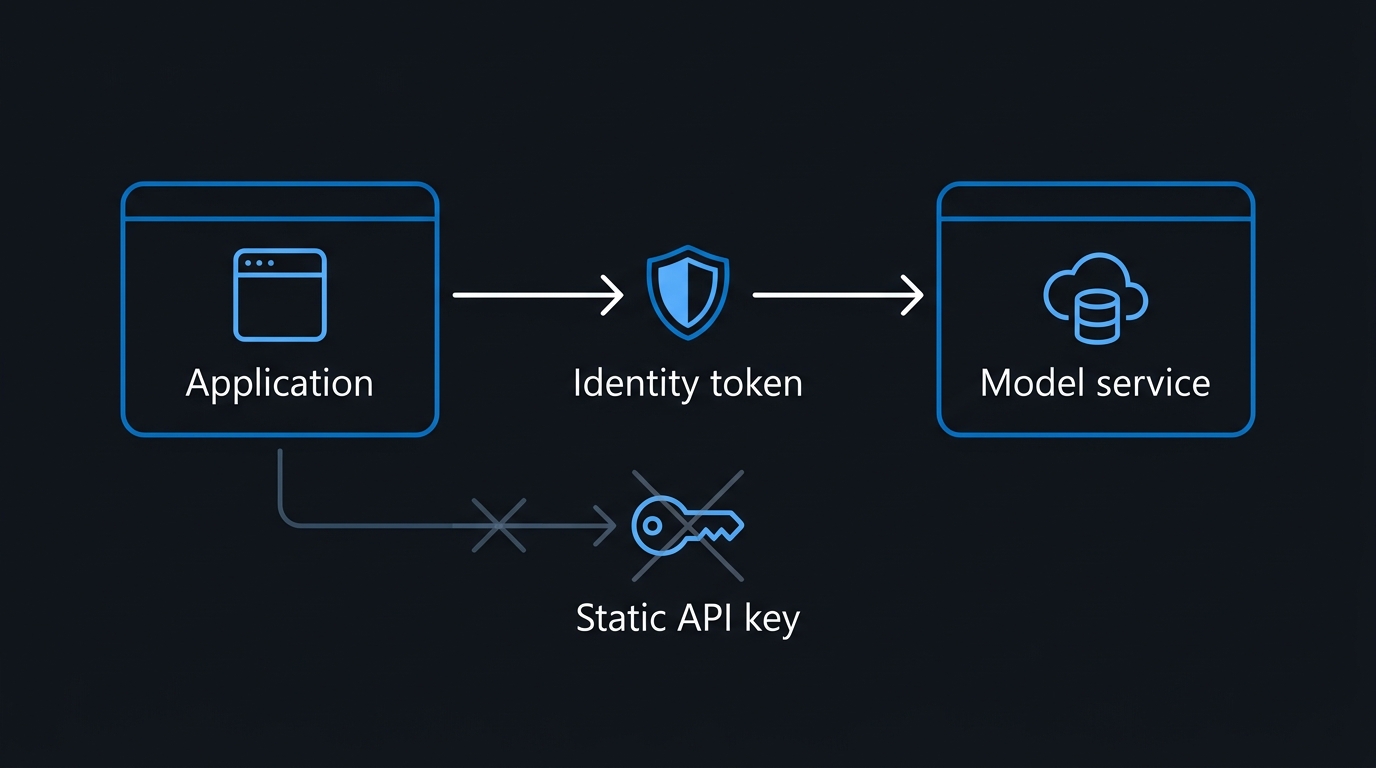
Step 2 — Replace API Keys with Entra ID Authentication
API keys are long-lived, scope to the entire resource, cannot be tied to an identity, and do not appear in sign-in logs. Entra ID tokens expire in ~60 minutes, are tied to a specific principal, and flow through Microsoft Entra's audit trail.
2.1 Assign the Correct RBAC Role
Azure OpenAI uses the Cognitive Services OpenAI User role for inference calls and Cognitive Services OpenAI Contributor for fine-tuning and deployment management. Grant the minimum required.
# Assign to a managed identity (replace with your app's managed identity object ID)
APP_MI_OBJECT_ID="<your-managed-identity-object-id>"

az role assignment create \
  --assignee-object-id "$APP_MI_OBJECT_ID" \
  --assignee-principal-type ServicePrincipal \
  --role "Cognitive Services OpenAI User" \
  --scope "$AOAI_ID"
For developer workstations, assign the same role to the developer's Entra ID UPN so az login or VS Code's Azure extension provides credentials locally:
DEV_UPN="jsmith@contoso.com"
az role assignment create \
  --assignee "$DEV_UPN" \
  --role "Cognitive Services OpenAI User" \
  --scope "$AOAI_ID"
2.2 Call the API with a Token — No Keys Required
# Python 3.11+ — azure-identity 1.17+, openai 1.35+
from azure.identity import DefaultAzureCredential, get_bearer_token_provider
from openai import AzureOpenAI

credential = DefaultAzureCredential()
token_provider = get_bearer_token_provider(
    credential,
    "https://cognitiveservices.azure.com/.default"
)

client = AzureOpenAI(
    azure_endpoint=f"https://{AOAI_NAME}.openai.azure.com/",
    azure_ad_token_provider=token_provider,
    api_version="2024-10-21",   # GA version as of mid-2026
)

response = client.chat.completions.create(
    model="gpt-4o",             # deployment name, not model family
    messages=[{"role": "user", "content": "Summarise this document..."}],
)
print(response.choices[0].message.content)
DefaultAzureCredential checks, in order: environment variables, workload identity, managed identity, Azure CLI, VS Code, and Azure PowerShell. In production on Azure Kubernetes Service, the workload identity path fires automatically — no secret mounts needed.
2.3 Disable API Key Authentication Entirely
Once every caller is on tokens, revoke the keys at the resource level:
az cognitiveservices account update \
  --name "$AOAI_NAME" \
  --resource-group "$RG" \
  --api-properties disableLocalAuth=true
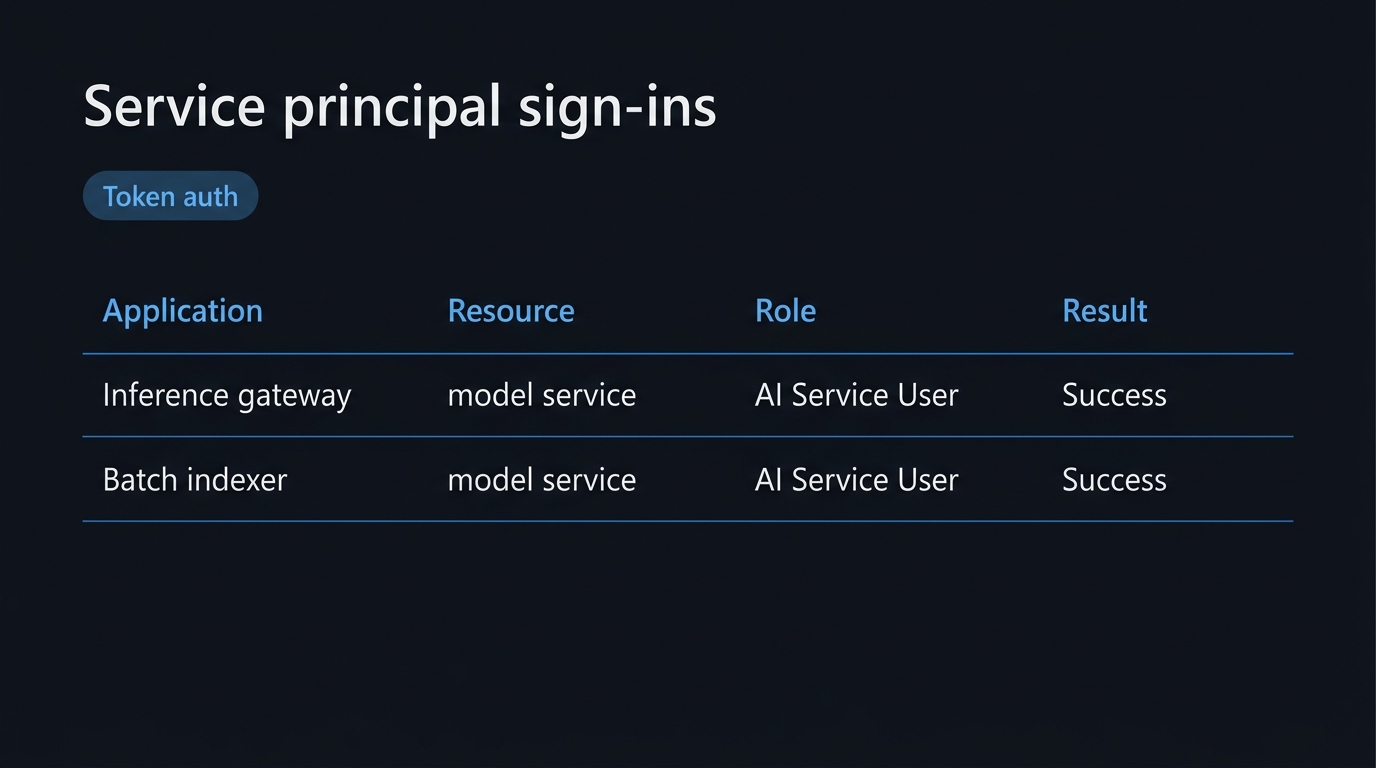
Pitfall: Azure Monitor's
AzureDiagnosticstable logsAuthTypeas"Key"or"AAD". Run the query below during testing to confirm no key-based calls are still reaching the endpoint:
AzureDiagnostics
| where ResourceType == "MICROSOFT.COGNITIVESERVICES/ACCOUNTS"
| where Category == "RequestResponse"
| summarize count() by AuthType_s, bin(TimeGenerated, 1h)
| order by TimeGenerated desc
Step 3 — Content Filtering Policies for Enterprise Risk Tolerance
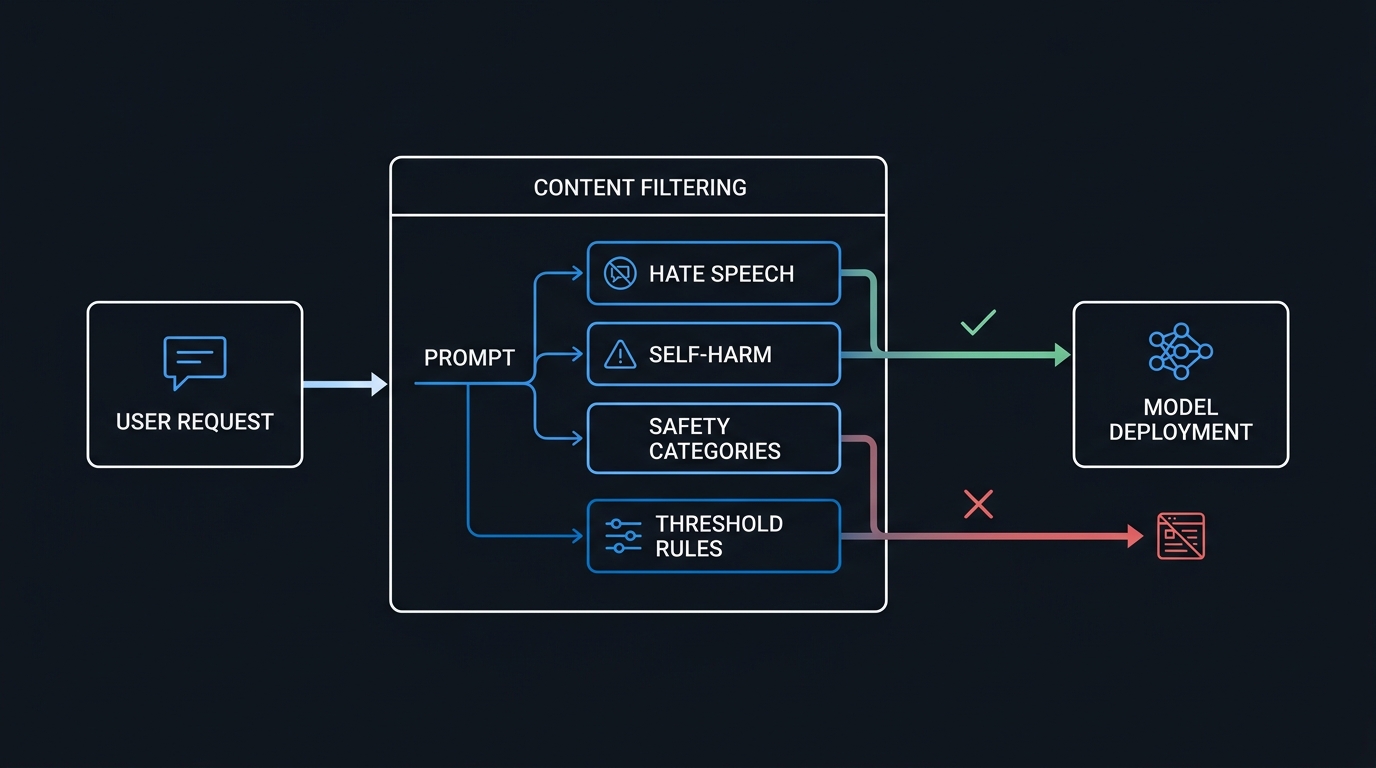
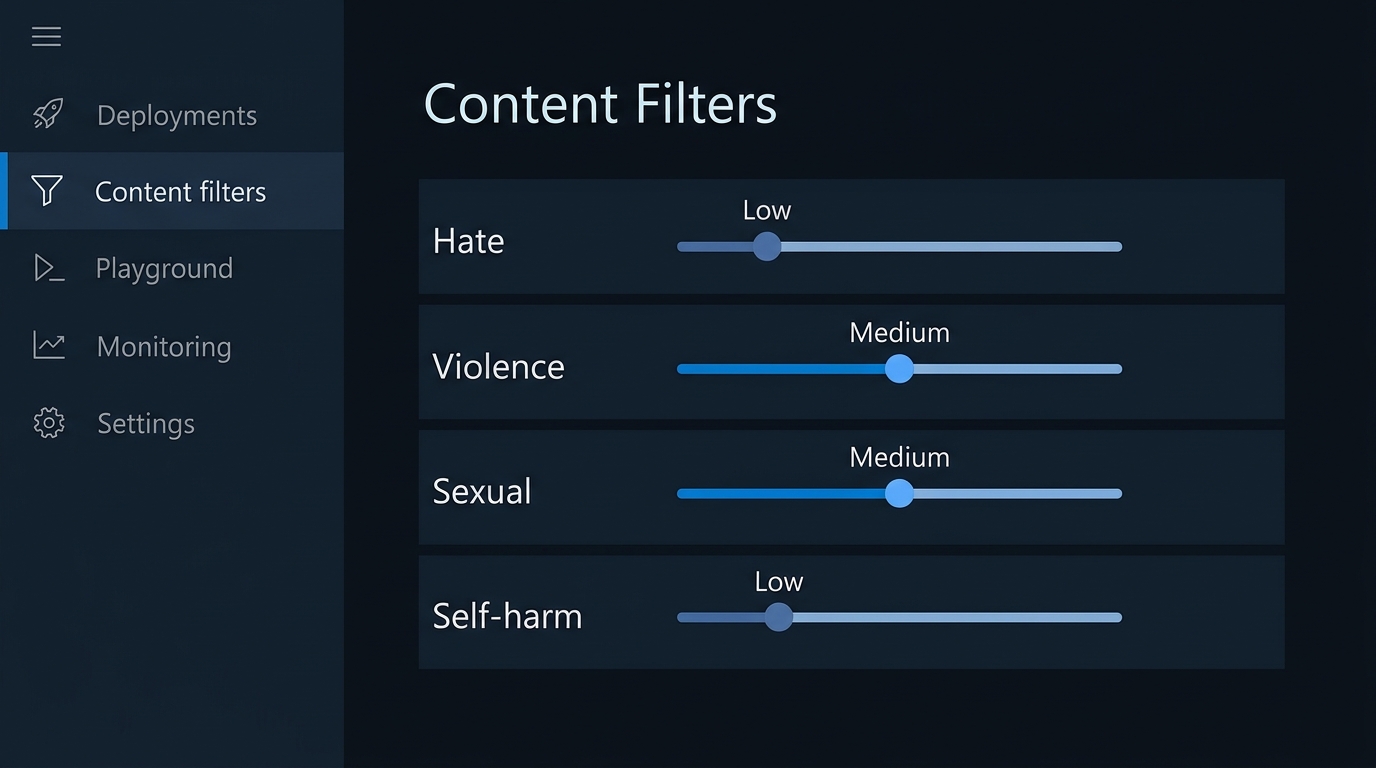
Microsoft's default content filter blocks the most severe harm categories at a high severity threshold. For regulated industries — financial services, healthcare, legal — the default is almost always too permissive. The full filter category reference documents the four harm categories (Hate, Violence, Sexual, Self-harm) and their configurable input/output severity thresholds.
As of the 2024-10-21 API version, custom content filter policies can be defined via the management API and applied per-deployment. The Azure portal and REST API both support this; the CLI does not yet have a dedicated subcommand.
3.1 Design Your Policy Before Configuring It
| Category | Default Threshold | Recommended Enterprise-Strict | Rationale |
|---|---|---|---|
| Hate | Medium | Low | Regulatory and reputational risk |
| Violence | Medium | Medium | Context-dependent; keep at medium |
| Sexual | Low | Low | Default is already restrictive |
| Self-harm | Medium | Low | HR and duty-of-care obligations |
| Jailbreak (input) | On | On | Always leave enabled |
| Indirect attack (input) | On | On | Prompt injection protection |
| Groundedness (output) | Off | On | Reduces hallucination in RAG apps |
3.2 Create the Filter Policy via REST
The management plane for content filters lives under management.azure.com, not the inference endpoint. Use this pattern from a pipeline or a one-off admin script:
SUBSCRIPTION_ID=$(az account show --query id -o tsv)
CONTENT_FILTER_NAME="enterprise-strict"

# Get a management plane token
MGMT_TOKEN=$(az account get-access-token \
  --resource https://management.azure.com \
  --query accessToken -o tsv)

curl -sX PUT \
  "https://management.azure.com/subscriptions/${SUBSCRIPTION_ID}/resourceGroups/${RG}/providers/Microsoft.CognitiveServices/accounts/${AOAI_NAME}/raiPolicies/${CONTENT_FILTER_NAME}?api-version=2024-10-01" \
  -H "Authorization: Bearer ${MGMT_TOKEN}" \
  -H "Content-Type: application/json" \
  -d '{
    "name": "enterprise-strict",
    "properties": {
      "basePolicyName": "Microsoft.Default",
      "mode": "Default",
      "contentFilters": [
        { "name": "hate",        "blocking": true, "enabled": true, "allowedContentLevel": "Low",    "source": "Prompt"     },
        { "name": "hate",        "blocking": true, "enabled": true, "allowedContentLevel": "Low",    "source": "Completion" },
        { "name": "violence",    "blocking": true, "enabled": true, "allowedContentLevel": "Medium", "source": "Prompt"     },
        { "name": "violence",    "blocking": true, "enabled": true, "allowedContentLevel": "Medium", "source": "Completion" },
        { "name": "selfharm",    "blocking": true, "enabled": true, "allowedContentLevel": "Low",    "source": "Prompt"     },
        { "name": "selfharm",    "blocking": true, "enabled": true, "allowedContentLevel": "Low",    "source": "Completion" },
        { "name": "sexual",      "blocking": true, "enabled": true, "allowedContentLevel": "Low",    "source": "Prompt"     },
        { "name": "sexual",      "blocking": true, "enabled": true, "allowedContentLevel": "Low",    "source": "Completion" }
      ]
    }
  }'
3.3 Apply the Policy to a Deployment
DEPLOYMENT_NAME="gpt-4o-prod"

curl -sX PUT \
  "https://management.azure.com/subscriptions/${SUBSCRIPTION_ID}/resourceGroups/${RG}/providers/Microsoft.CognitiveServices/accounts/${AOAI_NAME}/deployments/${DEPLOYMENT_NAME}?api-version=2024-10-01" \
  -H "Authorization: Bearer ${MGMT_TOKEN}" \
  -H "Content-Type: application/json" \
  -d '{
    "sku": { "name": "Standard", "capacity": 40 },
    "properties": {
      "model": { "format": "OpenAI", "name": "gpt-4o", "version": "2024-11-20" },
      "raiPolicyName": "enterprise-strict"
    }
  }'
Step 4 — Diagnostics and Alerting That Prove It Is All Working
Security controls without observability are unverifiable. Wire these three things up before signing off on the deployment.
4.1 Send Diagnostic Logs to Log Analytics
LAW_ID="/subscriptions/${SUBSCRIPTION_ID}/resourceGroups/${RG}/providers/Microsoft.OperationalInsights/workspaces/law-ai-prod"

az monitor diagnostic-settings create \
  --name "aoai-diag" \
  --resource "$AOAI_ID" \
  --workspace "$LAW_ID" \
  --logs '[
    {"category":"RequestResponse","enabled":true,"retentionPolicy":{"enabled":true,"days":90}},
    {"category":"Audit","enabled":true,"retentionPolicy":{"enabled":true,"days":90}}
  ]' \
  --metrics '[{"category":"AllMetrics","enabled":true}]'
4.2 Alert on Content Filter Blocks
// KQL — run in Log Analytics, then pin as an alert rule
AzureDiagnostics
| where ResourceType == "MICROSOFT.COGNITIVESERVICES/ACCOUNTS"
| where Category == "RequestResponse"
| where properties_s contains "content_filter_result"
| where properties_s contains '"filtered": true'
| summarize FilteredRequests = count() by bin(TimeGenerated, 5m), Resource
| where FilteredRequests > 10
A spike in filtered requests is either a prompt injection attempt or a misconfigured client — both warrant immediate investigation.
4.3 Verify the Private Endpoint Is Resolving Correctly — Post-Deployment Test
Run this from a VM or container inside the VNet as part of your deployment pipeline smoke test:
#!/usr/bin/env bash
set -euo pipefail

FQDN="${AOAI_NAME}.openai.azure.com"
RESOLVED_IP=$(dig +short "$FQDN" | tail -1)

# Fail the smoke test if the resolved IP is NOT in RFC 1918 space
if [[ ! "$RESOLVED_IP" =~ ^(10\.|172\.(1[6-9]|2[0-9]|3[01])\.|192\.168\.) ]]; then
  echo "FAIL: ${FQDN} resolved to ${RESOLVED_IP} — public IP detected. Check DNS config."
  exit 1
fi
echo "PASS: ${FQDN} → ${RESOLVED_IP} (private)"
Include this in your CI gate so a mis-configured DNS change cannot silently reroute production traffic to the public endpoint.
Common Mistakes That Survive Code Review
Leaving both authentication modes enabled "for fallback." Any key in any team member's .env file or pipeline secret is a liability. If you cannot disable key auth completely yet, at minimum enforce a 30-day rotation policy via Azure Policy [Preview]: Azure AI Services resources should have key access disabled (disable local authentication).
Using a shared Private DNS Zone without verifying VNet links. Multiple spoke VNets in a hub-and-spoke topology often share one Private DNS Zone. If the zone is linked only to the hub VNet, spoke VNets will fail to resolve the private IP unless the DNS forwarder in the hub is configured to proxy those queries, or you add explicit VNet links for each spoke.
Assuming content filter blocks return HTTP 400 by default. The API returns HTTP 400 with a content_filter error code. Applications that treat all 4xx responses as user input errors (and display a generic message) miss the signal entirely. Log and alert on content_filter error codes separately.
Deploying without a network security group (NSG) on the private endpoint subnet. Private endpoints do not inherit NSG rules from the subnet by default in older API versions; you must explicitly enable PrivateEndpointNetworkPolicies to enforce NSG rules on PE traffic:
az network vnet subnet update \
  --resource-group "$RG" \
  --vnet-name "$VNET_NAME" \
  --name "$SUBNET_NAME" \
  --private-endpoint-network-policies Enabled
This was a long-standing Azure limitation that was resolved in 2023 but is still misconfigured in templates copied from pre-2023 documentation.
Granting Cognitive Services Contributor instead of Cognitive Services OpenAI User to application identities. The Contributor role can regenerate keys and modify deployments — a compromised app identity becomes a full resource takeover vector. Principle of least privilege is not optional here.
What to Do the Week After Go-Live
Once traffic is flowing through the hardened path, your next operational priorities are:
-
Enrol the resource in Azure Policy. Apply the built-in initiative
[Preview]: Azure OpenAI - Governanceto your subscription. It audits network isolation, key auth status, and diagnostic settings in one sweep. -
Establish a token throughput baseline. Content filter latency adds 20-80 ms to inference calls. Capture p95 latency in the first week so you have a baseline to alert on if a policy change later degrades performance.
-
Test jailbreak resilience quarterly. Run the Azure AI Evaluation SDK's adversarial evaluation dataset against your deployment to measure what percentage of known jailbreak prompts are blocked. Document the results — auditors increasingly ask for this evidence.
-
Rotate managed identity credentials on a schedule that matches your threat model. Managed identities rotate automatically, but service principal client secrets used as a fallback do not. Audit for any remaining SP credentials with
az ad app credential list. -
Review Private DNS Zone A records after any VNet topology change. A VNet peering change or a subnet rename can silently orphan the DNS zone group, causing the A record to go stale. Add a monthly DNS resolution verification check to your runbook.
The three controls in this guide — private network path, Entra ID identity-based auth, and a hardened content filter policy — close the most common audit findings against Azure OpenAI deployments in a single configuration pass. Each one is independently valuable; together they form a defense-in-depth posture that holds up against both external threat actors and the insider-risk scenarios that compliance frameworks increasingly emphasise.

Leave a Reply