
Executive Snapshot
| Category | Recommendation |
|---|---|
| Problem Solved | Long-lived client secrets stored in CI/CD variable stores |
| Mechanism | OIDC token exchange — external IdP token traded for an Entra access token |
| GitHub Issuer | https://token.actions.githubusercontent.com |
| Required Audience | api://AzureADTokenExchange |
| Workflow Permission | id-token: write (plus contents: read if you check out code) |
| Biggest Gotcha | Subject claim is an exact string match — no wildcards in standard credentials |
| Scale Limit | 20 federated credentials per app or user-assigned managed identity |
| Migration Path | Add the federated credential alongside the secret, cut over, then delete the secret |
TL;DR
- A client secret in a CI/CD variable store is a standing breach vector — it survives employee turnover, gets copied into build logs, and is almost never rotated on the schedule the policy claims.
- Workload identity federation removes the secret entirely. Your pipeline proves its identity to its own platform, and Entra ID validates that proof cryptographically against the platform's published OIDC keys.
- The whole configuration is three values: issuer, subject, audience. Get the subject wrong and the token exchange fails with no clue at creation time.
- Environment-scoped jobs change the subject claim. Adding
environment: productionto a GitHub Actions job silently replaces the branch-based subject — the single most common cause of a broken setup. - User-assigned managed identities support federated credentials too, and are usually the better fit when everything you deploy to lives in Azure and your tenant restricts app registration creation.
Introduction
Look at where your deployment credentials actually live. In most organisations the answer is a variable group in Azure DevOps, a repository secret in GitHub, or — worse — a .env file on a build agent that nobody has logged into since 2023. The credential inside is a service principal client secret with Contributor on a production subscription and an expiry date somewhere in the next two years.
That secret is a bearer credential. Anyone who obtains it becomes your deployment identity, from anywhere on the internet, until someone notices. Secret sprawl in CI/CD is consistently near the top of cloud breach post-mortems, and the reason is structural rather than careless: a long-lived secret has to be created, transmitted, stored, read at runtime, and eventually rotated. Every one of those five steps is an exposure opportunity, and rotation is the step teams skip because it breaks pipelines.
Entra workload identity federation removes the credential from the equation. Instead of your pipeline presenting a password, it presents a signed token issued by its own platform — GitHub, Azure DevOps, Kubernetes, or any OIDC-compliant provider — and Entra ID exchanges that token for a short-lived access token. There is no secret to store, no secret to leak, and nothing to rotate.
This tutorial covers the identity-platform side in depth: how the trust is actually established, the subject-claim semantics that cause most failures, Azure DevOps service connections, when to use a managed identity instead of an app registration, the scale limits you will hit, how to audit workload identity sign-ins, and a safe migration path off secrets.
Prerequisites
- An Azure subscription with rights to assign RBAC roles at the target scope (Owner or User Access Administrator)
- Permission to create app registrations in the tenant, or
Managed Identity Contributorif you take the managed identity route - Azure CLI 2.55+ (
az --version) — thefederated-credentialcommand group has matured across releases - A GitHub repository or Azure DevOps project you administer
- Familiarity with OIDC concepts: issuer, audience, subject, and JWT claims
- For log analysis: Entra diagnostic settings streaming sign-in logs to a Log Analytics workspace
1. How the Token Exchange Actually Works
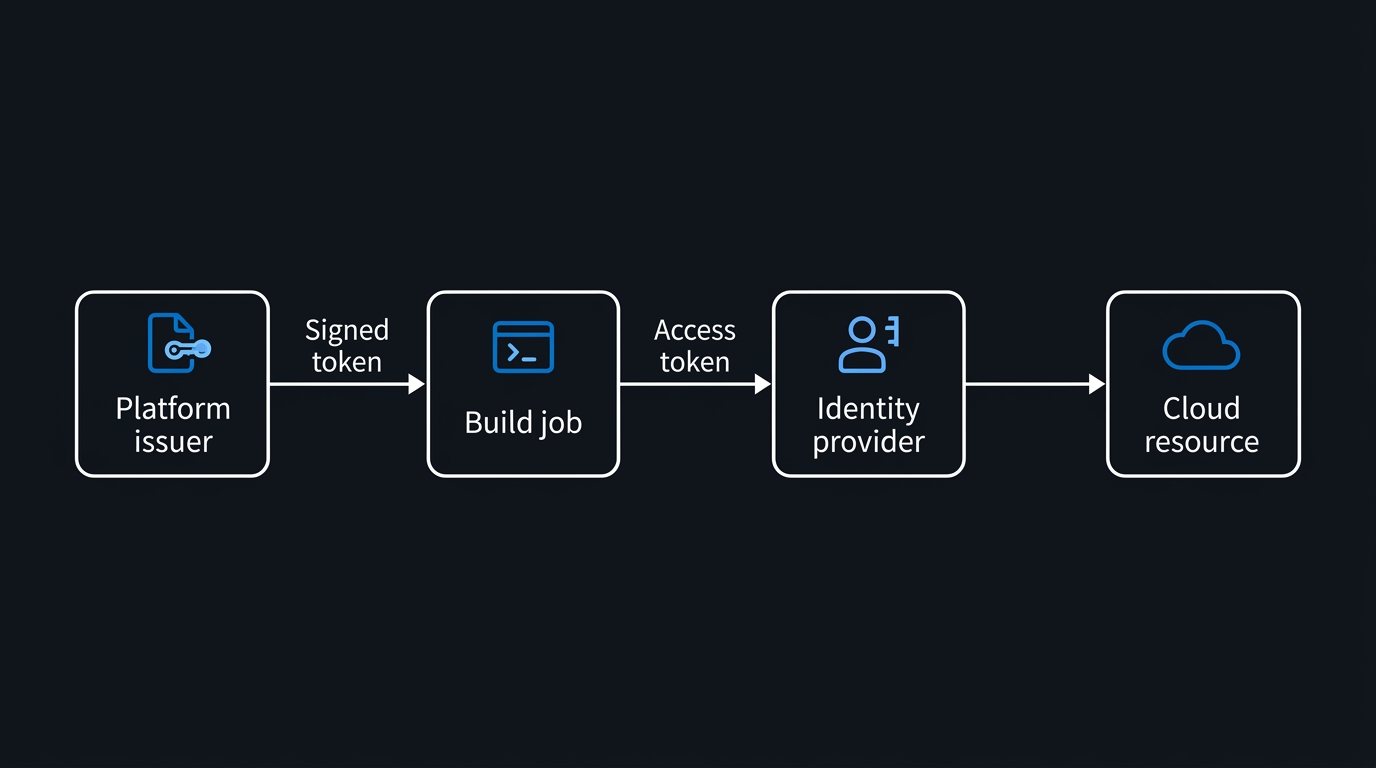
There is no secret because there is no secret to exchange. The trust chain is entirely cryptographic and rests on the external platform's published OIDC discovery document and signing keys.
sequenceDiagram
    participant J as CI job
    participant P as Platform OIDC issuer
    participant E as Entra ID
    participant R as Azure resource
    J->>P: Request ID token
    P-->>J: Signed JWT with sub claim
    J->>E: Present JWT as client assertion
    E->>P: Fetch public signing keys
    E->>E: Match issuer, subject, audience
    E-->>J: Short-lived access token
    J->>R: Call ARM with access token
Three things must line up for step 5 to succeed:
- Issuer — the URL Entra uses to discover the platform's signing keys. For GitHub Actions this is always
https://token.actions.githubusercontent.com. - Subject — the
subclaim inside the presented token, identifying which workload on that platform is asking. This is the field you will get wrong. - Audience — who the token was minted for. Entra expects
api://AzureADTokenExchangeunless you deliberately change it on both sides.
A federated identity credential (FIC) is simply a record on your app registration or managed identity that says: tokens from this issuer, with this subject, for this audience, may act as me. It has no expiry and no material to rotate.
2. Set Up GitHub Actions Federation
Create the application and its service principal, then attach a federated credential.
# 1. Create the app registration and its service principal
az ad app create --display-name "gha-contoso-web-deploy"

APP_ID=$(az ad app list --display-name "gha-contoso-web-deploy" --query "[0].appId" -o tsv)
az ad sp create --id "$APP_ID"

SP_OID=$(az ad sp show --id "$APP_ID" --query id -o tsv)

# 2. Attach the federated credential — no secret is ever generated
az ad app federated-credential create \
  --id "$APP_ID" \
  --parameters '{
    "name": "gha-env-production",
    "issuer": "https://token.actions.githubusercontent.com",
    "subject": "repo:contoso/web-app:environment:production",
    "description": "GitHub Actions - production environment deploys",
    "audiences": ["api://AzureADTokenExchange"]
  }'

# 3. Grant least-privilege RBAC at the narrowest useful scope
az role assignment create \
  --assignee-object-id "$SP_OID" \
  --assignee-principal-type ServicePrincipal \
  --role "Contributor" \
  --scope "/subscriptions/$SUB_ID/resourceGroups/rg-web-prod"
Using --assignee-object-id with an explicit principal type avoids the Graph lookup that makes --assignee fail intermittently in automation.
Now the workflow. Note that the three AZURE_* values are identifiers, not credentials — store them as repository variables rather than secrets so reviewers can see them.
name: Deploy to Azure

on:
  push:
    branches: [main]

permissions:
  id-token: write      # required to request the OIDC token
  contents: read       # required by actions/checkout once permissions are declared

jobs:
  deploy:
    runs-on: ubuntu-latest
    environment: production   # this changes the OIDC subject claim - see section 3
    steps:
      - uses: actions/checkout@v4

      - name: Sign in to Azure with OIDC
        uses: azure/login@v2
        with:
          client-id: ${{ vars.AZURE_CLIENT_ID }}
          tenant-id: ${{ vars.AZURE_TENANT_ID }}
          subscription-id: ${{ vars.AZURE_SUBSCRIPTION_ID }}

      - name: Confirm the identity that signed in
        run: az account show --output table

      - name: Deploy application
        run: |
          az webapp deploy \
            --resource-group rg-web-prod \
            --name contoso-web-prod \
            --src-path ./dist.zip \
            --type zip
The permissions block is not optional. Omitting id-token: write produces a login failure that reads like a credential problem but is actually a missing token-request permission. And once you declare a permissions block at all, every permission you do not list is dropped — which is why contents: read has to be spelled out for actions/checkout.
3. Subject Claims: Exact-Match Semantics and the Environment Trap
This is where setups break. The subject you configure must match the sub claim in the presented token character for character. There is no wildcard support in a standard federated credential, and the field allows up to 600 characters.
Worse, the failure is silent at configuration time. Microsoft's guidance is explicit on this point: if you configure the wrong subject, the credential is created successfully with no error. Nothing surfaces until a real pipeline run attempts the exchange and is rejected — typically as AADSTS70021, indicating no matching federated identity record for the presented assertion.
The common GitHub subject shapes:
| Trigger | Subject claim |
|---|---|
| Push to a branch | repo:<org>/<repo>:ref:refs/heads/main |
| Tag push | repo:<org>/<repo>:ref:refs/tags/v1.2.3 |
| Job bound to an environment | repo:<org>/<repo>:environment:production |
| Pull request event | repo:<org>/<repo>:pull_request |
| Reusable workflow caller | repo:<org>/<repo>:job_workflow_ref:... |
The environment trap
A job that declares environment: production stops emitting the branch-based subject. The token carries repo:contoso/web-app:environment:production and nothing else. Teams routinely register a ref:refs/heads/main credential, later add an environment for approval gating, and break the pipeline with a change that looks entirely unrelated to authentication.
Two consequences worth internalising:
- Environment names are part of the security boundary. A credential trusting
environment:productionis trusted by any branch whose job targets that environment — so protect the environment with required reviewers and branch restrictions on the GitHub side. - Tag-based subjects scale badly. Because matching is exact,
refs/tags/v1.2.3will not matchv1.2.4. Release pipelines keyed on tags need either one credential per tag (unworkable), an environment-based subject instead, or the flexible credential model in section 6.
Treat the subject as case-sensitive and never hand-assemble it from documentation. Print the real claim from a throwaway job instead:
      - name: Print OIDC claims (debug only - never print the token)
        run: |
          python3 - <<'PY'
          import base64, json, os, urllib.request

          url = os.environ["ACTIONS_ID_TOKEN_REQUEST_URL"] + "&audience=api://AzureADTokenExchange"
          req = urllib.request.Request(
              url,
              headers={"Authorization": "bearer " + os.environ["ACTIONS_ID_TOKEN_REQUEST_TOKEN"]},
          )
          token = json.load(urllib.request.urlopen(req))["value"]

          payload = token.split(".")[1]
          payload += "=" * (-len(payload) % 4)
          claims = json.loads(base64.urlsafe_b64decode(payload))

          print(json.dumps({k: claims.get(k) for k in ("iss", "sub", "aud")}, indent=2))
          PY
Copy the sub value straight into your federated credential. Delete the step afterwards — an ID token is a bearer assertion and belongs nowhere near a build log.
One more wrinkle: GitHub lets organisations customise the subject claim template at repository or organisation level. If someone changes that template, every federated credential in your tenant that trusts those repositories stops matching at once. Treat subject-claim customisation as a change-managed operation.
4. Azure DevOps Workload Identity Service Connections
Azure DevOps has first-class support through the workload identity federation service connection type, which replaces the old secret-based Azure Resource Manager connection.
Two creation modes:
- Automatic — Azure DevOps provisions the app registration (or uses a user-assigned managed identity), creates the federated credential, and wires up the RBAC assignment. Fastest path; requires the creating account to hold sufficient rights in both Entra and Azure.
- Manual — Azure DevOps shows you the issuer URL and subject identifier and you create the federated credential yourself. This is the mode to use when identity objects are provisioned through Terraform or Bicep, or when a separate team owns Entra.
In manual mode the subject identifier follows the shape sc://<organisation>/<project>/<service-connection-name>, and the issuer is organisation-specific. Microsoft has revised the Azure DevOps issuer URL format at least once, so copy the issuer directly out of the service connection dialog rather than hardcoding a value from a blog post or an older runbook — check current documentation before scripting it.
# Manual-mode federated credential for an Azure DevOps service connection.
# Replace the issuer with the exact value shown in the service connection dialog.
az ad app federated-credential create \
  --id "$APP_ID" \
  --parameters '{
    "name": "ado-sc-prod-deploy",
    "issuer": "https://vstoken.dev.azure.com/<organisation-id>",
    "subject": "sc://contoso/Platform/prod-deploy",
    "description": "Azure DevOps prod deploy service connection",
    "audiences": ["api://AzureADTokenExchange"]
  }'
The operational win here is larger than on the GitHub side, because secret-based ARM service connections carry expiring credentials that fail deployments on a schedule nobody tracks. A federated service connection has no expiry. Azure DevOps also exposes a conversion action on existing ARM service connections that migrates them in place without changing the connection's ID — meaning your pipeline YAML does not have to change at all.
5. Managed Identity or App Registration?
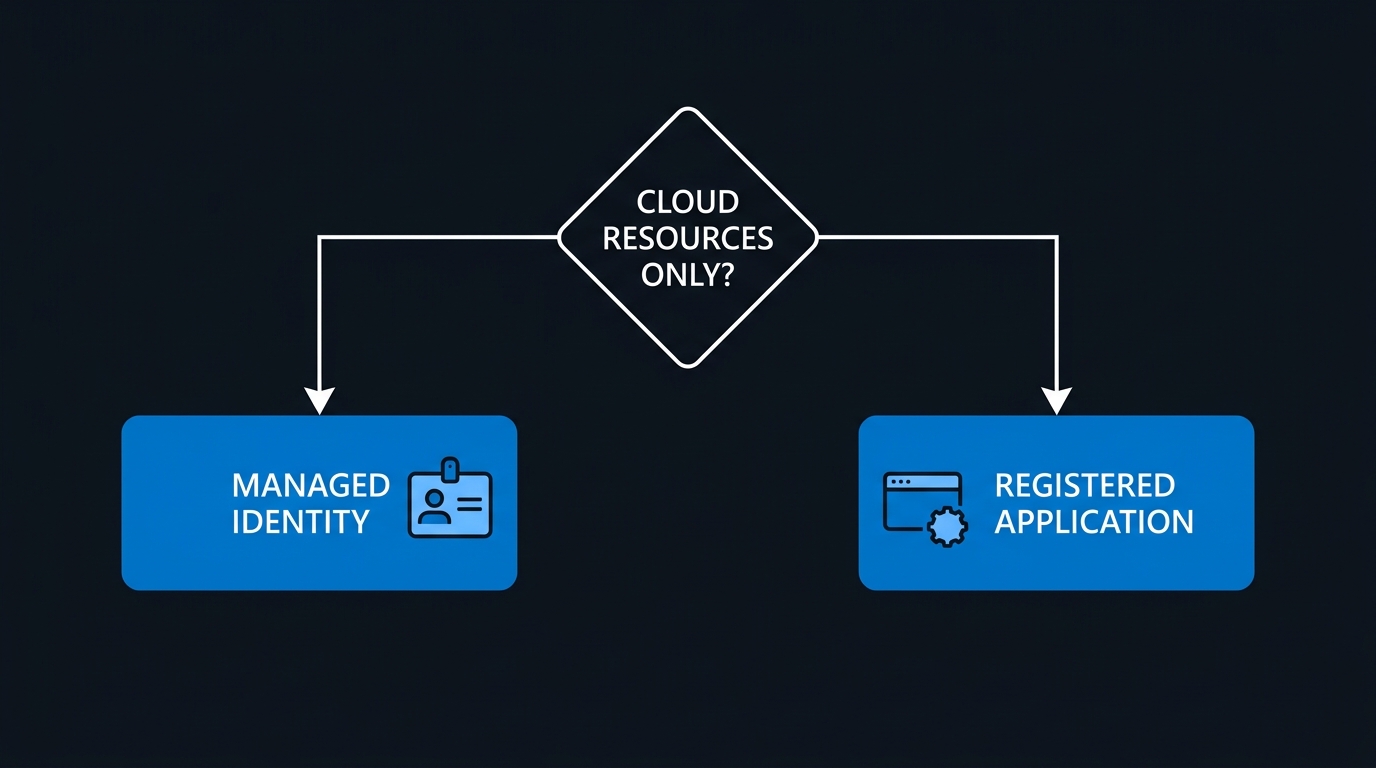
Both object types support federated credentials. The choice is mostly about governance and blast radius, not capability.
| Consideration | User-assigned managed identity | App registration |
|---|---|---|
| Lives as | An Azure resource in a resource group | A directory object in the tenant |
| Creation rights | Subscription RBAC only | Tenant-level app registration rights |
| Lifecycle | Deleted with its resource group; natural fit for Terraform | Survives independently; needs its own cleanup process |
| Cross-tenant use | Single tenant | Supports multi-tenant scenarios |
| Graph API permissions | Assignable, but only via Graph or CLI | Full portal support for API permissions and app roles |
| System-assigned variant | Not supported for federation — user-assigned only | Not applicable |
The practical default: if your pipeline only touches Azure resources and your tenant restricts app registrations, use a user-assigned managed identity. It keeps the identity inside the same IaC lifecycle as the resources it deploys, and it removes an entire class of orphaned-app-registration cleanup work.
# Federated credential on a user-assigned managed identity
az identity create --name id-deploy-prod --resource-group rg-identity

az identity federated-credential create \
  --name gha-main-branch \
  --identity-name id-deploy-prod \
  --resource-group rg-identity \
  --issuer "https://token.actions.githubusercontent.com" \
  --subject "repo:contoso/web-app:ref:refs/heads/main" \
  --audiences "api://AzureADTokenExchange"
Reach for an app registration when you need multi-tenant access, Microsoft Graph application permissions with portal-managed consent, or an identity that outlives any single subscription.
6. Limits, Scale, and Flexible Credentials
The constraint that catches platform teams is the cap of 20 federated identity credentials per application or per user-assigned managed identity. A monorepo with fifteen services, three environments each, quickly exceeds that if you model one credential per repo-branch-environment triple. Check current documentation before designing around a specific number — the ceiling and the preview features around it have moved.
Three ways to stay under it:
- Model by environment, not by branch or tag. One credential per environment per identity covers every release path into that environment.
- Use one identity per deployment boundary. Separate identities per service or per environment reset the counter and shrink blast radius at the same time — this is better security regardless of the limit.
- Evaluate flexible federated identity credentials. Microsoft's newer model replaces the fixed
subjectwith aclaimsMatchingExpression, allowing restricted wildcard matching such asclaims['sub'] matches 'repo:contoso/web-app:ref:refs/heads/*', and can collapse many credentials into one. This capability has been in preview — confirm its current availability and supported expression syntax in the documentation before depending on it in production.
Also worth knowing: federated credentials themselves are not licensed features, but applying Conditional Access to workload identities (for example, restricting a service principal to known egress IP ranges) requires a separate premium workload identities licence. Verify current licensing terms before you plan around it.
7. Audit Workload Identity Sign-Ins
Removing the secret does not remove the need to watch the identity. Federated sign-ins land in the service principal sign-in logs, a separate stream from user sign-ins that many tenants never enable.
In Entra diagnostic settings, confirm ServicePrincipalSignInLogs (and ManagedIdentitySignInLogs if you took that route) are streaming to your workspace, then baseline behaviour:
// Workload identity sign-in baseline over the last 30 days
AADServicePrincipalSignInLogs
| where TimeGenerated > ago(30d)
| where ServicePrincipalName has "gha-"
| summarize
    Attempts   = count(),
    Failures   = countif(ResultType != 0),
    SourceIPs  = dcount(IPAddress),
    TopSources = make_set(IPAddress, 5),
    LastSeen   = max(TimeGenerated)
    by ServicePrincipalName, ServicePrincipalId
| extend FailureRate = round(100.0 * Failures / Attempts, 1)
| sort by Attempts desc
What to alert on:
- Sign-in success from an unexpected source range. Hosted runners come from broad cloud ranges, but a deployment identity authenticating from a residential ASN is worth a page.
- A spike in
ResultType != 0. Repeated failures against a federated identity often mean a subject mismatch — but they can equally mean someone probing an identity they should not know about. - Silence. An identity with zero sign-ins for 90 days is an unretired credential; delete it.
Newer log schemas expose an identifier for the specific federated credential used in the exchange. If that column is present in your workspace, group by it — it tells you exactly which credential is carrying traffic and, by omission, which ones are dead weight against your 20-credential budget.
Separately, federated credential creation and deletion are recorded in the Entra audit logs. Alert on Update application – Certificates and secrets management style events for your deployment applications; adding a federated credential to an existing app registration is a quiet and effective persistence technique for an attacker who has compromised an application administrator.
8. Migrating Off Secret-Based Service Principals
Federated credentials and client secrets coexist happily on the same application, which makes for a genuinely zero-downtime migration. Never do a hard cutover.
Step 1 — Inventory what you actually have.
# Every app registration still carrying a password credential
az ad app list --all \
  --query '[?length(passwordCredentials) > `0`].{name:displayName, appId:appId, secrets:length(passwordCredentials)}' \
  -o table
Cross-reference the output against your CI/CD variable stores. Anything in the list that no pipeline references is a cleanup candidate before you migrate anything.
Step 2 — Rank by blast radius. Sort by RBAC scope, not by pipeline frequency. An identity with Owner on a subscription outranks one with Reader on a resource group, regardless of how often it runs.
Step 3 — Add the federated credential alongside the existing secret. The application keeps working; nothing has changed for running pipelines.
Step 4 — Switch the pipeline to OIDC and run it. The secret is still there as an instant rollback.
Step 5 — Verify from the logs, not from the pipeline result. Confirm in the service principal sign-in logs that recent successful sign-ins are federated exchanges rather than secret-based ones, and let it soak for at least one full release cycle so scheduled and manually-triggered pipelines both exercise the new path.
Step 6 — Delete the secret.
# List remaining credentials, then remove the password credential by key ID
az ad app credential list --id "$APP_ID" -o table

az ad app credential delete --id "$APP_ID" --key-id "<key-id-from-the-list>"
Step 7 — Remove the secret from the variable store, and confirm it is gone from any backup or export of that store. A deleted Entra secret that still sits in an exported variable group inventories as a leaked credential during your next audit.
Troubleshooting
AADSTS70021 — no matching federated identity record
Cause: the presented sub, iss, or aud does not match any credential on the application. Nine times out of ten it is the subject, and the trigger is an environment: key added to the job.
Fix: print the real claims with the debug step in section 3, then compare against az ad app federated-credential list --id "$APP_ID". Compare character by character, including case.
Login fails with a permissions error before any Azure call
Cause: missing id-token: write in the workflow permissions block, or a permissions block that declares other scopes and therefore drops it.
Fix: declare id-token: write explicitly at workflow or job level. Remember that any declared block is an allowlist.
Works on branch pushes, fails on pull requests from forks
Cause: GitHub restricts token issuance for workflows triggered by pull requests from forked repositories. This is intentional — a fork must not be able to assume your deployment identity.
Fix: do not design deploy jobs on fork PR triggers. Use pull_request_target with strict review gating, or move deployment behind a merge to a protected branch.
Authentication succeeds but the deployment returns 403
Cause: identity and authorisation are separate problems. The token exchange worked; RBAC did not.
Fix: check the role assignment scope with az role assignment list --assignee "$APP_ID" --all. A common error is assigning at the resource group while the pipeline targets a resource in a different group.
Key Takeaways
- A stored client secret is a liability with a countdown timer — federation eliminates the credential rather than shortening its life.
- Issuer, subject, audience are the entire configuration surface, and the subject is an exact-match string with no wildcards in the standard credential model.
- Misconfigured subjects fail silently at creation time and only surface on a real pipeline run — always derive the subject from the actual token, never from documentation.
- Declaring a GitHub environment rewrites the subject claim, which makes approval gating and authentication a single coupled change.
- User-assigned managed identities are the better default for Azure-only pipelines, especially where app registration creation is restricted or identities are managed as code.
- Plan around the 20-credential ceiling early by modelling credentials per environment and splitting identities per deployment boundary.
- Audit workload identity sign-ins deliberately — service principal sign-in logs are a separate stream, and a new federated credential on an existing app is a quiet persistence mechanism.
- Migrate incrementally: add the credential, cut over, verify from logs, then delete the secret.
Next Steps
- Inventory secret-bearing app registrations today using the CLI query in section 8, and rank the results by RBAC scope rather than by usage frequency.
- Convert one low-risk pipeline first — a non-production deploy with a resource-group-scoped role — and use it to validate your subject-claim conventions before touching anything that matters.
- Standardise a naming convention for federated credentials that encodes platform, repository, and environment, so a 20-credential budget stays legible to whoever inherits it.
- Enable service principal sign-in log streaming to Log Analytics if it is not already on, and build the baseline query from section 7 into a scheduled workbook.
- Add an alert on federated credential creation in your Entra audit logs, treating any credential added outside your IaC pipeline as an incident until proven otherwise.
- Re-check the limits and preview features — the credential ceiling and the flexible-matching model are both areas where the documentation moves faster than internal runbooks.

Leave a Reply