
Executive Snapshot
| Item | Detail |
|---|---|
| Goal | Keep a minimum number of replicas serving traffic while nodes are cordoned, drained, upgraded, or scaled in |
| What it protects | Voluntary disruptions only — anything routed through the Eviction API |
| What it does not protect | Node hardware failure, kernel panic, node-level OOM kills, spot/preemption, direct kubectl delete pod |
| API object | policy/v1 PodDisruptionBudget, one of minAvailable or maxUnavailable, plus a label selector |
| Rounding rule | Percentages round up in both fields — which makes minAvailable stricter and maxUnavailable looser |
| Key status field | .status.disruptionsAllowed (the ALLOWED DISRUPTIONS column). Zero means the next drain will stall |
| Classic incident | Single-replica Deployment + minAvailable: 1 = a node drain that never completes and an AKS upgrade that times out |
| Escape hatch to know | .spec.unhealthyPodEvictionPolicy: AlwaysAllow — stops CrashLoopBackOff pods from wedging a drain |
| Monitor | kube_poddisruptionbudget_status_pod_disruptions_allowed == 0 sustained, plus eviction 429s |
TL;DR
- A PDB is a budget, not a guarantee of uptime. It constrains what the Eviction API is allowed to do. Involuntary disruptions — a node dying, a spot VM being reclaimed — ignore it completely.
maxUnavailableis the safer default for most stateless workloads. It scales with replica count and, critically, it does not deadlock a single-replica Deployment the wayminAvailabledoes.- Percentages round up, always. With 7 replicas,
minAvailable: "50%"means 4 must stay up, whilemaxUnavailable: "50%"means 4 may go down. The same percentage is not symmetric. - The blocked drain is the number one PDB incident. A budget that permanently allows zero disruptions turns a routine node image upgrade into a stuck control-plane operation, and the error surfaces hours later.
disruptionsAllowed: 0is your alert condition. If a PDB sits at zero outside a rollout window, your next maintenance operation is already broken — you just have not tried it yet.
Introduction
Every platform team eventually meets the same failure: someone kicks off a node pool upgrade at 9am, it sits at "upgrading" for half an hour, and then fails with a message about a pod that could not be evicted. The workload was healthy. The nodes were healthy. The thing standing in the way was a two-line YAML object that somebody added months earlier to be safe.
Pod Disruption Budgets are one of the highest-leverage reliability primitives in Kubernetes and one of the easiest to misconfigure, because a wrong PDB looks exactly like a right one until you drain a node. This guide covers what a PDB genuinely guarantees, the semantics of the two configuration fields including the rounding behaviour that surprises people, how budgets interact with drains and AKS upgrades, the blocked-drain failure mode and how to get out of it, and the monitoring that turns a future outage into a today ticket.
What a PDB Actually Guarantees
Kubernetes splits disruptions into two categories, and the distinction is the whole ball game.
Voluntary disruptions are the ones an operator or controller deliberately initiates: draining a node for maintenance, a cluster autoscaler removing an underused node, a node image or Kubernetes version upgrade rolling through a pool, or an administrator directly calling the Eviction API. These go through the eviction subresource, and the eviction subresource consults PDBs.
Involuntary disruptions are everything else: the underlying VM fails, the kernel panics, the kubelet is evicting under memory pressure, the node is deleted out from under the cluster, or — importantly on Azure — a spot node is reclaimed. Spot eviction is a platform-initiated reclaim with a short notice window, not an API eviction, so no PDB will hold it back. If you run production replicas on spot capacity, your availability strategy has to be replica spread and surge capacity, not a disruption budget.
There is a third category worth naming because it is a frequent source of confusion: direct deletion. kubectl delete pod writes to the pods resource, not the eviction subresource, and bypasses PDBs entirely. So do Deployment and StatefulSet rolling updates — those are governed by the workload's own strategy.rollingUpdate settings, not by your PDB. A PDB will not save you from a bad rollout.
minAvailable vs maxUnavailable
A PDB carries a selector and exactly one of two mutually exclusive fields. You cannot set both.
minAvailable is a floor: at least this many pods matching the selector must remain available. maxUnavailable is a ceiling: at most this many may be unavailable at once. Both accept an integer or a percentage string.
The controller reduces either form to the same internal number, desiredHealthy, and then publishes disruptionsAllowed = currentHealthy - desiredHealthy (never below zero). That single number is what the eviction endpoint checks.
The rounding gotcha
Percentages round up in both fields. That sounds neutral until you notice the two fields sit on opposite sides of the subtraction, so identical percentages produce different postures:
| Replicas | Field | Computation | desiredHealthy | Allowed disruptions |
|---|---|---|---|---|
| 7 | minAvailable: "50%" |
ceil(3.5) = 4 must stay | 4 | 3 |
| 7 | maxUnavailable: "50%" |
ceil(3.5) = 4 may go | 3 | 4 |
| 3 | minAvailable: "50%" |
ceil(1.5) = 2 must stay | 2 | 1 |
| 3 | maxUnavailable: "50%" |
ceil(1.5) = 2 may go | 1 | 2 |
| 1 | minAvailable: "50%" |
ceil(0.5) = 1 must stay | 1 | 0 — drains block |
| 1 | maxUnavailable: "50%" |
ceil(0.5) = 1 may go | 0 | 1 |
Read the last two rows carefully, because that is the trap. A well-intentioned minAvailable: "50%" applied cluster-wide via Helm chart defaults will silently make every single-replica Deployment undrainable. The same percentage expressed as maxUnavailable behaves sanely.
The practical rule: use maxUnavailable for stateless workloads where you care about how much capacity you can lose at once, and reserve minAvailable with an integer for quorum systems — etcd, ZooKeeper, a three-node database — where a specific count is genuinely load-bearing.
Two more semantics worth knowing. Percentage values need the workload controller to expose a scale subresource so the controller can determine the expected replica count; for custom controllers that do not, use integers. And in policy/v1 an empty selector matches every pod in the namespace — the opposite of the old policy/v1beta1 behaviour — so selector: {} is a namespace-wide budget, almost never what anyone intends.
Writing the PDB
Here is the shape you want for a typical stateless API service. Note that the selector must match the pod labels, not the Deployment name — a mismatch produces a PDB that guards zero pods and reports zero expected pods, which looks harmless and protects nothing.
apiVersion: policy/v1
kind: PodDisruptionBudget
metadata:
  name: checkout-api-pdb
  namespace: storefront
spec:
  # Stateless service, 6 replicas: tolerate losing a third at a time.
  maxUnavailable: "33%"
  # Do not let a CrashLoopBackOff pod wedge a node drain.
  unhealthyPodEvictionPolicy: AlwaysAllow
  selector:
    matchLabels:
      app.kubernetes.io/name: checkout-api
      app.kubernetes.io/instance: storefront
And the quorum flavour, where an absolute number is the correct expression of the constraint:
apiVersion: policy/v1
kind: PodDisruptionBudget
metadata:
  name: zk-quorum-pdb
  namespace: data
spec:
  # 5-member ensemble; quorum is 3. Never let two go at once.
  minAvailable: 4
  # Default policy: an unhealthy member is protected while the app is degraded.
  unhealthyPodEvictionPolicy: IfHealthyBudget
  selector:
    matchLabels:
      app.kubernetes.io/name: zookeeper
Verifying Before You Drain Anything
A PDB you have not tested is a hypothesis. Apply it, then confirm the controller agrees with your arithmetic — the ALLOWED DISRUPTIONS column is the ground truth.
kubectl apply -f checkout-api-pdb.yaml

# The fast read: ALLOWED DISRUPTIONS is what the eviction endpoint enforces.
kubectl get pdb -n storefront
# NAME               MIN AVAILABLE   MAX UNAVAILABLE   ALLOWED DISRUPTIONS   AGE
# checkout-api-pdb   N/A             33%               2                     8s

# Confirm the selector actually matched something. EXPECTED PODS of 0 means
# your labels are wrong, and the budget is protecting nothing at all.
kubectl get pdb checkout-api-pdb -n storefront \
  -o custom-columns='NAME:.metadata.name,EXPECTED:.status.expectedPods,\
CURRENT:.status.currentHealthy,DESIRED:.status.desiredHealthy,ALLOWED:.status.disruptionsAllowed'

# Cross-check against the pods the selector really resolves to.
kubectl get pods -n storefront \
  -l app.kubernetes.io/name=checkout-api -o wide

# Cluster-wide audit: every PDB that currently permits zero disruptions.
# Anything listed here will block the next drain of a node hosting its pods.
kubectl get pdb -A -o json | jq -r '
  .items[]
  | select(.status.disruptionsAllowed == 0)
  | "\(.metadata.namespace)/\(.metadata.name)  healthy=\(.status.currentHealthy) desired=\(.status.desiredHealthy)"'
Then rehearse the actual operation on one node, in a maintenance window, with a timeout so a wedged drain cannot run indefinitely:
NODE=aks-userpool-31245678-vmss000003

# Cordon first so the scheduler stops placing new work while you evaluate.
kubectl cordon "$NODE"

# Dry-run style reconnaissance: what is actually on this node?
kubectl get pods -A --field-selector "spec.nodeName=$NODE" \
  -o custom-columns='NS:.metadata.namespace,POD:.metadata.name,OWNER:.metadata.ownerReferences[0].kind'

# The real drain. --timeout bounds the blast radius of a bad PDB.
kubectl drain "$NODE" \
  --ignore-daemonsets \
  --delete-emptydir-data \
  --timeout=600s

# Watch the eviction rejections live in a second terminal:
kubectl get events -A --sort-by=.lastTimestamp | grep -i "disruption budget"

# When maintenance is done:
kubectl uncordon "$NODE"
Two flags deserve a warning. --disable-eviction makes drain delete pods directly, bypassing every PDB in the cluster — it is a break-glass tool, not a workaround for a drain that is taking too long. And --force deletes unmanaged pods that nothing will recreate. Both are ways of turning a controlled operation into an outage.
How Drains and AKS Upgrades Actually Behave
kubectl drain cordons the node and then calls the Eviction API for each evictable pod. When a budget is exhausted the API server returns 429 Too Many Requests with a message about violating the pod's disruption budget, and drain retries in a loop until its timeout expires. A misconfigured PDB therefore does not fail fast — it fails slowly, which is much worse operationally.
Managed upgrades run the same machinery. On AKS, a node image upgrade or a Kubernetes version upgrade surges new nodes according to maxSurge, then cordons and drains the old ones one wave at a time. If the drain cannot complete, the upgrade operation fails with an error of roughly this shape:
Code: UpgradeFailed
Message: Drain node ... failed when evicting pod ... Cannot evict pod as it would
violate the pod's disruption budget.
AKS gives you several controls around this, and the defaults matter. The node drain timeout defaults to 30 minutes and node soak time defaults to 0. Verify current defaults and flag availability against Microsoft's docs before you script against them, because this surface has been actively developed:
RG=platform-rg; CLUSTER=platform-aks; POOL=userpool

# Give slow-terminating workloads more room, and pause between nodes so
# replacements are genuinely Ready before the next node is cordoned.
az aks nodepool update \
  --resource-group "$RG" --cluster-name "$CLUSTER" --name "$POOL" \
  --drain-timeout 30 \
  --node-soak-duration 5

# Preferred failure mode: quarantine a node that will not drain and keep the
# upgrade moving, instead of failing the whole operation.
az aks nodepool update \
  --resource-group "$RG" --cluster-name "$CLUSTER" --name "$POOL" \
  --undrainable-node-behavior Cordon \
  --max-blocked-nodes 2

# Find quarantined nodes after a partially blocked upgrade.
kubectl get nodes -l kubernetes.azure.com/upgrade-status=Quarantined
Cordon behaviour labels the stuck node kubernetes.azure.com/upgrade-status=Quarantined and leaves it in place for you to investigate; the alternative Schedule behaviour deletes it and surges a replacement. There is also a force-upgrade option that bypasses PDB validation entirely and can drain everything at once — treat it as an incident tool, and fix the budget instead wherever you have the choice. AKS additionally runs a pre-upgrade validation that flags obviously broken budgets such as maxUnavailable: 0, and there is preview tooling that temporarily scales a Deployment up so a blocked drain can satisfy its own budget. Check which of these are generally available in your region before designing a process around them.
The cluster autoscaler is the other voluntary-disruption source. During scale-down it evicts pods from candidate nodes and honours PDBs; a node whose pods cannot be evicted is simply never removed. The visible symptom is not an error but a bill — nodes that stay at 10% utilisation forever because one pod on each carries an unsatisfiable budget.
The Blocked-Drain Failure Mode
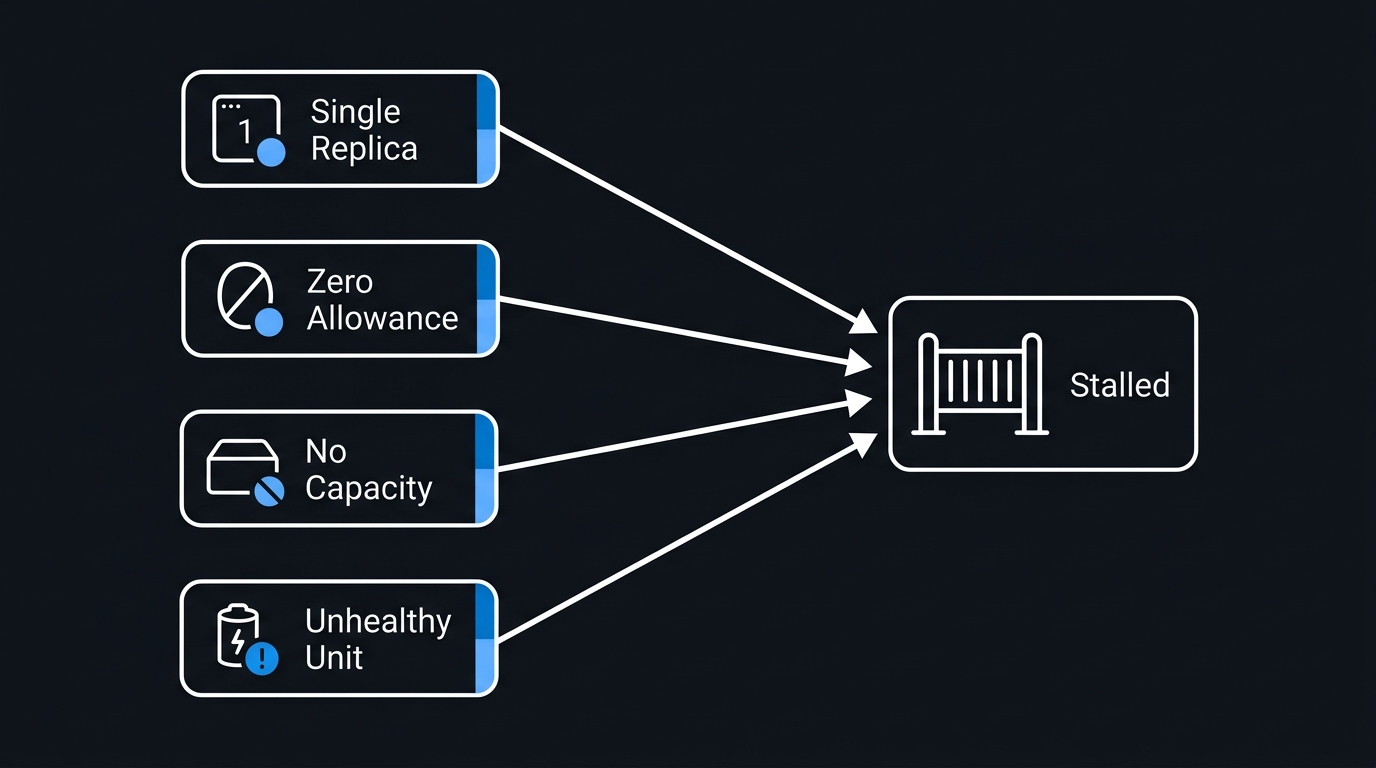
Almost every PDB incident reduces to one of these four shapes:
- Single replica,
minAvailable: 1.currentHealthyis 1,desiredHealthyis 1,disruptionsAllowedis 0, permanently. The pod can never be evicted, and no amount of waiting helps because nothing will ever create a second replica. This is the classic, and it is usually inherited from a chart default. maxUnavailable: 0orminAvailable: 100%. An explicit instruction that no voluntary disruption is ever acceptable. It does exactly what it says.- Replicas that cannot reschedule. The budget is arithmetically fine, but the evicted pod cannot become Ready anywhere else — no capacity, a zone-bound persistent volume, a strict anti-affinity rule, or a node selector matching only the node you are draining. The budget never recovers, so the drain never progresses.
- Unhealthy pods held by the default policy. Covered below, and the least obvious of the four.
The triage sequence is always the same: read disruptionsAllowed, then decide whether the number is wrong or the cluster is. If the budget is wrong, patch it. If the cluster cannot host the replacement, fix capacity — do not delete the budget, because that just converts a stalled drain into a real outage.
# Which PDB is blocking, and by how much?
kubectl describe pdb -n storefront checkout-api-pdb

# Legitimate fix #1: scale up so the budget can be satisfied during the drain.
kubectl scale deployment/checkout-api -n storefront --replicas=3

# Legitimate fix #2: correct a budget that was never satisfiable.
kubectl patch pdb checkout-api-pdb -n storefront --type merge \
  -p '{"spec":{"minAvailable":null,"maxUnavailable":"33%"}}'

# Break-glass only, with a change record: remove the budget for the window.
kubectl get pdb checkout-api-pdb -n storefront -o yaml > /tmp/pdb-backup.yaml
kubectl delete pdb checkout-api-pdb -n storefront
# ... complete the drain, then immediately:
kubectl apply -f /tmp/pdb-backup.yaml
unhealthyPodEvictionPolicy
This is the field that fixes the subtlest version of the blocked drain. A pod can be Running but not Ready — CrashLoopBackOff after a bad config change, a failing readiness probe, a dependency outage.
Under the default policy, IfHealthyBudget, a running-but-unhealthy pod may only be evicted while the application is not already disrupted, meaning currentHealthy is at least desiredHealthy. The intent is protective: give the pods of an already-degraded application the best chance to recover rather than churning them. The side effect is that a broken application actively blocks node drains, precisely when you may be trying to move it onto healthy hardware.
Setting AlwaysAllow treats running-but-unhealthy pods as already disrupted, so they can always be evicted regardless of the budget. For stateless services this is nearly always the right choice: a pod that is not serving traffic is not contributing to availability, and letting it move is strictly better than wedging cluster maintenance. For quorum-based stateful systems, leave the default — there, a member that is running but not yet caught up is doing meaningful work.
The field reached stable status in Kubernetes 1.31; if you are on an older cluster, confirm the feature gate state for your version before relying on it.
Monitoring Disruption Events
The whole point of the audit above is that you should not be discovering broken budgets during a maintenance window. Standard kube-state-metrics exposes everything you need:
groups:
  - name: pod-disruption-budgets
    rules:
      # A budget stuck at zero is a maintenance operation that will fail later.
      - alert: PDBAllowsNoDisruptions
        expr: kube_poddisruptionbudget_status_pod_disruptions_allowed == 0
        for: 30m
        labels:
          severity: warning
        annotations:
          summary: "PDB {{ $labels.namespace }}/{{ $labels.poddisruptionbudget }} allows no disruptions"
          description: "Node drains and AKS upgrades touching these pods will stall."

      # A budget guarding nothing: selector typo or renamed workload labels.
      - alert: PDBSelectorMatchesNoPods
        expr: kube_poddisruptionbudget_status_expected_pods == 0
        for: 15m
        labels:
          severity: warning

      # Running below the floor means the app is degraded right now.
      - alert: PDBBelowDesiredHealthy
        expr: >
          kube_poddisruptionbudget_status_current_healthy
            < kube_poddisruptionbudget_status_desired_healthy
        for: 10m
        labels:
          severity: critical
Pair those with an eviction-rejection signal from the API server — requests to the eviction subresource returning 429 — so an in-progress drain that is quietly retrying shows up as a spike rather than as a support ticket forty minutes later. And keep the kubectl get pdb -A zero-disruption audit in a scheduled job or a pre-upgrade checklist; it takes seconds and catches the single-replica case before the upgrade does.
Common Mistakes to Avoid
- Treating a PDB as an uptime guarantee. It constrains voluntary evictions only. Node failure and spot reclaim walk straight through it.
minAvailable: 1on a single-replica Deployment. The canonical undrainable workload. Either add a replica or express the budget asmaxUnavailable.- Percentage budgets applied by chart defaults across every workload. Round-up semantics turn
minAvailable: "50%"into a hard block on anything running one pod. - Selectors copied from the Deployment's
metadata.labelsinstead of the pod template. The PDB reports zero expected pods and protects nothing. - An empty
selector: {}inpolicy/v1. That is every pod in the namespace, not none. - Leaving
unhealthyPodEvictionPolicyat default for stateless apps. A CrashLoopBackOff pod then blocks the drain that would have moved it somewhere healthier. - Reaching for
--disable-evictionor force upgrade first. Both bypass every budget in scope. They are incident tools with an outage attached. - Deleting a PDB to unblock a drain and never restoring it. The protection is gone and nobody notices until the next real incident.
- No alerting on
disruptionsAllowed == 0. The failure is fully predictable hours or weeks ahead of the operation that trips it.
Key Takeaways
- PDBs gate the Eviction API and nothing else. Drains, cluster autoscaler scale-down, and managed node upgrades are in scope; hardware failure, spot reclaim, direct deletion, and rolling updates are not.
maxUnavailablescales gracefully and does not deadlock single-replica workloads;minAvailablewith an integer is the right tool for quorum systems.- Percentages round up in both fields, so identical percentages are not symmetric — check the resulting
ALLOWED DISRUPTIONSrather than trusting the arithmetic in your head. .status.disruptionsAllowed == 0outside a rollout is a defect, not a state. Alert on it and audit for it before upgrades.- On AKS, tune
--drain-timeout,--node-soak-duration, and--undrainable-node-behavior Cordonso a bad budget quarantines one node instead of failing an entire upgrade. unhealthyPodEvictionPolicy: AlwaysAllowis the correct default for stateless services and removes an entire class of stuck drain.- Fix the budget or the capacity. Deleting the PDB or forcing the upgrade converts a blocked maintenance window into a genuine availability event.
- The AKS upgrade and drain surface moves quickly — confirm current flags, defaults, and preview status against Microsoft's documentation before automating around them.
Next Steps
- Run the zero-disruption audit from the verification section across every cluster you own and triage what it returns.
- Find your unprotected workloads — any Deployment with more than one replica and no matching PDB is unmanaged during upgrades.
- Convert percentage
minAvailablebudgets tomaxUnavailablefor stateless services, and to integerminAvailablefor quorum systems. - Set
unhealthyPodEvictionPolicy: AlwaysAllowon stateless service budgets, subject to your cluster version. - Add the three alert rules to your monitoring stack and wire the eviction 429 signal into your upgrade runbook.
- Rehearse a full node drain in a non-production cluster with a timeout set, and record how long the drain honestly takes — that number belongs in your maintenance window planning.
Related Articles
-
AKS Production Hardening: A 2026 Security and Reliability Checklist
-
Kubernetes Ingress Controllers Compared: nginx vs Traefik vs Azure Application Gateway
-
Docker Multi-Stage Builds: Shrink Your Images and Speed Up CI
-
Reserved Instances vs Savings Plans vs Spot VMs: An Azure Cost Optimization Comparison
-
AKS Observability with Managed Prometheus and Grafana: Metrics, Alerts, and Dashboards
-
Specifying a Disruption Budget for your Application | Kubernetes
-
Upgrade options and recommendations for AKS clusters | Microsoft Learn

Leave a Reply