
Executive Snapshot
| Dimension | Reserved Instances | Savings Plan for Compute | Spot VMs |
|---|---|---|---|
| What you commit to | A specific VM series, in a specific region, for 1 or 3 years | A fixed hourly spend (for example $4.20/hour) for 1 or 3 years | Nothing — pay the current spot rate |
| Typical discount vs pay-as-you-go | Largest of the three; Microsoft cites up to ~72% on 3-year terms | Slightly below the equivalent-term reservation; Microsoft cites up to ~65% | Largest overall; commonly cited up to ~90%, varies continuously |
| Flexibility | Region- and series-bound, with instance size flexibility inside a series | Applies automatically across regions, series, and OS | Total — but the VM can be taken away |
| Exchange | Historically supported; policy has changed direction before — confirm current terms | Not supported | Not applicable |
| Cancellation | Self-service refund subject to a cap and an early termination fee | Not supported at all | Not applicable |
| Availability guarantee | Full SLA | Full SLA | No SLA, 30-second eviction notice |
| Best for | Steady-state, long-lived, predictable footprints | Variable or evolving compute that persists in aggregate | Batch, CI, rendering, dev/test, fault-tolerant scale-out |
Every percentage in this article is a planning range, not a quote. Discounts vary by VM series, region, term, and agreement type, and Microsoft revises the published rates. Model your own SKUs in the Azure Pricing Calculator, or pull the retail price for the exact meter, before you commit budget.
TL;DR
- Reservations buy the deepest guaranteed discount but the least flexibility — you are locking a VM series in a region for one or three years, and the discount only lands if that footprint actually stays put.
- Savings plans trade a few points of discount for near-total flexibility — the benefit follows your compute automatically across regions, series, and operating systems, which is why it wins whenever the shape of your fleet is still moving.
- Savings plans cannot be cancelled, refunded, or exchanged. Reservations have an exit path (capped, and with a fee). Treat a savings plan commitment as spend you have already made.
- Spot VMs deliver the biggest headline discount and the only real risk — a 30-second eviction notice and no SLA, which is fine for batch and catastrophic for a database.
- The three models stack. Reservations cover the immovable baseline, a savings plan absorbs the variable layer above it, and spot handles interruptible work — but spot usage is never eligible for reservation or savings plan discounts.
- Under-utilised commitments erase the savings. A reservation sitting at 60% utilisation is often worse than pay-as-you-go, so monitoring is part of the purchase, not an afterthought.
Introduction
Azure gives you three fundamentally different ways to pay less for compute, and they fail in three fundamentally different ways. Buy the wrong reservation and you are locked to a VM series your architects abandon six months later. Over-commit on a savings plan and there is no refund window to crawl back through. Put the wrong workload on spot and you learn about eviction mechanics during an incident review.
The comparison that matters is not "which one is cheapest." On a like-for-like SKU, the ordering is usually predictable: spot beats reservations, reservations beat savings plans, and all three beat pay-as-you-go. The real question is which model's constraints your workload can absorb — commitment length, resource specificity, and interruption tolerance.
This article walks the mechanics of each model, the flexibility and exit rules that decide most real purchases, the eviction behaviour that determines whether spot is viable, and a decision framework you can apply per workload rather than per subscription. It closes with the Azure CLI and PowerShell you need to keep commitments honest after the purchase order is signed.
How Each Model Actually Works
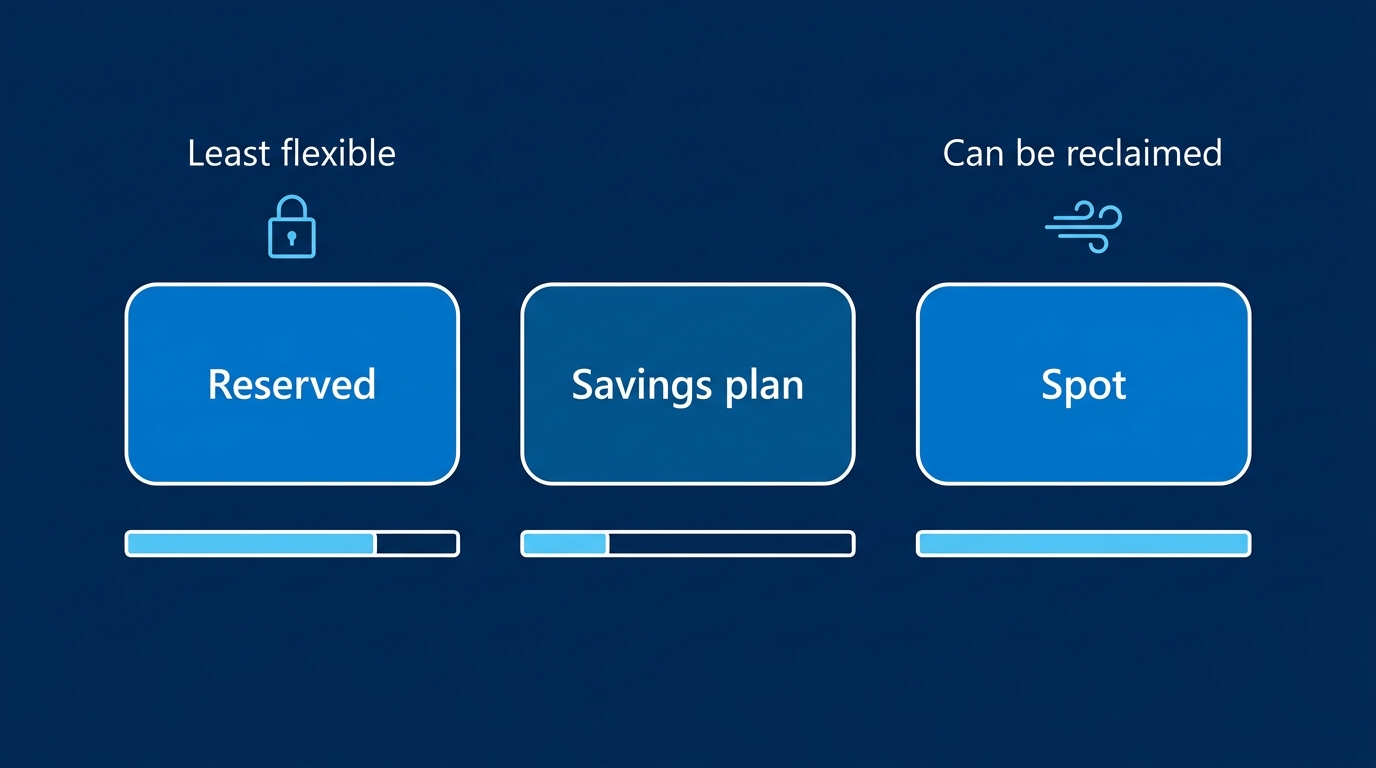
Reserved Instances (Azure Reservations)
A reservation is a prepaid commitment to a quantity of a specific resource type, in a specific region, for a one-year or three-year term. For VMs, you buy something like "10 × D4s v5 in West Europe for 3 years." Azure then applies the reserved rate hourly against matching usage; anything beyond the reserved quantity bills at pay-as-you-go.
Key mechanics IT pros get wrong:
- You can pay monthly at no extra cost. Unlike some competing clouds, Azure's monthly reservation payment plan carries no premium over the upfront option. There is rarely a financial reason to drain cash upfront unless your finance team wants the capex treatment.
- The discount covers compute infrastructure only. Windows Server and SQL Server licensing, plus most marketplace software charges, are billed separately. If you are not already applying Azure Hybrid Benefit to those, the reservation will look like it under-delivered.
- Reservations are not capacity guarantees. A standard reservation is a billing construct. If you need guaranteed capacity in a region, that is a separate Capacity Reservation product (billed on its own), and it can be combined with a reservation for the discount.
- Reservations extend well beyond VMs — SQL Database vCores, Cosmos DB throughput, App Service, Azure VMware Solution, storage capacity, and several data services all have reservation SKUs with their own rules. The VM rules described here do not transfer wholesale.
Savings Plan for Compute
An Azure savings plan is a commitment to spend a fixed amount per hour on eligible compute for one or three years. You are not naming a SKU, a region, or an operating system. Each hour, Azure applies discounted savings-plan rates to your eligible usage — starting with the usage that carries the highest discount percentage — until your hourly commitment is consumed. Usage beyond the commitment bills at pay-as-you-go, and any unused commitment in that hour is simply lost.
Eligible services generally include virtual machines, dedicated hosts, container instances, App Service (specific plan types), and Azure Functions Premium plans. The eligible-service list has grown since the product launched, so verify the current list in Microsoft's savings plan documentation before you assume a workload is covered.
The trade is explicit: you accept a somewhat smaller per-hour discount than the equivalent-term reservation on the same SKU, and in exchange the benefit follows your fleet wherever it goes. Re-platform from D-series to E-series, move a workload from North Europe to Sweden Central, or migrate Linux to Windows — the savings plan keeps applying.
Spot Virtual Machines
Spot VMs run on Azure's unused capacity in a region. You pay a variable spot price that sits well below pay-as-you-go — discounts in the region of 60% to 90% are common, but the rate is dynamic and differs per size, per region, and over time.
The price is not the interesting part. The interesting part is that Azure can reclaim that capacity, at any time, with 30 seconds of notice. Spot VMs carry no SLA, cannot be covered by a reservation or savings plan, and are unavailable for some VM families (B-series burstable sizes, in particular, are not offered as spot). Spot also draws on a separate quota from your standard vCPU quota, which trips up a lot of first deployments.
Scope and Flexibility: Where the Models Diverge
Flexibility is the axis that decides most purchases, and it has three sub-dimensions.
Instance size flexibility (reservations only). A VM reservation with instance size flexibility enabled applies across different sizes within the same size series using a published ratio table. A reservation bought for one D4s v5 can cover two D2s v5 instances, or half a D8s v5, because Azure normalises by a per-size ratio. This is genuinely useful and frequently forgotten at purchase time. Caveats: it works within a series, never across series (a D-series reservation will not cover E-series), and not every family participates. Check the current VM size flexibility ratio table in Microsoft's documentation for the specific series you are buying.
Scope (both reservations and savings plans). Both benefits can be scoped to a single resource group, a single subscription, a management group, or shared across all eligible subscriptions in the billing context. Shared scope is the default recommendation for most organisations because it maximises the chance the benefit finds matching usage — narrow scoping is the single most common cause of a reservation that reports low utilisation while identical VMs elsewhere pay list price. Scope is editable after purchase on both products, at no cost, and it is the first thing to check when utilisation looks wrong.
Region and family binding. A reservation is bound to a region and a VM series. Changing either historically required an exchange. A savings plan is bound to neither: the commitment is denominated in dollars per hour, and Azure applies it to whatever eligible compute is running. That difference is the entire product rationale for savings plans.
Exchange, Cancellation, and Refunds
This is where an avoidable multi-year mistake gets made, so read the current terms rather than trusting institutional memory.
Reservation exchanges. Historically, Microsoft allowed self-service exchanges of compute reservations — trading an existing reservation for a new one of equal or greater value, with the unused prorated amount credited toward the replacement. In late 2023 Microsoft announced that VM reservation exchanges would be discontinued from January 2024, then postponed that change indefinitely following customer feedback. Because this policy has already reversed direction once, do not architect a purchasing strategy that depends on exchanging your way out. Confirm the current exchange rules in Microsoft's self-service exchanges and refunds documentation before you buy, and again before you attempt an exchange.
Reservation cancellations and refunds. Self-service cancellation exists but is deliberately constrained: refunds are capped at a rolling 12-month limit per billing profile or enrollment (commonly documented as $50,000 USD), and Microsoft's terms allow for an early termination fee of up to 12% on the prorated refund amount. Exchanges have historically not counted against the refund cap, while cancellations do. Verify both the cap and the fee percentage against current documentation — these numbers have moved before.
Savings plan cancellations. There are none. Azure savings plans cannot be cancelled, refunded, or exchanged for any other benefit. You may change the scope, and in some agreement types you may transfer ownership, but the money is committed for the full term. This asymmetry deserves more weight than it usually gets in vendor conversations: a savings plan is a slightly smaller discount and a strictly harder commitment. It earns its place through flexibility of application, not flexibility of exit.
The practical takeaway: size a savings plan conservatively against the compute spend you are confident will exist in month 30, not the spend you have today. Under-committing costs you a few points of discount on the uncovered layer; over-committing is unrecoverable.
Spot Eviction Mechanics and Eviction-Rate Data
Two things can evict a spot VM:
- Capacity eviction — Azure needs the underlying capacity back for pay-as-you-go or reserved customers. This can happen at any time, in any region, regardless of price.
- Price eviction — the current spot price rises above the maximum price you set. Setting your max price to
-1means "pay up to the pay-as-you-go rate," which removes price eviction as a cause entirely and leaves only capacity eviction.
You also choose an eviction policy per VM or scale set:
- Deallocate — the VM moves to the stopped-deallocated state. The disk is retained and you keep paying for storage, but the VM can be restarted when capacity returns. Right for stateful-ish workers that can resume.
- Delete — the VM and (optionally) its disks are removed. Right for stateless scale-out where a fresh instance is cheaper than a resurrected one.
The 30-second notice is real but short. Eviction is announced through Azure Scheduled Events on the instance metadata endpoint, as an event of type Preempt. Anything that needs to happen before the VM disappears — checkpointing, draining a queue message, deregistering from a load balancer — must fit inside that window and must be triggered by polling the endpoint, not by a graceful OS shutdown you hope arrives.
# Poll Azure Scheduled Events from inside a Spot VM for eviction notices.
# Run on a short interval (every few seconds) from a supervisor process.
curl -s -H "Metadata: true" \
  "http://169.254.169.254/metadata/scheduledevents?api-version=2020-07-01" \
  | jq '.Events[] | select(.EventType == "Preempt")'

# A Preempt event looks broadly like this — NotBefore is your deadline:
# {
#   "EventId": "…",
#   "EventType": "Preempt",
#   "ResourceType": "VirtualMachine",
#   "Resources": ["spot-worker-03"],
#   "EventStatus": "Scheduled",
#   "NotBefore": "Mon, 03 Aug 2026 11:42:07 GMT"
# }
Eviction-rate data. Azure publishes a per-size, per-region eviction rate as a bucketed percentage — the portal surfaces bands such as 0-5%, 5-10%, 10-15%, 15-20%, and 20%+ when you select a spot size, derived from recent historical eviction behaviour. Use it as a comparative signal, not a forecast: a size showing 0-5% in one region and 20%+ in the region next door is telling you something useful about where to schedule the batch, but it is a trailing statistic and carries no forward commitment. Treat any specific eviction percentage you find in a blog post — including this one — as stale, and read the live figure in the portal for your target size and region at planning time.
The design rule that follows: build for eviction as the normal case. Idempotent work items, checkpointing to durable storage, a queue that redelivers unacknowledged messages, and a scale set configured across multiple sizes so a single size's capacity crunch does not idle the whole job.
The Decision Framework
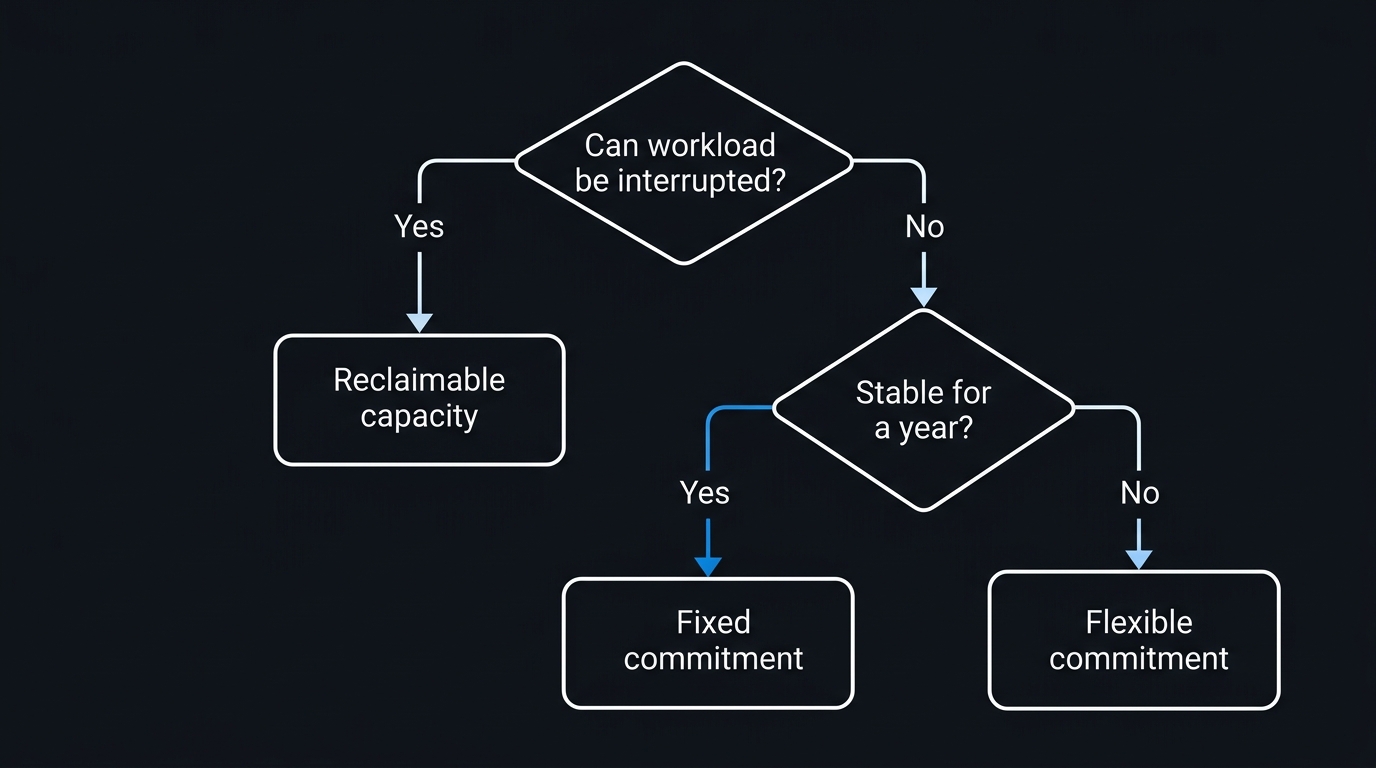
Run this per workload, not per subscription. The first question is binary and disqualifying; the rest are about how much of your footprint is genuinely predictable.
Steady-state workloads — domain controllers, production application tiers, always-on databases, jump boxes, anything that has run on the same SKU for a year and has no re-platforming project attached. Reservations, three-year term if the business case survives a three-year horizon.
Variable or evolving workloads — fleets mid-migration, environments where AKS node pool sizes shift with demand, teams that change VM families as new generations land. Savings plan. The aggregate spend is predictable even when the individual SKUs are not, and the savings plan is priced against exactly that situation.
Interruptible workloads — CI/CD agents, batch ETL, media rendering, ML training with checkpointing, dev/test environments outside business hours, stateless scale-out behind a queue. Spot, with Delete or Deallocate chosen deliberately and a max price of -1 unless you have a specific budget ceiling.
Everything else — short-lived projects, proof-of-concept environments, anything with a defined end date inside twelve months. Pay-as-you-go, and put the savings effort into shutdown schedules and right-sizing instead.
Combining the Models
Most mature Azure estates use all three, layered:
- Reservations for the immovable base. Take the portion of your fleet that has been stable for 12 months on a known series in a known region. Cover roughly 70-80% of it, not 100% — the last slice is where change happens.
- A savings plan for the variable layer above it. Size the hourly commitment against the compute spend that persists even as SKUs churn. Because reservations are applied first in the billing engine and the savings plan then covers remaining eligible usage, the two do not fight each other.
- Spot for everything interruptible, sitting entirely outside both commitments — spot usage is not eligible for reservation or savings plan discounts, so it should be excluded from your commitment sizing calculations altogether.
The single most common sizing error is including spot usage or short-lived project VMs in the baseline used to size a commitment. Filter both out of your usage export before you calculate coverage, or you will buy a commitment that has nothing to attach to.
Order of application matters when you are reconciling an invoice: reservation discounts land first, the savings plan absorbs eligible usage that remains, and anything still uncovered bills at list. If a reservation looks like it stopped applying, check whether a scope change or a series migration moved the underlying usage out from under it before you assume a billing error.
Monitoring Utilisation with Advisor and Cost Management
A commitment you do not monitor is a discount you may not be receiving. Two Azure surfaces matter.
Azure Advisor produces reservation and savings plan purchase recommendations based on a lookback window over your recent usage (selectable, commonly 7, 30, or 60 days), plus recommendations to act on under-used commitments. It is a decent starting point and a poor final answer — Advisor recommends against observed history and cannot know about the migration you have planned for Q4.
# Pull all cost recommendations, including reservation and savings plan advice
az advisor recommendation list --category Cost \
  --query "[].{Problem:shortDescription.problem, Impact:impact, Resource:impactedValue}" \
  --output table
Cost Management is where post-purchase truth lives: reservation utilisation percentages, unused reservation quantities, savings plan utilisation, and the amortised cost views that let you attribute a commitment back to the teams consuming it. Set a reservation utilisation alert so a drop below your threshold (80% is a reasonable trigger) reaches a human rather than waiting for the quarterly review.
Query utilisation from the CLI:
# The reservation commands live in an extension — install it once
az extension add --name reservation

# List reservation orders, then the reservations inside one
az reservations reservation-order list \
  --query "[].{Name:displayName, Term:term, State:provisioningState, Id:name}" \
  --output table

az reservations reservation list \
  --reservation-order-id "<reservation-order-id>" \
  --query "[].{Sku:sku.name, Qty:properties.quantity, State:properties.provisioningState}" \
  --output table

# Daily utilisation summary for a reservation order over the last month
az consumption reservation summary list \
  --reservation-order-id "<reservation-order-id>" \
  --grain daily \
  --start-date 2026-07-01 \
  --end-date 2026-07-31 \
  --output table
The savings plan surface is newer than the reservation surface and its command names have shifted between extension versions. Run az billing-benefits --help after installing the billing-benefits extension to confirm the current verbs for your CLI version rather than copying a command from an older article:
az extension add --name billing-benefits
az billing-benefits --help
The same picture from PowerShell, which is often the easier path when you want to pipe results into a report:
# Requires the Az.Reservations and Az.Billing modules
Connect-AzAccount

# Inventory every reservation order and its reservations
$orders = Get-AzReservationOrder

foreach ($order in $orders) {
    Get-AzReservation -ReservationOrderId $order.Name | ForEach-Object {
        [PSCustomObject]@{
            OrderName   = $order.DisplayName
            Sku         = $_.SkuDescription
            Quantity    = $_.Quantity
            Term        = $order.Term
            State       = $_.ProvisioningState
            ExpiryDate  = $order.ExpiryDate
            Scope       = $_.AppliedScopeType
        }
    }
} | Sort-Object ExpiryDate | Format-Table -AutoSize

# Daily utilisation for one order — flag anything under 90%
$summary = Get-AzConsumptionReservationSummary `
    -ReservationOrderId "<reservation-order-id>" `
    -Grain daily `
    -StartDate "2026-07-01" `
    -EndDate   "2026-07-31"

$summary |
    Where-Object { $_.AvgUtilizationPercentage -lt 90 } |
    Select-Object UsageDate, ReservedHours, UsedHours, AvgUtilizationPercentage |
    Format-Table -AutoSize
Cmdlet names and parameter sets in the consumption and reservations modules do change between Az module major versions. If a command above errors on parameter binding, run Get-Command -Module Az.Billing, Az.Reservations and Get-Help <cmdlet> -Full to confirm the current signature.
Run the utilisation check monthly and again 90 days before any reservation expiry. Expiry is the moment a stale commitment quietly turns into full-price billing, and auto-renew defaults are worth an explicit decision rather than a discovery.
Pitfalls to Avoid
- Scoping a reservation to a single resource group and forgetting. The usage moves, the reservation does not, utilisation drops, and nobody notices until the annual review. Prefer shared scope unless chargeback rules genuinely require otherwise.
- Sizing a commitment from a month that included a load test. Use a representative window, exclude spot and short-lived project usage, and size to the trough rather than the peak.
- Assuming the reservation covers the Windows licence. It covers compute. Pair it with Azure Hybrid Benefit or the savings will read lower than the model predicted.
- Buying a three-year term on a series with a next generation already announced. Check the regional availability roadmap for newer VM generations before locking three years to an older one.
- Treating a savings plan as reversible. It is not. Size it as the floor of your compute spend, never the ceiling.
- Running anything with state on spot without checkpointing. The 30 seconds is not enough to invent a recovery strategy at eviction time.
- Ignoring commitment expiry dates. Set a calendar reminder at 90 days out for each reservation and savings plan, and decide renewal deliberately.
Troubleshooting
Reservation utilisation shows well below 100% but matching VMs are running
Almost always a scope problem. Check AppliedScopeType on the reservation — if it is Single and pointed at one subscription or resource group, usage elsewhere in the billing account cannot consume it. Change the scope to shared (free, effective going forward) and re-check after the next full billing day.
Reservation applied last month and stopped this month
Look for a VM series change first, then a region change. Instance size flexibility covers different sizes within a series, not a move from, say, D-series to E-series. A resize during a right-sizing exercise is the usual culprit.
az reservations returns "command not found"
The reservation commands ship in a CLI extension. Run az extension add --name reservation, and az extension update --name reservation if you installed it long ago. The consumption commands (az consumption reservation summary list) are in the core CLI but have their own API version quirks — add --output json and inspect the raw response if the table view is empty.
Spot VM deployment fails with a quota error despite available standard quota
Spot draws on a separate quota (historically surfaced as low-priority vCPU quota) per region and per family. Request an increase for the spot quota specifically in the target region; the standard vCPU quota does not apply.
Spot VMs evict immediately after deployment, repeatedly
Check your max price first. If it is set to a fixed value below the current spot rate, you will be evicted on price as soon as the rate moves. Setting max price to -1 caps you at the pay-as-you-go rate and eliminates price eviction. If eviction persists with -1, it is a capacity signal — check the eviction-rate band for that size and region in the portal and pick a different size or region.
Savings plan utilisation is below 100% while VMs are billing at list price
The benefit only applies to eligible services, and the eligible list is narrower than "all compute." Confirm the specific service and plan type is covered in the current documentation, and check the savings plan scope. Remember that spot usage will never draw down a savings plan.
Key Takeaways
- Reservations give the deepest guaranteed discount in exchange for binding you to a series and region for one or three years — right for footprints that have already proven they are stable.
- Savings plans cost a few points of discount and buy back near-total flexibility in where the benefit applies, which is the correct trade for fleets that are still changing shape.
- The exit terms are the real differentiator: reservations have a capped, fee-bearing refund path and a historically available exchange, while savings plans have neither. Size savings plans to the floor of your spend.
- Spot is the biggest discount and the only model with an availability risk — a 30-second
Preemptnotice, no SLA, and eviction rates that vary by size and region. - The models compose. Reservations for the base, a savings plan above it, spot alongside for interruptible work, and pay-as-you-go for anything short-lived.
- Utilisation monitoring is part of the purchase. A commitment running at 60% utilisation can be more expensive than no commitment at all.
Next Steps
- Export 90 days of usage from Cost Management, filter out spot and short-lived project resources, and identify the compute footprint that never dropped below a floor. That floor is your reservation candidate.
- Run the Advisor cost recommendations with the CLI snippet above, and treat them as a starting hypothesis to validate against your roadmap — not a purchase order.
- Price your top three SKUs three ways in the Azure Pricing Calculator: pay-as-you-go, one-year and three-year reservation, and the equivalent savings plan. The gap between reservation and savings plan on your specific series is the number that decides the trade.
- Audit existing commitments with the PowerShell inventory script, flagging anything under 90% utilisation and anything expiring within 90 days.
- Pilot spot on one non-critical workload — a CI agent pool or a nightly batch job — with checkpointing and a Scheduled Events watcher, and measure the real eviction rate over a fortnight before scaling the pattern.
- Set a reservation utilisation alert in Cost Management at an 80% threshold so drift reaches a human automatically.

Leave a Reply