
Executive Snapshot
| Category | Recommendation |
|---|---|
| Identity & Access | Workload Identity + Microsoft Entra ID RBAC; disable local accounts |
| Network | Private cluster + Azure CNI Overlay; enforce Calico or Cilium NetworkPolicy |
| Node Security | CIS-hardened node images; node auto-upgrade on patch channel |
| Workload Isolation | Namespace-scoped RBAC; OPA Gatekeeper or Kyverno admission control |
| Secrets | Azure Key Vault CSI driver; zero plaintext Secrets in etcd |
| Observability | Azure Monitor + Prometheus/Grafana; enable audit logs to Log Analytics |
| Reliability | PodDisruptionBudgets + topology spread; cluster autoscaler + KEDA |
| Supply Chain | Defender for Containers image scanning; signed images via Notation |
| Backup & DR | Velero to Azure Blob; multi-region standby or Azure Backup for AKS |
| Compliance | Azure Policy for Kubernetes; CIS AKS Benchmark v1.5 alignment |
TL;DR
- AKS production hardening is a multi-layer discipline — perimeter, node, workload, identity, and supply chain each need explicit controls.
- Workload Identity replaces pod-managed identity and is now the only supported approach for production credential management in 2026.
- Private clusters with Azure CNI Overlay and Cilium are the recommended network baseline — public API endpoints are a critical risk in production.
- Admission controllers (Gatekeeper or Kyverno) are non-negotiable for enforcing the Kubernetes Pod Security Standards at deploy time; Azure Policy alone is insufficient for runtime.
- Reliability is part of hardening — misconfigured PDBs and missing topology spread constraints are among the top causes of avoidable production incidents.
Introduction
Running a Kubernetes cluster on Azure is straightforward. Running one in production that survives real-world adversaries, noisy-neighbour workloads, upstream CVEs, and 3 a.m. node pool drain events — that's the hard part.
Azure Kubernetes Service has matured significantly, but the platform's flexibility means it ships with several defaults that prioritise ease of onboarding over security depth. Local admin accounts are enabled by default. The API server is public unless you explicitly opt out. Node pools don't auto-upgrade unless you configure the channel. None of these are accidents — they're trade-offs that make sense for a first cluster but are liabilities in production.
This checklist consolidates the 2026 AKS security and reliability baseline — building on Microsoft's own cluster security best practices for AKS — updated for Kubernetes 1.30+, the GA of Cilium as an AKS CNI option, the deprecation of AAD Pod Identity in favour of Workload Identity, and the General Availability of Azure Backup for AKS. Each section is actionable, with tested commands you can run today. Work through it sequentially or jump to the layer most relevant to your current risk posture.
Prerequisites
- An existing AKS cluster or permission to create one (Contributor + User Access Administrator on the subscription)
- Azure CLI ≥ 2.61 (
az --version) withaks-previewextension installed kubectl≥ 1.30 configured with cluster admin context for initial setup- Helm ≥ 3.14 for add-on deployments
- Familiarity with Kubernetes RBAC, NetworkPolicy, and basic Azure IAM concepts
- (Recommended) Terraform or Bicep IaC pipeline — hardening is most durable when codified
Architecture: AKS Hardening Layers
1. Cluster Provisioning: Get the Baseline Right
Hardening retrofitted onto a running cluster is always harder than hardening baked into provisioning. Use this Bicep/CLI baseline.
1.1 Create a Private Cluster with Azure CNI Overlay and Cilium
# Set variables
RG="rg-aks-prod"
CLUSTER="aks-prod-01"
LOCATION="australiaeast"
VNET="vnet-prod"
SUBNET="snet-aks-nodes"

# Create resource group
az group create --name $RG --location $LOCATION

# Create the cluster with production-baseline flags
az aks create \
  --resource-group $RG \
  --name $CLUSTER \
  --location $LOCATION \
  --kubernetes-version 1.30 \
  --enable-private-cluster \
  --private-dns-zone system \
  --network-plugin azure \
  --network-plugin-mode overlay \
  --network-dataplane cilium \
  --network-policy cilium \
  --enable-oidc-issuer \
  --enable-workload-identity \
  --enable-azure-rbac \
  --disable-local-accounts \
  --enable-managed-identity \
  --enable-defender \
  --enable-azure-monitor-metrics \
  --enable-addons monitoring \
  --workspace-resource-id "/subscriptions/<SUB>/resourceGroups/$RG/providers/Microsoft.OperationalInsights/workspaces/law-prod" \
  --auto-upgrade-channel patch \
  --node-os-upgrade-channel NodeImage \
  --tier standard \
  --zones 1 2 3 \
  --node-count 3 \
  --node-vm-size Standard_D4ds_v5 \
  --vnet-subnet-id "/subscriptions/<SUB>/resourceGroups/$RG/providers/Microsoft.Network/virtualNetworks/$VNET/subnets/$SUBNET" \
  --generate-ssh-keys
Key flags explained:
| Flag | Why it matters |
|---|---|
--enable-private-cluster |
API server unreachable from public internet |
--network-dataplane cilium |
eBPF dataplane, Cilium NetworkPolicy, observability |
--enable-azure-rbac |
Kubernetes RBAC backed by Entra ID groups |
--disable-local-accounts |
Eliminates clusterUser/clusterAdmin credential sprawl |
--enable-workload-identity |
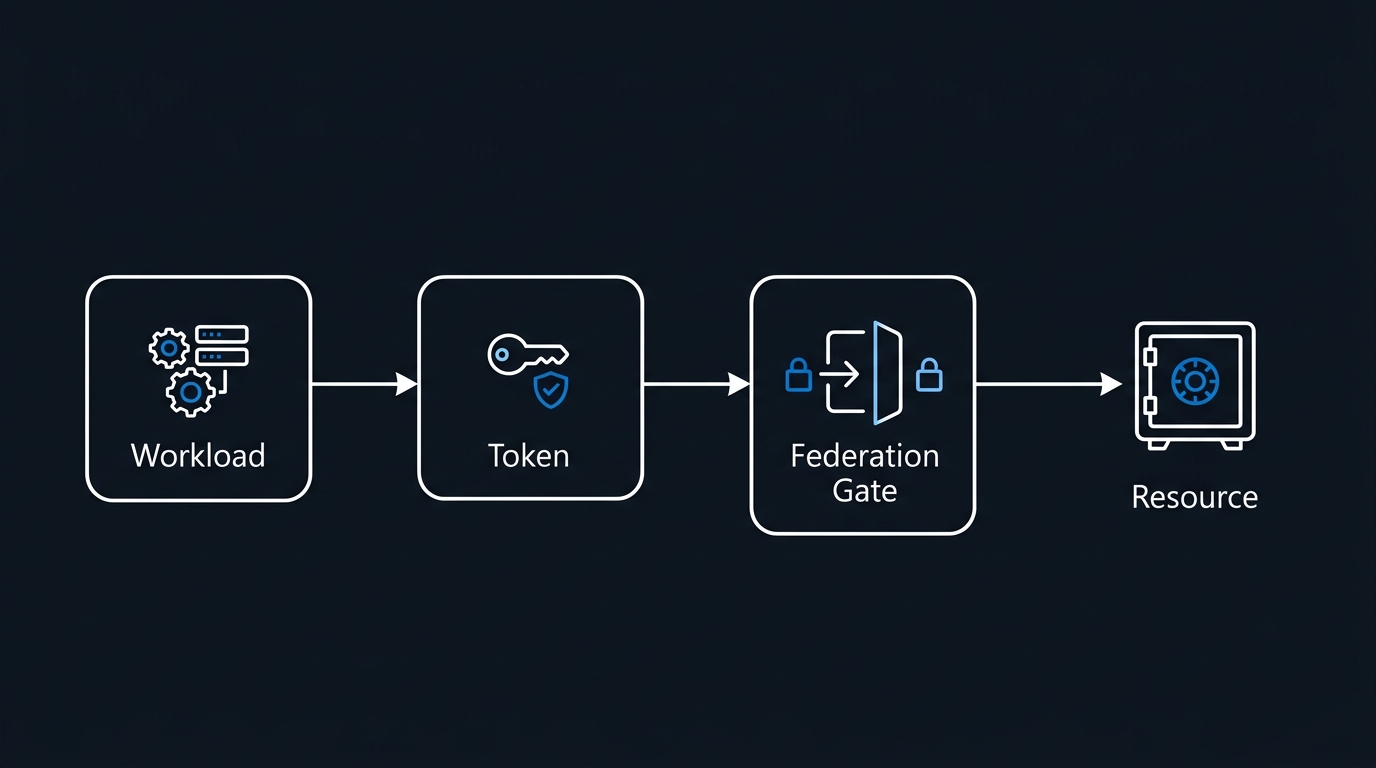
OIDC federation for pod-level Azure auth without secrets |
--enable-defender |
Defender for Containers runtime threat detection |
--auto-upgrade-channel patch |
Automated patch-version upgrades |
--zones 1 2 3 |
Control plane + nodes spread across availability zones |
2. Identity and Access Control
2.1 Disable Local Accounts on Existing Clusters
If you inherited a cluster that wasn't created with --disable-local-accounts:
az aks update \
  --resource-group $RG \
  --name $CLUSTER \
  --disable-local-accounts
Verify with:
az aks show --resource-group $RG --name $CLUSTER \
  --query "disableLocalAccounts" -o tsv
# Expected output: true
2.2 Configure Workload Identity for Applications
Microsoft Entra Workload ID replaces the deprecated AAD Pod Identity. It uses Kubernetes ServiceAccount OIDC federation — no secrets in pods, no credential rotation.
# Step 1: Create a managed identity for the workload
az identity create \
  --name "id-myapp-prod" \
  --resource-group $RG

CLIENT_ID=$(az identity show -n id-myapp-prod -g $RG --query clientId -o tsv)
OBJECT_ID=$(az identity show -n id-myapp-prod -g $RG --query principalId -o tsv)

# Step 2: Get the OIDC issuer URL
OIDC_ISSUER=$(az aks show -n $CLUSTER -g $RG \
  --query "oidcIssuerProfile.issuerUrl" -o tsv)

# Step 3: Create the federated credential
az identity federated-credential create \
  --name "fc-myapp-prod" \
  --identity-name "id-myapp-prod" \
  --resource-group $RG \
  --issuer $OIDC_ISSUER \
  --subject "system:serviceaccount:myapp:myapp-sa" \
  --audiences "api://AzureADTokenExchange"

# Step 4: Grant the identity access (e.g., Key Vault Secrets User)
KV_ID=$(az keyvault show -n kv-prod-01 -g $RG --query id -o tsv)
az role assignment create \
  --role "Key Vault Secrets User" \
  --assignee $OBJECT_ID \
  --scope $KV_ID
# serviceaccount.yaml — annotate with client ID
apiVersion: v1
kind: ServiceAccount
metadata:
  name: myapp-sa
  namespace: myapp
  annotations:
    azure.workload.identity/client-id: "<CLIENT_ID_FROM_ABOVE>"
---
# deployment.yaml — label pods to pick up the token volume
apiVersion: apps/v1
kind: Deployment
metadata:
  name: myapp
  namespace: myapp
spec:
  template:
    metadata:
      labels:
        azure.workload.identity/use: "true"
    spec:
      serviceAccountName: myapp-sa
      containers:
        - name: myapp
          image: myacr.azurecr.io/myapp:1.0.0
          # No environment variables containing secrets.
          # The OIDC token is mounted automatically at
          # /var/run/secrets/azure/tokens/azure-identity-token
2.3 Namespace-Scoped RBAC
Never grant cluster-admin to application teams. Use namespace-scoped roles:
# rbac-dev-team.yaml
apiVersion: rbac.authorization.k8s.io/v1
kind: Role
metadata:
  name: dev-team-role
  namespace: myapp
rules:
  - apiGroups: ["apps"]
    resources: ["deployments", "replicasets"]
    verbs: ["get", "list", "watch", "create", "update", "patch"]
  - apiGroups: [""]
    resources: ["pods", "pods/log", "services", "configmaps"]
    verbs: ["get", "list", "watch"]
  # Explicitly deny secrets — teams use Key Vault CSI, not raw secrets
---
apiVersion: rbac.authorization.k8s.io/v1
kind: RoleBinding
metadata:
  name: dev-team-binding
  namespace: myapp
roleRef:
  apiGroup: rbac.authorization.k8s.io
  kind: Role
  name: dev-team-role
subjects:
  - kind: Group
    apiGroup: rbac.authorization.k8s.io
    name: "<ENTRA_GROUP_OBJECT_ID>"
3. Network Security
3.1 Default-Deny NetworkPolicy
The single most impactful network control is a default-deny policy applied to every namespace. Without it, every pod can reach every other pod.
# default-deny-all.yaml — apply to every application namespace
apiVersion: networking.k8s.io/v1
kind: NetworkPolicy
metadata:
  name: default-deny-all
  namespace: myapp
spec:
  podSelector: {}        # Matches all pods in the namespace
  policyTypes:
    - Ingress
    - Egress
---
# Allow specific ingress from ingress controller namespace only
apiVersion: networking.k8s.io/v1
kind: NetworkPolicy
metadata:
  name: allow-ingress-controller
  namespace: myapp
spec:
  podSelector:
    matchLabels:
      app: myapp
  policyTypes:
    - Ingress
  ingress:
    - from:
        - namespaceSelector:
            matchLabels:
              kubernetes.io/metadata.name: ingress-nginx
      ports:
        - protocol: TCP
          port: 8080
---
# Allow egress to Key Vault and Azure Monitor endpoints only
apiVersion: networking.k8s.io/v1
kind: NetworkPolicy
metadata:
  name: allow-egress-azure-services
  namespace: myapp
spec:
  podSelector:
    matchLabels:
      app: myapp
  policyTypes:
    - Egress
  egress:
    - ports:
        - protocol: TCP
          port: 443   # HTTPS to Azure services via private endpoints
    - ports:
        - protocol: UDP
          port: 53    # DNS
3.2 Restrict API Server Authorised IP Ranges (Public Clusters Only)
If you're running a public cluster for any reason (not recommended), at minimum lock the API server:
az aks update \
  --resource-group $RG \
  --name $CLUSTER \
  --api-server-authorized-ip-ranges "203.0.113.10/32,198.51.100.0/24"
4. Admission Control and Policy Enforcement
4.1 Deploy OPA Gatekeeper
helm repo add gatekeeper https://open-policy-agent.github.io/gatekeeper/charts
helm repo update

helm install gatekeeper gatekeeper/gatekeeper \
  --namespace gatekeeper-system \
  --create-namespace \
  --set replicas=3 \
  --set auditInterval=60 \
  --set logLevel=WARNING \
  --set metricsBackends="{prometheus}" \
  --version 3.17.0
4.2 Enforce Critical Constraints
The following ConstraintTemplate blocks privileged containers — one of the most commonly exploited misconfigurations:
# constraint-no-privileged.yaml
apiVersion: templates.gatekeeper.sh/v1
kind: ConstraintTemplate
metadata:
  name: k8snooprivilegedcontainers
spec:
  crd:
    spec:
      names:
        kind: K8sNoprivilegedContainers
  targets:
    - target: admission.k8s.gatekeeper.sh
      rego: |
        package k8snoprivilegedcontainers

        violation[{"msg": msg}] {
          container := input.review.object.spec.containers[_]
          container.securityContext.privileged == true
          msg := sprintf("Container '%v' must not run as privileged.", [container.name])
        }

        violation[{"msg": msg}] {
          container := input.review.object.spec.initContainers[_]
          container.securityContext.privileged == true
          msg := sprintf("Init container '%v' must not run as privileged.", [container.name])
        }
---
apiVersion: constraints.gatekeeper.sh/v1beta1
kind: K8sNoprivilegedContainers
metadata:
  name: no-privileged-containers
spec:
  match:
    kinds:
      - apiGroups: [""]
        kinds: ["Pod"]
    excludedNamespaces:
      - kube-system
      - gatekeeper-system
4.3 Enforce Pod Security Standards via Azure Policy
# Apply the AKS CIS benchmark initiative
az policy assignment create \
  --name "aks-cis-benchmark" \
  --display-name "AKS CIS Benchmark v1.5" \
  --policy-set-definition "c047ea8e-9c78-49b2-958b-37e56d291a44" \
  --scope "/subscriptions/<SUB>/resourceGroups/$RG" \
  --enforcement-mode Default \
  --mi-system-assigned \
  --location $LOCATION
5. Secrets Management
5.1 Mount Key Vault Secrets via CSI Driver
Never use Kubernetes Secret objects for sensitive material in production. The Key Vault CSI driver mounts secrets directly into pods without touching etcd.
# Enable the CSI driver (if not already enabled at cluster creation)
az aks enable-addons \
  --resource-group $RG \
  --name $CLUSTER \
  --addons azure-keyvault-secrets-provider

# Enable secret rotation (default rotation poll: 2 minutes)
az aks addon update \
  --resource-group $RG \
  --name $CLUSTER \
  --addon azure-keyvault-secrets-provider \
  --enable-secret-rotation \
  --rotation-poll-interval 2m
# secretproviderclass.yaml
apiVersion: secrets-store.csi.x-k8s.io/v1
kind: SecretProviderClass
metadata:
  name: myapp-keyvault-secrets
  namespace: myapp
spec:
  provider: azure
  parameters:
    usePodIdentity: "false"
    clientID: "<MANAGED_IDENTITY_CLIENT_ID>"
    keyvaultName: "kv-prod-01"
    tenantId: "<TENANT_ID>"
    objects: |
      array:
        - |
          objectName: db-connection-string
          objectType: secret
          objectVersion: ""
        - |
          objectName: api-key
          objectType: secret
          objectVersion: ""
  secretObjects:                         # Optional: also sync to K8s Secret
    - secretName: myapp-secrets
      type: Opaque
      data:
        - objectName: db-connection-string
          key: DATABASE_URL
---
# Reference in your deployment
apiVersion: apps/v1
kind: Deployment
metadata:
  name: myapp
  namespace: myapp
spec:
  template:
    spec:
      serviceAccountName: myapp-sa
      containers:
        - name: myapp
          image: myacr.azurecr.io/myapp:1.0.0
          volumeMounts:
            - name: secrets-store
              mountPath: "/mnt/secrets"
              readOnly: true
      volumes:
        - name: secrets-store
          csi:
            driver: secrets-store.csi.k8s.io
            readOnly: true
            volumeAttributes:
              secretProviderClass: "myapp-keyvault-secrets"
6. Container Image Supply Chain
6.1 Restrict to Signed Images from Trusted Registries
# Enable image integrity (Notation-based signing verification) on AKS
az aks update \
  --resource-group $RG \
  --name $CLUSTER \
  --enable-image-integrity

# Create an Azure Policy assignment that denies unsigned images
az policy assignment create \
  --name "require-signed-images" \
  --policy "951b3557-235d-4ba4-8e16-803ab58c6176" \
  --scope "/subscriptions/<SUB>/resourceGroups/$RG" \
  --enforcement-mode Default
6.2 Lock Node Pools to a Private ACR
# Attach ACR at cluster level (grants AcrPull to kubelet identity)
az aks update \
  --resource-group $RG \
  --name $CLUSTER \
  --attach-acr "myacr"

# Disable public network access on the registry
az acr update \
  --name myacr \
  --public-network-enabled false

# Enforce via Gatekeeper: only allow images from myacr.azurecr.io
# constraint-allowed-registries.yaml
apiVersion: templates.gatekeeper.sh/v1
kind: ConstraintTemplate
metadata:
  name: k8sallowedrepos
spec:
  crd:
    spec:
      names:
        kind: K8sAllowedRepos
      validation:
        openAPIV3Schema:
          properties:
            repos:
              type: array
              items:
                type: string
  targets:
    - target: admission.k8s.gatekeeper.sh
      rego: |
        package k8sallowedrepos

        violation[{"msg": msg}] {
          container := input.review.object.spec.containers[_]
          not strings.any_prefix_match(container.image, input.parameters.repos)
          msg := sprintf("Container image '%v' is not from an allowed registry.", [container.image])
        }
---
apiVersion: constraints.gatekeeper.sh/v1beta1
kind: K8sAllowedRepos
metadata:
  name: prod-allowed-repos
spec:
  match:
    kinds:
      - apiGroups: [""]
        kinds: ["Pod"]
    excludedNamespaces: ["kube-system", "gatekeeper-system"]
  parameters:
    repos:
      - "myacr.azurecr.io/"
7. Node Security
7.1 Configure Node Auto-Upgrade and Maintenance Windows
# Set a maintenance window to control when auto-upgrades apply
az aks maintenanceconfiguration add \
  --resource-group $RG \
  --cluster-name $CLUSTER \
  --name "aksManagedAutoUpgradeSchedule" \
  --schedule-type Weekly \
  --day-of-week Sunday \
  --start-time "02:00" \
  --utc-offset "+10:00" \
  --duration 4

# Confirm upgrade channels
az aks show -n $CLUSTER -g $RG \
  --query "{upgradeChannel:autoUpgradeProfile.upgradeChannel, nodeOSUpgradeChannel:autoUpgradeProfile.nodeOSUpgradeChannel}" \
  -o table
7.2 Apply Node Taints and Labels for Workload Isolation
# Add a dedicated node pool for sensitive workloads
az aks nodepool add \
  --resource-group $RG \
  --cluster-name $CLUSTER \
  --name sensitivepool \
  --node-count 2 \
  --node-vm-size Standard_D4ds_v5 \
  --node-taints "workload-class=sensitive:NoSchedule" \
  --labels "workload-class=sensitive" \
  --zones 1 2 3 \
  --enable-encryption-at-host \
  --mode User
7.3 Enable Host Encryption and Confidential Computing
# Verify the feature is registered
az feature show \
  --namespace Microsoft.Compute \
  --name EncryptionAtHost \
  --query "properties.state" -o tsv
# Must show: Registered

# Add a confidential node pool (DCdsv3 for AMD SEV-SNP)
az aks nodepool add \
  --resource-group $RG \
  --cluster-name $CLUSTER \
  --name confidentalpool \
  --node-count 2 \
  --node-vm-size Standard_DC4ds_v3 \
  --enable-encryption-at-host \
  --mode User
8. Reliability Patterns
Security and reliability are two sides of the same production-readiness coin. A cluster that crashes under load or drops pods during upgrades fails the availability pillar of your SLA — and availability failures create their own attack surface.
8.1 PodDisruptionBudgets for Every Critical Deployment
# pdb-myapp.yaml
apiVersion: policy/v1
kind: PodDisruptionBudget
metadata:
  name: myapp-pdb
  namespace: myapp
spec:
  minAvailable: "60%"    # At least 60% of pods must stay up during voluntary disruptions
  selector:
    matchLabels:
      app: myapp
8.2 Topology Spread Constraints
# topology-spread in deployment spec
spec:
  template:
    spec:
      topologySpreadConstraints:
        - maxSkew: 1
          topologyKey: topology.kubernetes.io/zone
          whenUnsatisfiable: DoNotSchedule
          labelSelector:
            matchLabels:
              app: myapp
        - maxSkew: 1
          topologyKey: kubernetes.io/hostname
          whenUnsatisfiable: DoNotSchedule
          labelSelector:
            matchLabels:
              app: myapp
8.3 Cluster Autoscaler and KEDA
# Enable cluster autoscaler on the user node pool
az aks nodepool update \
  --resource-group $RG \
  --cluster-name $CLUSTER \
  --name userpool \
  --enable-cluster-autoscaler \
  --min-count 2 \
  --max-count 20

# Deploy KEDA for event-driven autoscaling
helm repo add kedacore https://kedacore.github.io/charts
helm install keda kedacore/keda \
  --namespace keda \
  --create-namespace \
  --version 2.14.0 \
  --set prometheus.metricServer.enabled=true
8.4 Resource Requests, Limits, and LimitRanges
# limitrange-myapp.yaml — enforce sensible defaults and ceilings
apiVersion: v1
kind: LimitRange
metadata:
  name: myapp-limitrange
  namespace: myapp
spec:
  limits:
    - type: Container
      default:
        cpu: "500m"
        memory: "512Mi"
      defaultRequest:
        cpu: "100m"
        memory: "128Mi"
      max:
        cpu: "4"
        memory: "8Gi"
    - type: PersistentVolumeClaim
      max:
        storage: "50Gi"
9. Observability and Audit Logging
9.1 Enable and Retain Audit Logs
# Verify diagnostic settings are sending audit logs to Log Analytics
az monitor diagnostic-settings create \
  --name "aks-diag-prod" \
  --resource "/subscriptions/<SUB>/resourceGroups/$RG/providers/Microsoft.ContainerService/managedClusters/$CLUSTER" \
  --workspace "/subscriptions/<SUB>/resourceGroups/$RG/providers/Microsoft.OperationalInsights/workspaces/law-prod" \
  --logs '[
    {"category":"kube-audit","enabled":true,"retentionPolicy":{"days":90,"enabled":true}},
    {"category":"kube-audit-admin","enabled":true,"retentionPolicy":{"days":90,"enabled":true}},
    {"category":"kube-apiserver","enabled":true,"retentionPolicy":{"days":30,"enabled":true}},
    {"category":"kube-controller-manager","enabled":true,"retentionPolicy":{"days":30,"enabled":true}},
    {"category":"guard","enabled":true,"retentionPolicy":{"days":90,"enabled":true}}
  ]'
9.2 Key KQL Queries for Security Monitoring
// Detect exec into pods (potential container breakout indicator)
AzureDiagnostics
| where Category == "kube-audit"
| extend auditLog = parse_json(log_s)
| where auditLog.verb == "create"
  and auditLog.objectRef.resource == "pods"
  and auditLog.objectRef.subresource == "exec"
| project TimeGenerated,
    User = tostring(auditLog.user.username),
    Namespace = tostring(auditLog.objectRef.namespace),
    PodName = tostring(auditLog.objectRef.name),
    SourceIP = tostring(auditLog.sourceIPs[0])
| order by TimeGenerated desc

// Detect ClusterRole or ClusterRoleBinding creation (privilege escalation)
AzureDiagnostics
| where Category == "kube-audit"
| extend auditLog = parse_json(log_s)
| where auditLog.verb in ("create","update","patch")
  and auditLog.objectRef.resource in ("clusterroles","clusterrolebindings")
| project TimeGenerated,
    Actor = tostring(auditLog.user.username),
    Resource = tostring(auditLog.objectRef.resource),
    ResourceName = tostring(auditLog.objectRef.name)
| order by TimeGenerated desc
10. Backup and Disaster Recovery
10.1 Azure Backup for AKS (GA 2025)
# Register the provider
az provider register --namespace Microsoft.DataProtection

# Create a Backup Vault
az dataprotection backup-vault create \
  --resource-group $RG \
  --vault-name "bv-aks-prod" \
  --location $LOCATION \
  --type SystemAssigned \
  --storage-settings "[{datastore-type:'VaultStore',type:'LocallyRedundant'}]"

# Create a backup policy (daily, 30-day retention)
az dataprotection backup-policy create \
  --resource-group $RG \
  --vault-name "bv-aks-prod" \
  --name "aks-daily-30d" \
  --policy @aks-backup-policy.json
Wrap-up. With backups and the controls above in place, treat this list as a living baseline: re-audit every item each release cycle and validate a restore on a non-production cluster before you depend on it.

Leave a Reply