
Executive Snapshot
| Aspect | Detail |
|---|---|
| The problem | An AI assistant is connected to data with broad service-level privileges; users who query it inherit that access, bypassing the permission model |
| The name for it | The confused deputy problem, wearing an AI badge — the assistant exercises its authority on behalf of a less-privileged caller |
| Who is exposed | Any org that indexed "everything the assistant might need" without per-user trimming: internal copilots, RAG chatbots, M365 Copilot with oversharing debt |
| The fix | Identity passthrough, permission-trimmed retrieval, post-retrieval authorization checks, and continuous access-mismatch auditing |
| Effort | Days to audit, weeks to retrofit — far cheaper than the incident report |
| Assumes | You run or are deploying an AI assistant over internal data (RAG, enterprise copilot, or embedded chat) |
TL;DR
- Your AI assistant is a new access path to old data. If it reads with a privileged service identity and answers any user who asks, every user effectively holds that service identity's permissions.
- The permission check must travel with the query, not the index. ACLs enforced when documents were ingested are worthless if they are not re-enforced when chunks are retrieved.
- "The model won't reveal it" is not a control. Prompt-level instructions are advisory; authorization must happen in code, before the content ever reaches the model's context window.
- Retrieval is the choke point. Filter by the caller's effective permissions at query time, verify again post-retrieval, and log what was served to whom.
- Audit for the gap you already have: compare what the assistant has cited against what each user can open directly. Any mismatch is a live leak, not a theoretical one.
Introduction
Every organization that ships an internal AI assistant makes the same move early on: to make the assistant useful, someone grants it access to the wikis, the file shares, the ticketing system, the CRM. The grant is almost always a service identity with read access to everything the assistant might ever need — because provisioning per-source, per-user access is hard, and the demo is on Friday.
Then a user in the sales team asks the assistant a harmless question, and the answer quotes a salary band from a spreadsheet in an HR folder that user has never been able to open. Nothing was "hacked." Every component worked exactly as configured. The permission model was simply never consulted on the path the data actually traveled: source → index → context window → answer. The AI became a deputy with a master key, confused about whose authority it was exercising.
This article is about that gap. We will name the failure mode precisely, show where it enters RAG and copilot architectures, and then build the guardrails that close it: identity passthrough, permission-trimmed retrieval, post-retrieval checks, and the audit that tells you whether you are already leaking.
Prerequisites
- An AI assistant, chatbot, or copilot connected to internal data — or a plan to build one.
- Working knowledge of your identity platform (Entra ID, Okta, or equivalent) and how group membership maps to data permissions.
- Access to the assistant's retrieval layer (vector database, search index, or connector configuration).
- The ability to query audit logs on both the assistant and the underlying data sources.
1. The failure mode: a confused deputy with embeddings
The confused deputy is one of the oldest problems in security — named by Norm Hardy in his 1988 paper "The Confused Deputy (or why capabilities might have been invented)": a privileged program performs an action on behalf of a less-privileged caller, using its own authority instead of the caller's. Enterprise AI assistants reproduce it at scale, because the architecture practically invites it.
Three properties combine to create the leak:
- One identity for all reads. The assistant authenticates to data sources as itself — a service principal with union-of-everyone access — not as the person asking.
- Ingestion-time permissions, query-time amnesia. Documents were protected by ACLs where they lived. The moment they were chunked and embedded into a vector index, those ACLs stayed behind unless someone deliberately carried them along.
- Natural language as a search superpower. Users don't need to know a file path or guess a URL. "What is the leadership planning for the Oslo office?" will happily surface a restricted document's contents if a chunk of it is in the index, because semantic search is better at finding things than the browsing interfaces the ACLs were designed around.
Note what is absent from that list: any model misbehavior. The LLM did not jailbreak anything. It summarized the context it was handed, which is its job. The authorization failure happened before the model was ever involved — which is exactly why prompt-level fixes cannot repair it.

2. Why "tell the model not to" is not a guardrail
The first instinct in many teams is to patch the system prompt: "Do not reveal salary information. Do not discuss documents from the HR share." This fails for a structural reason worth internalizing: by the time content is in the context window, disclosure is a model decision, and model decisions are probabilistic. A determined user — or an ordinary user with an unlucky phrasing — will eventually get the content out, paraphrased, summarized, or reasoned about, even if verbatim quoting is suppressed.
The rule that follows is the single most important sentence in this article: authorization is enforced in code, on data, before the model sees it — never in prose, on outputs, after. Instructions in a prompt are UX polish. The guardrail is whatever decides which chunks are eligible to enter the context window at all.
This failure mode is codified, not anecdotal. The OWASP GenAI Security Project's Top 10 for LLM applications ranks Sensitive Information Disclosure second (LLM02) and names excessive permissions — precisely the union-of-everyone service identity — as a root cause of Excessive Agency (LLM06). If you need shared vocabulary to argue for this work in a risk review, those are the entries to cite.
3. The fix: permission-trimmed retrieval with identity passthrough
The corrected architecture makes the caller's identity a first-class input to retrieval, and treats the retrieved set — not the model's answer — as the security boundary.
Four layers, each catching what the previous one misses:
Layer 1 — carry ACLs into the index. At ingestion, stamp every chunk with the security identifiers of who may read the source document. The chunk inherits the document's ACL as queryable metadata.
Layer 2 — filter at query time. The retrieval query includes the caller's effective group memberships, and the index returns only chunks whose ACL intersects them. This is the choke point; done right, unauthorized content never even becomes a candidate.
// Ingestion: every chunk carries the source document's ACL as metadata.
await vectorIndex.upsert(chunks.map(chunk => ({
  id: chunk.id,
  vector: chunk.embedding,
  metadata: {
    sourceUri: chunk.sourceUri,
    // Security identifiers (groups/users) allowed to READ the source.
    aclRead: chunk.sourceAcl,          // e.g. ["grp-finance", "grp-hr-leads"]
    sensitivity: chunk.label,          // e.g. "confidential"
  },
})))

// Query time: the user's resolved groups are a hard filter, not a hint.
const groups = await identity.effectiveGroups(user)   // from IdP, not client input
const results = await vectorIndex.query({
  vector: await embed(question),
  topK: 12,
  filter: {
    aclRead: { $in: groups },          // chunk is eligible only if ACLs intersect
    sensitivity: { $ne: 'restricted' } // labels the assistant never serves at all
  },
})
Layer 3 — re-check post-retrieval. ACLs drift: a document gets reclassified, a user leaves a group, the index lags. Before assembling the context window, verify each candidate chunk against the live source permission, and drop what fails.
// Defense in depth: never trust the index's ACL snapshot alone.
const authorized = []
for (const r of results) {
  // Live check against the source system's authorization API.
  const ok = await sourceAuth.userCanRead(user.id, r.metadata.sourceUri)
  if (ok) authorized.push(r)
  else audit.log('acl_drift_blocked', { user: user.id, uri: r.metadata.sourceUri })
}
// Only `authorized` chunks may enter the prompt.
Layer 4 — push enforcement into the data tier where you can. For structured data, don't let the assistant query as a superuser at all. Database-native row-level security means even a malformed or over-broad query returns only the caller's rows — and Postgres applies a default-deny policy the moment RLS is enabled on a table:
-- Postgres: the assistant connects with the end user's identity claim set
-- via SET, and RLS makes over-broad queries structurally harmless.
ALTER TABLE compensation ENABLE ROW LEVEL SECURITY;

CREATE POLICY comp_read_own_org ON compensation
  FOR SELECT
  USING (
    org_unit = current_setting('app.user_org_unit')::text
    OR current_setting('app.user_role')::text = 'hr_admin'
  );
The layering matters because each mechanism has a blind spot: index filters miss drift, live checks add latency you'll be tempted to cache, RLS only covers structured stores. Together they make the leak require multiple simultaneous failures instead of zero.

4. The managed-copilot version of the same problem
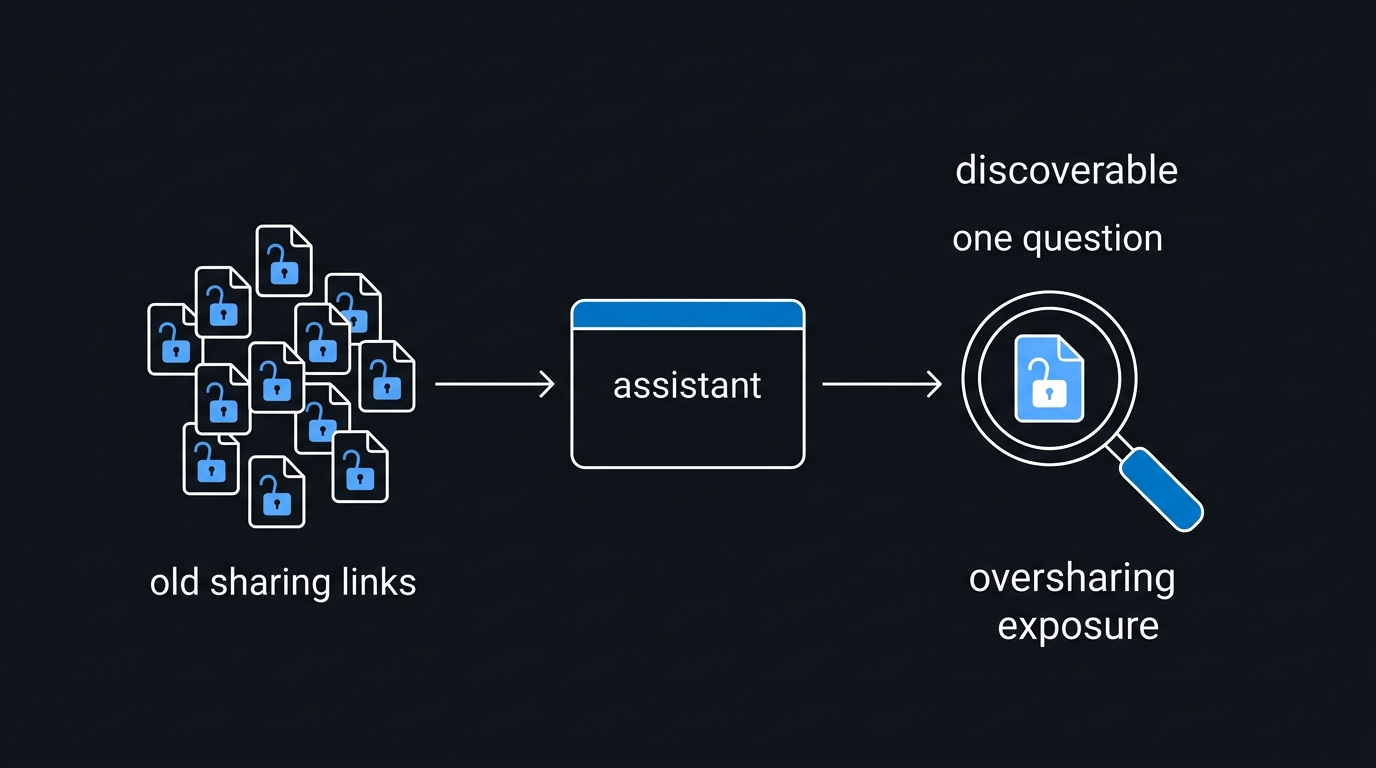
If you run Microsoft 365 Copilot or a comparable managed assistant, you do not control the retrieval code — but the identical logic applies, translated into tenant hygiene. Managed copilots are typically permission-respecting: Microsoft documents that Copilot honors the signing-in user's existing permissions and only surfaces what that user can already access. That sounds like the problem is solved, until you remember what "can already access" means in a tenant with fifteen years of SharePoint sprawl: sites shared with "Everyone except external users," inherited permissions nobody reviewed, links set to "anyone in the organization."
The assistant did not create that oversharing — it weaponizes the discoverability of it. Files that were technically open but practically invisible become one natural-language question away. The guardrail work is therefore access-debt work: find and fix oversharing before the assistant makes it searchable; restrict which sites and libraries the assistant may index until they are reviewed — in Microsoft's stack, Restricted SharePoint Search exists for exactly this, and the documentation is candid that it is a temporary measure while you fix the underlying permissions; and use sensitivity labels as the "never serve this" backstop — the managed equivalent of the sensitivity filter in Layer 2. Microsoft's own oversharing mitigation blueprint sequences the same work at tenant scale. The lesson generalizes: a permission-respecting assistant over a broken permission model faithfully serves the broken model.
5. Audit the gap you already have
If an assistant has been running without these guardrails, assume exposure and measure it. The audit is conceptually simple: for every document the assistant has cited or quoted, check whether the receiving user could have opened it directly at that time. Every mismatch is a concrete over-serve event with a name, a document, and a timestamp attached.
// Access-mismatch audit: what did the assistant serve vs. what could the user open?
for await (const event of assistantLog.events({ type: 'chunks_served' })) {
  for (const uri of event.sourceUris) {
    const couldOpen = await sourceAuth.userCanRead(event.userId, uri, { at: event.ts })
    if (!couldOpen) {
      findings.push({
        user: event.userId,
        document: uri,
        servedAt: event.ts,
        conversation: event.conversationId,   // for incident scoping
      })
    }
  }
}
report(findings)   // triage: sensitivity of document × breadth of exposure
Two operational notes. First, this audit is only possible if the assistant logs which sources backed each answer — if yours doesn't, that logging is the first guardrail to add, because you cannot investigate what you cannot see. Second, run a standing red-team suite of probing prompts from a deliberately low-privileged test account: ask for salary bands, unreleased plans, incident reports, customer PII. The test account should come back empty-handed every time; any hit is a regression caught before a real user finds it.

6. Rollout order that works
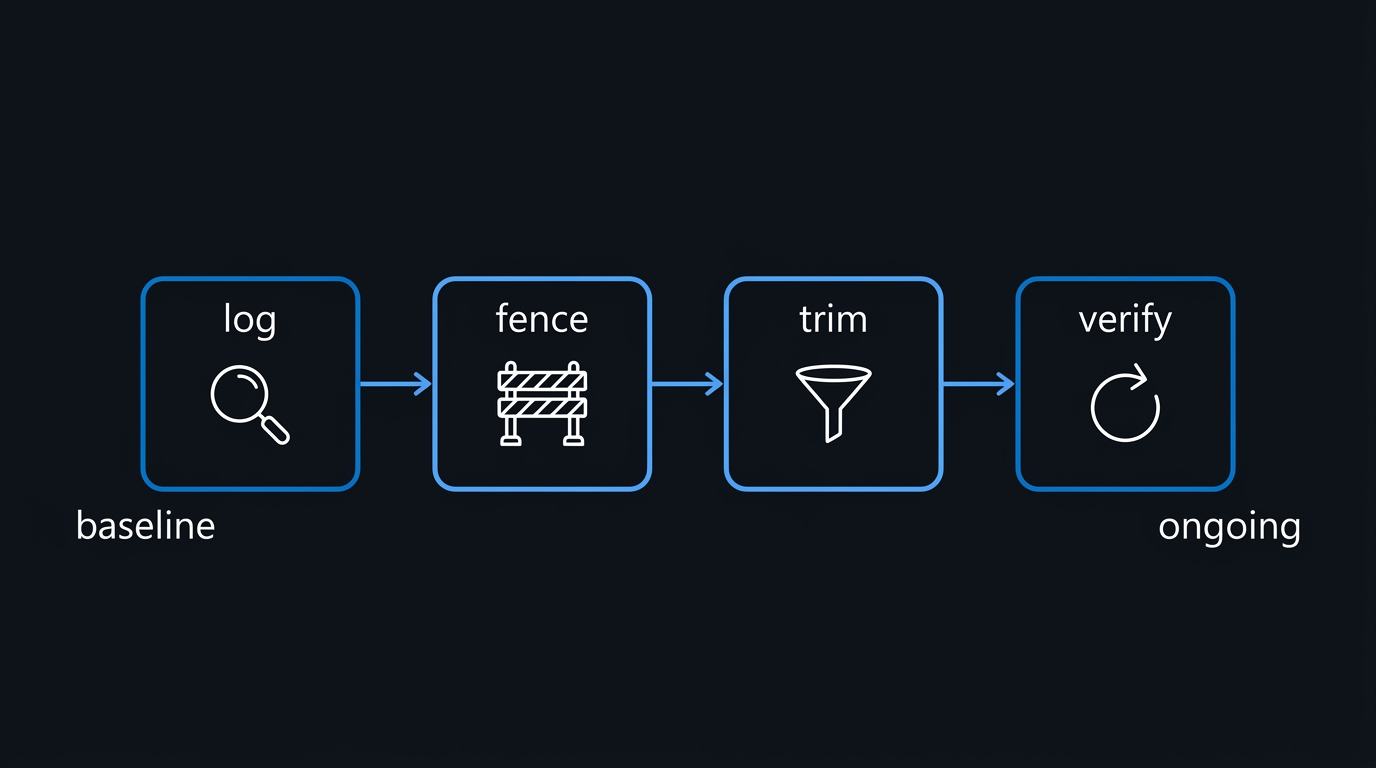
Retrofitting guardrails onto a live assistant is disruption-prone, so sequence it: log first (source-attribution logging plus the mismatch audit — you need the baseline), fence second (exclude unreviewed or sensitive sources from the index entirely; a smaller, safe corpus beats a complete, leaking one), trim third (implement ACL metadata and query-time filtering, then post-retrieval checks), and verify forever (the red-team suite and the mismatch audit run on a schedule, not once). Teams that invert this order — building the perfect filter before fencing the corpus — spend weeks exposed while the elegant solution is under construction. Fencing is a one-day configuration change that stops the bleeding immediately.
Troubleshooting
- The assistant suddenly "knows less" after trimming. Correct and expected — it now knows what each user is entitled to. Track which filtered-out sources users actually needed and fix those permissions deliberately, rather than re-widening the assistant.
- Group resolution adds latency to every query. Cache the user's effective groups for minutes, not hours, and invalidate on session change. Never cache the post-retrieval document check for restricted-labeled content.
- ACL metadata went stale after a permissions change. Ingestion pipelines must subscribe to permission-change events (or re-crawl ACLs on a short cycle), not only content changes. The Layer 3 live check is your safety net while the index catches up — check the
acl_drift_blockedlog volume to see how often it saves you. - Users paste restricted content INTO the assistant. Retrieval trimming does not govern what users upload. That is a separate DLP control on prompt input — in the managed world, Purview DLP now covers Copilot prompts — pair the two, or the leak simply reverses direction.
- The red-team account got a hit after a source system migration. Migrations frequently reset or flatten ACLs. Treat any source migration as a trigger to re-run the full mismatch audit before re-enabling that source in the index.
- "We'll just fine-tune the model on access rules." Training data cannot enforce authorization; it can only bias phrasing. If restricted content is in the weights or the context, it is disclosable. Keep enforcement in the retrieval path.
Key Takeaways
- An AI assistant is an access path, and every access path needs authorization. If the assistant reads with a privileged identity and users read from the assistant, users hold that identity's access.
- Enforce in code, on data, before the model — prompt instructions are not a security control, and post-hoc output filtering is a losing game.
- Retrieval is the choke point: ACL metadata at ingestion, permission filters at query time, live re-checks post-retrieval, and RLS in the data tier.
- Managed copilots inherit your permission debt. A permission-respecting assistant over an overshared tenant is an oversharing amplifier.
- Audit continuously: source-attribution logging, mismatch audits, and a low-privilege red-team account that should always come back empty.
- Sequence the retrofit: log, fence, trim, verify — stop the bleeding before building the elegant filter.
Next Steps
- Run the access-mismatch audit against your assistant's last 90 days of logs; triage any findings as real exposure events, not test noise.
- Inventory every data source the assistant's service identity can read, and fence out anything that has not had a permissions review.
- Add ACL metadata to your ingestion pipeline and turn on query-time filtering — then measure the
acl_drift_blockedrate to size how much Layer 3 is catching. - Stand up the low-privileged red-team account with a scheduled probe suite, and wire its hits into your alerting.
Sources & Further Reading
- Norm Hardy — "The Confused Deputy (or why capabilities might have been invented)", ACM SIGOPS Operating Systems Review 22(4), 1988 — the original statement of the problem this entire article is a modern instance of.
- OWASP GenAI Security Project — Top 10 for LLM Applications — see LLM02 (Sensitive Information Disclosure) and LLM06 (Excessive Agency, root cause: excessive permissions).
- Microsoft Learn — Microsoft 365 Copilot data protection and auditing architecture — how a managed copilot enforces the caller's permissions.
- Microsoft Learn — Restricted SharePoint Search — the temporary fence while permissions are reviewed.
- Microsoft Learn — Purview sensitivity labels — the label-based "never serve this" backstop.
- Microsoft Learn — Purview DLP for Microsoft 365 Copilot — DLP on the prompt-input side of the leak.
- Microsoft 365 Copilot blog — Mitigate oversharing to govern Copilot and agents — Microsoft's own identify-protect-monitor blueprint.
- PostgreSQL documentation — Row Security Policies — default-deny row filtering for the data tier.

Leave a Reply