
Executive Snapshot
| Item | Detail |
|---|---|
| Goal | Deflect repetitive password, VPN, licence and access-request tickets without inventing answers |
| Build surface | Copilot Studio (copilotstudio.microsoft.com) inside a dedicated Power Platform environment |
| Core objects | Topics, knowledge sources, generative answers, actions (connectors + Power Automate flows), channels |
| Grounding rule | Knowledge sources on, general model knowledge off, moderation high — for an internal help desk this is the only safe default |
| Authentication | Entra ID end-user auth, so the agent acts as the user and inherits their SharePoint permissions |
| Ticketing | A Power Automate flow triggered by the agent, returning the ticket number back into the conversation |
| Deployment | Teams and Microsoft 365 Copilot channel, published through the Teams admin center as a managed app |
| Cost model | Message/capacity-based; generative and agentic responses consume more than deterministic ones — verify current licensing before you forecast |
| Biggest failure mode | Publishing an agent whose connections run under the maker's credentials, quietly handing every user the maker's access |
TL;DR
- A Copilot Studio agent is four things: topics (deterministic conversation paths), knowledge (what it may read), actions (what it may do), and channels (where it lives). Every design problem resolves to one of those four.
- Grounding is a configuration, not a hope. Turn off general model knowledge, point the agent at curated knowledge sources only, set content moderation high, and require in-line citations. An ungrounded help-desk agent will confidently invent a VPN client version.
- Authentication decides your data-leak blast radius. With Entra end-user auth, SharePoint knowledge is trimmed to what the signed-in user can already see. With uploaded files or a maker-owned connection, it is not.
- Ticket creation belongs in Power Automate, not in a topic. The flow is the contract: typed inputs, a typed return value, and error handling that gives the user a ticket number rather than a shrug.
- Governance happens outside the agent. Power Platform DLP policies, a dedicated environment, and Managed Environments controls are what stop your help-desk agent from becoming a general-purpose data exfiltration tool built by a well-meaning colleague.
Introduction
Most internal help desks answer the same forty questions several thousand times a year. How do I reset my password. Why does the VPN drop on Wi-Fi. How do I request a Visio licence. Who approves shared mailbox access. The knowledge to answer all of it already exists — in a SharePoint site, in a service-desk knowledge base, in a Word document someone maintains heroically — and none of it is where the user is at the moment they need it.
Copilot Studio is Microsoft's low-code surface for closing that gap: you build an agent, point it at that existing knowledge, give it a small number of things it is allowed to do, and drop it into Teams where people already are. The build is genuinely achievable in a day. The parts that take longer, and that this guide spends most of its time on, are the parts that decide whether the thing survives contact with real users: grounding configuration, authentication, the ticketing hand-off, licensing capacity, and the governance perimeter around makers.
This guide walks the full sequence, then covers the failure modes that show up in week three rather than day one. Copilot Studio's interface changes frequently — labels may vary as the product evolves, so treat the navigation described here as the shape of the flow and confirm exact wording in your own tenant.
Prerequisites
Before you open Copilot Studio, get these lined up:
- A Power Platform environment you control. Do not build in the Default environment. Create a dedicated one (Production type, with a Dataverse database) so you can apply DLP policy, capacity, and maker access to it specifically.
- A Copilot Studio licence or trial assigned to you as the maker, plus a decision — even a provisional one — about how end-user consumption will be paid for.
- Curated knowledge. A SharePoint site or document library that contains the current IT knowledge, not the 2019 archive. This is the single largest determinant of answer quality.
- Service-desk API access if you want ticket creation: a ServiceNow (or Jira Service Management, or equivalent) integration account with permission to create incidents, and nothing more.
- Teams admin cooperation. Publishing an agent to the whole organisation goes through app approval in the Teams admin center. Find out now who owns that.
- A naming convention.
HelpDesk-Agent-ProdandHelpDesk-Agent-DevbeatCopilot (1).
Anatomy of a Copilot Studio Agent
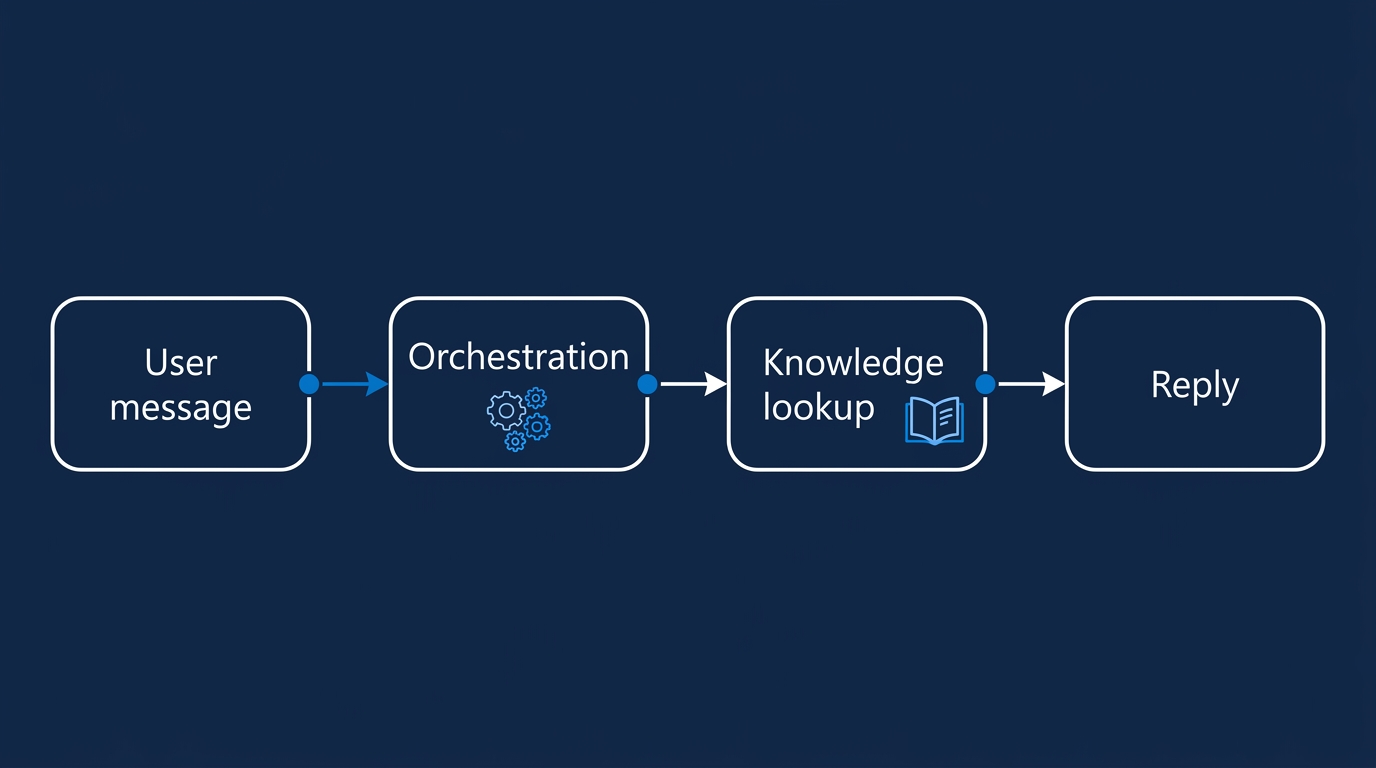
Four object types, and understanding the division of labour between them is most of the learning curve.
Topics are deterministic conversation paths. Each has trigger phrases (or, under generative orchestration, a natural-language description of when it should fire) and a node graph: ask a question, branch on the answer, set a variable, call an action, send a message. Topics are where you put anything that must happen the same way every time — a password reset procedure, a policy statement, an escalation path. System topics (greeting, fallback, escalate, end of conversation) ship pre-built and are worth customising early.
Knowledge sources are what the agent may read to answer questions it has no topic for. Options typically include SharePoint sites and document libraries, uploaded files, public websites, Dataverse tables, and enterprise data reached through connectors or Microsoft Graph connectors. Each source has different permission semantics, which matters enormously and is covered below.
Generative answers is the capability that reads those sources at query time, synthesises a response, and cites where it came from. It is retrieval-augmented generation with the retrieval half configured through a UI. You can invoke it as an explicit node inside a topic, or let it run as the fallback for anything no topic caught.
Actions are what the agent can do: call a Power Automate flow, invoke a connector operation, run a prompt, or call an external tool. Actions carry inputs and outputs, and — critically — they carry a connection, which is an identity. Who that identity is determines what your agent can reach.
Channels publish the finished agent: Teams and Microsoft 365 Copilot, a demo website, an embedded custom website, and various external surfaces. For an internal help desk, Teams is the answer and the others are a distraction.
Sitting above all of this is the orchestration mode. Classic orchestration matches trigger phrases to topics in a fairly predictable way. Generative orchestration lets the model decide which topics, actions and knowledge sources to combine for a given request, including chaining several. Generative orchestration is more capable and less predictable; start with it on for a help desk, but keep your critical procedures in explicit topics so they cannot be paraphrased into something wrong.
flowchart TD
    A[User in Teams] --> B[Entra sign in]
    B --> C[Agent orchestration]
    C --> D[Knowledge search]
    C --> E[Topic match]
    D --> F[Generative answer]
    E --> G[Action call]
    G --> H[Power Automate flow]
    H --> I[Ticket created]
    F --> J[Reply with citations]
    I --> J
    J --> K[Analytics and transcripts]
Step 1: Create the Agent in Its Own Environment
Sign in to Copilot Studio and confirm the environment selector in the top right is pointing at your dedicated environment before you create anything. Agents built in the wrong environment are moved by rebuilding them, which is a lesson people learn once.
Create a new agent, give it a name users will recognise (IT Help Desk, not Agent-v3-final), and write the description carefully — under generative orchestration the description is part of how the model reasons about the agent's remit. Something like: "Answers internal IT questions from company knowledge only, and raises service desk tickets when it cannot."
Set the instructions to constrain scope explicitly. Instructions are the agent's standing brief; a short, blunt one outperforms a long, polite one:
- Answer only from the provided knowledge sources.
- If the knowledge does not cover the question, say so and offer to raise a ticket.
- Never guess software versions, licence entitlements, or security policy.
- Keep answers under 150 words with a link to the source article.
Finally, put the agent inside a solution. Solutions are the Power Platform unit of application lifecycle management; an agent built outside one cannot be cleanly exported to a test environment later.
Step 2: Attach Knowledge Sources
Knowledge is where quality is won or lost. Two practical routes for a help desk.
SharePoint is the primary source. Add the specific site or document library holding your IT knowledge — not the root of your intranet. Narrow scoping improves retrieval precision and reduces the chance of the agent surfacing an HR policy in response to a VPN question. Where SharePoint knowledge is used with end-user authentication, results are security-trimmed to the signed-in user, which is the behaviour you want.
The service desk knowledge base — ServiceNow, Jira Service Management, or similar — is more involved, because published KB articles usually live behind an API rather than in a file. Three viable patterns:
- A Microsoft Graph connector that indexes the KB into Microsoft Search, which the agent can then use as an enterprise knowledge source. Cleanest option where your platform has a supported connector.
- A scheduled export into SharePoint. A nightly Power Automate flow or Azure Function that pulls published KB articles and writes them as files into the SharePoint library you already indexed. Unglamorous, reliable, and easy to reason about.
- A live lookup action rather than a knowledge source: the agent calls a flow that queries the KB API for a given phrase and returns the top articles. Always current, but slower and it consumes an action rather than a knowledge search.
Whichever you pick, put an owner and a review date on the underlying content. Nothing degrades a help-desk agent faster than a knowledge base nobody prunes.
Step 3: Configure Generative Answers and Grounding Guardrails
This is the step that separates a useful agent from a liability. In the agent's generative AI settings, expect to find controls along these lines — again, labels may vary as the product evolves:
- General knowledge / model knowledge: turn it off. If left on, the agent will answer questions your knowledge base does not cover using its training data, which is how users end up following generic internet advice for your specific VPN client.
- Content moderation: set to the strictest level. Higher moderation means the agent is more willing to say "I don't know" and less willing to stretch a weak retrieval into a confident answer. For an internal help desk, a refusal is a good outcome; a confident invention is not.
- In-line citations / references: on. Every generative answer should carry a link back to the source article. This is your single best defence, because it lets users verify and lets you spot which stale document is generating bad answers.
- Knowledge-source scoping on the generative answers node when you use it inside a topic: restrict it to the relevant source rather than everything, so a "how do I request software" topic cannot answer from the security incident runbook.
Test with deliberately unanswerable questions. Ask about a product you do not own. Ask about a policy that does not exist. A correctly configured agent says it cannot find that in the IT knowledge base and offers a ticket. If it produces a plausible paragraph instead, your general-knowledge toggle is still on.
Step 4: Author the Deterministic Topics
Generative answers handle the long tail. Topics handle the things that must be exact. For a help desk, build these by hand:
- Password reset — link to the self-service portal, state the MFA requirement, and never attempt to walk the user through a procedure that varies by account type.
- Account lockout — distinguish "locked" from "disabled" and route the second to a ticket, because it usually means an HR process.
- Access request — capture the resource and business justification, then create the ticket. Do not let the agent editorialise about whether the request is reasonable.
- Escalate to a human — an explicit path, triggered by phrases like "talk to a person", that creates a ticket with the transcript attached.
- Fallback — rewrite the default. It should apologise once, offer the ticket path, and stop.
Topics can be edited visually or in a code view that expresses the node graph as YAML. The code view is useful for review and diffing. Structure is illustrative here — the schema evolves, so open the code view on a real topic in your own tenant before scripting anything against it:
# Illustrative shape of a topic in the Copilot Studio code editor.
kind: AdaptiveDialog
beginDialog:
  kind: OnRecognizedIntent
  intent:
    triggerQueries:
      - I need access to a shared mailbox
      - request access to a folder
      - how do I get permission for
  actions:
    - kind: Question
      id: askResource
      prompt: Which system or mailbox do you need access to?
      variable: Topic.Resource
      entity: StringPrebuiltEntity

    - kind: Question
      id: askJustification
      prompt: What do you need it for? One sentence is fine.
      variable: Topic.Justification
      entity: StringPrebuiltEntity

    - kind: InvokeFlowAction
      id: createTicket
      input:
        binding:
          RequestType: "Access request"
          Resource: =Topic.Resource
          Justification: =Topic.Justification
      output:
        binding:
          Topic.TicketNumber: TicketNumber

    - kind: SendActivity
      activity: |
        Raised ticket {Topic.TicketNumber} for access to {Topic.Resource}.
        You'll get an email when it's approved.
Two things to notice. Inputs are captured as typed variables before the action is called, so the flow receives structured data rather than a paragraph. And the ticket number comes back into the conversation — users who get a reference number stop re-asking.
Step 5: Add Authentication
Under the agent's security settings, choose Entra ID authentication for end users rather than "no authentication". In Teams, this typically means users are signed in transparently, with a one-time consent.
Doing this buys you three things:
- Security trimming. SharePoint knowledge results are filtered to what the signed-in user could open themselves. Uploaded files are not trimmed — anything you upload directly is readable by every user of the agent. Treat file upload as publishing to the whole audience.
- User context in actions. The signed-in user's identity is available to topics and flows, so a ticket is raised as them, with their email and department populated automatically instead of asked for.
- An audit trail worth having. Conversation transcripts tied to real identities are the difference between an incident investigation and a guessing game.
Where a connector must run under a service identity rather than the user — a service-desk API account, typically — scope that account's permissions to exactly the operations you need. An integration account with global admin in your ITSM platform, reachable through a chat box, is a genuine security finding.
Step 6: Wire Ticket Creation with Power Automate
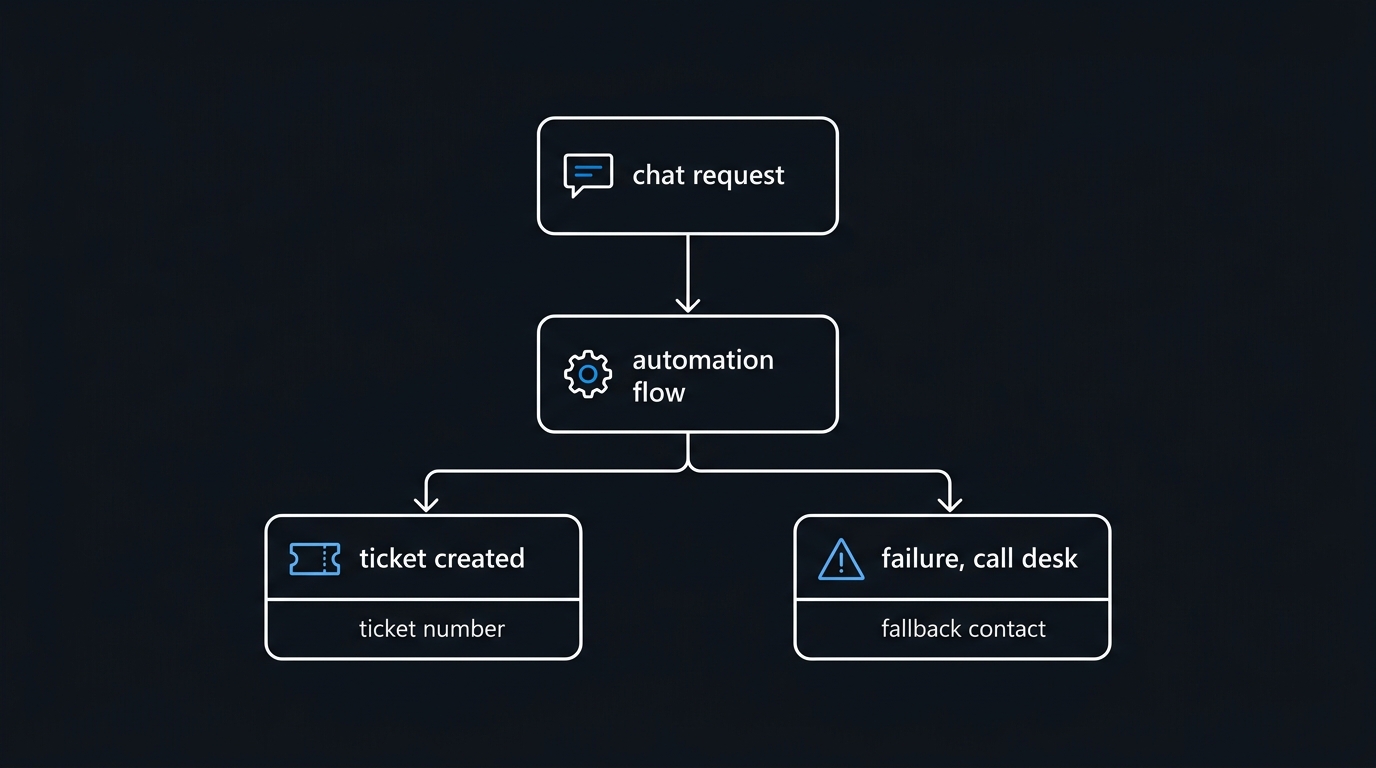
Build the flow in the same solution as the agent, using the Copilot Studio trigger (labels here have changed more than once; look for the trigger that runs when an agent calls a flow).
The flow's job is narrow: accept typed inputs, create the ticket, return the ticket number and a status. Keep business logic in the flow and conversation logic in the topic.
{
  "trigger": "When an agent calls the flow",
  "inputs": [
    { "name": "RequestType",   "type": "string" },
    { "name": "Resource",      "type": "string" },
    { "name": "Justification", "type": "string" },
    { "name": "RequesterUpn",  "type": "string" }
  ],
  "actions": [
    {
      "name": "Create ServiceNow incident",
      "connector": "ServiceNow",
      "operation": "Create Record",
      "table": "incident",
      "body": {
        "short_description": "@{triggerBody()?['RequestType']}: @{triggerBody()?['Resource']}",
        "description": "@{triggerBody()?['Justification']}",
        "caller_id": "@{triggerBody()?['RequesterUpn']}",
        "category": "inquiry",
        "u_source": "copilot-studio-helpdesk"
      }
    }
  ],
  "respondToAgent": {
    "TicketNumber": "@{body('Create_ServiceNow_incident')?['number']}",
    "Status": "created"
  }
}
That u_source field (or whatever custom field your platform offers) is not optional in practice. Tagging agent-created tickets is the only way you will later answer "is this thing actually helping?" — you need to compare volume and reopen rates between agent-raised and human-raised tickets.
Add a failure path. If the ticket API returns an error, the flow should return Status: failed and the topic should tell the user plainly, with the service desk phone number. A chat agent that silently swallows a failed access request is worse than no agent.
Step 7: Publish to Teams
Publishing is two steps that people frequently conflate.
Publish the agent inside Copilot Studio. This promotes your latest authoring changes to the running agent. Nothing you edit takes effect for users until you do this — a surprising amount of "my fix didn't work" is an unpublished change.
Enable the channel. In Channels, turn on Teams and Microsoft 365 Copilot. You will get options for availability: a shareable link for testing, and an option to make it available to everyone in the organisation. The org-wide option submits the agent as a Teams app for admin approval, so a Teams administrator has to approve and set up the app policy before users see it. Build that lead time into your plan.
Roll out in three waves: the IT team itself (who will find the wrong answers fastest), one friendly department, then everyone. Between waves, read transcripts. Not summaries — actual transcripts. Twenty of them will teach you more than any dashboard.
For environment promotion, export the solution and import it into your production environment rather than rebuilding by hand:
# Power Platform CLI — promote the agent between environments
pac auth create --name dev  --environment "https://contoso-dev.crm4.dynamics.com"
pac auth create --name prod --environment "https://contoso.crm4.dynamics.com"

pac auth select --name dev
pac solution export `
    --name HelpDeskAgent `
    --path .\HelpDeskAgent_managed.zip `
    --managed true `
    --async

pac auth select --name prod
pac solution import `
    --path .\HelpDeskAgent_managed.zip `
    --activate-plugins `
    --force-overwrite
Connection references and environment variables get remapped at import time — expect to re-point the ServiceNow connection and any URLs on first import into production.
Licensing and Capacity: The Message Model
Copilot Studio consumption is metered in messages (sometimes framed as capacity units), pre-purchased in packs or consumed pay-as-you-go against an Azure subscription. The important structural points:
- Not all responses cost the same. Deterministic topic responses are the cheapest unit. Generative answers cost more. Agentic actions — where the agent invokes tools or chains steps autonomously — cost more again. A help desk that leans on generative answers for everything will consume several times what a topic-heavy design does.
- Capacity is tenant-level, allocated to environments. One enthusiastic maker's experimental agent can consume the capacity your production help desk needs, which is another reason for a dedicated environment.
- Microsoft 365 Copilot licences interact with this. Users with a Microsoft 365 Copilot licence have different entitlements for consuming agents than unlicensed users, and the boundary has moved more than once.
- Pay-as-you-go removes the cliff but removes the ceiling too. Set an Azure budget alert on the meter before you enable it.
Exact per-message rates, pack sizes and prices change regularly and vary by region and agreement, so verify current licensing and pricing against Microsoft's official documentation before you build a business case. What you can safely model is the shape: estimate conversations per month, multiply by average turns, weight generative turns more heavily than deterministic ones, and add headroom for the pilot's inevitable curiosity traffic.
Run the pilot with capacity monitoring visible from day one. The most common budget surprise is not usage growth — it is a single misconfigured agent looping on a fallback topic.
Governance: DLP and Maker Controls
Copilot Studio is Power Platform, which means Power Platform governance applies. Three controls matter most.
Data loss prevention policies classify connectors into Business, Non-Business, and Blocked groups; connectors in different groups cannot be used in the same app, flow, or agent. This is the mechanism that stops someone building an agent that reads SharePoint and posts to a personal cloud storage account. Define policy per environment, not just tenant-wide, so your help-desk environment can use the ServiceNow connector while general-purpose environments cannot.
# Power Platform admin — inventory environments and DLP policies
Install-Module Microsoft.PowerApps.Administration.PowerShell -Scope CurrentUser -Force
Add-PowerAppsAccount

# What environments exist, and who owns them?
Get-AdminPowerAppEnvironment |
    Select-Object DisplayName, EnvironmentType, Location, CreatedBy |
    Sort-Object EnvironmentType, DisplayName

# What DLP policies are in force, and where do they apply?
Get-DlpPolicy |
    Select-Object displayName, environmentType, lastModifiedTime

# Snapshot the connector classification for change review
Get-DlpPolicy | ConvertTo-Json -Depth 8 |
    Out-File ".\dlp-policies-$(Get-Date -Format yyyyMMdd).json"
Cmdlet and parameter names in the Power Platform admin modules have shifted between module generations — check Get-Help output in your own tenant before scripting bulk changes.
Managed Environments adds the governance surface you actually want for a production agent: sharing limits, weekly maker digests, solution checker enforcement, and usage insights. It has licensing implications, so confirm entitlement, but a production internal agent is exactly the workload it exists for.
Tenant-level Copilot Studio settings deserve a deliberate review: whether makers may publish agents to public websites, whether customer data may be used for AI features, and whether data may move across geographic regions for generative AI processing. That last one is a compliance conversation, not an IT one — have it before the pilot, not after.
Analytics: Proving It Deflects Anything
Copilot Studio's Analytics page gives you session volume, engagement rate, resolution rate, escalation rate, abandon rate, and a breakdown of which topics fire most. Read them in this order:
- Escalation and abandon rates first. High escalation means knowledge gaps. High abandonment means the agent is answering, but badly — users are giving up mid-conversation rather than asking for a human.
- Topic volume next. The topics that never fire are either badly phrased or unnecessary. The fallback topic firing constantly is your knowledge-gap backlog, in priority order.
- Resolution rate last, and sceptically. A session that ends without escalation is not necessarily a session that helped.
The number that convinces finance is not in the dashboard: it is ticket volume in the categories the agent covers, before and after. That is why the source tag on agent-created tickets matters.
For deeper analysis, connect the agent to Application Insights and query the conversation telemetry directly:
// Escalations and unresolved sessions by day
customEvents
| where timestamp > ago(30d)
| where name in ("BotMessageSend", "BotMessageReceived")
| extend outcome = tostring(customDimensions["conversationOutcome"])
| where isnotempty(outcome)
| summarize sessions = dcount(tostring(customDimensions["conversationId"]))
        by bin(timestamp, 1d), outcome
| render timechart

// Which unmatched utterances are driving fallback?
customEvents
| where timestamp > ago(14d)
| where tostring(customDimensions["topicName"]) == "Fallback"
| summarize hits = count() by utterance = tostring(customDimensions["userMessage"])
| top 40 by hits desc
That second query is the highest-value thing in this article. It is a ranked list of questions your knowledge base cannot answer, written in your users' own words. Work it top-down and answer quality improves faster than any prompt tuning will achieve.
Pitfalls to Avoid
- Leaving general model knowledge on. The agent fills gaps with training data, sounds authoritative, and is wrong about your environment specifically. This is the single most common cause of a pilot being switched off.
- Uploading files as knowledge without thinking about audience. Uploaded content is not security-trimmed. An HR salary band spreadsheet uploaded "just for testing" is readable by every user of the agent.
- Over-permissioned connections. A connection created by a maker runs with that maker's access unless you deliberately use end-user authentication. Publish an agent with a maker-owned connection to a broad data source and you have effectively granted the maker's permissions to everyone who can chat with it.
- Knowledge staleness. An agent citing an article last reviewed in 2023 is more damaging than no agent, because the citation confers false authority. Put review dates on source content and audit the ones the agent cites most.
- Building in the Default environment. No meaningful isolation, shared with every citizen developer in the tenant, and painful to untangle later.
- Skipping the publish step. Authoring changes are invisible to users until the agent is published. Half of all "the fix didn't take" reports are this.
- No failure path on the ticket flow. Users assume a request was raised. It was not. They find out a week later.
- Treating trigger phrases as keywords. Five natural, differently-phrased examples beat twenty near-duplicates. Under generative orchestration, the topic description does more work than the phrase list.
- Launching org-wide immediately. The first two hundred conversations are your best tuning dataset. You only get them once.
Troubleshooting
The agent answers from nowhere. General knowledge is still enabled, or a knowledge source is broader than you think. Check the citations — no citation means no grounding.
SharePoint knowledge returns nothing. Confirm authentication is configured, the site is indexed, and the signed-in test user actually has access. Freshly added sites take time to index.
The flow does not appear as an action. It must live in the same solution and environment as the agent, and use the correct Copilot Studio trigger. Refresh the actions list after publishing the flow.
Users see the old behaviour. Publish the agent, then confirm the Teams app version users have installed matches. Teams caches aggressively.
Answers are good in the test pane, bad in Teams. The test pane usually runs as you, the maker. In Teams it runs as the user, with their permissions. This difference is a feature, and it means your test pane is not a valid quality signal — always test with a low-privilege account.
Key Takeaways
- A Copilot Studio agent is topics, knowledge, actions, and channels. Diagnose problems by working out which of the four is at fault before touching anything.
- Grounding is configuration: knowledge sources only, general knowledge off, moderation high, citations on. Verify by asking questions the knowledge base cannot answer.
- Entra end-user authentication is what makes SharePoint knowledge safe, because results are trimmed to the signed-in user. Uploaded files never are.
- Ticket creation belongs in a Power Automate flow with typed inputs, a returned ticket number, a source tag, and an explicit failure path.
- Deterministic topics protect the procedures that must not vary; generative answers cover the long tail. Design the split deliberately.
- Licensing is message/capacity-based and response types are not priced equally — model the shape, verify current licensing before committing budget, and set an alert on pay-as-you-go meters.
- Power Platform DLP, a dedicated environment, and Managed Environments are the governance perimeter. The agent's own settings are not enough.
- The fallback-topic transcript is the most valuable analytics artifact you have: a ranked list of what your knowledge base is missing.
Next Steps
- Create a dedicated environment and apply a DLP policy to it before any agent exists in it.
- Audit the knowledge you intend to use — owner, last review date, accuracy — and fix the top twenty articles first.
- Build the agent with grounding locked down, three deterministic topics, and one ticket-creation flow. Resist adding more until the pilot runs.
- Pilot with the IT team for two weeks, reading transcripts daily and working the fallback list top-down.
- Instrument before you scale: source-tag the tickets, connect Application Insights, and put a capacity alert in place before the org-wide rollout.
Related Articles
-
Copilot for Microsoft 365 Rollout: Licensing, Data Readiness, and Governance — the tenant-level readiness work that should precede any agent build
-
Missing AI Guardrails: When Your Copilot Serves Data Users Shouldn't See — why security trimming and connection identity matter more than prompt wording
-
SharePoint Online Permissions and Governance: Stop Oversharing in 2026 — fix the permissions underneath your knowledge source before you index it
-
Automating Microsoft 365 with PowerShell: The Graph SDK Way in 2026 — the scripting foundation for auditing what your agents can reach
-
LiteLLM, RAGFlow, Kestra: Your AI Gateway Is a Control-Plane Target
Last reviewed: 2026-08-09 | Tested against: Microsoft Copilot Studio (2026 release wave), Power Platform admin PowerShell, Power Platform CLI. Copilot Studio's interface, generative-AI settings and licensing meters change frequently — verify labels, cmdlet parameters, and current pricing against Microsoft documentation before production rollout.

Leave a Reply