
Executive Snapshot
| Category | Recommendation |
|---|---|
| Programming model | .NET isolated worker — the in-process model is on a retirement path |
| Core building blocks | Orchestrator functions, activity functions, entity functions, durable clients |
| Reliability mechanism | Event sourcing + replay — state is rebuilt from an append-only history |
| Hard constraint | Orchestrator code must be deterministic — no clocks, GUIDs, randoms, or I/O |
| Default storage | Azure Storage (queues + tables + blobs). Netherite and MSSQL also exist |
| Retry strategy | Declarative retry policies on activity calls, plus try/catch compensation |
| Biggest trap | Deploying breaking orchestrator changes while instances are still in flight |
| Best fit | Tenant provisioning, compliance sweeps, approval gates, long polling waits |
TL;DR
- Plain queue-triggered functions cannot hold a workflow together. The moment you need step 4 to know what step 2 returned, you are hand-rolling a state machine in a database — and hand-rolling the retries, timeouts, and idempotency that go with it.
- Durable Functions gives you a real orchestration runtime on top of Azure Functions: checkpointed state, at-least-once activity execution, durable timers that survive host restarts, and first-class waiting for external events.
- The replay model is the whole trick, and the whole constraint. Orchestrator code is re-executed from the top every time it resumes, so it must be deterministic.
DateTime.Now,Guid.NewGuid(),Random, and direct I/O are all banned inside an orchestrator. - Five patterns cover the vast majority of IT automation: function chaining, fan-out/fan-in, async HTTP with status polling, the monitor pattern with durable timers, and human interaction with external events plus a timeout.
- Versioning is the operational hazard nobody warns you about. In-flight orchestrations replay against whatever code is deployed now — a reordered activity call is enough to poison them.
Introduction
Every IT automation project reaches the same wall. You start with a tidy queue-triggered Azure Function: a message arrives, you provision a resource, you are done. Then the request grows a second step. Then a third. Then someone asks for an approval gate before step four, and a retry with backoff on step two, and a report at the end that summarises all of it.
At that point the queue-trigger model quietly stops working. Not loudly — quietly, which is worse. You end up writing a workflow state table, a poison-message handler, a correlation ID scheme, and a scheduled sweeper that finds workflows stuck halfway. You have built a bad orchestration engine, and now you own it.
Azure Durable Functions exists so you do not have to. It is an extension to Azure Functions that lets you write stateful workflows as ordinary code — sequential await statements, loops, try/catch — while the runtime handles the durability underneath. This guide covers the mental model, the determinism rules that trip up nearly every newcomer, the patterns you will actually reach for, and the failure modes that only show up in production.
Prerequisites
- An Azure subscription with rights to create a Function App and a storage account
- .NET 8 or later and the Azure Functions Core Tools v4 (
func --versionto verify) - The Azurite storage emulator for local development, or a real storage account connection string
- Working familiarity with Azure Functions triggers and bindings — this guide assumes you have shipped at least one HTTP or queue-triggered function
- Azure CLI 2.50+ if you want to provision from the terminal
- Optional: Node.js 20 LTS if you want to try the JavaScript/TypeScript sample near the end
1. Why Plain Queue-Triggered Functions Fall Apart
A single function invocation is stateless and bounded. Those two properties are exactly what make Functions cheap and scalable, and exactly what make multi-step workflows painful.
There is no shared memory between steps. Function A puts a message on a queue for Function B. If B needs A's output and the original request context, you are now serialising a growing payload through every hop, or reading it back from a database you have to design, version, and clean up.
Timeouts are real. On the Consumption plan, a function execution has a bounded lifetime. Anything that needs to wait 20 minutes for an Entra ID group to replicate, or 3 days for a manager to approve a request, cannot simply await Task.Delay(). Sleeping inside a function burns billable time and dies on the next host restart.
Retries are per-message, not per-workflow. Queue triggers retry the individual message. They have no concept of "step 3 failed, so undo steps 1 and 2." Compensation logic has to be written by hand, and it has to be idempotent, because at-least-once delivery means step 1 may already have run twice.
Observability collapses. With eight queues and eight functions, "where is order 4471 right now?" becomes an Application Insights archaeology exercise. There is no single object you can query for workflow status.
Durable Functions addresses all four by introducing a genuinely stateful function type — the orchestrator — whose state is checkpointed after every step.
2. The Three Function Types
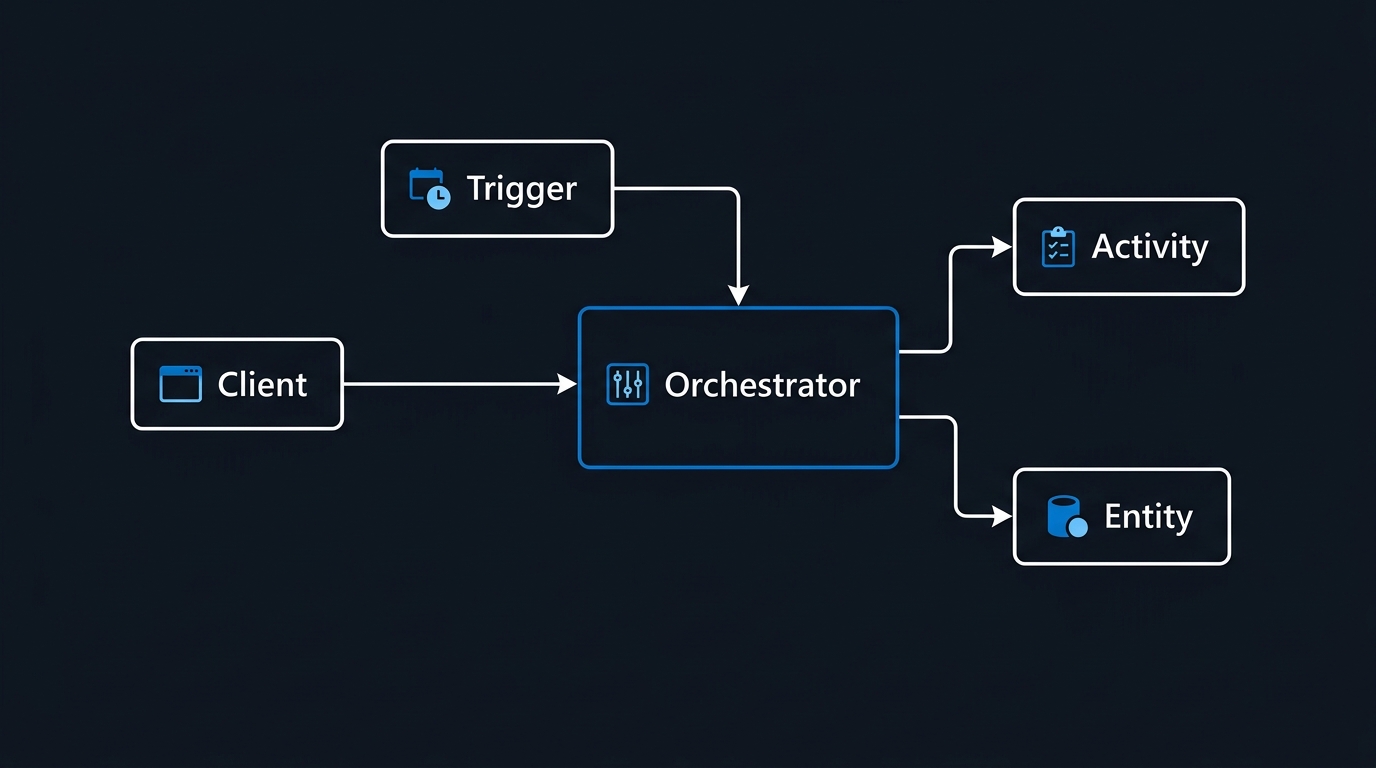
Durable Functions adds three roles on top of the normal trigger set.
Orchestrator functions define the workflow. They call other functions, await results, branch, and loop. They contain no business logic and no I/O — they are pure coordination. This is the function type with the determinism constraint.
Activity functions do the actual work: call Microsoft Graph, write to a database, send an email, create a resource. They are ordinary functions with an [ActivityTrigger]. They can do anything, and they should be idempotent because the runtime guarantees at-least-once execution.
Entity functions hold small pieces of addressable, durable state — a counter, a per-tenant configuration blob, an aggregation buffer. They are useful when many orchestrations need to read or update the same logical object without a race. Reach for them sparingly; most workflows never need one.
Tying these together is the durable client binding, which starting code (an HTTP endpoint, a timer trigger, a queue handler) uses to launch orchestrations and query their status.
Here is the minimal chain — the "hello world" of Durable Functions, in the isolated worker model:
using Microsoft.Azure.Functions.Worker;
using Microsoft.DurableTask;

public static class TenantProvisioning
{
    [Function(nameof(ProvisionTenantOrchestrator))]
    public static async Task<ProvisioningResult> ProvisionTenantOrchestrator(
        [OrchestrationTrigger] TaskOrchestrationContext context)
    {
        var request = context.GetInput<TenantRequest>()!;

        // Each await is a durable checkpoint. The host can crash between any
        // two of these lines and the workflow resumes exactly here.
        var tenantId  = await context.CallActivityAsync<string>(
            nameof(CreateTenantRecord), request);

        var groupId   = await context.CallActivityAsync<string>(
            nameof(CreateSecurityGroup), tenantId);

        await context.CallActivityAsync(
            nameof(AssignLicenses), new LicenseAssignment(tenantId, groupId));

        return new ProvisioningResult(tenantId, groupId, Succeeded: true);
    }

    [Function(nameof(CreateTenantRecord))]
    public static async Task<string> CreateTenantRecord(
        [ActivityTrigger] TenantRequest request,
        FunctionContext ctx)
    {
        // Real I/O lives here, never in the orchestrator.
        var logger = ctx.GetLogger(nameof(CreateTenantRecord));
        logger.LogInformation("Creating tenant record for {Name}", request.DisplayName);
        return await TenantStore.CreateAsync(request);
    }
}
Read that orchestrator again. It looks like a synchronous method. It is not — it is a durable state machine that may execute across days, dozens of host instances, and several deployments.
3. Event Sourcing, Replay, and the Determinism Rules
This is the section that saves you three days of debugging.
When an orchestrator awaits an activity, the runtime does not keep the thread alive. It records "called CreateTenantRecord" in an append-only history, unloads the orchestrator, and schedules the activity. When the activity completes, the runtime replays the orchestrator function from the very first line, feeding it the recorded results for every call it has already made. Calls that already have a recorded result return instantly from history; the first call without a result is the one that actually gets scheduled.
That replay is what makes durability free. It is also what imposes the constraints.
Orchestrator code must be deterministic. Given the same history, it must make the same sequence of calls, in the same order, every single time. Anything that could return a different value on replay will corrupt the workflow — usually as a baffling "non-deterministic workflow detected" error, sometimes as silently wrong behaviour.
The banned list, and what to use instead:
| Do not use | Why it breaks | Use instead |
|---|---|---|
DateTime.Now / DateTime.UtcNow |
Different value on every replay | context.CurrentUtcDateTime |
Guid.NewGuid() |
New GUID on every replay | context.NewGuid() |
Random, Environment.TickCount |
Non-reproducible | Generate inside an activity |
HttpClient, database calls, file I/O |
Re-executes on every replay; may fail or double-write | Move into an activity function |
Task.Delay, Thread.Sleep |
Not durable; dies with the host | context.CreateTimer(...) |
Task.Run, custom threads |
Breaks the single-threaded replay model | Task.WhenAll over durable task calls |
| Static mutable state, config lookups | Value can change between replays | Pass as orchestration input |
| Blocking on non-durable tasks | Deadlocks the dispatcher | Only await durable tasks |
Two more practical notes. Logging inside an orchestrator will emit duplicate lines on every replay — use context.CreateReplaySafeLogger<T>() (or check context.IsReplaying) so your logs reflect real progress rather than replay noise. And keep orchestrator inputs and activity payloads small; every value crosses a serialisation boundary and lands in the history table.
4. Pattern 1 — Function Chaining
The sequential pattern from Section 2 is already function chaining, and it is the pattern you will use most. Its value is not the sequence — it is that the sequence is resumable. If AssignLicenses throws on attempt one, the first two activities are not re-executed. Their results are already in the history.
Chaining also gives you loops and conditionals for free, which is the real advantage over declarative workflow engines:
[Function(nameof(OffboardUserOrchestrator))]
public static async Task<OffboardReport> OffboardUserOrchestrator(
    [OrchestrationTrigger] TaskOrchestrationContext context)
{
    var user = context.GetInput<OffboardRequest>()!;
    var completed = new List<string>();

    foreach (var system in user.ConnectedSystems)   // ordinary C# loop
    {
        var revoked = await context.CallActivityAsync<bool>(
            nameof(RevokeAccess), new RevokeInput(user.UserPrincipalName, system));

        if (revoked) completed.Add(system);
    }

    if (user.ArchiveMailbox)                        // ordinary C# branch
    {
        await context.CallActivityAsync(nameof(ArchiveMailbox), user.UserPrincipalName);
    }

    return new OffboardReport(user.UserPrincipalName, completed, context.CurrentUtcDateTime);
}
Note context.CurrentUtcDateTime at the end rather than DateTime.UtcNow. During replay it returns the original timestamp of that point in the history, which is both deterministic and semantically what you want.
5. Pattern 2 — Fan-Out / Fan-In
Fan-out/fan-in is the pattern that makes Durable Functions worth the learning curve. You dispatch N activities in parallel, then wait for all of them and aggregate. The runtime handles the parallelism, the partial failures, and the reassembly.
A scheduled compliance sweep across every subscription in a tenant is the textbook case:
[Function(nameof(ComplianceSweepOrchestrator))]
public static async Task<SweepSummary> ComplianceSweepOrchestrator(
    [OrchestrationTrigger] TaskOrchestrationContext context)
{
    var subscriptions = await context.CallActivityAsync<List<string>>(
        nameof(ListSubscriptions), null);

    // Fan out — nothing executes until we await.
    var scans = new List<Task<SubscriptionFindings>>();
    foreach (var subId in subscriptions)
    {
        scans.Add(context.CallActivityAsync<SubscriptionFindings>(
            nameof(ScanSubscription), subId));
    }

    // Fan in — durable, resumable, survives host restarts.
    SubscriptionFindings[] results = await Task.WhenAll(scans);

    var summary = new SweepSummary(
        SubscriptionsScanned: results.Length,
        TotalFindings: results.Sum(r => r.Findings.Count),
        CriticalFindings: results.Sum(r => r.Findings.Count(f => f.Severity == "Critical")),
        CompletedUtc: context.CurrentUtcDateTime);

    await context.CallActivityAsync(nameof(PublishReport), summary);
    return summary;
}
Two operational notes. First, Task.WhenAll throws an aggregate failure if any branch fails after exhausting its retries — decide deliberately whether one bad subscription should sink the whole sweep, or whether each activity should catch internally and return a "failed" result object instead. Second, fan-out width is bounded by your host's concurrency settings; maxConcurrentActivityFunctions in host.json controls how many activities run per instance, and scaling out adds more instances rather than raising per-instance concurrency.
6. Pattern 3 — Async HTTP API with Status Polling
A tenant provisioning run takes minutes. An HTTP caller cannot hold a connection that long. The async HTTP API pattern solves this with a 202 Accepted plus a status URL, and Durable Functions generates the whole thing for you.
using Microsoft.Azure.Functions.Worker.Http;
using Microsoft.DurableTask.Client;

[Function(nameof(StartProvisioning))]
public static async Task<HttpResponseData> StartProvisioning(
    [HttpTrigger(AuthorizationLevel.Function, "post", Route = "tenants")]
    HttpRequestData req,
    [DurableClient] DurableTaskClient client)
{
    var request = await req.ReadFromJsonAsync<TenantRequest>();

    string instanceId = await client.ScheduleNewOrchestrationInstanceAsync(
        nameof(ProvisionTenantOrchestrator), request);

    // Returns 202 with statusQueryGetUri, terminatePostUri,
    // sendEventPostUri and purgeHistoryDeleteUri in the payload.
    return await client.CreateCheckStatusResponseAsync(req, instanceId);
}
The caller polls statusQueryGetUri until the runtime status leaves the running state. Pass a deterministic instanceId (a normalised tenant name, say) when you want idempotent submission — starting an orchestration with an ID that already exists will not silently spawn a duplicate, though the exact behaviour depends on the existing instance's status, so check current docs before relying on it as your only dedupe mechanism.
7. Pattern 4 — The Monitor Pattern with Durable Timers
Polling an external system until a condition is met is where durable timers earn their keep. A durable timer is a scheduled entry in the orchestration history, not an in-memory sleep — the host can be recycled, redeployed, or scaled to zero, and the timer still fires.
[Function(nameof(MonitorReplicationOrchestrator))]
public static async Task<string> MonitorReplicationOrchestrator(
    [OrchestrationTrigger] TaskOrchestrationContext context)
{
    var state = context.GetInput<MonitorState>()!;
    var expiry = state.StartedUtc.AddHours(4);

    while (context.CurrentUtcDateTime < expiry)
    {
        var status = await context.CallActivityAsync<string>(
            nameof(CheckReplicationStatus), state.ObjectId);

        if (status == "Replicated")
        {
            await context.CallActivityAsync(nameof(NotifyReady), state.ObjectId);
            return "Replicated";
        }

        // Durable sleep — no compute billed, survives host restarts.
        var nextCheck = context.CurrentUtcDateTime.AddMinutes(2);
        await context.CreateTimer(nextCheck, CancellationToken.None);
    }

    await context.CallActivityAsync(nameof(NotifyTimeout), state.ObjectId);
    return "TimedOut";
}
For monitors that run for days rather than hours, the history table grows with every poll. Use context.ContinueAsNew(newState) to restart the orchestration with fresh state and a truncated history — the instance ID stays the same, so external status queries keep working.
8. Pattern 5 — Human Interaction with an Approval Timeout
Provisioning that grants privileged access should stop and ask a human. The external-events pattern models this directly: race the approval event against a durable timer, and act on whichever wins.
[Function(nameof(PrivilegedAccessOrchestrator))]
public static async Task<string> PrivilegedAccessOrchestrator(
    [OrchestrationTrigger] TaskOrchestrationContext context)
{
    var request = context.GetInput<AccessRequest>()!;
    await context.CallActivityAsync(nameof(SendApprovalRequest), request);

    using var cts = new CancellationTokenSource();
    var timeoutAt   = context.CurrentUtcDateTime.AddHours(72);
    var timeoutTask = context.CreateTimer(timeoutAt, cts.Token);
    var approvalTask = context.WaitForExternalEvent<ApprovalDecision>("ApprovalDecision");

    Task winner = await Task.WhenAny(approvalTask, timeoutTask);

    if (winner == approvalTask)
    {
        cts.Cancel();   // release the timer so the instance can complete
        var decision = approvalTask.Result;
        if (!decision.Approved) return "Denied";

        await context.CallActivityAsync(nameof(GrantPrivilegedRole), request);
        return "Granted";
    }

    await context.CallActivityAsync(nameof(EscalateStaleRequest), request);
    return "Expired";
}
Cancelling the timer matters: an uncancelled durable timer keeps the orchestration alive until it fires. The approval itself arrives via the durable client:
await client.RaiseEventAsync(
    instanceId, "ApprovalDecision",
    new ApprovalDecision(Approved: true, ApproverUpn: "ops.lead@contoso.com"));
Newer SDK versions also expose a WaitForExternalEvent overload that takes a timeout directly and signals cancellation on expiry — convenient, but the explicit Task.WhenAny form above works across versions and makes the race visible in code.
9. Error Handling, Retries, and Compensation
Two layers of failure handling, and you need both.
Layer one: declarative retries on individual activities. In the isolated worker model, retry behaviour is supplied via TaskOptions:
var retry = TaskOptions.FromRetryPolicy(new RetryPolicy(
    maxNumberOfAttempts: 5,
    firstRetryInterval: TimeSpan.FromSeconds(5),
    backoffCoefficient: 2.0,
    maxRetryInterval: TimeSpan.FromMinutes(5),
    retryTimeout: TimeSpan.FromMinutes(30)));

var groupId = await context.CallActivityAsync<string>(
    nameof(CreateSecurityGroup), tenantId, retry);
That is 5 attempts with exponential backoff, capped at a 5-minute gap and a 30-minute total. In the older in-process model the equivalent was CallActivityWithRetryAsync — you will still find that name in most search results, so map it mentally when reading older material.
Layer two: compensation, in ordinary try/catch. When step 4 fails permanently, steps 1–3 usually have to be undone. Because the orchestrator is real code, a saga is just a catch block:
[Function(nameof(SafeProvisionOrchestrator))]
public static async Task<ProvisioningResult> SafeProvisionOrchestrator(
    [OrchestrationTrigger] TaskOrchestrationContext context)
{
    var request = context.GetInput<TenantRequest>()!;
    string? tenantId = null;
    string? groupId  = null;

    try
    {
        tenantId = await context.CallActivityAsync<string>(nameof(CreateTenantRecord), request, Retry);
        groupId  = await context.CallActivityAsync<string>(nameof(CreateSecurityGroup), tenantId, Retry);
        await context.CallActivityAsync(nameof(AssignLicenses), new LicenseAssignment(tenantId, groupId), Retry);
        return new ProvisioningResult(tenantId, groupId, Succeeded: true);
    }
    catch (TaskFailedException ex)
    {
        // Compensate in reverse order. Every compensating activity must be
        // idempotent — it may itself be retried.
        if (groupId  is not null) await context.CallActivityAsync(nameof(DeleteSecurityGroup), groupId);
        if (tenantId is not null) await context.CallActivityAsync(nameof(DeleteTenantRecord), tenantId);

        await context.CallActivityAsync(nameof(RecordFailure),
            new FailureRecord(request.DisplayName, ex.Message, context.CurrentUtcDateTime));

        return new ProvisioningResult(tenantId, groupId, Succeeded: false);
    }
}
Activity failures surface in the orchestrator as TaskFailedException with details about the underlying error. Catch narrowly, and resist the urge to catch everything — a swallowed exception in an orchestrator produces a workflow that "succeeds" while having done nothing.
10. Versioning: The Trap That Bites in Production
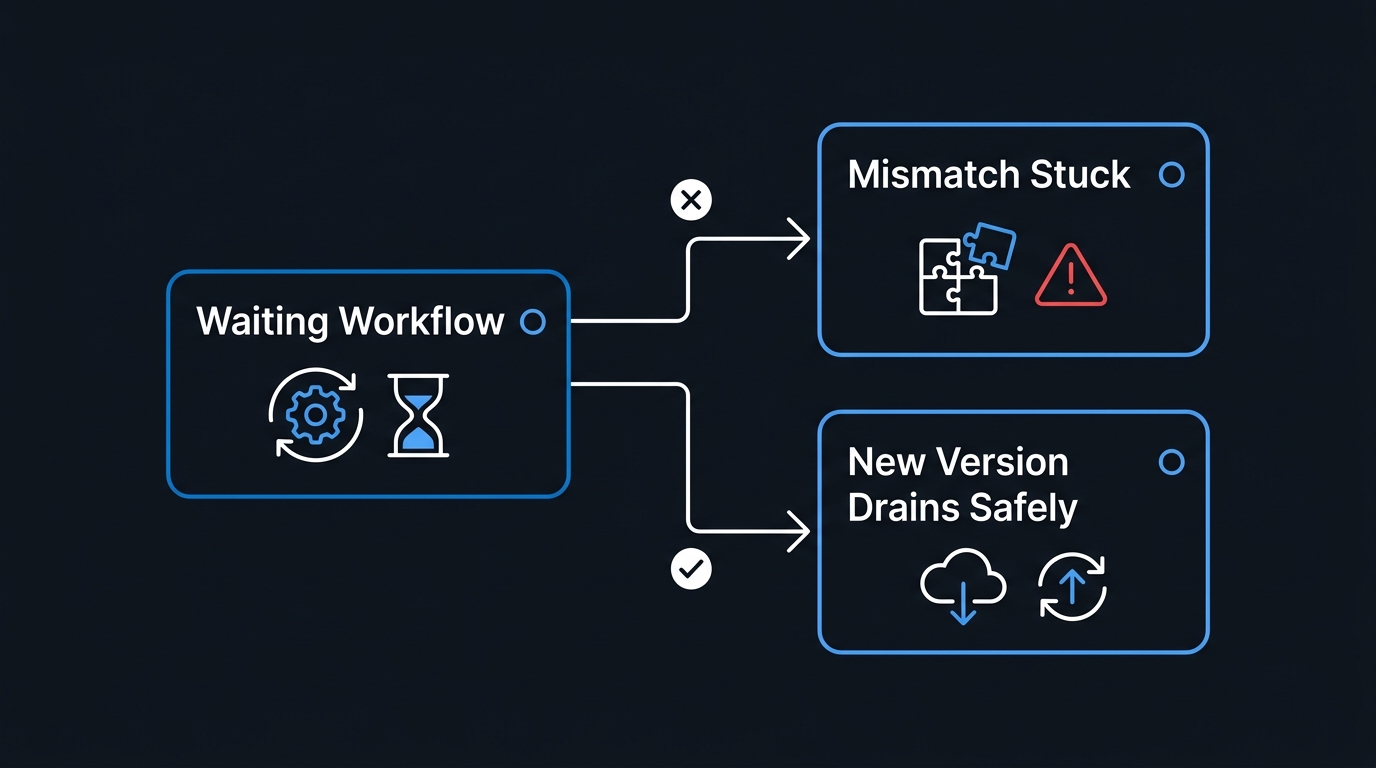
Here is the failure mode that surprises teams six months in.
An orchestration started last Tuesday is still waiting for an approval. You deploy a change that inserts a new activity call between steps 2 and 3. That waiting instance resumes, replays from the top, reaches the point where its history says "step 3 was CreateSecurityGroup" but the new code says "step 3 is ValidateNaming" — and the runtime raises a non-determinism error. The instance is stuck, possibly permanently.
Changes that are safe on replay: editing activity implementations (activities are not replayed, only their recorded results), adding entirely new orchestrator functions, and appending steps after the last await that any in-flight instance could have reached.
Changes that are not safe: inserting, removing, or reordering activity calls; renaming an orchestrator or activity function; changing the shape of serialised inputs or outputs in an incompatible way; and altering the branch structure so a different sequence of calls results.
The traditional mitigation is side-by-side deployment. Copy the orchestrator to a new name (ProvisionTenantOrchestratorV2), point new starts at V2, and let V1 instances drain against unchanged V1 code. It is crude but bulletproof. The heavier variant is deploying to a new task hub entirely — change extensions.durableTask.hubName in host.json — which isolates the new version's history completely at the cost of orphaning in-flight work in the old hub.
Recent Durable Functions releases have added built-in orchestration versioning, letting you tag orchestrator code with a version and control how mismatched instances are handled rather than managing names by hand. Support and configuration keys vary by SDK version and storage provider, so check the current versioning docs before designing around it — and keep the side-by-side approach in your back pocket regardless, because it works everywhere.
Whichever route you pick, make draining part of the deployment runbook: before a breaking release, query for in-flight instances and either wait them out or terminate them deliberately.
11. Storage Providers and Instance Management
Storage providers. By default, Durable Functions persists state to Azure Storage — queues for work dispatch, tables for history and instance state, blobs for large payloads and leases. It needs no extra infrastructure and is the right default for most workloads. Two alternative providers exist for higher-throughput or SQL-centric estates: Netherite and Microsoft SQL Server / Azure SQL. Microsoft has also been building out a dedicated managed backend for durable orchestrations aimed at higher throughput and better built-in monitoring. Availability, pricing, feature parity, and migration paths differ meaningfully between all of these and change over time — treat provider choice as a decision to make against the current storage provider documentation, not against a blog post.
Whatever the provider, the task hub is the isolation unit. Two Function Apps sharing a task hub name against the same backend will steal each other's work. Give every app and every environment its own hub name.
Instance management. The durable client is also your operational console:
// Query in-flight instances — the pre-deployment drain check.
var query = new OrchestrationQuery
{
    Statuses = new[] { OrchestrationRuntimeStatus.Running,
                       OrchestrationRuntimeStatus.Pending,
                       OrchestrationRuntimeStatus.Suspended },
    CreatedFrom = DateTimeOffset.UtcNow.AddDays(-30)
};

await foreach (var instance in client.GetAllInstancesAsync(query))
{
    logger.LogInformation("{Id} [{Name}] {Status}",
        instance.InstanceId, instance.Name, instance.RuntimeStatus);
}

// Inspect one instance, including its input and output payloads.
var metadata = await client.GetInstanceAsync(instanceId, getInputsAndOutputs: true);

// Stop a wedged instance. Terminate is not graceful — the running activity
// finishes, but no compensation logic runs. Handle cleanup yourself.
await client.TerminateInstanceAsync(instanceId, "superseded by manual remediation");

// Reclaim storage from completed instances.
await client.PurgeInstanceAsync(instanceId);
Purging matters more than people expect. History rows accumulate forever unless you clean them up, and a chatty monitor orchestration can generate a great deal of history. Schedule a periodic purge of completed and failed instances older than your retention requirement, and use ContinueAsNew on long-running loops.
12. The Node.js / TypeScript Equivalent
If your automation stack is JavaScript rather than .NET, the same patterns are available through the durable-functions npm package. Orchestrators are generator functions, and yield plays the role of await:
import * as df from 'durable-functions';
import { OrchestrationContext, OrchestrationHandler } from 'durable-functions';

const complianceSweep: OrchestrationHandler = function* (context: OrchestrationContext) {
  const subscriptions: string[] = yield context.df.callActivity('listSubscriptions');

  // Fan out: build the task array without yielding.
  const scans = subscriptions.map((subId) =>
    context.df.callActivity('scanSubscription', subId)
  );

  // Fan in.
  const results = yield context.df.Task.all(scans);

  const summary = {
    subscriptionsScanned: results.length,
    totalFindings: results.reduce((n: number, r: any) => n + r.findings.length, 0),
    completedUtc: context.df.currentUtcDateTime,   // deterministic clock
  };

  yield context.df.callActivity('publishReport', summary);
  return summary;
};

df.app.orchestration('complianceSweep', complianceSweep);
The determinism rules are identical, and the JavaScript equivalents are just as easy to violate: no Date.now(), no Math.random(), no crypto.randomUUID(), and no fetch inside an orchestrator. Use context.df.currentUtcDateTime, context.df.newGuid(), and push everything else into an activity.
13. Pitfalls to Avoid
Doing I/O in the Orchestrator
The single most common mistake. It appears to work locally because the first execution succeeds — then it re-executes on every replay, double-writing records and inflating latency. If a line touches the network, the disk, or a clock, it belongs in an activity.
Non-Idempotent Activities
Activities execute at least once. A retry after a timeout may run an activity that already succeeded. Design for it: use natural keys, check-then-create, or upserts rather than blind inserts.
Fat Payloads Through the Orchestrator
Every input and output is serialised into the history store. Passing a 5 MB report between activities via the orchestrator bloats history and slows every replay. Pass a blob reference instead.
Sharing a Task Hub Across Environments
Dev and production pointing at the same storage account with the default hub name will consume each other's messages. Set hubName explicitly per environment, and confirm it in your deployment templates.
Never Purging History
Instance history is retained until you delete it. Storage costs creep and status queries slow down. Automate purge on a schedule from day one.
Treating Terminate as a Graceful Stop
TerminateInstanceAsync stops the orchestration where it stands. Compensation blocks do not run. If a workflow needs a clean abort path, model it as an external event ("Cancel") that the orchestrator handles explicitly.
Deploying Breaking Changes Without a Drain Check
Covered above, and worth repeating because it is the one that causes a genuine production incident rather than a slow leak. Query for in-flight instances before every release that touches orchestrator control flow.
Troubleshooting
| Symptom | Likely Cause | Fix |
|---|---|---|
| "Non-deterministic workflow detected" | Orchestrator code changed while instances were in flight, or non-deterministic API used | Compare deployed code against the instance history; version side-by-side and drain in-flight instances |
Orchestration stuck in Running forever |
An uncancelled durable timer, or an external event that never arrived | Inspect history via GetInstanceAsync; cancel timers on the winning branch of a Task.WhenAny |
| Activity runs twice | At-least-once delivery plus a retry after a timeout | Make the activity idempotent; do not rely on exactly-once semantics |
| Duplicate log lines on every step | Logging with a non-replay-safe logger | Use context.CreateReplaySafeLogger<T>() or guard on context.IsReplaying |
| Two apps consuming each other's work | Shared task hub name against the same storage backend | Set a unique extensions.durableTask.hubName per app and environment |
| Fan-out barely parallelises | Per-instance concurrency limits, or scale-out not triggering | Review maxConcurrentActivityFunctions in host.json; confirm the plan permits scale-out |
| Storage costs climbing steadily | History never purged | Schedule PurgeAllInstancesAsync for completed/failed instances beyond your retention window |
| Long-running monitor slows over time | History growing with every poll iteration | Call ContinueAsNew periodically to reset the history |
| Orchestration fails immediately on start | Input serialisation failure, or a name mismatch | Confirm the orchestrator name string matches the [Function] attribute exactly |
Key Takeaways
- Durable Functions is a state machine you write as ordinary code — the replay engine converts sequential
awaitstatements into a checkpointed, resumable workflow with no state table of your own. - Determinism is the price of admission. Clocks, GUIDs, randoms, and I/O are forbidden in orchestrators; use the
contextAPIs and push side effects into activities. - Five patterns cover almost every IT automation need: chaining, fan-out/fan-in, async HTTP with polling, timer-based monitors, and human approval with a timeout.
- Retries and compensation are separate concerns. Declarative retry policies handle transient faults;
try/catchsagas handle permanent ones by undoing completed work in reverse. - Versioning is an operational discipline, not a code feature. Drain or side-by-side any release that reorders orchestrator control flow, and add an in-flight instance check to your deployment runbook.
- Azure Storage is the sensible default provider, with Netherite, MSSQL, and a managed durable backend as alternatives worth evaluating against current documentation rather than assumptions.
- Instance management APIs are your operations console — query, inspect, terminate, and purge belong in your runbooks from the first deployment, not after the first incident.
- Use the isolated worker model for new .NET work. The in-process model is on a published retirement path, and most current samples and features target isolated first.
Next Steps
- Build the compliance sweep from Section 5 against a read-only scan of two subscriptions. Fan-out/fan-in is the pattern with the highest payoff and the fastest feedback loop.
- Add Application Insights end-to-end correlation so a single orchestration instance ID traces across every activity — Microsoft Docs: Durable Functions diagnostics
- Write a drain check into your deployment pipeline — a short script that queries for running and pending instances and fails the release if any exist when orchestrator control flow has changed.
- Schedule a purge job for completed and failed instances beyond your retention window, and measure history table growth for a month before settling on the threshold.
- Evaluate storage providers only once you have a throughput number that Azure Storage demonstrably cannot meet — start with the default, measure, then revisit against current provider documentation.
- Trial a durable entity for a genuinely contended piece of state, such as a per-tenant licence pool counter, to understand where entities help and where they are overkill.
Related Articles
- Automate Windows Server Patching with PowerShell and Azure Update Manager — the scheduled-maintenance counterpart to orchestrated provisioning
- PowerShell Error Handling Patterns Every Sysadmin Should Use — the same retry and compensation thinking, applied to scripts
- Azure Monitor Alerts: Set Up Proactive Infrastructure Monitoring — wire orchestration failures into an alerting path that reaches humans
- Azure Key Vault: Store and Retrieve Secrets the Right Way — where the credentials your activity functions use should actually live
Last reviewed: 2026-08-03 | Tested against: Azure Functions v4 runtime, .NET 8 isolated worker, Azure Functions Core Tools v4. Durable Functions SDK surface area changes between releases — verify API names and versioning options against current Microsoft documentation before production use.

Leave a Reply