
Executive Snapshot
| Drift flavor | What actually happened | How you detect it | Default reconciliation |
|---|---|---|---|
| Out-of-band change | Someone edited the resource in the portal, CLI, or another tool | terraform plan -refresh-only reports state updates |
Decide: codify the change, or apply to revert it |
| Missed apply | Code was merged but never applied | terraform plan -detailed-exitcode returns 2 with no refresh diff |
Apply the pending plan |
| Config-versus-reality divergence | Provider defaults, Azure-generated values, or policy effects that were never in your HCL | Plan shows a persistent diff that reappears after every apply | ignore_changes, or codify the real value |
Drift is not a single failure mode. Treating all three the same way is how a "harmless" reconcile takes down a production subnet.
TL;DR
terraform plan -detailed-exitcodeis your CI signal — exit0means no changes,2means changes,1means the plan itself failed. Anything that treats2as an error will make your pipeline unusable; anything that ignores2makes drift invisible.-refresh-onlyseparates real drift from unapplied code. A normal plan mixes both. A refresh-only plan answers exactly one question: has reality moved away from state?- Read the drift plan before you reconcile. The plan output has two distinct sections — what changed outside Terraform, and what Terraform proposes to do about it. People skim the second and miss the first.
- Reconciliation is a decision, not a command. Either reality is right and you codify it, or the code is right and you apply over it. There is no third option that avoids choosing.
- Never blanket-apply accumulated drift. Weeks of untracked portal edits collapsed into one apply is the single most common way Terraform causes an outage.
importandremovedblocks replaced most CLI state surgery. They are reviewable, planned, and version-controlled.terraform state rmandstate mvare still the escape hatch, not the tool of first resort.- Azure generates drift on its own. Policy-applied tags, auto-scaled node counts, and provider defaults look identical to human meddling in a plan diff and need different handling.
Introduction
Terraform state is a claim about the world. Every apply refreshes that claim, records it, and moves on. In between applies, the world keeps changing — a colleague fixes an outage through the portal at 2am, an Azure Policy stamps a cost-centre tag on every resource in the subscription, an autoscaler moves a node pool from 3 nodes to 7. None of that reaches your state file until the next refresh.
That gap is drift, and the reason it matters is not tidiness. It is that the next terraform apply — run by someone who has no idea any of this happened, in a pipeline triggered by an unrelated pull request — will quietly reconcile the whole accumulated delta in one shot. The plan looks noisy, someone approves it because the change they care about is in there somewhere, and the 2am firewall rule that is holding production together disappears.
This guide covers how to detect drift deliberately rather than discovering it mid-apply, how to read a drift plan without misinterpreting it, how to decide between accepting reality and enforcing code, and how to shut the loop so out-of-band changes stop happening in the first place. Examples target the azurerm provider and Terraform 1.7 or later, where import and removed blocks are both available.
The Three Flavors of Drift
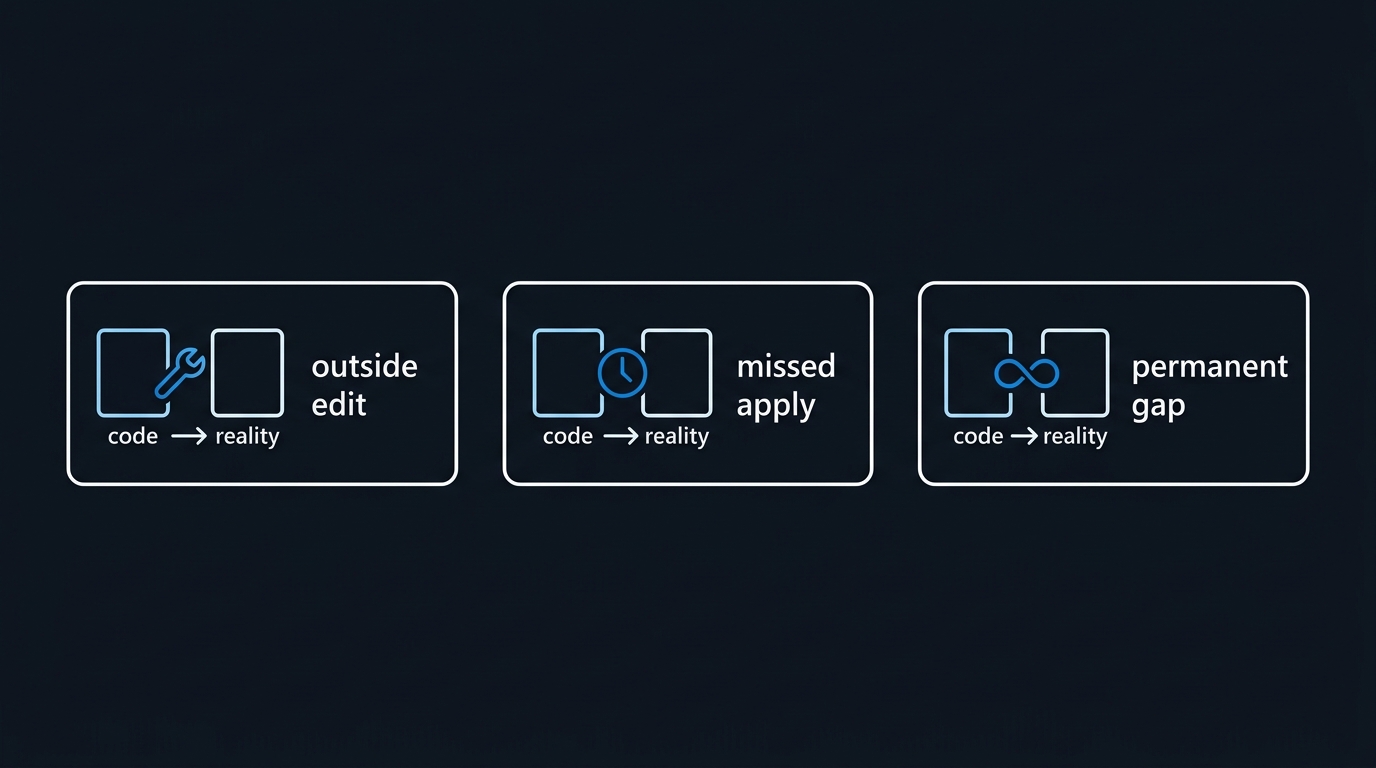
Out-of-band change
A resource that Terraform manages was modified by something that is not Terraform. Portal edits are the classic case, but az cli scripts, ARM/Bicep deployments targeting the same resource, Azure Policy remediation tasks, and other automation all qualify. State says one thing, Azure says another, and your HCL is innocent.
Missed apply
The code changed and was never applied. State and reality agree perfectly with each other and disagree with the repository. Strictly speaking this is not state drift at all — it is delivery drift — but it surfaces through the same terraform plan and gets conflated constantly. The distinction matters because the fix is trivially safe: apply the plan.
Config-versus-reality divergence
The most tiring flavor. Your configuration is silent about an attribute, Azure assigns a value, and the provider reports a permanent diff. Or the provider's default differs from what the platform actually does. These diffs come back after every apply because nothing you apply can make them stop. They are noise that trains people to ignore plan output, which is how the other two flavors get through.
Detecting Drift Deliberately
The exit code contract
terraform plan -detailed-exitcode is the primitive everything else builds on:
| Exit code | Meaning |
|---|---|
0 |
Succeeded, no changes proposed |
1 |
Errored — the plan itself failed |
2 |
Succeeded, changes proposed |
# Run a plan and branch on the detailed exit code.
# `set +e` is required: exit code 2 is a normal outcome, not a failure.
set +e
terraform plan -detailed-exitcode -lock=false -out=tfplan
code=$?
set -e

case $code in
  0) echo "No changes. Infrastructure matches configuration." ;;
  2) echo "Changes detected — review the plan before applying." ;;
  *) echo "Plan failed."; exit 1 ;;
esac
Note -lock=false. A read-only drift check should not take the state lock and block a real deployment; it is safe here because the check never writes state.
Refresh-only plans isolate real drift
A normal plan answers "what would Terraform do?" — which mixes drift with unapplied code. -refresh-only answers the narrower question:
# What has changed in Azure since the last apply, ignoring pending code changes?
terraform plan -refresh-only -detailed-exitcode -lock=false

# Machine-readable: the plan JSON exposes drift separately from proposed actions
terraform plan -refresh-only -out=drift.tfplan
terraform show -json drift.tfplan | jq '.resource_drift[]?.address'
The resource_drift array in the JSON plan is the cleanest programmatic drift signal Terraform offers. It contains only resources whose real-world state diverged from the recorded state — not resources your code wants to change. Feed that array into an alert and you get a list of resource addresses somebody touched outside the pipeline.
Cadence
Drift detection is a scheduled job, not a pre-deploy step. Run it nightly per environment, on a schedule that does not collide with your deployment window:
# .github/workflows/drift-detection.yml
name: Terraform Drift Detection
on:
  schedule:
    - cron: '0 3 * * *'   # 03:00 UTC daily
  workflow_dispatch:

permissions:
  id-token: write         # OIDC federation to Azure
  contents: read
  issues: write

jobs:
  detect:
    runs-on: ubuntu-latest
    strategy:
      fail-fast: false
      matrix:
        environment: [dev, staging, prod]
    steps:
      - uses: actions/checkout@v4
      - uses: hashicorp/setup-terraform@v3
      - uses: azure/login@v2
        with:
          client-id: ${{ secrets.AZURE_CLIENT_ID }}
          tenant-id: ${{ secrets.AZURE_TENANT_ID }}
          subscription-id: ${{ secrets.AZURE_SUBSCRIPTION_ID }}

      - name: Init
        run: terraform init -backend-config=environments/${{ matrix.environment }}/backend-config.tfvars

      - name: Refresh-only plan
        id: drift
        run: |
          set +e
          terraform plan -refresh-only -detailed-exitcode -lock=false \
            -var-file=environments/${{ matrix.environment }}/terraform.tfvars \
            -out=drift.tfplan
          echo "exitcode=$?" >> "$GITHUB_OUTPUT"
          set -e

      - name: Summarise drift
        if: steps.drift.outputs.exitcode == '2'
        run: |
          terraform show -json drift.tfplan \
            | jq -r '.resource_drift[]? | "\(.address) — \(.change.actions | join(","))"' \
            | tee drift-summary.txt
Open an issue or post to a channel when the exit code is 2. Do not fail the build — a failed nightly job that nobody owns gets muted within a fortnight. Make it produce a readable artifact instead.
If you run HCP Terraform or Terraform Enterprise, health assessments provide managed drift detection on a schedule without building this yourself. It is worth checking whether your tier includes it before writing the workflow above.
Reading a Drift Plan Without Misreading It
Refresh-only plan output has two parts, and the first one is the part people skip.
Section one: "Note: Objects have changed outside of Terraform." This is the drift itself — what Azure looks like now versus what state recorded. Read it as a report on the past.
Section two: the proposed actions. This is what Terraform intends to do. Read it as a proposal about the future.
Three rules for reading it safely:
- Count the resources before you read the attributes. If a refresh-only plan touches 40 resources when you expected 2, stop. You are looking at either a provider upgrade changing how attributes are read, or weeks of accumulated change. Neither should be reconciled on the spot.
- Look for
-/+andreplacefirst. An in-place update is recoverable. A replacement destroys and recreates — on a database, a public IP, or a subnet with dependencies, that is an outage. Scan for forced replacements before you read anything else, and check what triggers them. - Distinguish "Terraform will update state" from "Terraform will change infrastructure." In refresh-only mode, applying only writes state. In a normal plan, the same diff means Terraform reaches into Azure. The visual difference between the two is small and the consequences are not.
Deciding: Accept Reality or Enforce Code
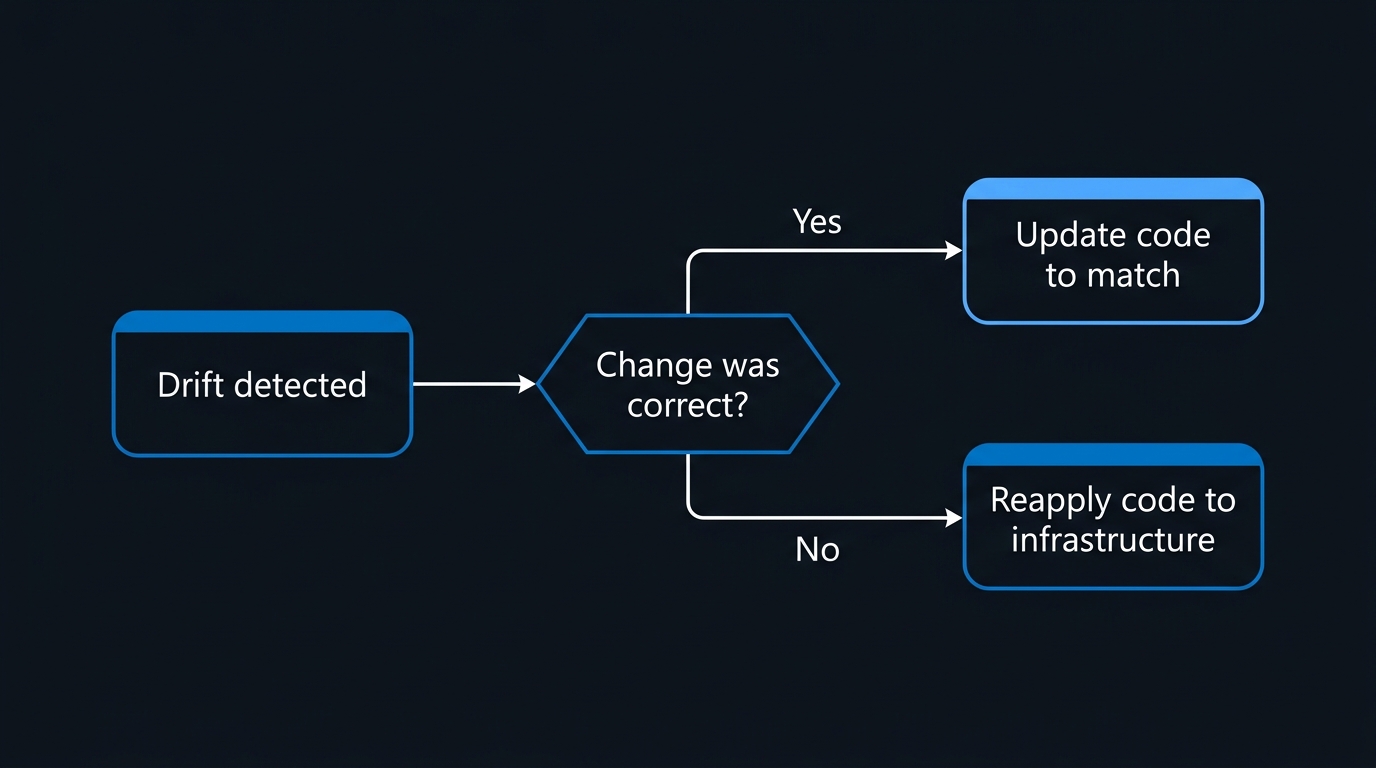
Once drift is confirmed, exactly one question matters — which side is right?
Accept reality when the out-of-band change was a legitimate fix — an emergency firewall rule, a scale-up that should stay, a setting the platform team applied on purpose. The work is to make the code say what the world says:
# 1. Update the HCL so it describes the real configuration.
# 2. Reconcile state to reality without touching infrastructure:
terraform apply -refresh-only

# 3. Confirm the code now agrees with both:
terraform plan -detailed-exitcode   # expect exit 0
That third step is not optional. apply -refresh-only updates state only. If your HCL still disagrees, the next normal apply will revert the change you just decided to keep.
If the change created a resource Terraform does not manage at all, that is an import, not a refresh — covered below.
Enforce the code when the change was unauthorised, accidental, or wrong. Here a normal terraform apply will restore the declared configuration. Before you run it, confirm three things: the plan touches only the drifted resources, no resource is being replaced rather than updated, and whoever made the change is not still mid-incident relying on it. The last one is a conversation, not a command.
Why Blanket-Applying Accumulated Drift Is Dangerous
The failure pattern is always the same. Drift accrues for weeks because nobody is checking. Someone opens a small pull request. The plan comes back with 60 changes, 58 of which are unrelated drift reconciliation. It gets approved because the reviewer is looking for their own change. Terraform reverts an emergency NSG rule and a manually raised SKU tier in the same apply.
The mitigation is scope. Reconcile the resource you decided about, not the whole workspace:
# Reconcile a single drifted resource, deliberately
terraform apply -target=azurerm_network_security_group.app

# Or a whole module, when the drift is confined to it
terraform apply -target=module.networking
The honest tradeoff on -target. HashiCorp documents it as a tool for exceptional circumstances and recovery, not routine workflow, and that guidance is correct. Targeted applies skip dependency evaluation outside the target, so Terraform will warn that applied changes may be incomplete. A targeted apply can leave state internally inconsistent — an output computed from an untargeted resource stays stale, and a dependent resource that should have been updated is not.
Use it anyway, in this specific situation, because the alternative is worse: applying 58 changes you have not read. But treat it as a two-step operation. Run the targeted apply to handle the decided drift, then run a full plan immediately afterwards and read what remains. If the full plan is not clean after your targeted applies, you have not finished — you have just moved the problem.
The real fix is frequency. Drift reconciled daily is one or two resources and a five-minute decision. Drift reconciled quarterly is a change-advisory board meeting.
Import and Removed Blocks: The Modern Syntax
A resource created in the portal is not drift in the strict sense — Terraform has no state entry to diverge. Bringing it under management used to mean terraform import, a stateful CLI command with no plan and no review. Terraform 1.5 replaced it with configuration-driven import blocks:
# Bring an existing, portal-created storage account under management.
import {
  to = azurerm_storage_account.audit_logs
  id = "/subscriptions/00000000-0000-0000-0000-000000000000/resourceGroups/rg-platform-prod/providers/Microsoft.Storage/storageAccounts/stauditlogsprod"
}

resource "azurerm_storage_account" "audit_logs" {
  name                     = "stauditlogsprod"
  resource_group_name      = azurerm_resource_group.platform.name
  location                 = "westeurope"
  account_tier             = "Standard"
  account_replication_type = "GRS"
}
Because the import is part of the configuration, it shows up in terraform plan before anything happens. You get a reviewable diff, a pull request, and an audit trail. Run the plan first and read it: if the plan proposes changes to the imported resource, your HCL does not match reality yet — fix the HCL, not the resource.
For resources with many attributes, let Terraform generate the first draft:
# Generate matching HCL for every import block that has no resource yet
terraform plan -generate-config-out=generated.tf
Treat generated.tf as a starting point. It emits every attribute the provider read, including computed ones you do not want to declare. Prune it, move it into your real module layout, and re-plan until the diff is empty. Import IDs are ARM resource IDs for most azurerm resources, but several — role assignments, network security rules, subresources — use composite or non-obvious formats. The provider documentation for each resource has an Import section with the exact shape; guessing wastes more time than reading it.
Terraform 1.7 added the mirror image. A removed block drops a resource from state declaratively, without destroying it:
# Stop managing this resource, but leave it running in Azure.
removed {
  from = azurerm_log_analytics_workspace.legacy

  lifecycle {
    destroy = false
  }
}
Delete the corresponding resource block, add the removed block, plan, review, apply, then delete the removed block in a follow-up commit. Omitting destroy = false means Terraform will actually destroy the resource — the lifecycle argument is the entire safety mechanism, and it is easy to leave out.
Use moved blocks, not state surgery, when a resource simply changed address during a refactor:
moved {
  from = azurerm_subnet.app
  to   = module.networking.azurerm_subnet.app
}
State Surgery as a Last Resort
terraform state rm and terraform state mv still exist and still work. They bypass plan entirely, which is exactly why they should be the last option rather than the first. Reach for them when a removed or moved block cannot express what you need — a corrupted entry, a resource split across workspaces, a provider migration that changed a resource type.
# Always snapshot state first. This is not optional.
terraform state pull > "state-backup-$(date +%Y%m%dT%H%M%S).json"

# Inspect before you act
terraform state list
terraform state show azurerm_key_vault.platform

# Remove a single entry from state (leaves the Azure resource untouched)
terraform state rm azurerm_key_vault.platform

# Move an entry to a new address
terraform state mv azurerm_subnet.app 'module.networking.azurerm_subnet.app'
Two safety notes specific to Azure. First, the azurerm backend stores state as a blob — enable blob versioning and soft delete on the state container so a bad surgery is recoverable by restoring a previous blob version, not by hoping someone kept the local .backup file. Second, run surgery from a single machine with the state lock held normally; if you have to terraform force-unlock, confirm no other apply is genuinely in flight first, because two concurrent writers is how state files get truncated.
After any surgery, run a full plan and read all of it. An empty plan is the only acceptable end state.
Azure-Specific Drift That Is Not Anyone's Fault
Policy-driven tags. An Azure Policy with a modify effect stamps tags onto resources after creation. Terraform reads them back and reports a diff on every plan, forever. The standard handling is to ignore the attribute Azure owns:
resource "azurerm_resource_group" "platform" {
  name     = "rg-platform-prod"
  location = "westeurope"

  tags = {
    workload = "platform"
  }

  lifecycle {
    # Cost-centre and creation tags are applied by Azure Policy, not by us.
    ignore_changes = [
      tags["CostCentre"],
      tags["CreatedOnDate"],
    ]
  }
}
Prefer ignoring the specific keys over ignoring tags wholesale. Ignoring the whole map means a genuinely wrong tag never surfaces again.
Autoscaled values. An AKS node pool with the cluster autoscaler enabled has a node count that Azure changes continuously. Declaring it in HCL guarantees a diff:
resource "azurerm_kubernetes_cluster" "main" {
  # ...
  default_node_pool {
    name                = "system"
    vm_size             = "Standard_D4s_v5"
    auto_scaling_enabled = true
    min_count           = 2
    max_count           = 10
  }

  lifecycle {
    ignore_changes = [
      default_node_pool[0].node_count,
    ]
  }
}
The same reasoning applies to anything the platform moves on its own — automatically upgraded Kubernetes patch versions, certificate thumbprints rotated by Azure, and identity principal IDs regenerated on some operations.
Portal "quick fixes." Azure Security Center and Defender for Cloud recommendations frequently offer a one-click remediation. Clicking it changes the resource. So do the portal's own defaults: creating something adjacent through a portal wizard often modifies the parent — adding a diagnostic setting, enabling a firewall rule, attaching a private endpoint. These are genuine out-of-band changes, they just do not feel like one to the person clicking.
Provider version changes. After upgrading azurerm, a plan can show diffs on resources nobody touched, because the new version reads or defaults an attribute differently. Before assuming drift, check whether the plan appeared immediately after a provider bump and read the upgrade guide. Pin the provider version in required_providers so upgrades are a deliberate, reviewable commit rather than a surprise on a Tuesday.
Closing the Loop: Stop Drift at the Source
Detection tells you drift happened. Prevention is what reduces the volume.
RBAC is the primary control. On resource groups managed by Terraform, humans get Reader. The pipeline's service principal — federated via workload identity, not a secret — gets Contributor. Elevated standing access is the root cause of most portal drift, and removing it removes most drift.
# Audit who holds write access on an IaC-managed resource group
az role assignment list \
  --resource-group rg-platform-prod \
  --include-inherited \
  --query "[?roleDefinitionName!='Reader'].{Principal:principalName, Role:roleDefinitionName, Type:principalType}" \
  --output table
Keep a break-glass path through Privileged Identity Management with an approval step and a time limit, so a real incident is never blocked. The goal is to make portal writes a deliberate, logged, expiring act — not to make them impossible.
Be honest about what Azure Policy can and cannot do here. Policy deny effects evaluate the properties of the resource being written, not the identity of the caller. Azure Policy cannot express "deny changes made through the portal." It is excellent at enforcing that resources must have certain tags, SKUs, or network settings regardless of who creates them — which narrows the blast radius of a portal edit but does not prevent one. Deny assignments do block actions by principal, but they have historically been creatable only through Managed Applications and Azure Blueprints rather than authored directly; confirm what your tenant supports before designing around them.
Resource locks are a blunt but real option. A ReadOnly lock on a resource group blocks modification through any path, portal included. It also blocks Terraform, so the pipeline has to remove and reapply the lock around each deployment, and ReadOnly breaks operations that look like reads but are not — listing storage account keys, for example. Use CanNotDelete broadly and ReadOnly only where the extra pipeline complexity is genuinely worth it.
Alert on out-of-band writes. The Azure activity log records every administrative write with the caller identity. Alert when a write on an IaC-managed resource group comes from anything other than your pipeline's service principal:
# What administrative writes happened in the last week, and who made them?
az monitor activity-log list \
  --resource-group rg-platform-prod \
  --offset 7d \
  --query "[?operationName.value!=null && authorization.action!=null] \
            | [?contains(authorization.action, 'write')] \
            .{Time:eventTimestamp, Caller:caller, Action:authorization.action}" \
  --output table
Route that through a Log Analytics workspace with a scheduled query rule for continuous alerting, so a portal edit generates a notification within minutes rather than surfacing in a nightly plan. Pair the alert with a norm rather than a punishment: the expectation is that anyone who makes an emergency portal change opens a pull request codifying it the same day.
Pitfalls to Avoid
- Treating exit code
2as a build failure. It means "changes proposed," which is the normal outcome of a plan. Wire it to a notification, not a red build. - Running drift detection with the state lock. A nightly read-only check that blocks a hotfix deployment gets disabled. Use
-lock=falsefor detection only. - Approving a plan because your change is in it. If the plan contains changes you did not author, the review is not finished.
- Using
ignore_changesto silence a diff you have not diagnosed. It is the right tool for platform-owned attributes and the wrong tool for "this keeps reverting and I do not know why." - Forgetting
destroy = falsein aremovedblock. The default destroys the resource. - Reaching for
terraform state rmbeforeimportandremovedblocks. Surgery has no plan step and no review. - Letting drift accumulate between releases. Reconciliation risk scales with the size of the delta, not the age of it.
Troubleshooting
The plan shows a diff that reappears after every successful apply
A perpetual diff means something outside your configuration owns that attribute. Identify the owner — Azure Policy, an autoscaler, the platform itself — and either declare the real value in HCL or add a scoped ignore_changes. If neither works, check the provider's GitHub issues; some perpetual diffs are provider bugs with known workarounds.
A refresh-only plan wants to remove resources that clearly exist
Usually an authentication or scope problem, not deletion. If the identity running the plan lost read access to the resource, or the subscription context changed, the provider reads back nothing and reports the object as gone. Verify with az account show and az resource show --ids <resource-id> before applying anything.
Drift detection reports changes but nobody made any
Check the provider version first. A azurerm upgrade between runs is the most common cause of drift that appears across many resources simultaneously. Second suspect is an Azure Policy remediation task that ran on a schedule.
terraform plan errors with a state lock conflict
Another operation holds the lock, or a previous run died without releasing it. Check for a running pipeline before doing anything. If none exists, terraform force-unlock <lock-id> releases it — but confirm first, because force-unlocking a live apply can corrupt state.
An import block plans changes to the resource being imported
Expected, and it means your HCL does not yet match reality. Adjust the configuration until the plan shows the import with no accompanying changes. Applying an import with pending changes modifies the resource at the moment you adopt it, which is rarely what anyone wants.
Key Takeaways
- Drift comes in three flavors — out-of-band change, missed apply, and config-versus-reality divergence — and each has a different correct response.
terraform plan -refresh-only -detailed-exitcodeis the detection primitive;resource_driftin the JSON plan output is the clean machine-readable signal.- Run detection nightly per environment, unlocked and non-blocking, producing a readable artifact rather than a failed build.
- Reconciliation is a decision between accepting reality (update HCL, then
apply -refresh-only) and enforcing code (a scopedapply). Both end with a clean full plan. -targetis the right tool for reconciling decided drift and the wrong tool for routine work; always follow it with a full plan.importandremovedblocks make adoption and release reviewable in a pull request. State surgery is the escape hatch, taken with a state snapshot in hand.- On Azure, policy-applied tags, autoscaled counts, and provider upgrades all produce diffs that are not anyone's mistake — handle them with scoped
ignore_changes, not blanket suppression. - Prevention beats detection: Reader-by-default RBAC with a PIM break-glass path, plus activity-log alerting on out-of-band writes.
Next Steps
- Add a nightly drift-detection workflow for one environment using the GitHub Actions job above, and let it run for a week before you touch anything. The baseline tells you how much drift you actually have.
- Triage the first report by flavor, not by resource. Separate genuine out-of-band changes from perpetual provider diffs before deciding anything.
- Fix the perpetual diffs first with scoped
ignore_changeson specific attributes. Quiet output is what makes the real signals visible. - Adopt one portal-created resource with an
importblock and-generate-config-out, end to end, so the workflow is familiar before you need it under pressure. - Audit write access on your IaC-managed resource groups with the
az role assignment listcommand above, and move standing human access down to Reader with a PIM path for emergencies. - Create an activity-log alert for administrative writes by any principal other than your pipeline service principal, and agree the team norm that an emergency portal change is followed by a pull request the same day.
Related Articles
- Terraform on Azure: Complete Getting Started Guide for 2026 — the foundations this guide assumes
- Azure Bicep vs Terraform in 2026: Choosing Your Azure IaC Tool — how the two tools handle existing resources differently
- Azure RBAC Best Practices: Lock Down Your Cloud Permissions in 2026 — the access model that stops portal drift at the source
- Azure Monitor Alerts: Set Up Proactive Infrastructure Monitoring — wiring activity-log signals into an alerting path

Leave a Reply